Accelera is a modern Elementor Template Kit designed for AI automation agencies, artificial intelligence consultants, workflow automation businesses, and no-code solution providers. Developed by askproject, it provides professionally designed website layouts for businesses that want to present their AI services, showcase completed projects, explain their solutions, and generate new client enquiries.
The kit features a clean, technology-focused design with conversion-oriented sections, reusable page templates, and customizable content blocks. You can use Elementor’s visual editor to modify layouts, update images, change colors, customize typography, and adapt the website to your agency’s branding without manually writing page-layout code.
Accelera includes 16 ready-to-use page designs and 20 templates covering essential business website sections, including services, case studies, pricing, team profiles, testimonials, careers, contact forms, and blog content.
Whether you are launching an AI consulting company, automation agency, machine learning startup, or no-code development business, Accelera provides a ready-made design foundation for building your professional online presence.
Important: Accelera is an Elementor Template Kit, not a standalone WordPress theme. It provides page and layout templates that work with Elementor and a compatible WordPress theme.
- Accelera AI Automation Agency Elementor Template Kit
- 16 ready-to-use page designs
- 20 pre-designed templates
- Global theme style settings
- Homepage layout
- About and company information pages
- Services and service detail layouts
- Case studies and case detail pages
- Team member profiles
- Pricing page
- FAQ page
- Career and career detail pages
- Testimonials page
- Contact page
- Blog and single post layouts
- Custom 404 page
- Header and footer templates
- Newsletter form template
- Contact form template
- Responsive layouts
- Elementor visual customization
- Reusable design sections and content blocks
Key Features
1. Modern AI Agency Website Design
Create a professional website for an AI-focused business using a clean, technology-oriented visual style.
Accelera is designed around the needs of businesses offering artificial intelligence consulting, workflow automation, no-code solutions, and related technology services.
Its structured layouts help communicate technical services in a clear and organized way.
2. 16 Ready-to-Use Page Designs
Start with pre-designed pages instead of creating every website section from scratch.
The kit includes layouts for:
- Home
- About
- Services
- Service Details
- Case Studies
- Case Details
- Team
- Pricing
- FAQs
- Career
- Career Details
- Testimonials
- Contact
- Blog
- Single Post
- 404 Page
These pages cover the main requirements of an agency website, from introducing the business to presenting services, sharing project results, and collecting enquiries.
3. 20 Pre-Designed Templates
In addition to complete page layouts, Accelera provides reusable templates for different website components.
The template collection includes global theme styles, page designs, headers, footers, and contact and newsletter form layouts.
You can import the required templates individually and reuse them across different pages.
4. Elementor Drag-and-Drop Editing
Customize the website using Elementor’s visual editing interface.
You can modify page sections, replace images, update text, adjust spacing, change colors, and rearrange content blocks without manually editing the underlying page-layout code.
The kit is designed to work with the free version of Elementor. Elementor Pro is not required for its core template layouts.
5. Global Theme Style
Set up your website’s visual identity using the included Global Theme Style template.
Configure the overall design direction, including colors and typography, before customizing individual pages.
This helps maintain a consistent appearance across the homepage, service pages, pricing layouts, blog, and other website sections.
6. Homepage Layout
Create a strong first impression with the dedicated homepage design.
Use its structured sections to introduce your agency, explain your AI automation services, highlight important benefits, showcase projects, and encourage visitors to contact your team.
Replace the sample content with your actual services, business information, and calls to action.
7. About and Company Profile Page
Introduce your agency through a dedicated About page.
Present your company’s background, mission, expertise, team approach, and business values. This page helps potential clients understand who you are and what makes your services relevant to their requirements.
8. Services and Service Detail Pages
Explain your agency’s offerings using dedicated Services and Service Details layouts.
These templates can be adapted for services such as:
- AI consulting
- Business process automation
- AI chatbot development
- Workflow automation
- No-code solutions
- AI-powered integrations
- Data analysis and business intelligence
- Custom AI implementation
Create separate service pages to explain individual offerings, describe their benefits, and guide visitors toward an enquiry.
9. Case Studies and Project Details
Showcase previous projects through dedicated Case Studies and Case Details templates.
Use these layouts to explain client challenges, project requirements, implemented solutions, and measurable outcomes.
Case study pages can help demonstrate your agency’s practical experience and give potential customers a better understanding of your work.
10. Team Member Profiles
Introduce the people behind your agency using the Team page.
Display team photographs, names, professional roles, biographies, and other relevant information to give your business a more personal identity.
11. Pricing Page
Present your service packages and pricing information through a dedicated Pricing layout.
You can customize package names, descriptions, included services, pricing information, and call-to-action buttons.
This is useful for agencies offering fixed-price automation packages, consulting plans, or recurring service agreements.
The template provides the design layout; payment processing and subscription management require separate integrations if needed.
12. FAQ Page
Answer common customer questions using the dedicated FAQ layout.
Use it to explain your services, implementation process, project timelines, pricing approach, technical requirements, and support arrangements.
A well-organized FAQ page can help visitors understand your offerings before contacting your team.
13. Career and Job Detail Pages
Create a recruitment section for your agency using the Career and Career Details templates.
Publish available positions, explain job responsibilities, describe required qualifications, and provide information about your company culture.
Application processing and job-board functionality require an appropriate form or recruitment integration.
14. Testimonials Layout
Present customer feedback using the dedicated Testimonials page.
Add client names, photographs, company information, and genuine reviews to highlight customer experiences and build confidence in your services.
15. Contact Page and Enquiry Forms
Give potential customers an easy way to contact your agency.
The Contact page provides a structured layout for business information and enquiry sections. The kit also includes a contact form template that can be customized using the supported form plugin.
This can be used for consultation requests, project enquiries, service questions, and business communication.
16. Newsletter Subscription Form
Use the included newsletter form template to encourage visitors to subscribe to your agency’s updates.
You can adapt the form for newsletters, product announcements, industry insights, and company news.
Connecting submissions to an email marketing platform requires the appropriate service or integration.
17. Blog and Single Post Layouts
Publish articles, company updates, AI industry insights, automation tutorials, and technology news using the included Blog and Single Post templates.
These layouts help maintain a consistent design between the blog archive and individual articles.
18. Custom 404 Error Page
Create a branded 404 page for visitors who reach an unavailable or incorrect URL.
The included layout gives you a starting point for adding a helpful message, navigation links, and a button directing visitors back to important website sections.
19. Header and Footer Templates
Customize the global navigation and footer using the included templates.
The header can be used for your logo, navigation menu, and important calls to action. The footer provides space for contact details, useful links, social profiles, and other business information.
For websites using Elementor’s free version, the kit documentation describes using ElementsKit Lite to assign the imported header and footer across the website.
20. Fully Responsive Layouts
Accelera is designed to adapt to desktop, tablet, and mobile screens.
Use Elementor’s responsive editing controls to review and adjust layouts, spacing, typography, and content alignment for different devices.
This helps maintain a consistent browsing experience for visitors accessing your agency website from different screen sizes.
21. Cross-Browser Compatibility
The product listing specifies compatibility with popular browsers, including Chrome, Firefox, Safari, and Opera.
Test your customized pages across current browser versions after importing the kit, particularly when using additional Elementor widgets or custom scripts.
22. Flexible Customization
Modify the imported templates to match your agency’s branding and business requirements.
You can replace demo images, update headings, change button labels, customize section backgrounds, and rearrange page elements through Elementor.
The reusable template structure also makes it easier to create additional pages with a consistent visual style.
Included Pages and Templates
| Page or Template | Purpose |
|---|---|
| Home | Introduce the agency and its services |
| About | Present company information and expertise |
| Services | Showcase available AI services |
| Service Details | Explain individual services |
| Case Studies | Display completed projects |
| Case Details | Present detailed project information |
| Team | Introduce agency members |
| Pricing | Display service packages |
| FAQs | Answer common questions |
| Career | Showcase job opportunities |
| Career Details | Explain individual job openings |
| Testimonials | Present customer feedback |
| Contact | Provide enquiry information |
| Blog | Display published articles |
| Single Post | Present individual articles |
| 404 Page | Provide a branded error page |
| Header and Footer | Manage global website navigation |
| Newsletter and Contact Forms | Collect subscriptions and enquiries |
Required Plugins
The official product listing specifies the following plugins:
- Elementor: Required for editing and displaying the page templates.
- ElementsKit Lite: Used for header and footer management with the free Elementor workflow.
- MetForm: Required for the included contact and newsletter form templates.
- Gum Elementor Addon: Provides additional Elementor elements used by the kit.
Elementor Pro is not required for the core template layouts. However, if you already use Elementor Pro, its Theme Builder and form functionality may provide alternatives to some of the companion plugin workflows.
Who Should Use Accelera?
Accelera can be useful for:
- AI automation agencies
- Artificial intelligence consultants
- AI development companies
- Workflow automation service providers
- No-code development agencies
- Machine learning startups
- Data science consultancies
- Business process automation companies
- Technology and SaaS startups
- AI chatbot development businesses
- Digital transformation consultants
- Freelancers and web design agencies
Compatibility and Setup Notes
- Platform: WordPress
- Product Type: Elementor Template Kit
- Developer: askproject
- Page Builder: Elementor
- Elementor Pro: Not required for the core layouts
- Header and Footer: ElementsKit Lite or Elementor Pro Theme Builder
- Forms: MetForm
- Additional widgets: Gum Elementor Addon
- Import Method: Envato Template Kit Import plugin or supported Elementor import workflow
- Theme: Hello Elementor is recommended by the installation instructions; other Elementor-compatible themes may also work.
Important: Accelera is not a standalone WordPress theme and does not include an AI automation engine, chatbot platform, workflow automation system, or AI API integration. It provides the website design templates for presenting those services. Actual AI products and automation functionality must be configured through separate services, plugins, or custom development.
Installation Overview
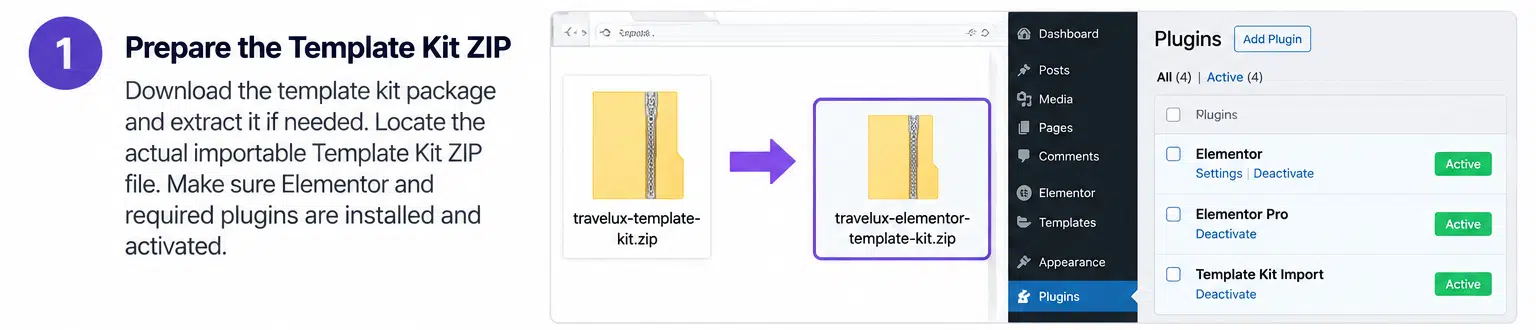
- Install and activate a compatible WordPress theme, such as Hello Elementor.
- Install and activate Elementor.
- Install the required companion plugins: ElementsKit Lite, MetForm, and Gum Elementor Addon.
- Install the Envato Template Kit Import plugin if using the Envato import workflow.
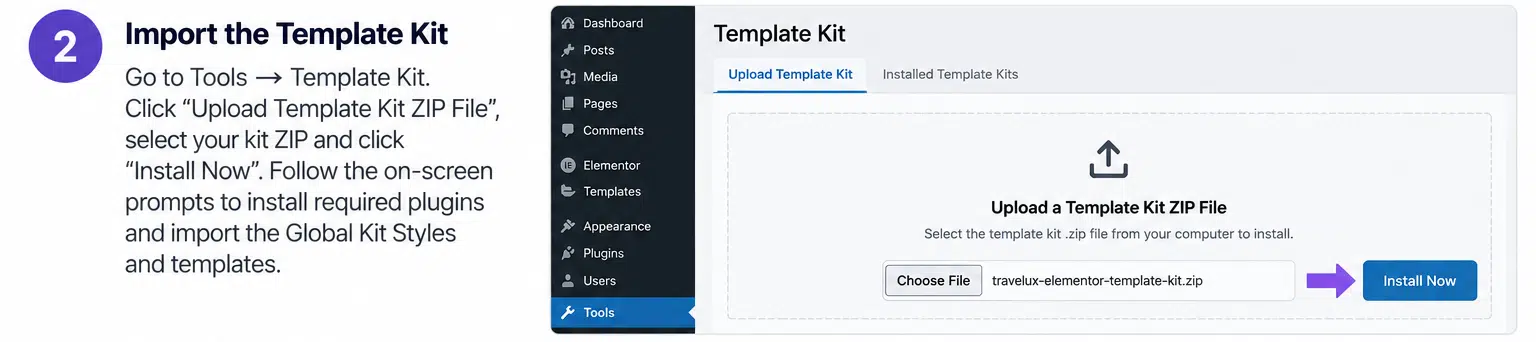
- Upload the Accelera Template Kit ZIP without extracting it.
- Import the Global Kit Styles first.
- Import the required page and section templates individually.
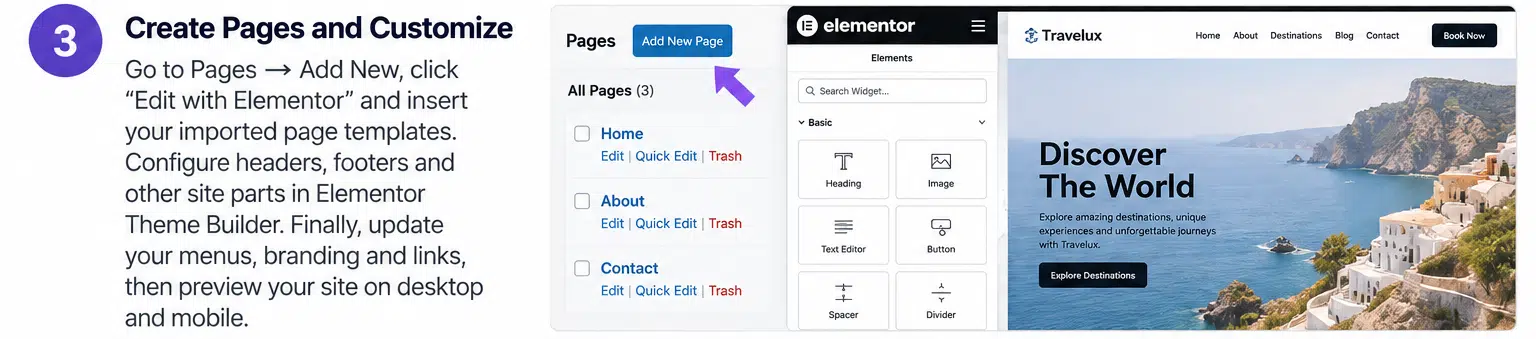
- Configure the global header and footer through ElementsKit or Elementor Pro Theme Builder.
- Create WordPress pages and insert the corresponding imported Elementor templates.
- Set your homepage under Settings → Reading.
- Replace demo content and images with your own agency information.
- Test forms, navigation, and responsive layouts before publishing.
Image licensing: The original kit uses demo images from Envato Elements. These images may require a separate Envato Elements license for your project. Replace them with your own licensed images if you do not have the required rights.
Compatibility note: The ThemeForest listing records an update date of December 30, 2025, and lists Elementor 3.10.x in its software-version field. Check the current Elementor and companion plugin versions before importing the kit into a production website.
Build Your AI Agency Website with Accelera
Accelera provides a complete visual starting point for AI automation agencies and technology businesses that need a professional online presence. Its service pages, case study layouts, pricing sections, team profiles, testimonials, and contact templates help organize important business information into a consistent website.
With Elementor’s visual editor and the included companion plugins, you can customize the layouts, build enquiry pages, and present your AI services without designing every section from scratch. For businesses looking for an AI-focused website design rather than a complete AI software solution, Accelera offers a practical template kit.