Bijoux is a premium WordPress theme designed for jewellery stores, handmade jewellery brands, luxury boutiques, and fashion accessory retailers. Developed by VamTam, it combines an elegant visual style with WooCommerce functionality to help businesses create a polished online shopping experience.
With refined product layouts, spacious sections, stylish typography, and collection-focused designs, Bijoux puts the spotlight on the details that make jewellery special. Whether you sell gold jewellery, handmade accessories, watches, or luxury fashion pieces, the theme provides a flexible foundation for building a distinctive online store.
Built with Elementor Pro and WooCommerce, Bijoux allows you to customize your storefront visually, organize products into collections, and create a consistent shopping experience from the homepage to checkout.
Bijoux includes a complete jewellery-store website design with customizable layouts for product displays, shop pages, product details, navigation, blog content, and essential store pages.
Its Elementor Pro integration makes it possible to edit the website’s main sections using a visual editor rather than relying on a separate proprietary page-building system.
Key Features
1. Elegant Jewellery Store Design
Bijoux features a premium boutique-style design created for jewellery and luxury accessory businesses. Its clean layouts and carefully arranged product sections help showcase collections without distracting visitors from the products.
2. WooCommerce Integration
The theme is built around WooCommerce, allowing you to manage products, inventory, orders, customers, shopping carts, and checkout from your WordPress dashboard.
You can organize products into categories such as rings, necklaces, bracelets, earrings, watches, and handmade collections.
3. Elementor Pro Website Builder
Customize your website using Elementor Pro’s visual drag-and-drop editor. Adjust layouts, images, typography, colors, spacing, and other design elements to match your brand identity.
Elementor Pro is required for the theme’s demo content importer and setup workflow.
4. Custom Product Page Designs
Create visually appealing product pages that give jewellery pieces the attention they deserve. Use product images, descriptions, pricing, and WooCommerce purchasing elements to present each item clearly.
5. Custom Shop and Product Archives
Design your shop pages and product archive layouts to organize collections and make product discovery easier. You can customize how products are displayed across category and shop pages.
6. Header and Footer Builder
Build custom website headers and footers using Elementor Pro. Add your brand logo, navigation menus, shopping links, contact details, and other important website elements.
7. Mega Menu Navigation
Use the Elementor Pro-powered mega menu functionality to organize large product catalogs and collection links. It is useful for stores with multiple jewellery categories and product ranges.
8. Wishlist Functionality
Bijoux extends WooCommerce with wishlist functionality, allowing shoppers to save products they may want to revisit or purchase later.
9. AJAX Product Search
The theme includes AJAX search functionality to help visitors find products more conveniently without relying entirely on traditional page navigation.
10. Gift Card Support
The theme’s WooCommerce enhancements include gift card functionality, giving jewellery businesses another way to offer gift purchases for birthdays, anniversaries, weddings, and special occasions.
11. Shopping Cart and Checkout Customization
Use the Elementor Pro WooCommerce builder to customize important shopping areas, including:
- Shopping cart
- Checkout page
- Side cart
- My Account page
- Product detail pages
- Product archive pages
These layouts help maintain a consistent visual experience throughout the purchasing process.
12. Blog and Content Layouts
Publish jewellery guides, fashion articles, collection announcements, gift recommendations, and brand stories using customizable blog and single-post layouts.
13. Dynamic Content Templates
Bijoux supports Elementor Pro dynamic layouts for different website sections, including products, blog posts, blog archives, product archives, search results, and 404 pages.
14. Popup and Form Designs
Create promotional popups, newsletter forms, contact forms, and other customer-facing elements using Elementor Pro. These can be used for campaign announcements, enquiries, and subscriber sign-ups.
15. Responsive Design Controls
Customize how the website appears on desktop, tablet, and mobile devices. Elementor Pro provides responsive design controls and custom breakpoints to help fine-tune the layout for different screen sizes.
16. RTL and Translation Support
Bijoux includes RTL support and translation-ready files, making it suitable for stores that need right-to-left layouts or multilingual website content. WPML compatibility is also listed.
17. Global Styling Controls
Use Elementor Pro’s Global Styles to manage typography and colors across the website. This makes it easier to maintain consistent branding when updating multiple pages and templates.
18. Premium Demo Images
The original vendor package advertises premium stock images alongside its demo content. These visuals help establish the theme’s luxury jewellery-store presentation during initial setup.
Who Should Use Bijoux?
Bijoux is suitable for:
- Jewellery and gold retailers
- Handmade jewellery businesses
- Luxury jewellery boutiques
- Watch and accessory stores
- Fashion jewellery brands
- Diamond and gemstone retailers
- Wedding and engagement jewellery shops
- Online gift and lifestyle stores
Required Plugins and Setup
To use Bijoux as intended, prepare the following:
- WordPress: The platform required to run the website.
- Elementor: The visual page-building foundation.
- Elementor Pro: Required for the theme’s demo importer, setup workflow, header and footer layouts, dynamic templates, and advanced WooCommerce builder features.
- WooCommerce: Required for product catalogs, shopping carts, orders, and checkout.
The theme is designed to work with these core tools rather than requiring a large collection of separate page-building plugins.
Installation and Setup
- Install WordPress on your hosting account.
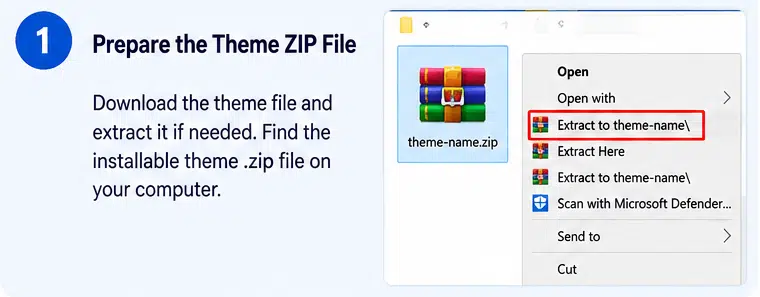
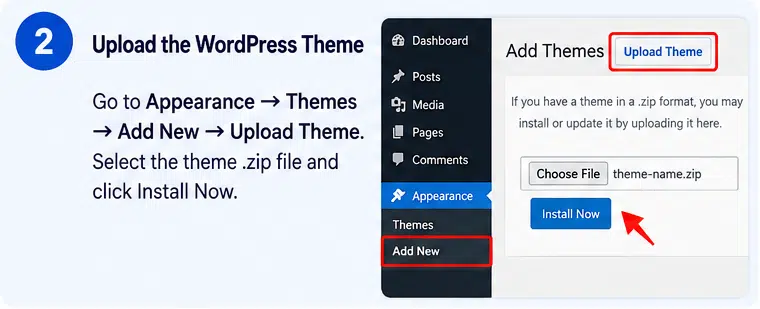
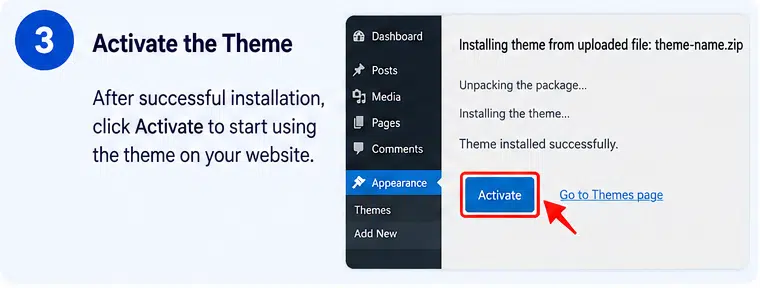
- Upload the Bijoux theme ZIP through Appearance → Themes → Add New → Upload Theme.
- Install and activate the required plugins, including Elementor, Elementor Pro, and WooCommerce.
- Follow the theme documentation to configure the theme and import the demo content.
- Set up your logo, colors, typography, navigation, header, and footer.
- Add jewellery products with descriptions, prices, categories, and high-quality images.
- Configure WooCommerce payment, shipping, tax, and checkout settings.
- Test the shopping experience on desktop and mobile before launching.
Compatibility and Important Notes
The vendor’s product listing identifies compatibility with WordPress 7.1.x and WooCommerce 10.x, alongside Elementor and Elementor Pro. Check the installed package and current plugin versions before deploying the theme on a production website.
Elementor Pro is an important requirement: it is needed for the demo content importer and the theme’s advanced website-building workflow. The free Elementor plugin alone is not sufficient for the complete intended setup.
The original vendor advertises premium stock images with the theme package. If you obtain the theme through a third-party download, independently verify the availability and usage rights of any included image assets.
Create a Luxury Jewellery Store with Bijoux
Bijoux provides a stylish starting point for building a professional jewellery ecommerce website. Its WooCommerce integration, Elementor Pro customization tools, product layouts, wishlist, AJAX search, and collection-focused design make it a practical option for jewellery retailers who want to present their products with a polished boutique feel. Customize the layouts with your own branding and product photography to create an online store that reflects the quality of your collections.