
Brave – Visitor Conversion Engine for WordPress is an all-in-one conversion and lead-generation plugin designed to help website owners turn visitors into subscribers, leads, and customers. Instead of installing separate tools for popups, opt-in forms, promotional banners, surveys, and WooCommerce product recommendations, Brave brings these marketing features together in one WordPress dashboard.
The plugin includes a visual drag-and-drop editor that lets you build custom popups, slide-ins, sticky bars, notification panels, contact forms, newsletter opt-ins, and other interactive website elements without writing code. You can customize the design, add different content elements, and decide when and where each campaign should appear.
Brave also supports WooCommerce promotions, email marketing integrations, visitor targeting, and conversion tracking. Its free version covers essential popup-building and lead-generation tasks, while the premium edition expands the available elements, templates, automation, and targeting options.
Whether you run a business website, blog, agency, membership platform, or online store, Brave provides a flexible toolkit for improving visitor engagement and creating more opportunities for conversion.
Key Features
1. Drag-and-Drop Visual Builder
Create custom conversion campaigns using Brave’s visual editor. Add text, images, buttons, forms, shapes, lists, and other supported elements, then adjust their appearance and layout to match your website’s design.
The editor makes it possible to build different types of marketing campaigns without manually writing popup code.
2. Create Different Types of Popups
Build a variety of website campaigns, including:
- Newsletter subscription popups
- Promotional and discount popups
- Contact and lead-generation forms
- Announcement boxes
- Lightboxes and modal windows
- Slide-in panels
- Sticky bars and notification banners
- Sidebar campaigns
- Feedback and survey popups
You can create campaigns for different marketing goals instead of relying on a single popup design.
3. Newsletter Opt-In Forms
Encourage visitors to subscribe to your mailing list through customizable opt-in forms. Add form fields, personalize the message, and connect submissions to supported email marketing services.
Brave supports integrations with services such as Mailchimp, MailPoet, AWeber, GetResponse, ActiveCampaign, ConvertKit, and other supported platforms.
4. Lead Generation Forms
Create forms to collect visitor information, business enquiries, contact details, and other lead data. Depending on the available edition, you can use advanced form fields, multi-step forms, automated replies, and custom submission actions.
Form submissions can also be stored locally or sent to connected services according to your configuration.
5. Surveys and Feedback Campaigns
Collect feedback directly from website visitors using interactive forms and survey-style campaigns. Use these widgets to understand customer preferences, gather opinions, and collect information about your products or services.
Premium functionality expands the available multi-step form and campaign options.
6. Ready-Made Templates and Presets
Start with available popup presets instead of designing every campaign from scratch. Import a suitable layout, customize its text and images, and adjust the design to fit your website.
The premium edition provides access to an expanded preset library, making it easier to create campaigns for different purposes.
7. Advanced Visitor Targeting
Display campaigns to selected visitors rather than showing the same popup to everyone. Depending on the edition, targeting conditions can include:
- Specific pages, posts, or products
- Visitor device type
- Registered user status or user role
- Referral source or traffic domain
- Visitor location
- Previous page visits
- WooCommerce cart or purchase conditions
These controls help make campaigns more relevant to the people viewing your website.
8. Flexible Popup Triggers
Choose when a campaign should appear. Available triggers include page loading, visitor scrolling, clicking a selected element, and other configured actions.
Premium display options extend the available triggers with features such as exit-intent and additional campaign conditions.
9. Control Popup Display Frequency
Manage how frequently visitors see a campaign. You can configure display limits and rules to avoid repeatedly showing the same popup to someone who has already closed it or completed its goal.
This helps create a less intrusive experience for returning visitors.
10. Separate Desktop and Mobile Designs
Customize popup layouts for different screen sizes. Use an automatically scaled layout or create a separate mobile design when you need more control over how campaign elements appear on smaller screens.
11. WooCommerce Product Promotions
Use Brave’s WooCommerce integration to display product-related campaigns and promote selected items through popups.
Supported use cases include:
- Latest and popular product promotions
- Best-selling product recommendations
- Related-product displays
- Upsell and cross-sell campaigns
- Discount and coupon announcements
- Cart-abandonment offers
Advanced WooCommerce targeting can help display campaigns according to products in the cart, purchase activity, or other supported conditions. WooCommerce is required for these store-specific features.
12. Multi-Step Campaigns and Forms
Create campaigns with multiple steps to guide visitors through a sequence of actions. For example, you can ask visitors to select an option, display a relevant follow-up form, and show a customized confirmation message.
Advanced multi-step campaign and form-building capabilities are part of the premium feature set.
13. Campaign Analytics and Goal Tracking
Monitor how visitors interact with your campaigns. Brave can track popup views, clicks, and form submissions, helping you understand which designs are receiving attention and which are generating responses.
Advanced reporting and tracking features depend on the edition and available integrations.
14. A/B Testing
Test different campaign variations to compare their performance. Experiment with alternative headlines, button text, layouts, and offers to identify which version works better with your audience.
A/B testing and advanced campaign analysis are available through the relevant premium functionality.
15. Email, CRM, and Automation Integrations
Connect forms and campaigns with supported email marketing and CRM services. Brave also provides integration options through platforms such as Zapier, helping you transfer form data to other applications and automate follow-up workflows.
Some integrations require an existing account, API credentials, or a separate subscription with the connected service.
16. Animation and Visual Customization
Add animations and visual effects to campaign elements to make popups more engaging. Customize buttons, text, images, backgrounds, and other design components to maintain consistency with your website’s branding.
Advanced animation controls are available in the premium edition.
17. Social and Visitor Engagement Widgets
Create campaigns that encourage visitors to interact with your website and social profiles. Depending on the available modules, you can build social sharing, social following, chat initiation, and social signup experiences.
18. Additional Website Widgets
Beyond traditional popups, Brave’s wider conversion toolkit includes options for related blog posts, custom banner ads, FAQs, video popups, welcome messages, terms and policy notices, and cookie-consent displays.
These features allow website owners to use the same campaign builder for marketing, content discovery, and visitor communication.
Free Version vs Premium
Brave offers a free WordPress plugin and paid premium plans.
Free version:
- Visual popup builder
- Essential design elements
- Basic popup and opt-in forms
- Contact and feedback forms
- Standard popup display controls
- Basic WooCommerce popup functionality
- Newsletter service integrations
- Basic campaign interaction statistics
Premium version:
- Additional campaign elements
- Expanded popup presets
- Multi-step campaigns and forms
- Advanced visitor targeting and display triggers
- Exit-intent campaigns
- Advanced animations
- Automated form replies and additional submission actions
- A/B testing and advanced campaign analytics
- Expanded integrations and notifications
The exact feature availability depends on the selected plan and plugin edition.
Who Should Use Brave?
Brave can be useful for:
- Business websites looking to generate more enquiries
- Bloggers building newsletter subscriber lists
- WooCommerce stores promoting products and offers
- Digital marketing agencies managing client campaigns
- Membership websites encouraging registrations
- Online businesses collecting customer feedback
- Website owners who want multiple conversion tools in one plugin
Compatibility and Setup Notes
- Platform: WordPress
- Plugin: Brave – Visitor Conversion Engine
- Developer: Brave
- Builder: Visual drag-and-drop campaign editor
- eCommerce integration: WooCommerce
- Email integrations: Supported newsletter and marketing services
- Automation: Zapier and other supported integrations
- Campaign tracking: Views, clicks, form submissions, and available analytics
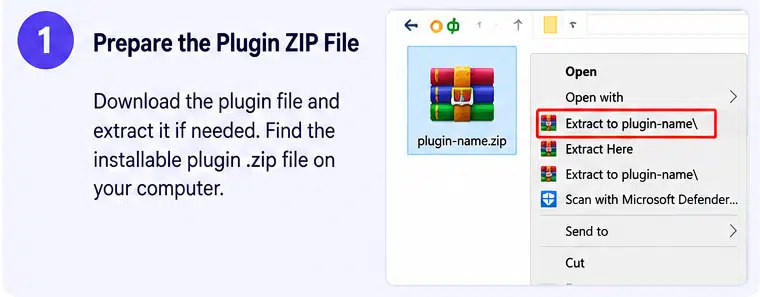
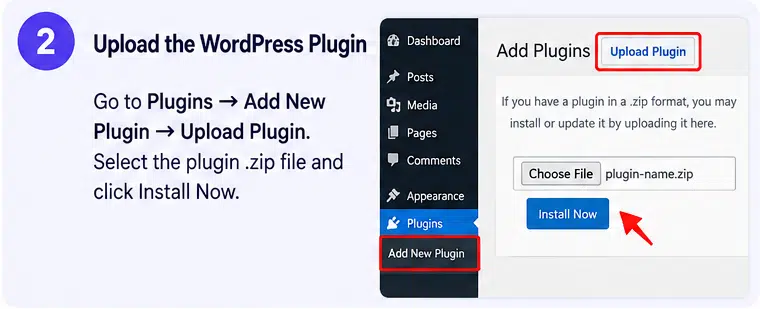
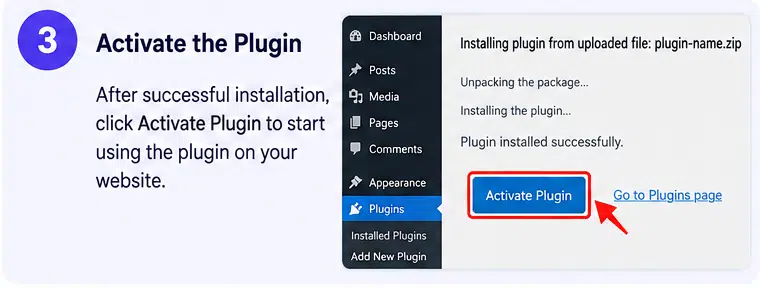
- Requirements: The WordPress.org listing currently reports WordPress 5.2 or later, PHP 7.2.24 or later, and testing through WordPress 7.1.4. Check the requirements for your specific downloaded edition before installation.
Important: Some advanced targeting, multi-step forms, campaign triggers, analytics, and design elements require Brave PRO or an eligible premium plan. WooCommerce-specific campaigns require WooCommerce, while external email and automation integrations may require separate accounts or API credentials.
If you use Brave to collect personal information, configure appropriate consent notices, privacy disclosures, and data-handling practices. Its cookie-consent widget does not automatically make a website compliant with GDPR or other privacy laws. Also, test popup behaviour alongside caching, optimization, and other frontend plugins to avoid display or script conflicts.
Improve Visitor Engagement with Brave
Brave brings popup creation, lead generation, visitor engagement, and promotional campaigns into one WordPress plugin. Its visual builder and range of conversion widgets make it possible to create targeted experiences for different pages, visitors, and marketing goals. For business websites and WooCommerce stores that want more control over how they engage visitors, Brave offers a flexible alternative to managing multiple separate popup and lead-generation tools.