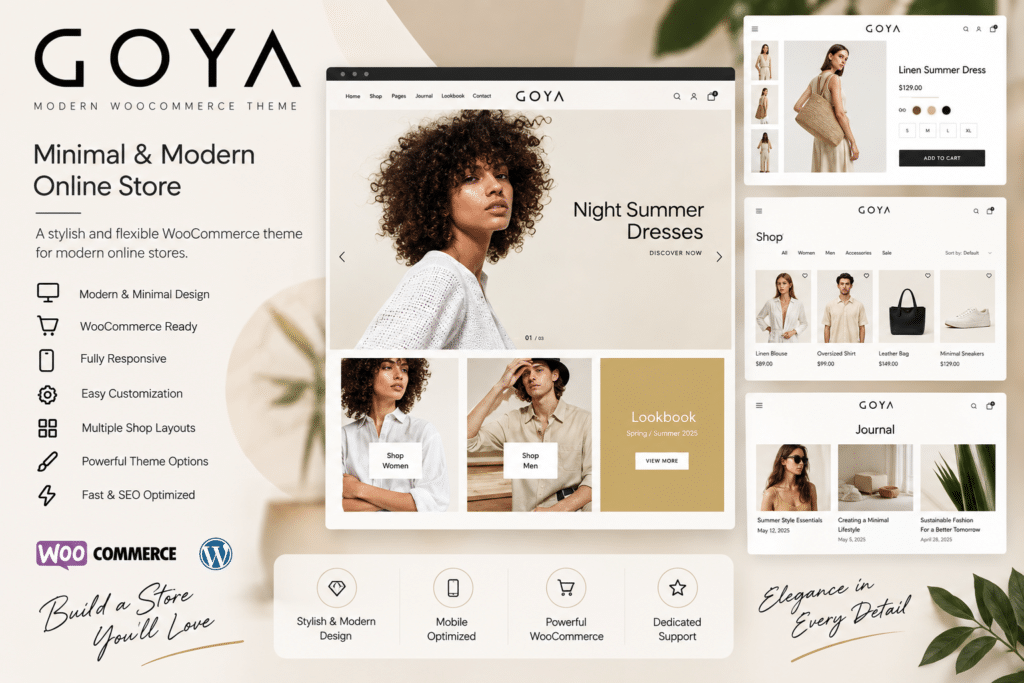
Goya is a modern WooCommerce WordPress theme designed for creating stylish and professional online stores. Its clean, minimal design puts your products at the center of the shopping experience, making it a great choice for fashion, furniture, lifestyle, beauty, and other eCommerce businesses.
The theme combines elegant layouts with practical shopping features, helping you build an online store that feels polished and easy to navigate. From product galleries and shop pages to promotional sections and mobile-friendly layouts, Goya provides a flexible foundation for presenting your brand and products.
Whether you’re launching a new WooCommerce store or refreshing an existing website, Goya gives you the design tools to create a modern shopping experience without starting from scratch.
Key Features
- Modern Minimal Design – Create a clean and elegant online store that keeps the focus on your products.
- WooCommerce Integration – Build and manage your online shop using the popular WordPress eCommerce platform.
- Responsive Layouts – Provide a consistent shopping experience across desktop, tablet, and mobile devices.
- Product-Focused Pages – Showcase product images, descriptions, prices, variations, and other important details.
- Flexible Shop Layouts – Organize products and categories in attractive, easy-to-browse layouts.
- Product Galleries – Present your products with engaging images and gallery options.
- Quick View & Shopping Features – Help customers explore products and shop more conveniently where supported.
- Customizable Headers – Adjust navigation and header layouts to suit your brand.
- Blog Support – Publish articles, product guides, announcements, and other content alongside your store.
- Flexible Customization – Personalize typography, colors, layouts, and other visual elements.
- Mobile-Friendly Shopping – Make it easier for customers to browse and purchase products on smaller screens.
- Multi-Purpose eCommerce Design – Adapt the theme for a wide range of online store categories.
Perfect For
Goya is a great choice for:
- Fashion and clothing stores
- Furniture and home décor shops
- Beauty and cosmetics websites
- Jewelry and accessories stores
- Lifestyle brands
- Electronics stores
- Digital product shops
- Boutique eCommerce websites
- Home and garden stores
- Modern WooCommerce businesses
Put Your Products in the Spotlight
Goya’s minimal design helps your products stand out without unnecessary distractions. Its spacious layouts, clear typography, and product-focused presentation make it easier to create a store that feels professional and welcoming.
You can organize your collections, highlight featured products, promote special offers, and create a consistent visual experience that reflects your brand.
Build Your Online Store with Goya
Create a modern and elegant WooCommerce website with Goya – Modern WooCommerce Theme.
With its clean design, responsive layouts, flexible customization options, and eCommerce-focused features, Goya provides a strong foundation for building an attractive online store that your customers will enjoy browsing.