Lantera is a clean and modern Elementor Template Kit designed for psychologists, therapists, counselors, psychiatrists, mental health professionals, and wellness consultants. Its calm visual style and thoughtfully arranged page layouts help create a welcoming online presence where visitors can learn about services, meet professionals, explore therapy options, and make appointment enquiries.
Whether you’re building a website for an independent therapist, a psychology practice, or a counseling center, Lantera provides ready-made layouts that can be customized to match your brand, services, and communication style.
This kit includes 14 ready-to-use page designs and 19 templates, giving you a practical starting point for building a complete mental health or counseling website without designing every section from scratch.
Lantera provides a collection of reusable Elementor layouts for the main sections of a professional psychology website. You can import the designs you need, replace the demo content, and adjust the colors, typography, images, and page sections to suit your practice.
The kit is built to work with the free version of Elementor, so Elementor Pro is not required for its core page layouts.
Key Features
1. Modern Design for Mental Health Websites
Lantera uses a clean, approachable design suitable for therapy practices and wellness services. Its layouts help present information in an organized way while keeping the website welcoming and easy to navigate.
2. 14 Ready-to-Use Page Layouts
The included page designs cover the essential sections of a psychology or counseling website:
- Home
- About
- Services
- Service Detail
- Appointment
- Career
- Reviews
- FAQs
- Team
- Pricing
- Blog
- Single Post
- Contact
- 404 Page
3. 19 Elementor Templates
Alongside the page layouts, the kit includes reusable website templates and supporting sections, including global theme styling, header, footer, appointment form, contact form, and newsletter form designs.
4. Easy Customization with Elementor
Edit page layouts visually using Elementor’s drag-and-drop interface. You can change text, images, colors, fonts, spacing, backgrounds, and section arrangements without needing to write code for ordinary design adjustments.
5. Appointment Enquiry Layout
The dedicated Appointment page and form template provide a convenient way for visitors to send appointment enquiries. You can customize the form fields to collect details such as contact information, preferred service, and availability.
The included form layout is not a complete appointment scheduling or calendar-booking system. Automated scheduling, confirmations, and calendar synchronization may require a separate booking solution.
6. Service and Therapy Presentations
Use the Services and Service Detail layouts to explain different therapy options, counseling programs, consultation services, and areas of professional focus. Each service can have its own dedicated page with relevant descriptions and enquiry links.
7. Professional Team Profiles
Introduce psychologists, therapists, counselors, and other practitioners through the Team page. Add professional biographies, qualifications, photographs, and areas of specialization.
8. Reviews and Testimonials
The Reviews layout gives you a dedicated place to display client feedback and testimonials. Publish testimonials only with appropriate permission and avoid including confidential or identifying client information.
9. Pricing and Service Information
Present consultation options, service packages, and pricing information in a structured format. You can adapt the layout to explain session types, durations, and other details relevant to your practice.
10. Blog and Article Layouts
The Blog and Single Post templates provide a foundation for publishing mental health articles, wellness guidance, practice updates, and educational resources.
11. Header and Footer Templates
Customize the global header and footer to include your logo, navigation links, contact details, social links, and important website information. ElementsKit Lite is used to assign these templates across the website.
12. Contact and Newsletter Forms
The included form designs help visitors contact your practice or subscribe to updates. MetForm is used for the supplied form templates, while submissions and email delivery depend on correct plugin and website configuration.
13. Responsive Layout
Lantera is designed to adapt to desktop, tablet, and mobile screens. You can also adjust responsive settings in Elementor to fine-tune the presentation for different devices.
14. Global Theme Styling
The Global Theme Style template helps establish consistent colors and typography throughout the website. Customize these settings to maintain a recognizable visual identity across pages.
15. Cross-Browser Compatibility
The kit is designed for use with popular browsers, including Chrome, Firefox, Safari, and Opera. Final appearance may vary depending on browser versions, fonts, and installed plugins.
Who Should Use Lantera?
Lantera is suitable for:
- Psychologists and clinical psychology practices
- Therapists and mental health counselors
- Psychiatry and counseling clinics
- Family and relationship counseling services
- Mental wellness centers
- Life coaches and wellness consultants
- Online therapy service providers
- Psychology and mental health organizations
Required Plugins
Install the following plugins to use the kit as intended:
- Elementor: Required to edit and display the page templates.
- ElementsKit Lite: Used for header and footer template functionality.
- MetForm: Required for the included appointment, contact, and newsletter form templates.
- Gum Elementor Addon: Required by the template kit for its included design elements.
Elementor Pro is not required for the core layouts. If you already use Elementor Pro, you can use its Theme Builder for headers and footers and its form features as an alternative to the corresponding ElementsKit and MetForm workflows.
Installation and Setup
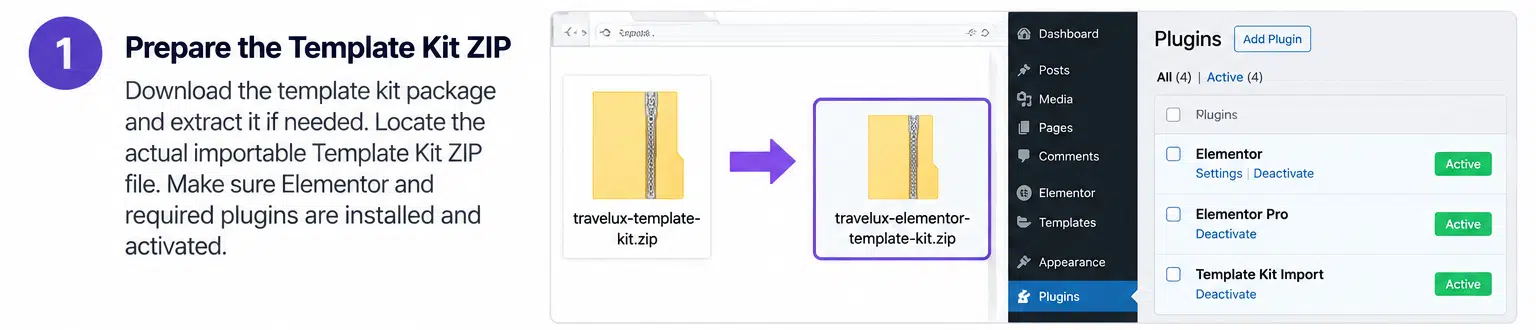
- Install and activate Elementor and the other required plugins.
- Install a compatible Template Kit Import workflow or use the Envato Elements plugin.
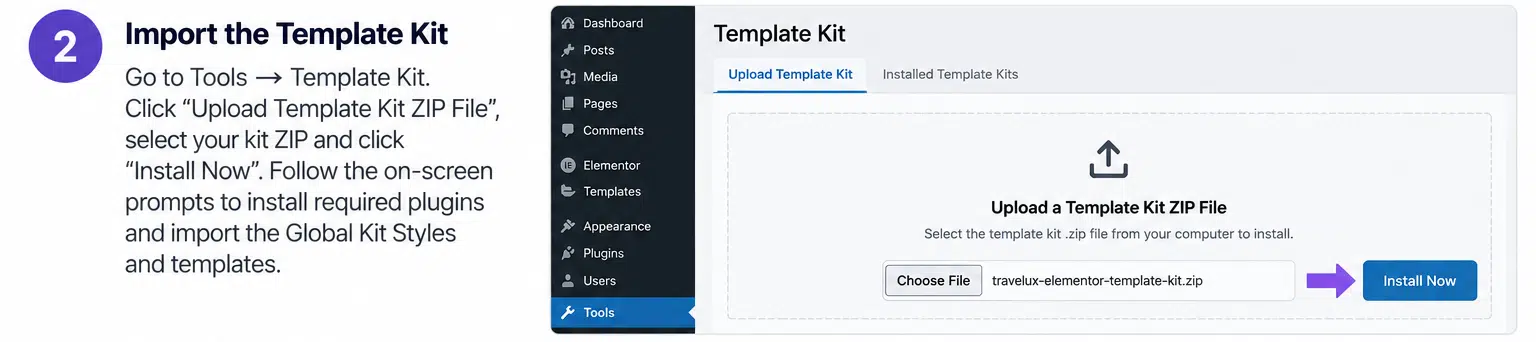
- Upload the Lantera Template Kit ZIP file without extracting it.
- Install any missing plugin requirements when prompted.
- Import the Global Theme Style first, followed by the individual templates.
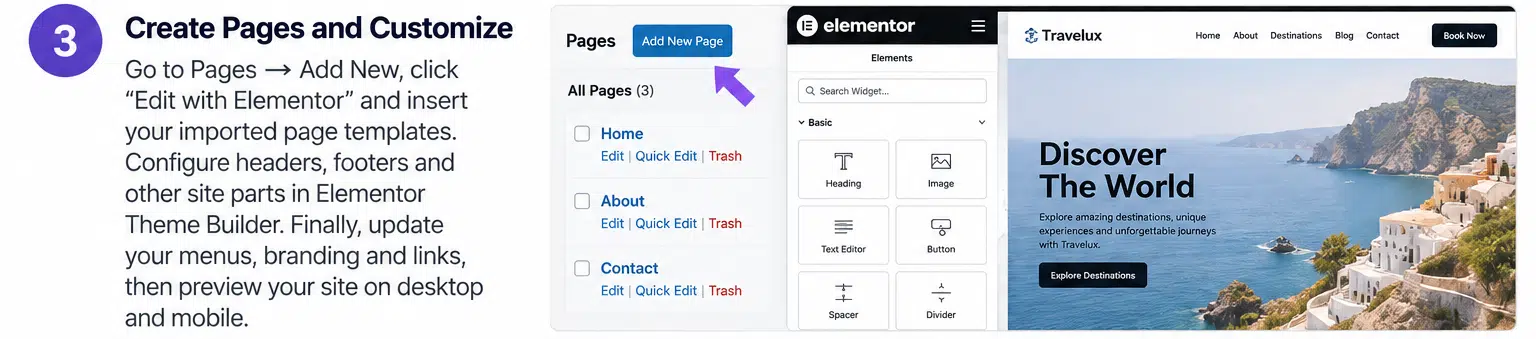
- Create the required WordPress pages and insert the corresponding Elementor layouts.
- Configure the header and footer through ElementsKit or Elementor Pro Theme Builder.
- Customize the forms, page content, images, colors, and typography.
- Set your homepage under Settings → Reading and check the website on desktop, tablet, and mobile.
Compatibility and Setup Notes
Lantera is an Elementor Template Kit, not a standalone WordPress theme. You need a compatible WordPress theme, such as Hello Elementor, along with Elementor to use the layouts.
The vendor listing identifies Elementor 3.10.x as its software compatibility version and shows an April 8, 2025 update date. Since this is older compatibility information, test the kit on a staging website with your current WordPress, Elementor, and required plugin versions before using it on a live site.
The demo images are sourced from Envato Elements. You may need a separate license for those images or should replace them with images you own or are authorized to use.
Build a Welcoming Website for Your Practice
Lantera gives mental health professionals and counseling businesses a ready-made design foundation for presenting their services online. With dedicated pages for appointments, services, team profiles, testimonials, pricing, and educational content, it helps organize the information visitors need when exploring a practice. Customize the layouts with your own branding and content to create a professional website that reflects your approach to care.