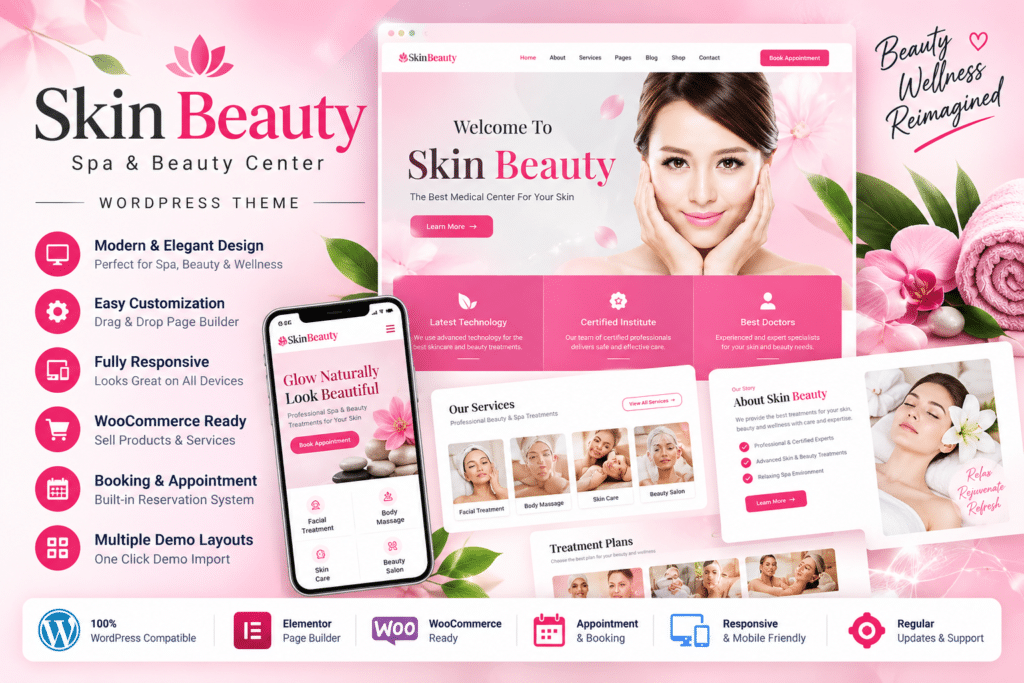
Skin Beauty is a professional WordPress theme by GoodLayers designed for beauty salons, spas, wellness centers, massage businesses, hair salons, skincare clinics, yoga studios, physiotherapy centers, cosmetic businesses, and other health and beauty services.
Its flexible design can be used to present treatments, services, products, portfolios, testimonials, promotions, and business information in a polished visual format.
Skin Beauty also includes WooCommerce support, allowing beauty and wellness businesses to combine service-focused content with an online product store.
Key Features
- Beauty & Spa Focused Design – Purpose-built styling for salons, wellness centers, massage businesses, skincare services, and related industries.
- Built-In Page Builder – Create and customize supported layouts using the GoodLayers page-building system.
- One-Click Demo Import – Import supported demo content to create a faster starting point for your website.
- WooCommerce Support – Build an online store for cosmetics, skincare products, spa items, beauty products, and other goods.
- Custom WooCommerce Layouts – Present supported products using theme-specific WooCommerce styling.
- Promotions & Coupons – Create supported promotional and shopping experiences through WooCommerce.
- 7 Portfolio Styles – Showcase treatments, services, projects, products, or visual work using multiple portfolio layouts.
- 4 Blog Styles – Choose from Column, Medium, Full, and Masonry blog presentations.
- Advanced Slider – Create full-screen, full-width, or boxed sliders with drag-and-drop controls.
- Mega Menu – Build more structured navigation menus without requiring a separate mega-menu plugin.
- Parallax Sections – Add supported parallax backgrounds and customizable content sections.
- Unlimited Colors – Adjust theme colors to match your beauty or wellness brand.
- Google Fonts & Font Uploads – Customize typography using Google Fonts or supported uploaded fonts.
- Responsive & Retina Ready – Present your website across modern desktop, tablet, and mobile screens.
Perfect For
Skin Beauty is suitable for beauty salons, spas, hair salons, barbershops, massage centers, wellness businesses, skincare clinics, makeup professionals, cosmetic companies, physiotherapy centers, yoga studios, beauty retailers, and treatment-focused websites.
Present Beauty & Wellness Services
Skin Beauty can be used to create professional pages for services such as:
- Massage treatments
- Skincare services
- Hair and beauty treatments
- Wellness programs
- Cosmetic procedures
- Physiotherapy services
- Yoga and relaxation programs
- Makeup and beauty services
Portfolio layouts can also be adapted to showcase treatment results, facilities, products, or other visual examples of your work.
Build an Online Beauty Store
Skin Beauty includes WooCommerce compatibility and dedicated product styling.
This gives spas, salons, and beauty businesses the option to sell products such as cosmetics, skincare items, wellness products, hair-care products, accessories, gift items, or other supported products directly from the same website.
Create Flexible Portfolio Layouts
The theme currently includes 7 portfolio styles:
- Classic
- Classic Without Space
- Classic Second Style
- Classic Second Style Without Space
- Modern
- Modern Without Space
- Medium Style
These layouts can be used for treatment galleries, salon work, products, before-and-after presentations, wellness programs, or other visual content.
Choose from Multiple Blog Styles
Skin Beauty also provides four blog presentation styles:
- Column
- Medium
- Full
- Masonry
This makes it useful for publishing beauty tips, wellness guides, skincare advice, treatment information, product announcements, and company news.
Customize Layouts with GoodLayers Tools
The theme includes GoodLayers’ own page-building and theme-management tools.
Supported features include configurable sidebars, scalable content containers, floating navigation, boxed or full-width layouts, custom skins, shortcodes, theme customization options, and page-builder shortcuts.
This gives you more control over the design without requiring every change to be made directly in theme files.
Build Multilingual Spa Websites
Skin Beauty supports WPML, making it suitable for salons and wellness businesses that serve customers in multiple languages.
A compatible WPML setup can be used to translate service descriptions, business information, blog content, product pages, and other supported site content.
Create Promotional Sliders
The theme includes a visual slider system supporting:
- Full-screen sliders
- Full-width sliders
- Boxed sliders
- Drag-and-drop element placement
- Timeline-based transition controls
These can be useful for promoting featured treatments, discounts, new products, seasonal packages, or salon campaigns.
Build a Professional Beauty & Spa Website
Create an elegant online presence with Skin Beauty – Spa & Beauty Salon WordPress Theme.
With beauty-focused layouts, a built-in page builder, WooCommerce support, 7 portfolio styles, multiple blog layouts, sliders, WPML compatibility, mega menus, responsive design, and extensive customization tools, Skin Beauty provides a flexible foundation for beauty, spa, wellness, and salon websites.