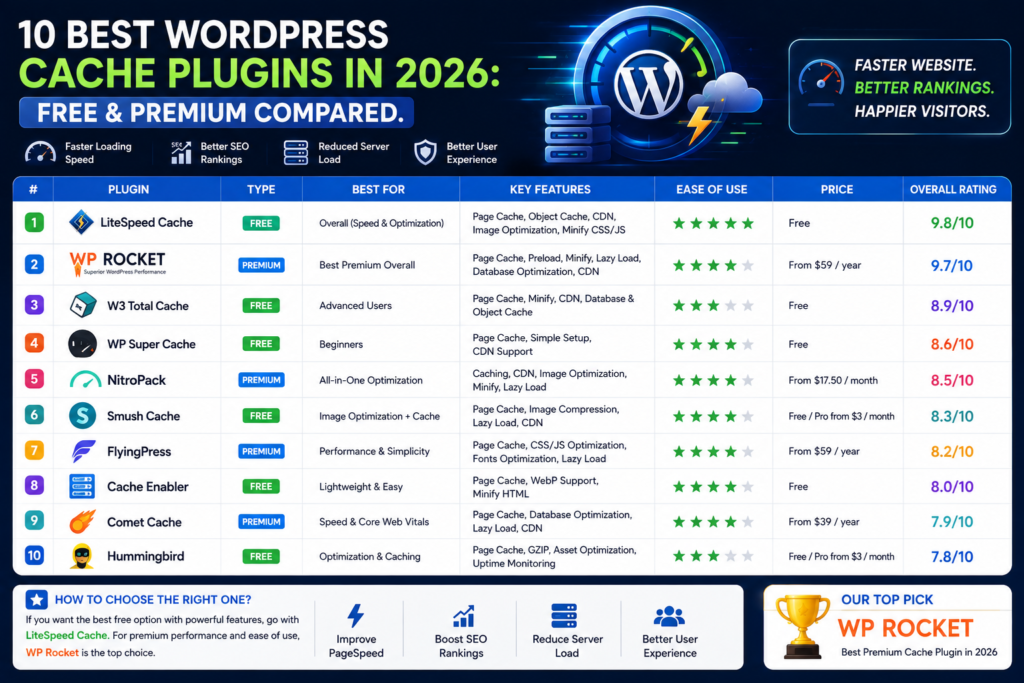
10 Best WordPress Cache Plugins in 2026: Free & Premium Compared
A fast WordPress website isn’t just nicer to use. Speed can influence user experience, conversions, engagement, and the overall technical quality of your site.
One of the easiest ways to improve WordPress performance is to use a good caching plugin.
But choosing one isn’t always simple.
Some WordPress cache plugins are completely free. Others charge annually but provide easier configuration, premium support, advanced CSS and JavaScript optimization, image optimization, CDN integration, or Core Web Vitals tools.
And some plugins—especially LiteSpeed Cache—work best only when paired with the right server technology.
So which WordPress cache plugin should you use in 2026?
In this guide, we’ll compare 10 of the best WordPress caching and performance plugins, including both free and premium options.
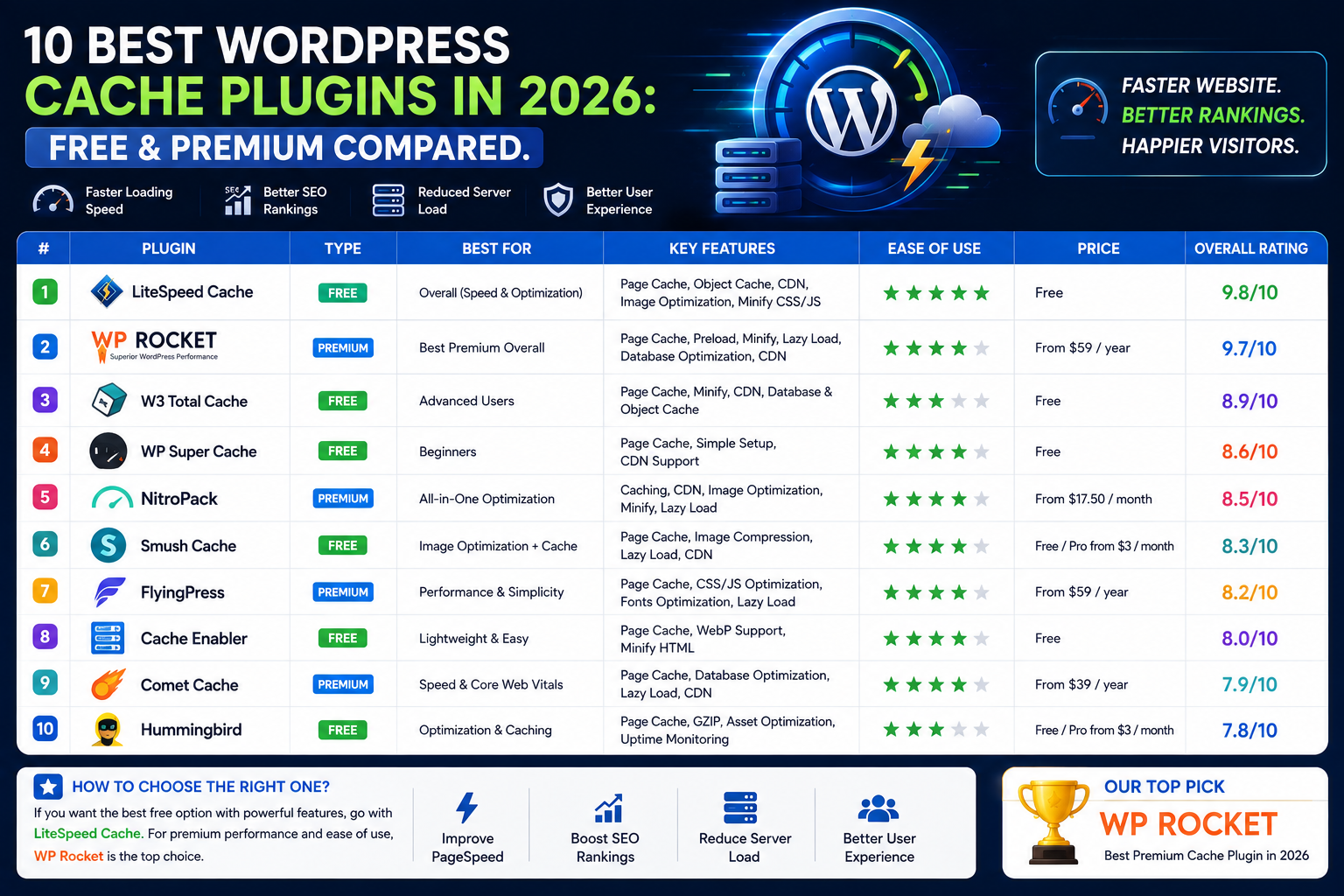
Best WordPress Cache Plugins 2026: Quick Comparison
| Plugin | Free Version | Best For | Ease of Use |
|---|---|---|---|
| LiteSpeed Cache | ✅ Yes | LiteSpeed hosting | ⭐⭐⭐⭐ |
| WP Rocket | ❌ No | Beginners & businesses | ⭐⭐⭐⭐⭐ |
| FlyingPress | Trial | Performance enthusiasts | ⭐⭐⭐⭐ |
| WP-Optimize | ✅ Yes | Cache + database optimization | ⭐⭐⭐⭐ |
| W3 Total Cache | ✅ Yes | Advanced users | ⭐⭐⭐ |
| WP Super Cache | ✅ Yes | Simple page caching | ⭐⭐⭐⭐ |
| NitroPack | Plan dependent | All-in-one optimization | ⭐⭐⭐⭐⭐ |
| Breeze | ✅ Yes | Cloudways & simple caching | ⭐⭐⭐⭐ |
| Cache Enabler | ✅ Yes | Lightweight caching | ⭐⭐⭐⭐⭐ |
| Comet Cache | ✅ Yes | Straightforward page caching | ⭐⭐⭐⭐ |
Our Quick Picks
Best overall free cache plugin: LiteSpeed Cache
Best premium cache plugin: WP Rocket
Best for beginners: WP Rocket
Best for LiteSpeed hosting: LiteSpeed Cache
Best lightweight option: Cache Enabler
Best for advanced configuration: W3 Total Cache
Best cache + database optimization: WP-Optimize
Best premium alternative to WP Rocket: FlyingPress
Why Does WordPress Need Caching?
WordPress dynamically generates pages.
When someone visits an uncached page, WordPress may need to run PHP, query the database, execute theme and plugin functionality, assemble the page, and send the result to the visitor.
Doing this repeatedly consumes resources.
Caching can generate or store reusable versions of your pages so the server doesn’t need to repeat the full process for every visitor.
Depending on your setup, caching can help reduce server processing, improve response times, improve scalability, and make navigation feel faster.
However, caching plugins aren’t magic.
Your website’s speed also depends on hosting, themes, plugins, images, fonts, JavaScript, advertising scripts, databases, CDNs, and page design.
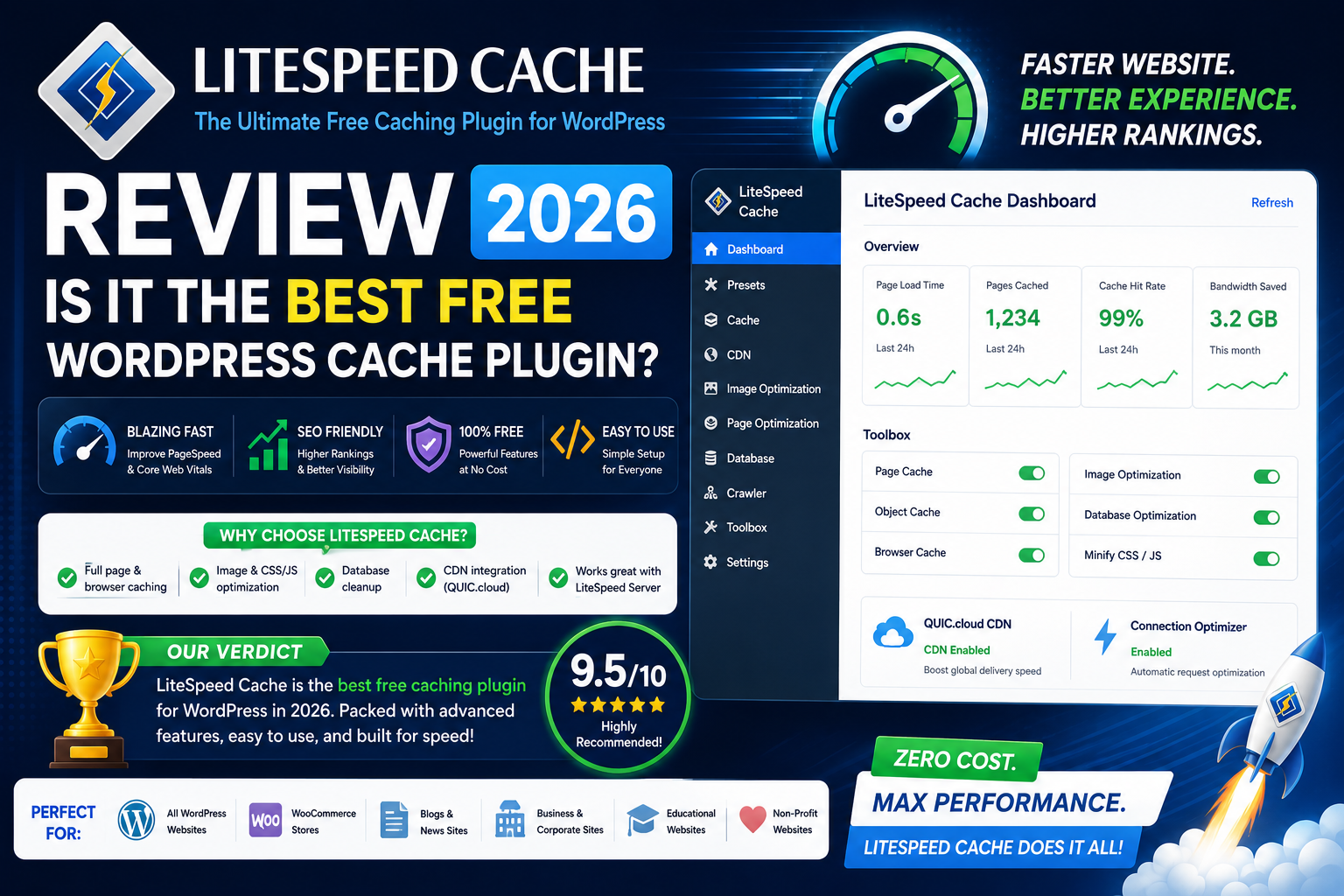
1. LiteSpeed Cache
Best Free WordPress Cache Plugin
LiteSpeed Cache is our top free caching recommendation for websites running compatible LiteSpeed infrastructure.
The plugin combines caching with a huge collection of WordPress performance tools.
LiteSpeed Cache supports general optimization functionality on different server platforms, but its exclusive caching features require compatible infrastructure such as OpenLiteSpeed, commercial LiteSpeed server products, LiteSpeed-powered hosting, or QUIC.cloud.
Key Features
- Server-level page caching on compatible hosting
- Browser caching
- Object cache integration
- CSS optimization
- JavaScript optimization
- Lazy loading
- Image optimization ecosystem
- Database optimization
- CDN integration
- QUIC.cloud integration
- WooCommerce compatibility
- WordPress Multisite support
One of its biggest advantages is that the WordPress plugin itself is free.
LiteSpeed Cache can also integrate with Redis or Memcached for object caching, and the plugin is compatible with popular WordPress tools including WooCommerce and Yoast SEO.
Why We Like LiteSpeed Cache
The combination of server-level caching and frontend optimization gives LiteSpeed Cache enormous potential.
It’s especially attractive if your hosting provider already uses LiteSpeed.
Downsides
The dashboard contains many technical settings.
Terms relating to cache TTLs, object caching, UCSS, optimization services, and other advanced features can be intimidating for beginners.
Best For
LiteSpeed-hosted WordPress websites, WooCommerce stores, developers, agencies, and users who want maximum free functionality.
Rating: 4.8/5
2. WP Rocket
Best Premium WordPress Cache Plugin
WP Rocket takes almost the opposite approach to LiteSpeed Cache.
Rather than exposing huge numbers of technical settings, WP Rocket focuses heavily on ease of use.
Its current feature set includes automatic page caching, browser caching, cache preloading, JavaScript optimization, CSS optimization, media optimization, database tools, and CDN functionality. WP Rocket says a large portion of its performance best practices are automatically applied on activation.
Key Features
- Automatic page caching
- Cache preloading
- Browser caching
- CSS optimization
- Delay JavaScript execution
- Lazy-loading functionality
- Database optimization
- Google Fonts optimization
- WooCommerce compatibility
- CDN integration
- Performance monitoring through Rocket Insights
WP Rocket 3.22 also introduced built-in RocketCDN access with every license for selected key pages.
WP Rocket Pricing
As of September 2026, WP Rocket’s official pricing page lists its Single license at $59/year for one website, with higher plans for additional sites. Prices can change, so always verify current checkout pricing before purchasing.
Why We Like WP Rocket
WP Rocket’s greatest strength is simplicity.
A business owner shouldn’t need to understand every technical detail of browser caching and JavaScript execution just to improve website performance.
WP Rocket makes advanced optimization much more accessible.
Downsides
There is no permanent free version.
Users on LiteSpeed hosting may also find LiteSpeed Cache provides better value because of its native server integration.
Best For
Businesses, bloggers, agencies, WooCommerce owners, beginners, Elementor users, and anyone willing to pay for convenience.
Rating: 4.7/5
3. FlyingPress
Best WP Rocket Alternative
FlyingPress has become one of the strongest premium WordPress performance plugins.
It combines page caching with aggressive frontend optimization while maintaining a relatively approachable interface.
Its current feature set includes page caching, cache preloading, image optimization, Core Web Vitals tracking, unused CSS removal, delayed scripts, minification, lazy loading, database optimization, font optimization, resource prioritization, and Cloudflare integration.
Key Features
- Page caching
- Cache preloading
- Remove unused CSS
- Delay JavaScript
- JavaScript defer
- Image optimization
- WebP and AVIF options
- Lazy loading
- Database cleanup
- Google Fonts optimization
- Core Web Vitals monitoring
- Cloudflare integration
FlyingPress Pricing
FlyingPress currently lists its Starter plan at $59/year for one website, with a 14-day free trial before billing. Higher multi-site plans are also available.
Why We Like FlyingPress
FlyingPress gives performance-focused users a lot of functionality without feeling as overwhelming as some highly technical plugins.
It is particularly interesting for users comparing it directly with WP Rocket.
Downsides
It’s another recurring premium expense.
Advanced CSS and JavaScript optimizations should also be carefully tested.
Best For
Performance enthusiasts, agencies, business websites, and users looking for a premium WP Rocket alternative.
Rating: 4.6/5
4. WP-Optimize
Best Cache + Database Optimization Plugin
WP-Optimize attempts to solve several WordPress performance problems from one dashboard.
It combines caching with image compression, database optimization, and frontend resource optimization.
The current plugin describes four main optimization areas, including site caching and image compression, while also offering minification and database-related functionality.
Key Features
- Page caching
- Database cleanup
- Image compression
- CSS optimization
- JavaScript optimization
- Font optimization
- Asset preloading
- Cache preloading
- Free and premium versions
This is particularly useful if you would otherwise install separate plugins for caching, database cleanup, and basic image optimization.
Why We Like WP-Optimize
It’s an excellent all-round option for users who want more than basic page caching.
The interface is also easier to understand than W3 Total Cache for many users.
Downsides
If your only priority is maximum caching performance, a server-integrated solution such as LiteSpeed Cache may make more sense.
Premium functionality is also required for certain advanced features.
Best For
Blogs, small businesses, content websites, and users who want cache and database optimization in one plugin.
Rating: 4.5/5
5. W3 Total Cache
Best for Advanced WordPress Users
W3 Total Cache has been part of the WordPress performance ecosystem for many years.
It’s one of the most configurable caching solutions available.
The plugin supports caching and CDN integration and provides more advanced premium functionality such as full-site delivery, fragment caching, REST API caching, render-blocking CSS optimization, delayed scripts, and resource preloading.
Key Features
- Page caching
- Browser caching
- Database-related caching options
- Object caching
- CDN integration
- Minification
- Fragment caching in Pro
- REST API caching in Pro
- Advanced configuration controls
Why We Like W3 Total Cache
Developers and advanced users can control a large number of performance settings.
It can be useful when you want to configure individual caching layers rather than rely heavily on automated settings.
Downsides
The interface can be intimidating.
Beginners can easily find themselves wondering which settings should actually be enabled.
More options aren’t always better if you don’t know what those options do.
Best For
Developers, technically experienced site owners, and users who want granular caching controls.
Rating: 4.3/5
6. WP Super Cache
Best Simple Free Page Cache
Sometimes you don’t need dozens of performance modules.
You simply need reliable WordPress page caching.
That’s where WP Super Cache remains useful.
It generates cached content so visitors can receive pages without WordPress performing the same expensive dynamic processing on every request.
Why We Like WP Super Cache
Its biggest attraction is straightforwardness.
It doesn’t try to become an all-in-one image optimization, CDN, database, CSS, JavaScript, and caching platform.
That can be an advantage.
Key Benefits
- Free
- Straightforward caching
- Suitable for blogs
- Relatively beginner-friendly
- Good choice when advanced optimization isn’t required
Downsides
Compared with LiteSpeed Cache, WP Rocket, FlyingPress, or NitroPack, its optimization scope is more limited.
You may need additional tools for advanced frontend optimization.
Best For
Simple blogs, small websites, and users who mainly need page caching.
Rating: 4.2/5
7. NitroPack
Best All-in-One Cloud Performance Solution
NitroPack is more than a traditional WordPress cache plugin.
It positions itself as an all-in-one website speed optimization platform combining caching with CDN delivery, image optimization, code optimization, and other performance techniques.
Its caching system includes page caching, cache warmup, smart cache invalidation, cache controls, and support for different device versions.
Key Features
- Page caching
- Cache warmup
- Smart invalidation
- Built-in CDN
- Image optimization
- CSS optimization
- JavaScript optimization
- Lazy loading
- Critical CSS
- Device-aware caching
Why We Like NitroPack
NitroPack appeals to users who don’t want to combine multiple speed optimization plugins and external services manually.
Much of the optimization workflow is automated.
Downsides
It relies more heavily on external cloud infrastructure than traditional local caching plugins.
Its pricing and plan limitations should also be compared carefully with alternatives.
Advanced dynamic content can require additional consideration; NitroPack’s own documentation notes that it does not support fragment caching.
Best For
Business websites, publishers, eCommerce stores, and users who want an automated all-in-one optimization platform.
Rating: 4.4/5
8. Breeze
Best Free Cache Plugin for Cloudways Users
Breeze is a free WordPress caching plugin developed by Cloudways.
Despite its connection with Cloudways, it can be used more broadly.
Breeze currently includes file-level caching, database cleanup, minification, Varnish support, and simplified CDN integration. It also supports standard WordPress websites, WooCommerce, and Multisite installations.
Key Features
- Free page caching
- File-level cache
- Database cleanup
- Minification
- CDN integration
- Varnish support
- WooCommerce support
- Multisite compatibility
Why We Like Breeze
Breeze offers a good balance between features and usability.
It’s considerably less intimidating than some advanced caching plugins.
Cloudways users may particularly appreciate the integration with their hosting environment.
Downsides
It doesn’t have the same broad advanced optimization ecosystem as LiteSpeed Cache or premium solutions such as WP Rocket and FlyingPress.
Best For
Cloudways customers, beginners, small businesses, and anyone looking for a straightforward free cache plugin.
Rating: 4.2/5
9. Cache Enabler
Best Lightweight WordPress Cache Plugin
Cache Enabler from KeyCDN is a good example of a plugin that focuses on doing a smaller number of things well.
It creates static cached files rather than trying to become an enormous WordPress optimization suite.
The plugin remains actively maintained, with WordPress.org listing more than 100,000 active installations at the time of our 2026 review. Recent versions include cache-management improvements, Brotli support, HTML minification updates, and WebP-related functionality.
Why We Like Cache Enabler
It is:
- Lightweight
- Free
- Straightforward
- Open source
- Easy to pair with other specialized optimization tools
This can be ideal for experienced users who don’t want one plugin controlling every aspect of their website.
Downsides
You won’t receive the enormous range of built-in optimization tools found in LiteSpeed Cache.
You may need separate solutions for image optimization, advanced JavaScript optimization, or CDN functionality.
Best For
Minimalist WordPress setups, developers, lightweight sites, and users who want simple caching without feature overload.
Rating: 4.3/5
10. Comet Cache
Best Straightforward Alternative Cache
Comet Cache creates cached snapshots of WordPress pages, posts, category pages, and other content to reduce repeated processing.
Its free version provides caching controls, cache expiration, browser-side caching functionality, URL exclusions, 404 caching, feed caching, and related tools.
A separate Pro feature set adds functionality such as logged-in-user caching, advanced cache clearing, HTML compression, cache statistics, CDN filters, and additional controls.
Why We Like Comet Cache
Its basic philosophy is fairly straightforward:
Create cached versions of WordPress content and serve those cached versions when appropriate.
Downsides
Compared with the leading plugins in this list, Comet Cache’s ecosystem feels more traditional.
Users who want an all-in-one 2026 performance stack may prefer LiteSpeed Cache, WP Rocket, FlyingPress, WP-Optimize, or NitroPack.
Best For
Users looking for traditional page caching and straightforward cache controls.
Rating: 3.9/5
Free vs Premium WordPress Cache Plugins
Do you actually need to pay for caching?
For many websites, no.
Free plugins can provide excellent results.
LiteSpeed Cache is particularly difficult to beat when your hosting infrastructure supports its server-level caching functionality.
WP-Optimize, Breeze, Cache Enabler, WP Super Cache, and W3 Total Cache also provide useful free options.
Premium plugins make more sense when ease of use and time savings matter.
WP Rocket is a perfect example.
You’re not paying simply because caching itself is impossible for free. You’re paying for a more polished workflow, automatic optimization, support, and a collection of features packaged together.
Best Cache Plugin for LiteSpeed Hosting
Winner: LiteSpeed Cache
If your hosting provider uses LiteSpeed Web Server, LiteSpeed Cache should normally be your first option to test.
Its WordPress plugin can communicate with the server’s built-in caching system, giving it advantages that ordinary PHP-level caching plugins cannot duplicate in exactly the same way.
The plugin itself is free.
That makes the value proposition extremely strong.
Best Cache Plugin for Apache or Nginx
Winner: WP Rocket
If you don’t have LiteSpeed server integration and want an easy solution, WP Rocket becomes considerably more attractive.
Its core caching features aren’t dependent on LiteSpeed Web Server, and the plugin is designed for compatibility across a broad range of WordPress hosting environments.
FlyingPress is another excellent premium option worth comparing.
Best Cache Plugin for Beginners
Winner: WP Rocket
The most powerful performance plugin isn’t necessarily the best plugin for a beginner.
A plugin can include 100 settings, but those features aren’t very useful if you’re afraid to change anything.
WP Rocket’s approach makes caching and optimization significantly easier to understand.
Free alternative: Breeze.
Best Cache Plugin for WooCommerce
Winner: LiteSpeed Cache on LiteSpeed Hosting
WooCommerce creates additional caching challenges because carts, customer accounts, checkout pages, currencies, and other dynamic information can’t always be handled like ordinary blog pages.
LiteSpeed Cache’s advanced server integration and compatibility with WooCommerce make it especially attractive on LiteSpeed hosting.
For users who want an easier premium configuration, WP Rocket is another excellent choice.
Best Cache Plugin for Elementor
There’s no caching plugin specifically required for Elementor.
Our recommendation depends more heavily on your hosting.
LiteSpeed server: LiteSpeed Cache
Apache/Nginx: WP Rocket or FlyingPress
Whatever plugin you choose, remember that caching won’t compensate for an unnecessarily heavy Elementor design.
Reduce excessive widgets, animations, plugins, fonts, oversized images, and third-party scripts.
Best WordPress Cache Plugin for Core Web Vitals
There isn’t one plugin that guarantees perfect Core Web Vitals.
However, plugins such as WP Rocket, LiteSpeed Cache, FlyingPress, and NitroPack provide broader optimization functionality than basic page-caching plugins.
They can help with factors related to:
LCP – Largest Contentful Paint
Caching, image optimization, preload behavior, and CSS optimization can improve loading performance.
INP – Interaction to Next Paint
JavaScript optimization and delayed execution can reduce unnecessary browser work.
CLS – Cumulative Layout Shift
Image sizing, font optimization, and resource prioritization can improve visual stability.
Your theme, hosting, images, advertisements, scripts, and page design still matter.
Can You Use Two WordPress Cache Plugins Together?
Generally, no.
You should avoid activating two plugins that both try to perform the same page-caching job.
For example, don’t simply enable:
WP Rocket + LiteSpeed Cache page caching
or
WP Rocket + W3 Total Cache
without understanding exactly which functionality each plugin controls.
Multiple overlapping caching systems can result in:
- Conflicts
- Stale pages
- Broken CSS
- Broken JavaScript
- Difficult troubleshooting
- Duplicate optimizations
Choose one primary cache/performance plugin and configure it properly.
How to Choose the Right WordPress Cache Plugin
The best plugin depends on your website rather than whichever plugin has the longest feature list.
Before choosing, consider your hosting server, technical experience, website type, budget, page builder, WooCommerce requirements, CDN setup, and whether you need image or database optimization.
For example:
LiteSpeed hosting + limited budget → LiteSpeed Cache
Business website + beginner → WP Rocket
Performance-focused user → FlyingPress
Database + caching → WP-Optimize
Developer wanting extensive control → W3 Total Cache
Simple blog → WP Super Cache
Minimalist setup → Cache Enabler
Our Final Ranking
1. LiteSpeed Cache — Best Overall Free Option
If you have compatible LiteSpeed hosting, this is our first recommendation.
Rating: 4.8/5
2. WP Rocket — Best Premium Option
The best combination of performance features and beginner friendliness.
Rating: 4.7/5
3. FlyingPress — Best Premium Alternative
Excellent frontend optimization and a serious competitor to WP Rocket.
Rating: 4.6/5
4. WP-Optimize — Best All-Round Free Toolkit
Great for users who want caching, database optimization, and additional performance features.
Rating: 4.5/5
5. NitroPack — Best Automated Cloud Solution
Good for users who want caching, CDN, and performance optimization heavily automated.
Rating: 4.4/5
6. W3 Total Cache — Best for Advanced Users
Very powerful, but more complicated.
Rating: 4.3/5
7. Cache Enabler — Best Lightweight Option
Simple, free, and effective.
Rating: 4.3/5
8. Breeze — Best for Cloudways Users
A solid free caching plugin with a beginner-friendly approach.
Rating: 4.2/5
9. WP Super Cache — Best Basic Page Cache
Excellent when you don’t need a huge performance toolkit.
Rating: 4.2/5
10. Comet Cache — Traditional Cache Alternative
Straightforward page caching with additional Pro options available.
Rating: 3.9/5
Final Verdict: Which Is the Best WordPress Cache Plugin in 2026?
There isn’t one universal winner.
But there are two plugins we would place at the top of most shortlists.
Best Free WordPress Cache Plugin: LiteSpeed Cache
If your website runs on LiteSpeed infrastructure, LiteSpeed Cache is our top free choice.
Its combination of server-level caching, frontend optimization, object-cache integration, QUIC.cloud compatibility, WooCommerce support, and extensive configuration is difficult to match at zero plugin cost.
Best Premium WordPress Cache Plugin: WP Rocket
If you want something easier to configure and don’t mind paying, WP Rocket is our top premium choice.
Its biggest advantage isn’t simply performance.
It’s making WordPress optimization easier for people who don’t want to become performance engineers.
Best Alternative: FlyingPress
FlyingPress deserves serious consideration if you’re comparing premium performance plugins.
It offers page caching, unused CSS removal, JavaScript optimization, image optimization, Core Web Vitals tracking, database tools, and other modern performance features.
Ultimately, don’t choose based solely on marketing promises or PageSpeed screenshots.
Back up your website, benchmark performance, configure one caching solution carefully, and compare real results.
The best WordPress cache plugin is the one that makes your website faster while keeping everything stable and functional.
Frequently Asked Questions
What is the best free WordPress cache plugin in 2026?
LiteSpeed Cache is our top free recommendation, particularly when the website runs on compatible LiteSpeed server infrastructure.
What is the best premium WordPress cache plugin?
WP Rocket is our top premium recommendation because of its balance between advanced performance features and ease of use.
Is LiteSpeed Cache better than WP Rocket?
On LiteSpeed hosting, LiteSpeed Cache has an important server-integration advantage. On other hosting stacks, WP Rocket may offer a simpler and more suitable performance workflow.
Is WP Rocket free?
No. WP Rocket is a premium plugin. Its official pricing currently starts at $59 per year for a single-site license.
Is LiteSpeed Cache free?
Yes. The LiteSpeed Cache WordPress plugin is free. Some connected cloud services can have their own usage structures.
Is FlyingPress better than WP Rocket?
Both are excellent premium options. WP Rocket has a particularly beginner-friendly workflow, while FlyingPress provides a strong collection of modern frontend performance controls.
Does WordPress need a caching plugin?
Not always. Some managed WordPress hosts provide caching at the server or platform level. Check your hosting configuration before adding another caching solution.
Can caching improve SEO?
Caching can improve website performance and user experience, which supports a technically stronger website. A caching plugin doesn’t replace an SEO plugin such as Yoast SEO or Rank Math.
Can I use WP Rocket and LiteSpeed Cache together?
Running overlapping page-caching functionality from both is generally unnecessary and can create conflicts. Choose the solution that best matches your hosting environment.
Which cache plugin is best for WooCommerce?
LiteSpeed Cache is particularly powerful for WooCommerce websites hosted on LiteSpeed infrastructure. WP Rocket is an excellent alternative for users prioritizing easier configuration.
Which cache plugin is best for Elementor?
Both LiteSpeed Cache and WP Rocket can work well with Elementor. Your hosting environment should influence the decision more than the page builder itself.
Will a cache plugin guarantee a 100 PageSpeed score?
No. Performance also depends on hosting, theme quality, images, JavaScript, fonts, third-party scripts, advertising, and page design.