
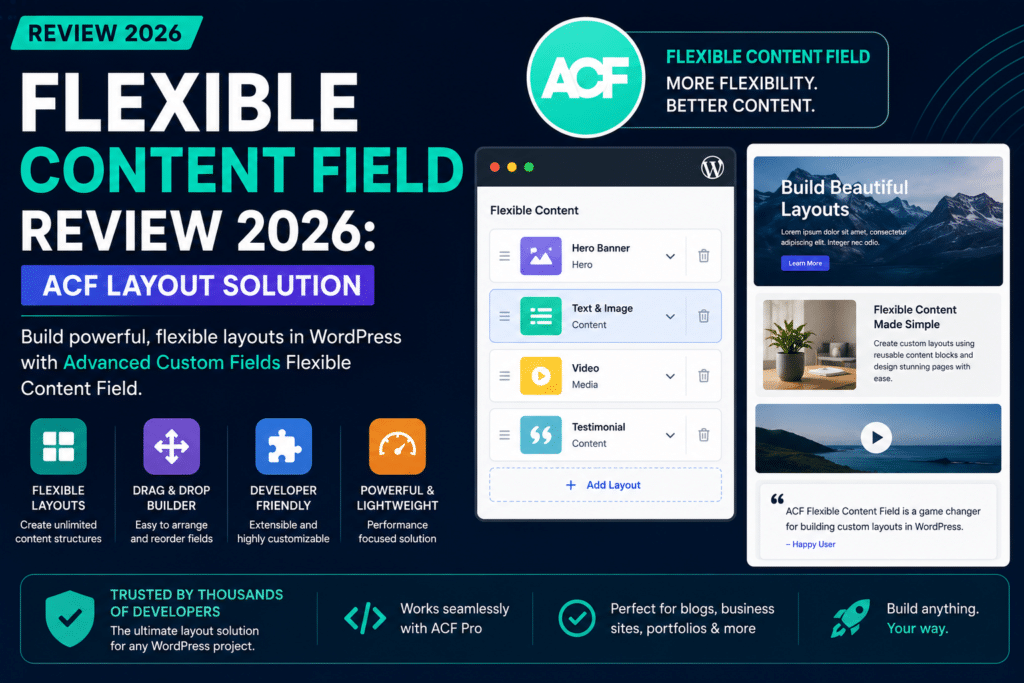
Flexible Content Field Review 2026: ACF’s Layout Solution
WordPress gives you a block editor, page templates, custom fields, and dozens of page builders—but sometimes developers need something more structured.
You may want clients to build flexible pages without giving them complete control over the design.
That’s exactly where the Flexible Content field in Advanced Custom Fields (ACF) becomes useful.
The Flexible Content field allows developers to create predefined layouts containing their own subfields. Content editors can then add, remove, reorder, and repeat those layouts while entering content.
The result is a powerful middle ground between rigid WordPress templates and unrestricted visual page builders.
But is ACF Flexible Content still worth using in 2026?
In this review, we’ll explore how Flexible Content works, its layouts, subfields, templates, developer workflow, advantages, disadvantages, performance considerations, and whether it’s the right solution for your WordPress project.
Flexible Content Field Review 2026: Quick Verdict
Overall Rating: 4.7/5
ACF Flexible Content remains one of the strongest solutions for developers who want to create structured, reusable, client-friendly WordPress layouts.
Instead of handing editors a completely blank canvas, developers define approved content sections.
For example:
- Hero
- Text and image
- Features
- Testimonials
- Pricing
- FAQ
- Call to action
Editors can then combine those sections to create different pages without changing the underlying design system.
Best For
- Custom WordPress development
- Agency websites
- Client projects
- Corporate websites
- Marketing websites
- Custom themes
- Structured landing pages
- Developers building reusable components
Main Drawback
Flexible Content is an ACF PRO feature, not part of the free ACF plugin.
It also requires development work to render your layouts on the frontend.
If you’re looking for a completely visual drag-and-drop builder, Elementor or another page builder may be easier.
What Is ACF Flexible Content?
Flexible Content is a field type included with Advanced Custom Fields PRO.
ACF describes it as a simple, structured, block-based editor.
Instead of giving a field one fixed structure, Flexible Content lets developers define multiple layouts.
Each layout can contain its own collection of subfields.
An editor can then choose which layouts to add and in what order.
Think of it as building a collection of predefined page sections.
For example:
Flexible Content Field: Page Builder
Inside it:
Layout 1: Hero
- Heading
- Description
- Background image
- Button text
- Button URL
Layout 2: Features
- Heading
- Feature repeater
- Icons
Layout 3: Testimonials
- Customer name
- Testimonial
- Photo
Layout 4: CTA
- Heading
- Text
- Button
- Link
The editor can build a page like
Hero → Features → Testimonials → CTA
Another page could use:
Hero → Testimonials → Features → FAQ → CTA
The developer controls the available layouts while the editor controls their arrangement.
How Flexible Content Works
Flexible Content works similarly to ACF’s. Repeater field, but with one major difference.
A repeater usually repeats the same set of fields.
Flexible Content lets each row use a different layout and field structure.
A typical development workflow looks like this:
- Create an ACF field group.
- Add a Flexible Content field.
- Create layouts.
- Add subfields to each layout.
- Assign the field group to the appropriate post type or template.
- Enter content in WordPress.
- Render each layout inside your theme.
This makes flexible content particularly useful for custom theme development.
What Are Flexible Content Layouts?
A layout is essentially a predefined content component.
For example, you could create:
Hero Layout
Fields:
- Heading
- Subheading
- Background image
- Button
- Alignment
Image + Text Layout
Fields:
- Image
- Heading
- Content
- Image position
Testimonial Layout
Fields:
- Quote
- Customer name
- Company
- Customer photo
CTA Layout
Fields:
- Heading
- Description
- Button text
- Button URL
Each layout can be rendered using its own frontend template.
This keeps both your WordPress administration experience and frontend code organized.
Flexible Content vs. Repeater Field
These two ACF field types are sometimes confused.
They solve different problems.
Repeater Field
A repeater repeats the same structure.
For example:
Team Members
Each row contains:
- Name
- Photo
- Job title
- Biography
Every row has the same fields.
Flexible Content
Flexible content allows different structures within the same field.
For example:
Page Sections
Row 1 → Hero
Row 2 → Features
Row 3 → Video
Row 4 → Testimonials
Row 5 → CTA
Each row can contain completely different fields.
Which Should You Use?
Use Repeater when every repeated item has the same structure.
Use flexible content when editors need to choose between multiple types of content sections.
Flexible Content vs Gutenberg
WordPress Gutenberg has changed the way developers approach structured content.
The block editor already allows users to build pages from reusable blocks.
So does flexible content still make sense?
Yes—but the two approaches solve slightly different problems.
Gutenberg
Gutenberg provides a visual block-based editing experience.
It is ideal when editors need significant control over page content and layout.
Flexible Content
Flexible Content provides a more structured, developer-controlled experience.
Developers define exactly which layouts and fields editors can use.
This can make flexible content attractive for agency and corporate projects where maintaining design consistency is critical.
Choose Gutenberg if:
- You want native WordPress editing
- Editors need visual flexibility
- You rely heavily on blocks
- You want less custom backend development
Choose Flexible Content If:
- You want strict design control
- You’re developing a custom theme
- Editors should only use approved layouts
- You want structured data
- You need predictable frontend markup
Neither approach is universally better.
The best choice depends on the project.
Flexible Content vs. Elementor
Elementor and Flexible Content can both be used to create flexible pages, but their workflows are completely different.
Elementor
Elementor is a visual page builder.
Users drag widgets into sections and control styling directly.
This provides tremendous flexibility.
But it also means editors can potentially change:
- Fonts
- Colors
- Spacing
- Alignment
- Layouts
- Responsive settings
That flexibility can sometimes lead to inconsistent designs.
Flexible Content
With flexible content, developers control the design.
Editors mainly control the content and arrangement of predefined sections.
For example, the editor might choose:
Add Hero
and fill in:
- Heading
- Description
- Image
- Button
They don’t need to configure padding, typography, breakpoints, or CSS.
Winner for Designers and No-Code Users
Elementor
Winner for Structured Custom Development
ACF Flexible Content
Flexible Content vs. ACF Blocks
ACF also allows developers to build custom WordPress blocks.
This creates another important decision.
Should you build a Flexible Content page builder or create ACF Blocks?
ACF Blocks
ACF Blocks integrate directly with the WordPress block editor.
This provides a more native Gutenberg experience.
They can be a better choice when you want reusable custom components inside the modern WordPress editor.
Flexible Content
Flexible Content keeps layouts inside a dedicated ACF field interface.
This provides a more controlled content structure.
Flexible Content Is Better When:
- You want a structured backend interface
- You’re maintaining an existing ACF-based theme
- Your layouts belong to one specific page-building system
- You want editors to follow a controlled workflow
ACF Blocks Are Better When:
- You want Gutenberg integration
- Blocks should work throughout the editor
- You want a more visual editing experience
- You’re building around modern WordPress block workflows
For new WordPress projects in 2026, developers should evaluate both approaches before automatically choosing Flexible Content.
Creating a Flexible Content Field
Setting up a basic Flexible Content system starts inside ACF.
Create a field group and add a field with the type:
Flexible Content
Then create your first layout.
For example:
Layout Name
hero
Layout Label
Hero Section
Then add subfields such as
- Heading
- Description
- Image
- Button Link
Create additional layouts for other sections.
Once the field group is assigned to a page or post type, editors can begin adding those layouts.
Rendering Flexible Content in a Theme
Flexible Content does not automatically design the frontend for you.
Developers need to write template code.
A typical concept is
<?php if ( have_rows('page_sections') ) : ?>

    <?php while ( have_rows('page_sections') ) : the_row(); ?>

        <?php if ( get_row_layout() === 'hero' ) : ?>

            <!-- Render hero section -->

        <?php elseif ( get_row_layout() === 'features' ) : ?>

            <!-- Render features section -->

        <?php elseif ( get_row_layout() === 'testimonials' ) : ?>

            <!-- Render testimonials -->

        <?php endif; ?>

    <?php endwhile; ?>

<?php endif; ?>
The key function is
get_row_layout()
It tells your template which flexible content layout is currently being processed.
The developer can then load the appropriate markup.
Better Template Organization
Large flexible content systems can become difficult to maintain if every layout is written inside one enormous PHP file.
A better approach is to create separate template files.
For example:
template-parts/
    flexible/
        hero.php
        features.php
        testimonials.php
        pricing.php
        faq.php
        cta.php
Your main flexible content loop can determine the current layout and load the appropriate template part.
This approach makes development cleaner and easier to maintain.
It also creates a component-like architecture for your WordPress theme.
Clone Fields With Flexible Content
Large ACF projects often contain repeated field structures.
For example, many layouts might require:
- Section heading
- Description
- Background color
- Spacing settings
- Anchor ID
Instead of manually recreating those fields repeatedly, developers can use ACF’s Clone field to reuse existing field groups or fields.
This can reduce duplication and make larger flexible content systems easier to maintain.
Conditional Logic
ACF supports conditional logic for fields.
This can make flexible content layouts considerably more user-friendly.
For example:
Background Type
Options:
- Color
- Image
- Video
If the editor selects Color, show:
Background Color
If they select Image, show:
Background Image
If they select Video, show:
Video URL
Instead of showing every possible field at once, conditional logic keeps the editing interface cleaner.
Flexible Content for Landing Pages
Landing pages are one of the strongest use cases.
Imagine an agency builds a custom marketing website.
Instead of creating a unique PHP template for every landing page, the developer could create layouts such as
- Hero
- Logo cloud
- Benefits
- Image and text
- Statistics
- Testimonials
- Pricing
- FAQ
- CTA
Marketing staff can then assemble new pages using these approved sections.
They get flexibility without needing to call a developer every time they want a new landing page.
At the same time, they cannot accidentally change the entire design system.
Flexible Content for Agency Websites
Agencies often need to solve two conflicting requirements.
Clients want flexibility.
Designers want consistency.
Giving a client unrestricted page-builder access can sometimes lead to:
- Random fonts
- Incorrect colors
- Broken spacing
- Inconsistent buttons
- Poor mobile layouts
Flexible content provides another approach.
Developers create approved sections.
Clients choose and populate those sections.
This creates controlled flexibility.
For many custom agency projects, that is exactly what is needed.
Flexible Content for Corporate Websites
Corporate websites often have strict brand guidelines.
Editors shouldn’t necessarily be able to redesign pages whenever they publish content.
Flexible content can restrict page construction to approved layouts while still allowing content teams to build different page structures.
For example:
Corporate Page Builder
- Hero
- Introduction
- Services
- Statistics
- Leadership
- Locations
- Case studies
- Downloads
- CTA
Each section follows the company’s design system automatically.
Flexible Content for WooCommerce
Flexible Content isn’t a WooCommerce page builder by default, but developers can use it when creating custom eCommerce experiences.
Possible uses include:
- Product storytelling sections
- Brand information
- Size guides
- Promotional blocks
- Product FAQs
- Feature comparisons
- Custom category content
For example, a premium product page could contain:
Product Details → Benefits → Video → Comparison → Testimonials → FAQ
The actual WooCommerce purchasing functionality remains separate while ACF controls supplementary content.
Flexible Content Performance
Flexible content itself doesn’t automatically make a website slow.
Frontend performance depends largely on how developers implement the layouts.
A flexible content page can actually be very efficient because developers control exactly what HTML, CSS, and JavaScript each component loads.
This is different from some general-purpose page builders that may load broader frontend frameworks.
However, poor development can still create slow pages.
Avoid:
- Loading huge scripts globally
- Oversized images
- Excessive database queries
- Deeply nested fields without reason
- Loading assets for layouts that aren’t used
- Overly complicated animations
Good architecture matters more than the field type itself.
Flexible Content and SEO
Flexible Content does not replace an SEO plugin such as Yoast SEO or Rank Math.
However, it can help developers create clean and consistent page structures.
For example, developers can control:
- Heading hierarchy
- Semantic HTML
- Image attributes
- Schema implementation
- Internal-link markup
- Content order
Because editors aren’t directly designing the HTML structure, developers have greater control over technical consistency.
That can be beneficial for SEO-focused websites.
Flexible Content and Responsive Design
ACF doesn’t automatically make flexible content layouts responsive.
The frontend implementation determines responsiveness.
Developers need to create appropriate CSS for:
- Desktop
- Tablet
- Mobile
The advantage is control.
Instead of allowing every editor to configure responsive settings differently, developers can define responsive behavior once for each layout.
Every instance of that layout then follows the same responsive rules.
Flexible Content Ease of Use
For Content Editors: 4.7/5
Once configured properly, Flexible Content can be extremely easy for editors.
They simply:
- Add a layout.
- Fill in fields.
- Reorder sections.
- Publish.
They don’t need to understand CSS or responsive design.
For Developers: 4.5/5
Developers familiar with PHP and ACF should find Flexible Content straightforward.
However, building a complete page-building system requires thoughtful architecture.
For Complete Beginners: 3.3/5
If you’re expecting a ready-made visual page builder, Flexible Content isn’t that.
You need development knowledge or a developer-built theme.
Flexible Content Pricing
The Flexible Content field is included with ACF PRO.
It is not included in the standard free version of Advanced Custom Fields.
ACF PRO also includes additional premium features such as
- Repeater Field
- Flexible Content Field
- Clone Field
- Options Pages
- ACF Blocks
- Gallery Field
Pricing can change, so check the official ACF website before purchasing.
For professional WordPress developers, ACF PRO often provides value far beyond flexible content alone.
Advantages of ACF Flexible Content
1. Structured Flexibility
Editors can create different pages without receiving unrestricted design control.
2. Reusable Layouts
Build a section once and reuse it throughout the website.
3. Clean Developer Workflow
Layouts can be separated into reusable PHP template parts.
4. Client-Friendly
Clients primarily edit content rather than design settings.
5. Design Consistency
Typography, spacing, colors, and responsive behavior remain controlled by the theme.
6. Custom Data Structure
Each layout can contain exactly the fields it needs.
7. Reordering
Editors can rearrange layouts without rewriting templates.
8. Integrates With ACF Ecosystem
Flexible content works naturally alongside other ACF field types.
9. Excellent for Custom Themes
Developers maintain complete control over frontend markup.
10. No Page Builder Lock-In
Your frontend isn’t dependent on a large visual page-builder framework.
Disadvantages of ACF Flexible Content
1. Requires ACF PRO
Flexible content isn’t available in the free ACF plugin.
2. Requires Development
Creating fields is only part of the job.
Developers must build the frontend templates.
3. Not True Visual Editing
Editors don’t necessarily see an exact frontend representation while filling in fields.
4. Can Become Complicated
A flexible content system containing dozens of poorly organized layouts can become difficult to manage.
5. Gutenberg May Be Better for Some Projects
Modern block-based WordPress development can make ACF Blocks or native blocks a better architectural choice for certain websites.
6. Field Architecture Requires Planning
Changing a poorly designed data structure later can require migrations or template changes.
Best Practices for Flexible Content
A good flexible content implementation should remain predictable and maintainable.
Keep Layouts Focused
Don’t create one giant “Everything Section” containing dozens of optional fields.
Create focused components.
Use Clear Layout Names
Prefer:
Hero – Image Right
instead of:
Section 7
Avoid Excessive Design Controls
Don’t give clients 40 styling settings unless they genuinely need them.
The purpose of structured content is partly to protect design consistency.
Separate Template Files
Use one template part per major layout.
Reuse Common Fields
Use clone fields or reusable field groups where appropriate.
Optimize Assets
Only load CSS and JavaScript required by your components.
Document the System
If clients don’t understand what each layout does, provide previews or simple instructions.
ACF Flexible Content vs Elementor: Quick Comparison
| Feature | ACF Flexible Content | Elementor |
|---|---|---|
| Visual Editing | Limited | Excellent |
| Developer Control | Excellent | Good |
| Client Design Restrictions | Excellent | Moderate |
| Custom Fields | Excellent | Good |
| Drag-and-Drop | Basic layout ordering | Excellent |
| Custom PHP Required | Usually | No |
| Design Consistency | Excellent | Depends on the editor |
| Custom Theme Development | Excellent | Good |
| Beginner Friendly | Moderate | Excellent |
| Structured Data | Excellent | Moderate |
| ACF PRO Required | Yes. | No for Elementor Free |
| Best For | Custom development | Visual page building |
ACF Flexible Content vs Gutenberg: Quick Comparison
| Feature | Flexible Content | Gutenberg |
|---|---|---|
| Native WordPress | No | Yes. |
| Structured Fields | Excellent | Depends on blocks |
| Visual Editing | Moderate | Better |
| Developer Control | Excellent | Excellent with custom blocks |
| Client Flexibility | Controlled | High |
| Custom Templates | Excellent | Excellent |
| Reusable Components | Yes. | Yes. |
| Best For | Structured custom themes | Modern block-based sites |
Who Should Use Flexible Content?
Flexible content is particularly suitable for:
- WordPress developers
- Development agencies
- Custom theme creators
- Corporate websites
- Marketing websites
- Structured landing pages
- Client projects
- Large custom WordPress builds
It’s especially valuable when the requirement is
“Give editors flexibility, but don’t let them redesign the website.”
Who Should Skip Flexible Content?
You may prefer another solution if:
- You don’t know PHP
- You want visual drag-and-drop editing
- You want a completely no-code solution
- Your website already uses Gutenberg effectively
- You only need basic custom fields
- Your pages all follow one fixed structure
Elementor, Gutenberg, or standard ACF fields may be more appropriate in those situations.
Is Flexible Content Still Worth It in 2026?
Yes.
WordPress has changed significantly with the continued development of Gutenberg and block-based editing, but Flexible Content still solves a specific and important problem.
It gives developers a way to create controlled page-building systems based on structured data.
That remains extremely useful for custom agency and client projects.
However, developers starting a brand-new project should also evaluate ACF Blocks and native WordPress blocks.
Flexible content shouldn’t automatically be chosen simply because it was the standard approach on previous projects.
Choose it when its structured editing model genuinely fits the project.
Final Verdict: Is ACF Flexible Content Worth Using?
Yes—especially for custom WordPress development.
Flexible Content provides an excellent balance between developer control and editor flexibility.
Developers determine:
- Which layouts exist
- Which fields are available
- How sections look
- How responsive behavior works
- What HTML is generated
Editors determine:
- Which sections to use
- What content they contain
- What order they appear in
That separation is extremely powerful.
Our Ratings
Developer Flexibility: 5/5
Content Editor Experience: 4.7/5
Design Control: 5/5
Performance Potential: 4.8/5
Beginner Friendliness: 3.3/5
Custom Theme Development: 5/5
Value for Agencies: 4.9/5
Overall Rating: 4.7/5
If you’re developing custom WordPress themes and want clients to create flexible pages without handing them unrestricted design controls, ACF Flexible Content remains one of the best tools for the job in 2026.
For developers moving toward block-based WordPress development, ACF Blocks and native Gutenberg blocks deserve serious consideration as alternatives.
The best approach ultimately depends on whether your project needs a structured content system or a visual block-editing system.
Frequently Asked Questions
What is ACF Flexible Content?
Flexible Content is an ACF PRO field type that lets developers create multiple predefined layouts containing different subfields. Editors can add and reorder those layouts to build flexible pages.
Is Flexible Content free?
No. The Flexible Content field is an ACF PRO feature.
Is Flexible Content a page builder?
It can be used to create a structured page-building system, but it isn’t a visual page builder like Elementor.
What is the difference between flexible content and repeaters?
Repeater repeats the same field structure for every row. Flexible content allows different layouts with different fields within the same field.
Is Flexible Content better than Elementor?
For custom development and strict design control, flexible content can be better. For visual no-code page building, Elementor is considerably easier.
Is Flexible Content better than Gutenberg?
It depends on the project. Flexible Content provides highly structured, developer-controlled data, while Gutenberg provides a more native and visual WordPress editing experience.
Can I create landing pages with flexible content?
Yes. Landing pages are one of its strongest use cases because developers can create reusable hero, features, testimonials, FAQ, pricing, and CTA layouts.
Does flexible content require coding?
For frontend output, generally yes. Developers typically use PHP templates to render flexible content layouts.
Is flexible content good for SEO?
It can support SEO-friendly development because developers have control over frontend markup, headings, images, and semantic structure. It does not replace an SEO plugin.
Is flexible content good for performance?
It can be very efficient when properly developed because the theme controls exactly which markup and assets are loaded.
Can Flexible Content work with WooCommerce?
Yes. Developers can use it to add structured custom sections to WooCommerce-related pages and custom product experiences.
Should I use flexible content for a new WordPress project in 2026?
Consider it alongside ACF Blocks and native Gutenberg blocks. Flexible content remains excellent when you specifically need structured, developer-controlled layouts



