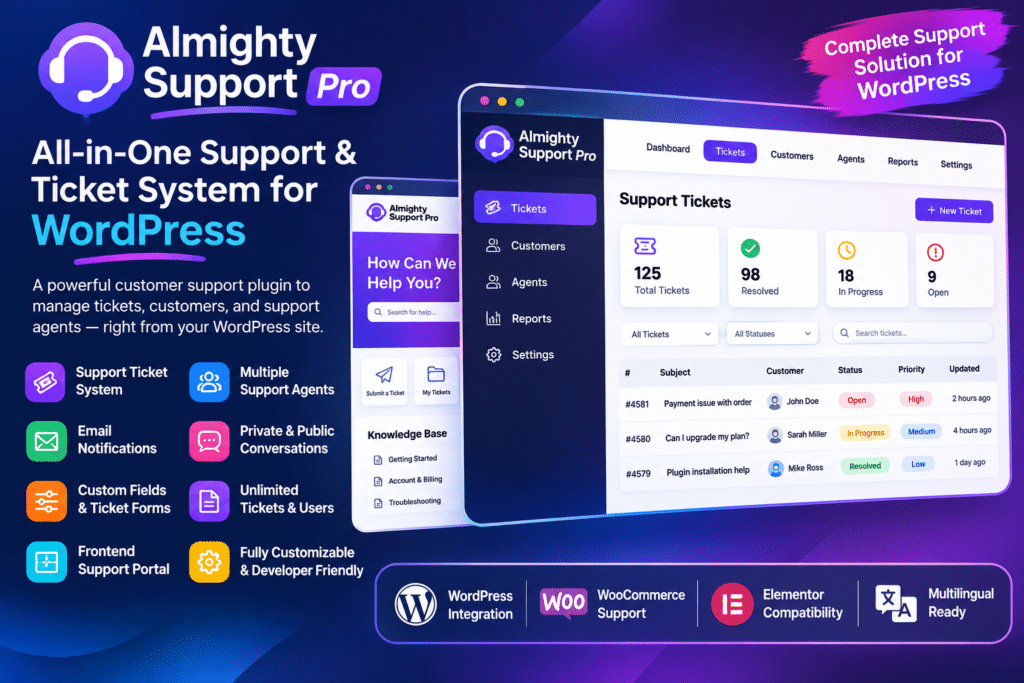
Almighty Support Pro provides a complete ticket management system for WordPress, with tools for customers, support agents, managers, and administrators.
You can create a customer support page, configure ticket submission forms, organize departments, connect support email accounts, and manage conversations through a centralized interface.
The plugin also offers advanced support features such as private staff notes, file attachments, agent signatures, saved tickets, customer satisfaction surveys, and ecommerce integrations.
Key Features
1. Complete WordPress Help Desk System
Turn your WordPress website into a centralized customer support platform. Manage customer enquiries, support requests, replies, and ticket statuses without relying entirely on external help desk services.
2. Frontend Customer Support Portal
Allow customers to submit support tickets and follow their conversations directly through your website. Customers can access their support history and communicate with your team through a dedicated support interface.
3. Ticket Management System
Organize customer requests using a structured ticket management workflow. View incoming enquiries, manage ticket statuses, assign responsibility, and keep track of ongoing support conversations.
4. Unlimited Support Agents and Clients
Manage multiple support agents and customer accounts within the help desk system. Organize team responsibilities without relying on a separate per-agent help desk subscription.
5. Multiple Support Departments
Create dedicated departments for different types of customer enquiries, such as:
- Technical Support
- Billing and Payments
- Sales Enquiries
- Product Support
- Account Assistance
- General Customer Service
Assign agents to relevant departments so support requests reach the appropriate team.
6. Role-Based Agent Permissions
Organize your support team with administrator, manager, and agent roles. Managers can oversee support activity across departments, while agents can work within their assigned areas.
This helps keep ticket access organized and prevents team members from being distracted by unrelated support requests.
7. Email-to-Ticket Conversion
Convert incoming customer emails into support tickets automatically. Connect supported Gmail, Microsoft 365, or IMAP mailboxes to bring email conversations into the help desk system.
This allows customers to contact your business through familiar email channels while your team manages their requests through a structured ticket interface.
8. Multi-Inbox and Email Piping
Connect multiple support inboxes and route incoming messages to the appropriate departments. You can configure different email addresses for billing, technical support, sales, and other support categories.
Department-specific routing helps keep incoming enquiries organized.
9. Create Tickets on Behalf of Customers
Allow support agents to open tickets for customers who contact your business by phone, in person, or through other communication channels. This ensures that enquiries are documented and tracked even when customers do not submit tickets themselves.
10. Private Staff Notes
Add internal notes to support tickets without displaying them to customers. Agents and managers can use private notes to share additional information, discuss solutions, and coordinate responses.
11. File Attachments
Allow relevant files to be attached to support conversations. This is useful when customers need to share screenshots, documents, or other information related to their problems.
12. Agent Signatures
Create default email signatures for support staff and allow agents to configure their own signatures. This helps maintain consistent communication and makes support replies look more professional.
13. Saved Tickets and Ticket Watchers
Save important tickets for quick access and use watcher functionality to keep relevant staff members informed about support conversations. These tools help teams follow important enquiries and collaborate more effectively.
14. WooCommerce Integration
Connect your WooCommerce store with the support system to give agents additional customer information while handling tickets.
Depending on the enabled integration settings, agents can access:
- Customer WooCommerce profile
- Purchase history
- Total customer spending
- Related support ticket information
This is particularly useful for online stores handling order-related questions, payment enquiries, and product support.
15. Easy Digital Downloads Integration
Integrate Easy Digital Downloads to provide agents with useful information about customers and their purchases.
Supported information includes purchase history, customer spending, and software license details where the relevant EDD licensing extensions are configured.
This makes the plugin especially useful for businesses selling WordPress themes, plugins, software, and digital downloads.
16. Slack Notifications
Connect your support system with Slack through an incoming webhook. Receive notifications when tickets are created, answered, assigned, reopened, or closed.
This helps support teams stay informed about important ticket activity without constantly checking the WordPress dashboard.
17. Suggested Knowledge Base Solutions
Use existing WordPress content to suggest relevant answers when customers submit support requests. The system can search selected posts, pages, and supported custom post types to recommend helpful resources.
This can help customers discover existing documentation before submitting a ticket.
18. Automated Ticket Closing
Configure automatic closing rules for inactive tickets. Choose how long a ticket should remain inactive after an agent’s last response before the system closes it.
This helps keep the support dashboard organized and reduces unnecessary open-ticket clutter.
19. Custom Email Notifications
Customize the email notifications sent to customers and support agents. Edit notification templates to match your business branding, communication style, and support workflow.
You can also customize email content using supported HTML templates.
20. Mobile App for Support Agents
Manage support conversations while away from your computer using the Awedesk mobile app for iOS and Android.
Agents can access tickets and customer conversations from compatible mobile devices. The app connects to your WordPress website through the WordPress REST API and application passwords.
21. Customer Satisfaction Surveys
Collect customer feedback through customer satisfaction survey functionality. Use survey responses to understand how customers feel about their support experience and identify areas where your service can improve.
22. Dashboard Statistics and Reporting
Review support activity through the dashboard statistics introduced in the plugin’s 1.9.3 release. Monitor ticket activity and gain a clearer overview of your support workload.
23. Predefined Replies
Create reusable responses for frequently asked questions and common customer problems. Support agents can use predefined replies to handle repetitive enquiries more consistently.
24. Spam Protection and Quarantine
Use spam protection features to help manage unwanted support submissions and email messages. The newer spam quarantine workflow also provides options to unblock senders and restore tickets incorrectly marked as spam.
25. WordPress Privacy Tools Integration
The plugin integrates with WordPress privacy tools to support customer data export and erasure requests. It also provides privacy-related controls for handling retained support information.
Your business remains responsible for configuring appropriate privacy practices and complying with applicable data protection requirements.
26. REST API and Developer-Friendly Architecture
Almighty Support Pro uses the WordPress REST API for its application functionality. Developers can work with available hooks, filters, and extension points to customize integrations and extend supported workflows.
27. Multilingual Support
The plugin includes translation support and expanded language availability. Its 1.9.4 release added several languages, including German, French, Italian, Japanese, Dutch, Polish, Portuguese, and others.
Who Should Use Almighty Support Pro?
This plugin is suitable for:
- WooCommerce store owners
- WordPress theme and plugin developers
- Digital product businesses
- Membership website owners
- Online course providers
- Web development agencies
- Freelancers and consultants
- Software and SaaS businesses with WordPress websites
- Customer service departments
- Businesses managing multiple support teams
Compatibility and Setup Notes
Almighty Support Pro was rebranded as Awedesk starting with version 1.5.0. The original product name is still commonly used when referring to the Pro plugin.
The plugin works within WordPress and provides a self-hosted support system. WooCommerce, Easy Digital Downloads, Slack, Gmail, Microsoft 365, and other integrations require the relevant services or plugins to be installed and configured.
The official changelog identifies version 1.9.4, released October 14, 2026, as the latest release and marks it as a security update. It includes improvements to spam handling, mobile app authentication, permissions, and ticket privacy. Using a current, trusted package is particularly important for a customer support plugin that handles private conversations and attachments.
The Awedesk mobile app is a separate mobile application, and agents need compatible WordPress application-password functionality enabled to connect.
Installation and Setup
- Install WordPress on your hosting account.
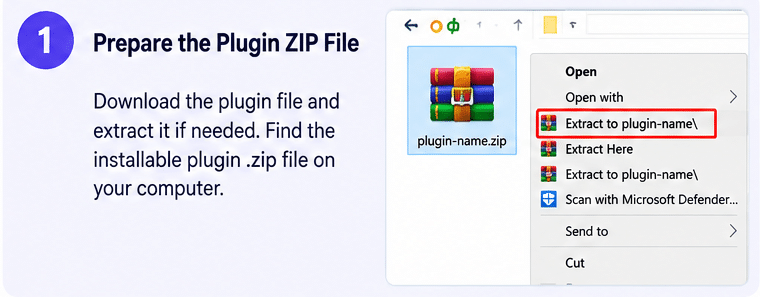
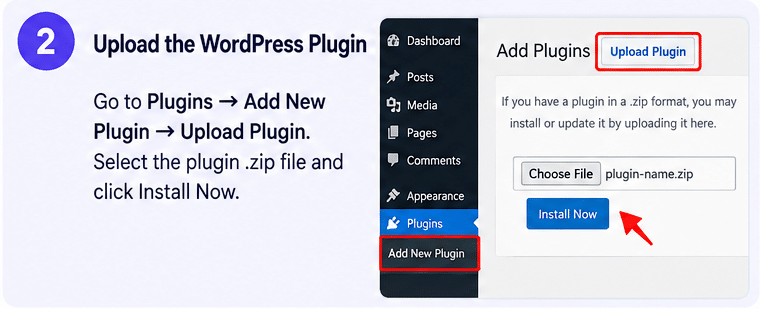
- Navigate to Plugins → Add New Plugin → Upload Plugin.
- Upload the Almighty Support Pro plugin ZIP file.
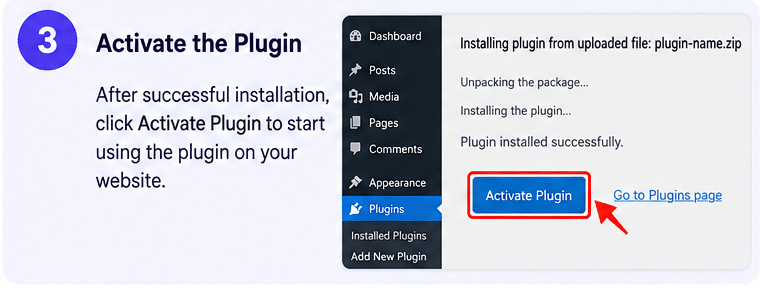
- Activate the plugin from your WordPress dashboard.
- Open the Awedesk or Almighty Support settings area.
- Configure support departments, staff members, roles, and permissions.
- Create a dedicated support page and configure the customer ticket portal.
- Set up email notifications and connect your support mailbox if you want email-to-ticket functionality.
- Enable WooCommerce, Easy Digital Downloads, or Slack integrations where required.
- Configure privacy settings, ticket statuses, and automatic closing rules.
- Test ticket submissions, customer replies, attachments, and notifications before launching.
Organize Customer Support with Almighty Support Pro
Almighty Support Pro provides a centralized way to manage customer conversations and support requests directly from WordPress. With its ticket management system, email piping, multiple departments, staff permissions, ecommerce integrations, mobile app, and automated workflows, it helps businesses organize their support operations without depending entirely on external help desk platforms. Whether you’re supporting customers who purchase digital products or managing enquiries for an online store, it provides a flexible foundation for a more organized customer service experience.