Dark Reader Pro is a premium dark mode extension developed by BdThemes for WordPress websites. It extends the free Dark Reader plugin with advanced customization, scheduling, page visibility controls, image and video filtering, and a dark interface for the WordPress administration dashboard.
The plugin allows website owners to offer visitors a choice between light and dark viewing modes. You can customize the dark color scheme, adjust brightness and contrast, choose different toggle button designs, and control where dark mode appears across your website.
Unlike a basic dark mode switcher, Dark Reader Pro provides more detailed controls over individual website elements. You can exclude logos, images, videos, and selected page sections from dark mode transformations, replace light-mode images with alternative dark-mode versions, and add custom CSS for more precise styling.
Whether you manage a business website, blog, online store, portfolio, or content platform, Dark Reader Pro provides additional tools for creating a consistent dark browsing experience.
Key Features
1. Frontend Dark Mode
Give website visitors the option to browse your website using a dark color scheme. Dark Reader transforms supported website elements while allowing visitors to switch between light and dark modes using a configurable toggle button.
This can provide a more comfortable viewing experience for people who prefer darker interfaces, particularly when browsing in low-light environments.
2. Custom Dark Mode Colors
Adjust the appearance of your website’s dark interface to match your brand and design preferences.
You can customize:
- Background colors
- Text colors
- Brightness levels
- Contrast levels
- Sepia intensity
- Grayscale effects
These settings help create a dark appearance that is more consistent with your website’s visual identity.
3. Advanced Brightness and Contrast Controls
Fine-tune how website content appears when dark mode is enabled. Adjust brightness and contrast to improve the visual balance between text, backgrounds, and other interface elements.
Additional sepia and grayscale controls provide more flexibility for different reading preferences.
4. Premium Toggle Button Styles
Customize the appearance of the dark mode switcher using additional Pro designs.
Available styles include:
- Modern Slider
- Text Toggle
- FlipFlop Toggle
- iOS Toggle
- iOS Toggle Icon
You can also configure the toggle button’s position, including the top-left, top-right, bottom-left, and bottom-right areas of the screen.
5. Automatic Dark Mode Scheduling
Configure dark mode to activate automatically instead of requiring visitors to switch it manually.
Supported scheduling options include:
- Time-based scheduling: Set specific start and end times.
- System preference: Follow the visitor’s operating system color scheme.
- Sunrise and sunset: Switch modes according to local daylight cycles.
- Date-based scheduling: Configure schedules with weekday selection where supported by the installed versions.
These options help websites provide a more adaptive viewing experience throughout the day.
6. WordPress Admin Dashboard Dark Mode
Apply a dark appearance to the WordPress administration dashboard. This is useful for website owners, editors, and developers who spend extended periods working inside WordPress.
You can enable admin dark mode, adjust its brightness and contrast, and configure automatic detection of the administrator’s system color preference.
7. Custom CSS for Dark Mode
Add your own CSS rules to control how individual website elements appear when dark mode is active.
Use custom styling to adjust sections that need special treatment, such as navigation menus, buttons, forms, product cards, headings, and other interface components.
The plugin also provides example CSS templates and a formatting option to help organize custom styles.
8. Element Exclusions
Not every website element should automatically change when dark mode is enabled. Dark Reader Pro allows you to exclude specific elements using CSS selectors.
This is useful for preserving the original appearance of:
- Brand logos
- Promotional banners
- Product images
- Special content sections
- Embedded interface elements
- Custom-designed website components
You can apply exclusions to individual elements rather than disabling dark mode across an entire page.
9. Image Exclusions and Filters
Control how images appear in dark mode. You can exclude images from transformations or apply custom visual filters when necessary.
Available image filter controls include:
- Brightness
- Contrast
- Saturation
- Hue rotation
- Blur
- Grayscale
- Sepia
- Invert
- Opacity
A live preview option helps you review image filter adjustments before applying them.
10. Alternative Dark-Mode Images
Use a different image when visitors switch to dark mode. For example, a dark logo can replace a light logo, or a specially designed banner can replace its original light-background version.
This is particularly useful for websites with branded graphics that do not display correctly when their colors are automatically transformed.
11. Video Exclusions and Filters
Control how embedded videos and other supported video elements appear in dark mode.
You can exclude videos from dark mode transformations or apply visual filters such as brightness, contrast, saturation, hue rotation, grayscale, sepia, blur, inversion, and opacity.
Live preview controls make it easier to check the results and maintain a consistent appearance.
12. Page Visibility Controls
Choose which parts of your website should offer dark mode. You can configure visibility rules to:
- Show dark mode on all pages
- Show dark mode only on selected pages
- Hide dark mode on selected pages
- Hide dark mode across the website
This is useful when certain pages, such as checkout, pricing, landing pages, or branded campaign pages, need to retain their original appearance.
13. Automatic System Color Detection
Allow dark mode to follow the visitor’s device preference. When system color detection is enabled, the plugin can use the operating system’s light or dark setting to determine the website’s initial appearance.
Visitors can still use the available switcher according to the configured settings.
14. PDF Dark Mode Support
Enable dark mode for supported embedded PDF documents. This provides an additional viewing option for websites that publish documents, reports, guides, brochures, or other downloadable resources.
Test individual PDF viewers and embedded documents to confirm that the transformation works as expected.
15. Apply Dark Mode Immediately
Use the immediate application option to reduce the appearance of light content before dark mode is initialized, particularly when displaying dynamic website content.
This helps create a more consistent transition when the selected mode is applied.
16. Elementor and Gutenberg Integration
Use supported toggle widgets and blocks to place the dark mode switcher within your website layouts.
This gives designers more flexibility when integrating the switcher into custom headers, footers, content sections, and other supported areas.
17. Shortcode Integration
Place the dark mode toggle button in specific website locations using the shortcode:
[dark_reader_toggle]
You can add it to supported content areas, widget sections, or Elementor layouts using a shortcode widget.
18. Responsive Website Compatibility
Dark Reader is designed to work with a wide range of WordPress themes and page builders. Its configurable toggle placement and visual controls make it possible to integrate dark mode into different website layouts.
The underlying theme and custom CSS can affect how individual elements are transformed, so testing is recommended before publishing the feature across the entire website.
Free Version vs Pro Add-on
Dark Reader has a free core plugin and a separate Pro extension.
Free Dark Reader plugin:
- Essential frontend dark mode
- Basic light and dark mode toggle
- Brightness and contrast controls
- Sepia and grayscale filters
- System color scheme detection
- Standard toggle styles
- Shortcode integration
- PDF dark mode
- Settings import and export
Dark Reader Pro adds:
- Premium toggle designs
- Automatic scheduling options
- Advanced page visibility controls
- WordPress admin dashboard dark mode
- Custom CSS controls
- CSS selector-based exclusions
- Advanced image and video filters
- Alternative dark-mode image replacement
- Additional customization options
The Pro extension builds on the free plugin rather than replacing it.
Who Should Use Dark Reader Pro?
Dark Reader Pro can be useful for:
- Business and corporate websites
- WordPress blogs and online magazines
- WooCommerce stores
- Portfolio and creative websites
- Educational websites
- Documentation and knowledge-base platforms
- Agencies building customized WordPress websites
- Website administrators who prefer a dark dashboard
- Designers who want greater control over dark mode styling
Compatibility and Setup Notes
- Platform: WordPress
- Plugin: Dark Reader Pro
- Developer: BdThemes
- Required companion plugin: Dark Reader – Beautiful Dark Mode for any Website
- Editor integrations: Elementor and Gutenberg
- Theme compatibility: Designed to work with most properly coded WordPress themes
- Additional controls: Custom CSS, page visibility, image and video filtering, and scheduling
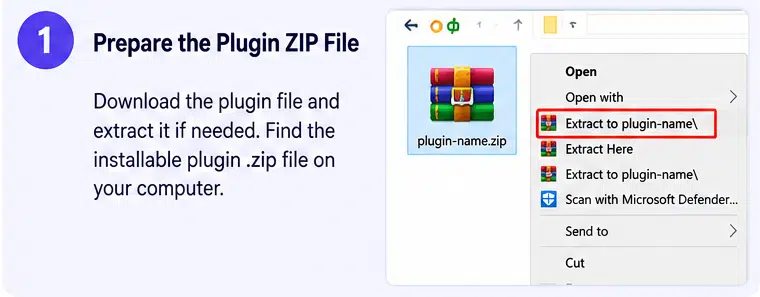
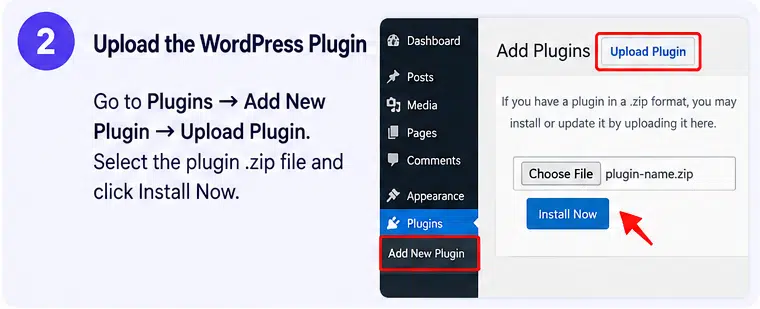
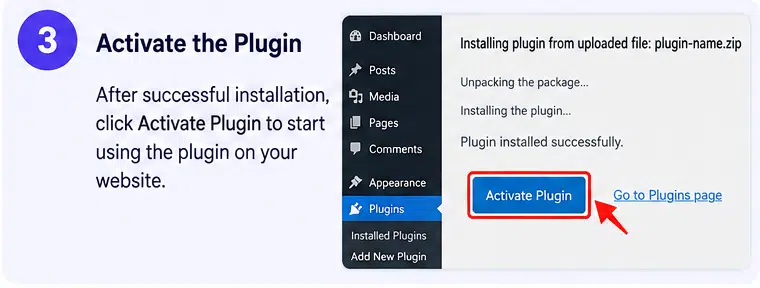
Important installation requirement: Dark Reader Pro requires the free Dark Reader plugin to be installed and activated on the same WordPress website. Installing the Pro extension alone is not sufficient.
The official BdThemes documentation also describes Pro license activation through the plugin’s license settings. A valid license may be required for activation, official updates, and vendor support.
Before enabling dark mode globally, test your website’s logos, product images, navigation menus, forms, checkout pages, and embedded content. Complex themes and custom CSS may require additional exclusions or styling adjustments.
Dark Reader improves the visual presentation of a website but does not automatically make it fully accessible or guarantee WCAG compliance. Check text contrast, keyboard navigation, and screen-reader behaviour independently.
Create a More Comfortable Browsing Experience with Dark Reader Pro
Dark Reader Pro extends WordPress dark mode with scheduling, custom CSS, element exclusions, image replacement, video filters, and admin dashboard controls. Its combination of automatic switching and detailed styling options makes it suitable for websites that want to offer visitors a flexible alternative to the standard light interface.
For WordPress site owners who want greater control over how dark mode looks and behaves, Dark Reader Pro provides a practical extension to the free BdThemes Dark Reader plugin.