Directorist Divi Builder Integration is an extension that connects the Directorist directory plugin with Divi 5, allowing you to design directory pages using native Divi Builder modules instead of relying entirely on predefined layouts or shortcodes.
Developed by the Directorist team, this integration gives you visual control over important parts of a directory website, including listing archives, search forms, category grids, location pages, listing cards, and individual listing details.
You can arrange directory elements using Divi’s sections, rows, and columns, then customize typography, colors, spacing, borders, and responsive layouts through the familiar Divi design controls.
The integration also works with Divi Theme Builder, allowing you to create reusable templates for individual listings and assign different designs to specific directory types. Meanwhile, Directorist continues to manage listing information, custom fields, reviews, bookings, and other directory data.
Whether you are building a business directory, real estate listing website, restaurant directory, job board, or travel directory, this extension provides more flexibility when designing the frontend experience.
- Native Directorist modules inside Divi 5
- Visual directory archive page builder
- Listing Loop module
- Listing Card Template module
- Listing Header module
- Search module
- Advanced Listing Filter module
- All Categories module
- All Locations module
- Directory Type module
- Individual listing field modules
- Divi Theme Builder integration
- Custom single listing templates
- Separate listing card designs for directory types
- AJAX-powered listing search and filtering
- Responsive desktop, tablet, and mobile controls
- Custom typography, colors, spacing, and layouts
- Support for Directorist custom fields
- Compatibility with Divi Theme, child themes, and Divi Builder plugin
- Shortcode support through the Divi Code module
Key Features
1. Native Divi Builder Integration
Bring Directorist functionality directly into the Divi visual editing environment. Once the extension is installed alongside Directorist and Divi, its dedicated modules become available inside the Divi Builder.
You can insert directory elements into your layouts, arrange them visually, and customize their appearance using Divi’s Content, Design, and Advanced settings.
2. Build Custom Directory Archive Pages
Design your All Listings page and other archive-style pages using real Divi modules. Instead of placing a single Directorist shortcode inside a text block, you can build the page with individual sections and elements.
Customize the placement of search forms, listing results, filters, sorting controls, and category sections to create a directory layout that matches your website.
3. Listing Loop Module
Use the Listing Loop module to display directory listings in a custom Divi layout. It handles the listing query and passes the relevant listing data to the modules placed inside the loop.
You can configure the listing display according to supported directory settings, including directory type and other available query options.
4. Custom Listing Card Templates
Design listing cards field by field instead of relying on a fixed card layout. Choose which information appears on each card and arrange the elements according to your preferred design.
For example, a restaurant directory card might include:
- Restaurant image
- Business name
- Category
- Location
- Rating
- Price information
- Contact details
You can also create different card designs for different directory types and supported view modes.
5. Individual Listing Page Design
Customize single listing pages using separate Divi modules for individual listing fields.
Rather than displaying all information in a fixed structure, you can select the fields that matter and position them in your preferred order.
For example, a hotel listing might display an image slider at the top, followed by its price, rating, location, contact information, map, and booking details.
A job directory could prioritize the job title, salary, employment type, description, deadline, and application information.
6. Divi Theme Builder Support
Use Divi Theme Builder to create reusable templates for Directorist single listings.
Design a template once and assign it to the Directorist listing post type. The template automatically displays the relevant listing information for each matching entry.
You can also use Theme Builder conditions to assign different designs to specific directory types, making it easier to manage multi-directory websites.
7. Dedicated Search Module
Create standalone directory search sections using the Search module. Place search forms in website headers, landing pages, hero sections, or dedicated search pages.
This makes it possible to build custom search experiences without relying on the default Directorist page layout.
8. Advanced Listing Filter Module
Add a filter sidebar to help visitors narrow down directory results. The module supports filtering options such as:
- Categories
- Locations
- Prices
- Tags
- Custom fields
You can position the filter module alongside the Listing Loop and customize its appearance through Divi’s design controls.
9. Listing Header and Sorting Controls
Use the Listing Header module to display directory information such as result counts, view switching, and sorting controls.
This gives visitors convenient ways to understand the available results and change how listings are displayed.
10. All Categories Module
Display directory categories in a browsable grid. Visitors can select a category to navigate to the corresponding filtered directory archive.
You can position the category grid within a homepage, directory landing page, or other custom Divi layout.
11. All Locations Module
Create a visual location directory using the All Locations module. Display available locations in a browsable layout and allow visitors to navigate to listings associated with a selected location.
This is useful for local business directories, travel websites, property directories, and location-based services.
12. Custom Field Modules
Display Directorist custom fields inside listing cards and individual listing layouts.
Dedicated modules support field types such as:
- Text
- Number
- URL
- Date
- Time
- Dropdown
- Radio
- Checkbox
- Color
- File
Select the required field in the module settings, and the module retrieves its value from the listing being displayed.
13. AJAX-Powered Search and Filtering
Give visitors a smoother browsing experience with AJAX-powered archive interactions.
Search queries, filter changes, sorting, view switching, and pagination can update listing results without requiring a complete page reload.
This is particularly useful for directories with large numbers of listings and multiple filtering options.
14. Responsive Design Controls
Customize directory layouts for desktop, tablet, and mobile devices using Divi’s responsive design settings.
Adjust spacing, typography, columns, alignment, and other visual properties to create a more usable experience across different screen sizes.
15. Full Typography and Styling Control
Use Divi’s design panel to customize the appearance of Directorist modules. Control fonts, text sizes, colors, backgrounds, borders, spacing, and other supported styling options.
You can create a consistent visual identity across search forms, listing cards, filters, category grids, and individual listing pages.
16. Multi-Directory Website Support
Build websites that manage multiple directory types from a single Directorist installation.
The Listing Loop module can filter results by directory type, while the Directory Type module allows visitors to switch between supported directory types.
You can also create separate single listing templates for different directory types using Divi Theme Builder conditions.
17. Compatible with Different Divi Setups
Use the integration with different supported Divi configurations:
- Divi Theme
- Divi child theme
- Divi Builder plugin installed with another WordPress theme
This gives designers flexibility when adding Directorist functionality to an existing Divi website.
18. Continue Using Directorist Shortcodes
The integration does not remove existing Directorist shortcode functionality. You can still use shortcodes inside Divi’s Code module when a complete functional component is better suited to shortcode output.
This is useful for pages such as Add Listing, User Dashboard, and Checkout, where the complete Directorist shortcode can handle the functionality without requiring individual design modules.
19. Optional Modules for Other Directorist Extensions
Some Divi modules depend on additional Directorist extensions. For example, the Booking module requires Directorist Booking, while the Claim Listing module requires Directorist Claim Listing.
Once the relevant extension is installed and activated, its supported modules become available in the Divi Builder.
20. dTour Directory Template Support
The Directorist ecosystem also provides the dTour travel and tour directory template experience for Divi users. Through the Divi integration, you can access the corresponding layout, import it, and customize it using Divi Visual Builder and Theme Builder.
This provides a starting point for travel directories without requiring every page to be designed from scratch.
How Directorist Divi Integration Works
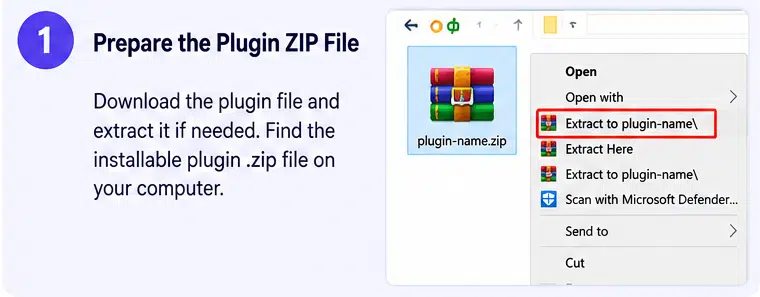
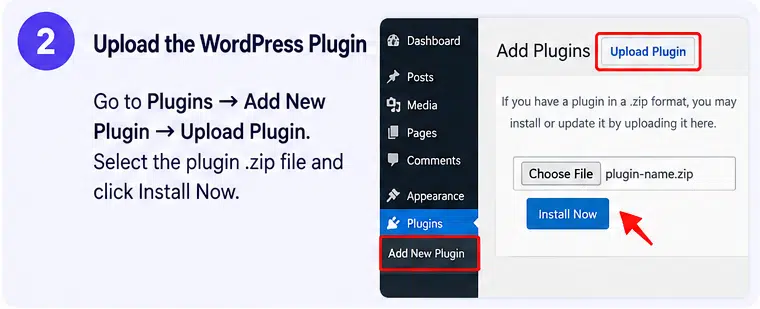
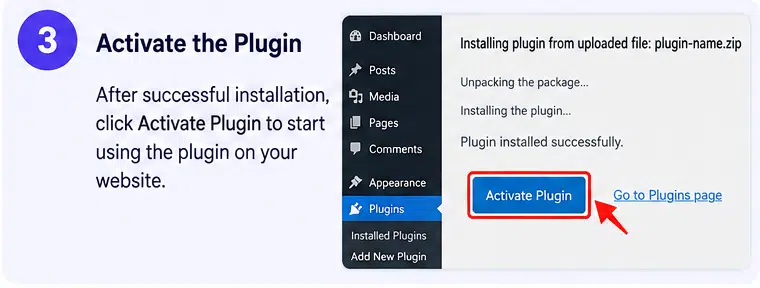
- Install and activate the Directorist core plugin.
- Install and activate Divi Theme or the Divi Builder plugin.
- Install and activate Directorist Divi Integration.
- Create your directory types, categories, locations, and custom fields.
- Add a few sample listings so you can preview real directory information.
- Open your All Listings page in Divi Builder.
- Replace the default shortcode-based layout with the available Directorist Divi modules.
- Design your listing cards, search forms, filters, and archive layouts.
- Use Divi Theme Builder to create custom single listing templates.
- Preview the website on desktop, tablet, and mobile before publishing.
Who Should Use Directorist Divi Integration?
This extension is suitable for:
- Business and company directory websites
- Restaurant and food directories
- Real estate and property listing websites
- Job boards and recruitment portals
- Travel and tourism directories
- Hotel and accommodation directories
- Local service provider directories
- Multi-directory WordPress projects
- Divi web designers and developers
- Agencies building directory websites for clients
Compatibility and Setup Notes
- Platform: WordPress
- Extension: Directorist Divi Integration
- Developer: Directorist
- Required plugin: Directorist core
- Required builder: Divi 5
- Supported Divi setups: Divi Theme, Divi child theme, or Divi Builder plugin
- Directory functionality: Managed by Directorist
- Visual editing: Divi Visual Builder and Divi Theme Builder
- Additional integrations: Compatible Directorist extensions for booking, claim listings, and other directory features
Important compatibility note: This integration is built specifically for Divi 5. Do not assume it provides the same native module functionality in Divi 4. The official getting-started documentation currently recommends WordPress 6.9 or later and PHP 7.4 or later.
Directorist core is required and must remain active. The extension controls the visual presentation of directory content; it does not replace the core listing management, submission, search, or monetization functionality.
Some modules only appear when their corresponding Directorist extensions are installed and activated. Also, aggressive JavaScript optimization or caching settings can interfere with AJAX-powered search and filtering. Test these features after configuring your caching plugin.
Build Custom Directory Websites with Divi and Directorist
Directorist Divi Integration brings directory content into the Divi visual design workflow. Its dedicated listing, search, filter, category, and custom-field modules give you greater control over how directory information appears across your website.
By combining Directorist’s listing management capabilities with Divi’s visual design tools, you can build custom directory archives, listing cards, and individual listing pages without manually editing template files. It is a useful extension for developers and designers who want to create flexible directory websites using Divi 5.