CartFlows Pro extends the free CartFlows plugin with advanced sales funnel and checkout features. It provides tools for building multi-step purchasing journeys, presenting conditional offers, testing different funnel variations, and monitoring performance.
You can create funnels for individual products, digital downloads, online courses, subscriptions, and other WooCommerce-based offerings.
Key Features
1. Complete WooCommerce Sales Funnel Builder
Create structured sales funnels that guide visitors through different stages of the buying process. Build landing pages, checkout steps, upsell offers, downsells, opt-in pages, and thank-you pages within WordPress.
2. One-Click Upsells
Present additional products or upgrades after customers complete their initial purchase. With supported payment gateways, customers can accept an eligible upsell without entering their payment details again.
This is useful for offering complementary products, premium upgrades, product bundles, and additional services.
3. One-Click Downsells
Create alternative offers for customers who decline an upsell. You can present a different product, a lower-priced option, or another relevant offer to give customers an alternative purchasing choice.
4. Dynamic Order Bumps
Add optional products or special offers directly to the checkout page. Customers can select an additional offer before completing their order.
CartFlows Pro supports conditional order bumps based on shopping cart contents and other rules, along with multiple display styles and placement options.
5. Modern WooCommerce Checkout
Replace the standard WooCommerce checkout with a customized layout that better matches your store’s design and purchasing workflow.
Available checkout styles include:
- One-column checkout
- Two-column checkout
- Two-step checkout
- Multi-step checkout
- Instant checkout layout
6. Checkout Field Editor
Customize checkout forms by adding, removing, editing, and rearranging fields. Collect the information required for your products and business without displaying unnecessary form fields.
This is particularly useful for stores selling personalized products, digital services, courses, and business-to-business offerings.
7. A/B Split Testing
Compare different versions of funnel pages and checkout experiences to understand which variations perform better.
Test elements such as:
- Checkout page layouts
- Headlines and page content
- Upsell and downsell offers
- Order bump presentations
- Calls to action
- Product offers
Use the results to make more informed decisions about funnel improvements.
8. Advanced Funnel Analytics
Monitor the performance of your sales funnels through the CartFlows analytics dashboard.
Track useful metrics such as:
- Funnel visits
- Conversions
- Conversion rates
- Revenue by funnel step
- Average order value
- Order bump performance
- Upsell and downsell results
These insights help identify which steps need attention and where customers may be leaving the purchasing process.
9. Smart Funnel Routing
Create personalized purchasing journeys using conditional funnel rules. Direct customers toward relevant offers based on their cart contents and purchase information.
This helps avoid showing the same additional offer to every customer.
10. Auto-Apply Coupons
Apply eligible discount coupons automatically when customers meet configured conditions. This reduces the need for customers to manually enter coupon codes during checkout.
It is useful for promotional campaigns, targeted discounts, and special purchasing offers.
11. Google Address Autocomplete
Integrate Google address autocomplete into supported checkout fields to help customers enter their billing and shipping addresses more conveniently.
A Google Maps API configuration may be required for this functionality.
12. Lead Generation and Opt-in Funnels
Build opt-in pages and lead capture steps to collect visitor information. These layouts can be used for newsletters, product launches, free resources, webinar registrations, and marketing campaigns.
Connect your preferred email marketing or automation service to manage collected leads.
13. Product Options and Quantity Selection
Allow customers to select supported product options and quantities during the checkout process. This is useful for stores selling variable products, product upgrades, and additional purchase options.
14. Pre-Checkout Offers
Display an additional offer during the checkout process before the customer completes the order. Use this opportunity to present relevant complementary products or special deals.
15. Subscription Checkout Support
CartFlows supports WooCommerce Subscriptions integration for stores offering recurring products and services. CartFlows Pro also provides enhanced subscription-related handling, including supported payment retry and upgrade proration workflows.
The WooCommerce Subscriptions extension is a separate requirement.
16. Ready-Made Funnel Templates
Start with professionally designed funnel templates instead of creating every page from scratch. Import available templates and customize them using your preferred page builder.
Template availability and selection depend on the installed CartFlows version and plan.
17. Multiple Page Builder Integrations
CartFlows works with several popular WordPress page-building tools, including:
- Elementor
- Spectra
- Bricks Builder
- Divi Builder
- Beaver Builder
- Gutenberg
- Brizy
- Thrive Architect
- Oxygen Builder
This allows you to design funnel pages using an editor that fits your existing website workflow.
18. Social Media Pixel Tracking
Track relevant funnel activities using supported advertising and analytics integrations. CartFlows provides pixel tracking options for platforms such as Google, Facebook, Pinterest, Snapchat, and TikTok.
Proper account configuration and tracking consent settings are important for accurate measurement and privacy compliance.
19. OttoKit Automation Integration
Connect CartFlows with OttoKit to automate workflows triggered by funnel activity. Depending on your connected applications, you can send notifications, update customer records, and connect your store with email marketing or business tools.
Some integrations and automation features may require separate OttoKit services or plans.
20. Flexible Funnel Management
Manage multiple funnels and their individual steps from the WordPress dashboard. Organize checkout pages, offers, thank-you pages, and other funnel elements according to your products and campaigns.
Who Should Use CartFlows Pro?
CartFlows Pro is suitable for:
- WooCommerce store owners
- Ecommerce businesses
- Digital product sellers
- Online course creators
- Membership website owners
- Subscription-based businesses
- Marketing agencies
- Coaches and consultants
- Product launch campaigns
- Dropshipping businesses
- Service providers
- Businesses running promotional sales funnels
Required Plugins and Integrations
To use CartFlows Pro as intended, you need:
- WordPress: The platform required to run your website.
- WooCommerce: Required for product management, checkout, orders, and payment processing.
- CartFlows Free: The free core plugin must be installed and activated before installing CartFlows Pro.
- CartFlows Pro: The premium add-on that unlocks advanced funnel and checkout functionality.
- Page Builder: Elementor, Spectra, Bricks, Divi, Beaver Builder, or another supported editor can be used to customize funnel pages.
Additional integrations may require separate plugins or services:
- WooCommerce Subscriptions for recurring payments.
- Google Maps API for address autocomplete.
- OttoKit for connected workflow automation.
- Email marketing services for subscriber management.
- Compatible WooCommerce payment gateways for checkout and eligible one-click upsells.
Installation and Setup
- Install and activate WordPress on your hosting account.
- Install and configure WooCommerce.
- Install the free CartFlows plugin from the WordPress plugin directory.
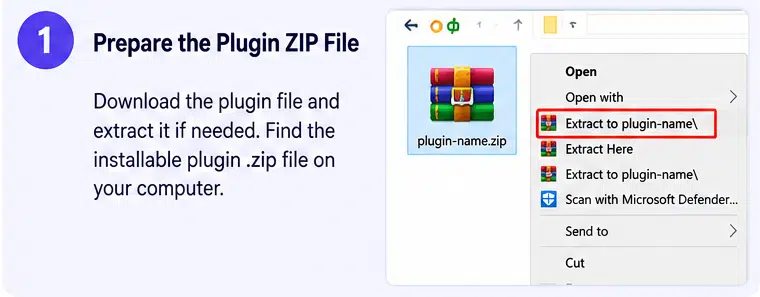
- Download the CartFlows Pro ZIP package from your authorized product account.
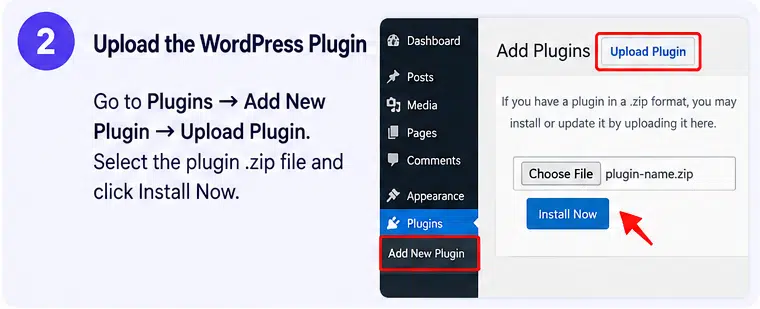
- Navigate to Plugins → Add New Plugin → Upload Plugin.
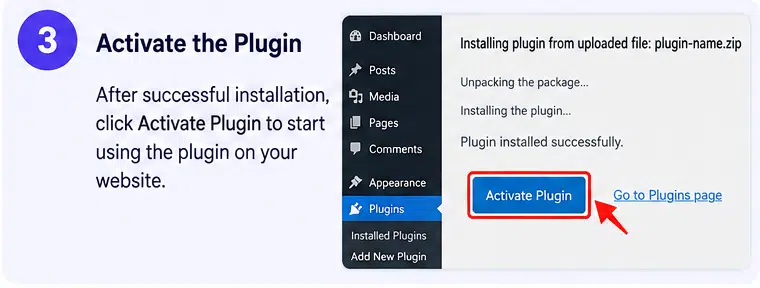
- Upload the CartFlows Pro ZIP file and activate it.
- Activate your CartFlows Pro license if one is included.
- Open the CartFlows dashboard and select a ready-made funnel template or create a new funnel.
- Add checkout, upsell, downsell, and thank-you steps as required.
- Customize the pages using your preferred page builder.
- Configure products, payment gateways, checkout fields, and conditional offers.
- Test the complete purchase journey before publishing your funnel.
Compatibility and Important Notes
CartFlows Pro is a premium extension of the free CartFlows plugin, not a standalone ecommerce platform. Both CartFlows Free and WooCommerce are required.
The free plugin listing reports version 3.3.1, released November 2, 2026. This release includes a security hardening update. Keep the core plugin and premium extension compatible and updated when using the product on a live store.
CartFlows supports multiple WooCommerce-compatible payment gateways for checkout, but not every gateway supports one-click upsells and downsells. Check the official payment gateway compatibility documentation before selecting a payment provider for your funnel.
The CartFlows Suite is a separate bundle that includes additional products such as Modern Cart, Cart Abandonment Recovery, and Power Coupons. These companion products should not be assumed to be included in a CartFlows Pro-only package.
Official license activation is required for access to premium updates and the vendor’s licensed support services. Features, updates, and support availability depend on the package and license obtained.
Build Smarter WooCommerce Sales Funnels with CartFlows Pro
CartFlows Pro gives WooCommerce store owners more control over how customers discover products, complete purchases, and explore additional offers. With customizable checkout layouts, one-click upsells, dynamic order bumps, A/B testing, smart funnel routing, and detailed analytics, it provides a comprehensive toolkit for building structured sales funnels inside WordPress. Whether you’re selling physical products, digital downloads, courses, or subscriptions, CartFlows Pro helps you create a purchasing experience tailored to your business.