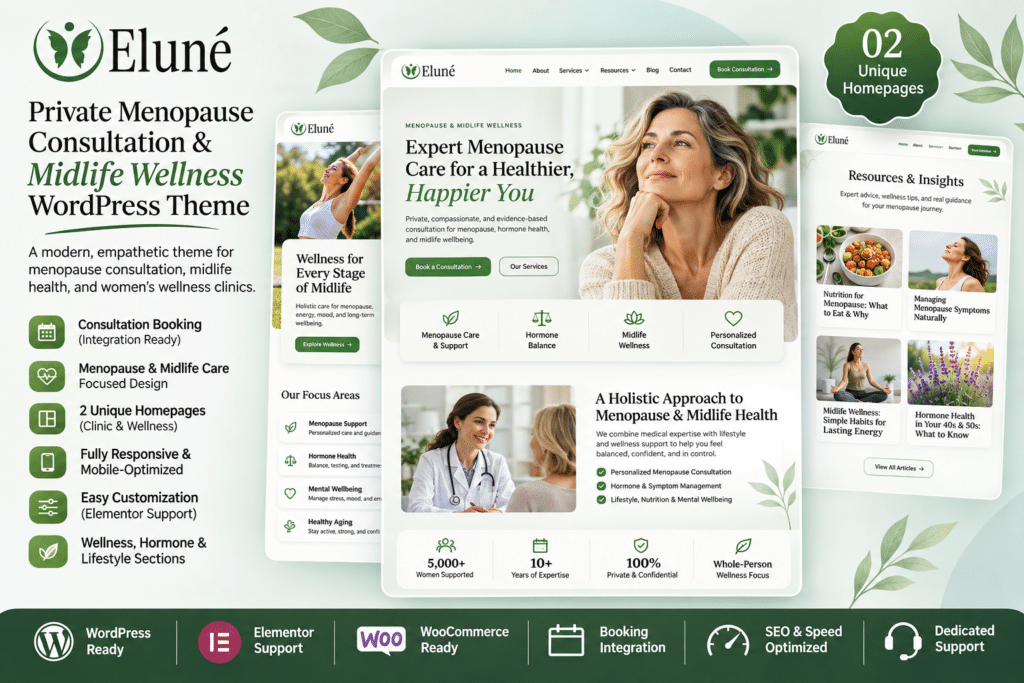
Elune includes a collection of customizable website layouts and design options for building a complete menopause consultation and midlife wellness website.
The package provides five professionally designed header layouts, Elementor-powered header and footer areas, blog layouts, typography controls, theme customization options, and one-click demo importing.
You can customize the included designs with your own branding, service information, consultation packages, practitioner biography, and contact details.
Key Features
1. Menopause and Midlife Wellness Design
Elune is specifically designed for menopause consultants and women’s wellness professionals. Its calming visual style, balanced typography, and organized content sections help create a welcoming online experience for visitors seeking professional guidance.
2. Elementor Drag-and-Drop Builder
Customize website pages using the Elementor visual editor. Edit headings, images, text, buttons, sections, spacing, and other design elements without manually writing code for ordinary changes.
The theme works with the free version of Elementor. Elementor Pro is optional and is not required for the core theme layouts.
3. Consultation-Focused Website Layouts
Present your consultation services using dedicated sections for service descriptions, professional information, pricing packages, and booking calls to action.
These layouts help visitors understand your offerings and find the information they need before contacting your practice.
4. Amelia Appointment Booking Compatibility
Elune is compatible with the Amelia booking plugin, allowing you to add appointment scheduling functionality to your website.
With Amelia configured, visitors can explore available services, select suitable appointment times, and submit bookings online. Amelia is a separate plugin and must be installed and configured to provide booking functionality.
5. Five Professional Header Layouts
Choose from five professionally designed header variations. Customize navigation, branding, and other header elements to match your website’s appearance and business requirements.
6. Elementor-Powered Header Widget Area
Use the Elementor-powered header widget area to customize supported header content. This provides additional flexibility when arranging navigation and other website elements.
7. Flexible Footer Templates
Customize the website footer using Elementor templates. Add contact information, navigation links, social media profiles, newsletter sections, and other relevant business details.
8. One-Click Demo Import
Import the available demo content to establish your website’s initial structure. This makes it easier to recreate the theme’s demonstration layout before replacing the sample text and images with your own content.
9. Redux Theme Options Panel
Manage important website settings through the Redux-powered theme options panel. Configure colors, typography, layout preferences, and other supported customization settings from the WordPress dashboard.
10. Flexible Typography and Color Settings
Personalize your website’s visual identity using Google Fonts and theme color settings. Adjust typography and major design elements to create a consistent appearance across your pages.
11. Three Blog Page Layouts
Choose from three main blog layouts:
- No Sidebar
- Left Sidebar
- Right Sidebar
These options allow you to present educational articles, wellness resources, practice updates, and professional insights in a layout that suits your website.
12. Three Blog Post Display Styles
Display articles using different post presentation styles:
- Classic layout
- Masonry layout with two or three columns
- Grid layout with two or three columns
You can also configure excerpt length, pagination style, and whether the first post receives a separate presentation.
13. Flexible Single Post Layouts
Customize individual article pages with no sidebar, a left sidebar, or a right sidebar. You can also manage post metadata visibility through the theme settings.
14. Contact Form 7 Integration
Create contact and consultation enquiry forms using Contact Form 7. Collect visitor details and messages so potential clients can contact your practice directly through your website.
15. WPML and Polylang Compatibility
Build multilingual websites using supported translation plugins such as WPML and Polylang. This is useful for practitioners who serve clients from different language backgrounds.
16. Translation-Ready Files
Elune includes a translation template file (.pot), providing a starting point for translating theme text into other languages.
17. SEO-Friendly Structure
The theme is built using modern HTML5 and CSS3 standards and includes SEO-oriented markup. It also provides built-in schema functionality for single posts, with options to disable it when compatible SEO plugins are active.
For complete SEO management, you can use a dedicated WordPress SEO plugin and configure your page titles, descriptions, structured data, and indexing settings separately.
18. Responsive Website Design
Elune features a responsive layout designed to adapt to desktop computers, tablets, and smartphones. Visitors can browse consultation information, explore services, and access contact options across different screen sizes.
19. Child Theme Included
The package includes a child theme for developers who want to add custom CSS, PHP modifications, or template changes. Keeping customizations in a child theme helps protect them when updating the parent theme.
20. Cross-Browser Compatibility
The theme is designed to work with popular web browsers, including:
- Google Chrome
- Mozilla Firefox
- Safari
- Microsoft Edge
- Opera
21. Documentation and Customization Resources
Elune includes online documentation to help with theme installation, demo importing, customization, and general website setup.
Who Should Use Elune?
Elune is suitable for:
- Menopause consultants
- Women’s health practitioners
- Midlife wellness specialists
- Health and lifestyle coaches
- Nutritionists and wellness professionals
- Hormone wellness consultants
- Holistic health practitioners
- Therapy and counseling practices
- Private consultation businesses
- Women’s health education websites
Required Plugins and Integrations
The main plugins and integrations for using Elune include:
- WordPress: Required to run the website.
- Elementor: Required for visual page editing and the theme’s Elementor-powered layouts.
- Contact Form 7: Used for contact and enquiry forms.
- Amelia: Optional, for appointment scheduling and booking functionality.
- WPML or Polylang: Optional, for multilingual website support.
Elementor Pro is not required for the core theme functionality. Additional booking, translation, and form features depend on the corresponding plugins being installed and configured.
Installation and Setup
- Install WordPress on your hosting account.
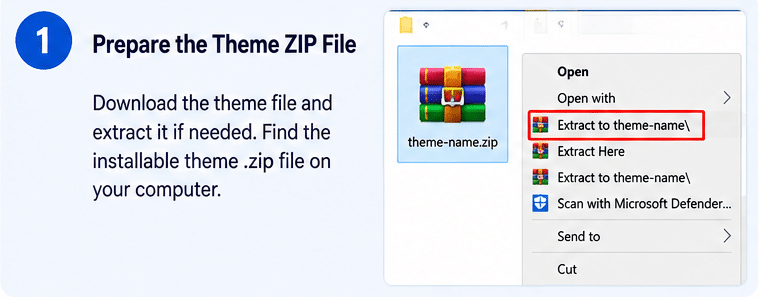
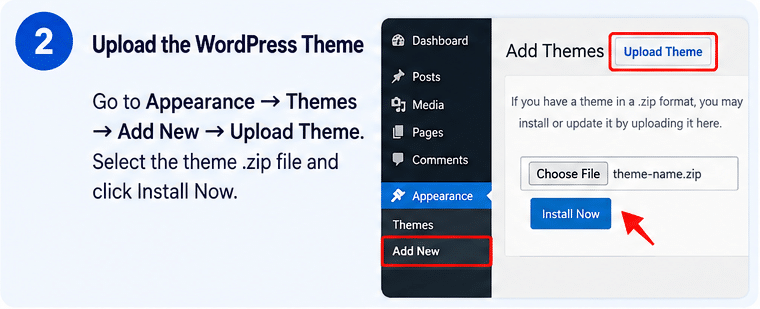
- Navigate to Appearance → Themes → Add New → Upload Theme.
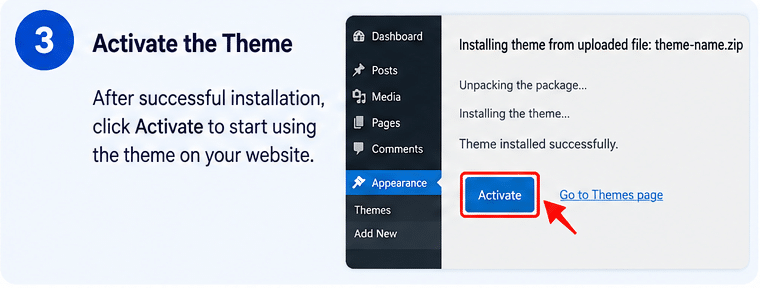
- Upload the Elune theme ZIP file and activate it.
- Install and activate Elementor and the other recommended plugins.
- Follow the theme documentation to run the one-click demo importer.
- Configure the header and footer using the available Elementor layouts.
- Customize colors, typography, logos, and website navigation.
- Add your consultation services, practitioner information, pricing, and FAQs.
- Configure Contact Form 7 and Amelia if you need enquiry forms or appointment booking.
- Review the website on desktop, tablet, and mobile before publishing.
Compatibility and Important Notes
Elune is a WordPress theme, not a standalone booking system or medical practice management platform. It provides the website design and Elementor layouts needed to present consultation services. Appointment scheduling requires a separate booking plugin such as Amelia.
The official ThemeForest listing identifies WordPress 6.9.x compatibility and lists Contact Form 7, Elementor, and WPML among its compatible plugins. Its published version is 1.0.0, with an official update date of April 8, 2026. Check the actual theme package and current plugin versions before installing on a live website.
The theme’s demo images may not be included in the downloadable package. Check image licensing and replace demonstration visuals with images you own or are authorized to use.
Create a Welcoming Midlife Wellness Website with Elune
Elune provides a specialized design foundation for professionals offering menopause consultations and women’s midlife wellness services. With Elementor customization, consultation-focused layouts, five header variations, Amelia booking compatibility, flexible blog designs, and multilingual support, it helps organize the information visitors need when exploring your services. Customize the theme with your own branding, professional background, and consultation details to create a reassuring online presence for your practice.