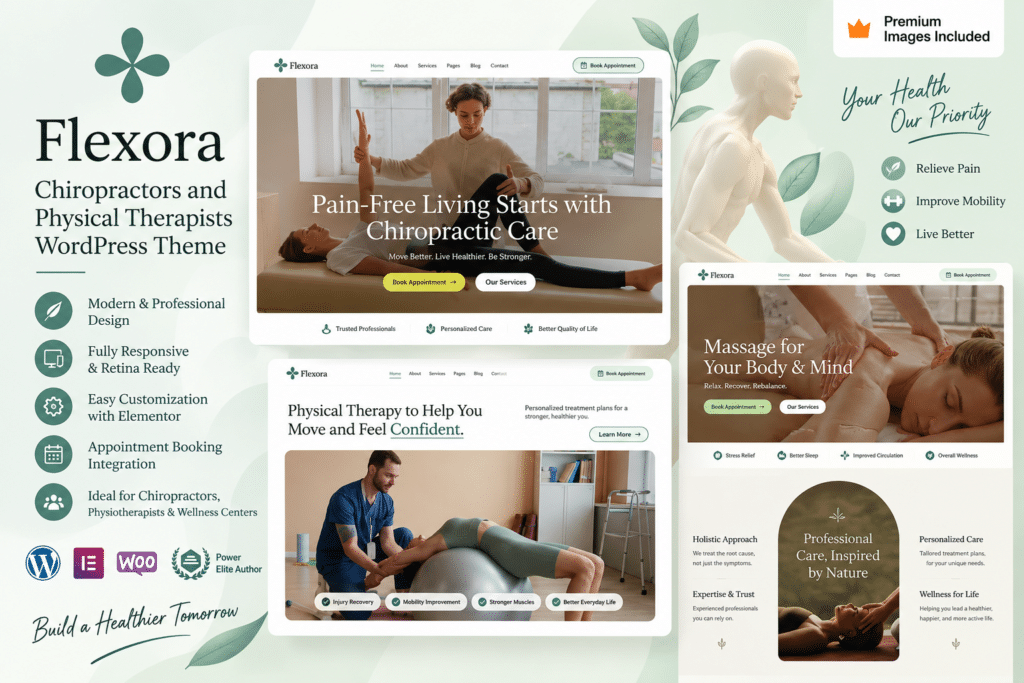
Flexora is a professional WordPress theme designed for chiropractors, physical therapists, physiotherapy clinics, rehabilitation centers, and other wellness-focused businesses. Its clean and modern design helps you present your services, specialists, clinic information, and patient resources in a clear and welcoming way.
Whether you run an independent chiropractic practice or a multi-service physiotherapy clinic, Flexora provides a flexible foundation for building a professional online presence. You can introduce your treatments, showcase your team, share useful information, and make it easier for potential patients to contact your clinic.
With responsive layouts and customizable sections, Flexora helps your website provide a smooth browsing experience across desktops, tablets, and mobile devices.
Key Features
- Healthcare-Focused Design – Professional layouts created for chiropractors, physiotherapists, and rehabilitation businesses.
- Service Pages – Clearly present chiropractic care, physical therapy, rehabilitation, and other services offered by your practice.
- Therapist Profiles – Introduce chiropractors, therapists, and other members of your professional team.
- Appointment-Focused Sections – Create clear calls to action that guide visitors toward appointment or enquiry options supported by your setup.
- Responsive Design – Provide an accessible browsing experience across desktop, tablet, and mobile devices.
- Customizable Layouts – Personalize typography, images, sections, and other design elements to match your clinic.
- Testimonials – Present patient feedback and experiences in dedicated website sections.
- Contact Information – Clearly display your clinic location, opening hours, phone number, and other important details.
- Blog Support – Publish wellness tips, clinic updates, rehabilitation guides, and educational content.
- FAQ Sections – Answer common questions about your services, appointments, and treatment process.
- Professional Navigation – Help visitors quickly find treatments, specialists, clinic details, and contact information.
- WordPress Integration – Manage your website pages, articles, images, and other content through WordPress.
Perfect For
Flexora is ideal for chiropractors, physical therapists, physiotherapists, rehabilitation centers, sports therapy clinics, wellness centers, posture specialists, injury recovery practices, and other therapy-focused businesses.
Create a Professional Online Presence for Your Practice
Your clinic website is often one of the first places potential patients go to understand your services. Flexora helps you organize important information into clear, professional pages so visitors can learn about your practice and decide on their next step.
Showcase your treatments, introduce your specialists, answer common questions, and provide straightforward ways for visitors to contact your clinic.
Build Your Therapy Website with Flexora
Create a clean and professional website with Flexora – Chiropractors and Physical Therapists WordPress Theme.
With healthcare-focused layouts, responsive design, service pages, team sections, and flexible customization options, Flexora provides a practical WordPress foundation for building the online presence of your chiropractic or physical therapy practice.