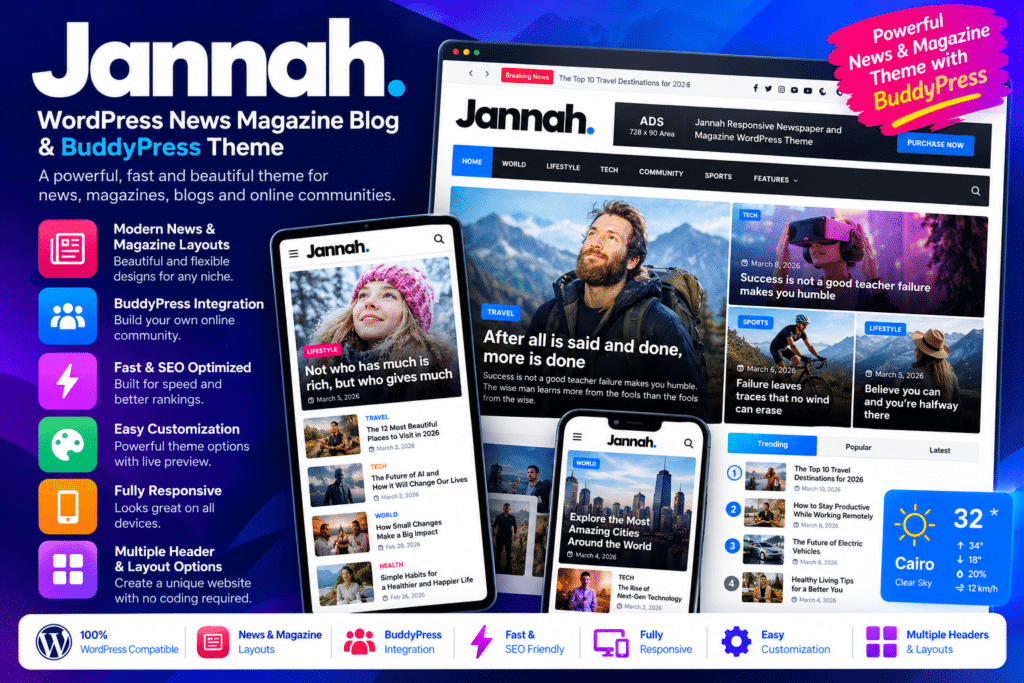
Jannah is a versatile WordPress theme designed for news websites, online magazines, blogs, and content-driven communities. Developed by TieLabs, it combines flexible editorial layouts, customizable navigation, multimedia publishing features, and integrations for building a feature-rich online publication.
Whether you run a technology blog, sports news portal, lifestyle magazine, travel website, entertainment publication, or online community, Jannah provides a collection of ready-made designs and customization options to help you create a website that fits your content and audience.
The theme includes multiple prebuilt demos, customizable headers and footers, category-based layouts, mega menus, live search, and support for the WordPress block editor. It also integrates with popular plugins such as WooCommerce, BuddyPress, and bbPress, allowing you to extend your website beyond traditional article publishing.
With advertising management options, social features, video content layouts, and support for right-to-left languages, Jannah is suitable for publishers who want to combine content presentation, audience engagement, and website monetization in one WordPress installation.
What You’re Getting
Jannah provides a flexible design foundation for building a professional news or magazine website. You can start with a suitable demo, customize the appearance, organize your content into categories, and create layouts that make articles easier for readers to discover.
Its features support different publishing styles, from image-rich magazine homepages to traditional news portals and personal blogs. You can also add community functionality or ecommerce features through compatible plugins.
Key Features
- 20+ Prebuilt Demo Designs – Explore website layouts for news, technology, sports, travel, lifestyle, photography, gaming, and other content niches.
- One-Click Demo Import – Use available demo-import tools to establish a starting layout and customize it with your own content and branding.
- Multiple Header Layouts – Configure your site’s header and navigation to match your publication’s visual identity.
- Customizable Footer Designs – Arrange footer content and columns to display useful links, social profiles, contact information, or other site elements.
- Multiple Article Layouts – Present posts using different content arrangements to suit news stories, long-form articles, featured content, and editorial blogs.
- Category-Based Magazine Layouts – Organize homepage sections around topics such as business, technology, entertainment, sports, or lifestyle.
- Mega Menus – Create expanded navigation menus to help visitors explore large websites with multiple categories and subcategories.
- AJAX Live Search – Provide interactive search functionality that can help visitors find relevant content more conveniently.
- Sticky Navigation – Keep important navigation elements accessible while readers browse longer pages, where configured.
- WordPress Block Editor Support – Use Gutenberg and compatible blocks to create and edit content within the WordPress publishing workflow.
- Responsive Design – Adapt supported layouts to desktop computers, tablets, and mobile screens.
- Right-to-Left Language Support – Build websites for languages such as Arabic, Hebrew, Persian, and Urdu using the theme’s RTL capabilities.
- Advertising Management – Configure supported advertising placements for banners and services such as Google AdSense.
- WooCommerce Integration – Add compatible online shopping functionality for merchandise, digital products, or other eligible products.
- BuddyPress Community Integration – Extend your website with member profiles, activity streams, groups, and other community features through BuddyPress.
- bbPress Forum Integration – Add discussion forums to encourage conversations and create a community around your publication.
- Multimedia Publishing Features – Use supported video playlists, GIF images, image galleries, and other media elements to enrich your articles.
- Multiple Visual Skins – Customize the site’s appearance with available light, dark, and other styling options.
- Typography and Color Controls – Adjust fonts, colors, and design details to maintain a consistent brand identity.
- Custom Widgets and Sidebar Options – Arrange supported widgets and sidebar layouts to display popular posts, categories, social content, and other useful information.
- Social and Engagement Elements – Use supported social widgets, sharing options, and web-notification features to improve the presentation of audience engagement tools.
- Multilingual Plugin Compatibility – Use compatible translation tools, including WPML, to develop a multilingual publication.
- AMP Integration – Configure the theme’s supported AMP functionality where appropriate for your publishing setup and current requirements.
Build a Professional News or Magazine Website
A successful publication needs more than a collection of articles. Readers should be able to identify important stories, browse categories, and discover related content without unnecessary friction.
Jannah offers magazine-style layouts that help publishers organize featured stories, recent posts, popular articles, and category sections. You can customize these areas to reflect your editorial priorities, whether you publish breaking news, in-depth analysis, tutorials, reviews, or lifestyle content.
For example, a technology publication could feature product reviews and industry updates on its homepage, while a sports website could emphasize match coverage, team news, and analysis. The available layout options help you adapt the site’s presentation to your content strategy.
Customize Your Website Without Starting from Scratch
Jannah includes demo designs and theme customization options that provide a starting point for creating your website. You can choose a layout, update its colors and typography, adjust navigation, and replace demo content with your own articles and images.
The theme’s support for the WordPress block editor also gives publishers a familiar way to create and manage posts and pages. Available theme-specific elements and companion plugins can extend the editing experience.
This flexibility can be useful for independent bloggers, editorial teams, agencies, and businesses that want a distinctive publication without developing every design component from the ground up.
Monetize Your Content with Advertising and Ecommerce
For publishers who want to generate revenue, Jannah offers advertising-management features that support configurable ad placements and compatible advertising services.
You can plan ad positions around your content and design while considering readability, mobile usability, and the overall visitor experience. Advertising revenue still depends on factors such as traffic, audience engagement, advertiser demand, and the performance of your monetization strategy.
Jannah also integrates with WooCommerce, allowing you to extend a publication with an online store. This can be useful for selling merchandise, branded products, or other supported offerings alongside your editorial content.
WooCommerce provides the underlying shopping, cart, and checkout functionality, while Jannah supplies compatible theme styling. Payment gateways, shipping options, tax settings, and product management must be configured separately as required.
Create a Community Around Your Publication
Jannah supports BuddyPress and bbPress, making it possible to build a website that combines publishing with community interaction.
With BuddyPress configured, you can offer features such as member profiles, activity streams, groups, and community notifications, depending on the components enabled. bbPress can add discussion forums where readers exchange ideas, ask questions, or discuss published articles.
These integrations can help turn a traditional blog or magazine into a more interactive destination. However, community registration, moderation, spam prevention, and privacy settings still need careful configuration.
Improve Navigation and the Reading Experience
Large content websites can become difficult to navigate when they contain hundreds or thousands of posts. Jannah provides navigation options such as mega menus, category-based sections, live search, and customizable sidebars to help visitors find content more easily.
You can also configure article layouts and multimedia elements to match the needs of your audience. Clear headings, useful internal links, appropriately sized images, and readable typography remain important for a comfortable reading experience.
The theme includes SEO-related markup and structured-content features, but these do not guarantee search rankings. Publishing useful original content, maintaining good technical SEO, and providing a positive user experience remain essential.
Who Should Use Jannah?
Jannah can be a suitable choice for:
- News publishers creating websites for local, national, or international news.
- Online magazine owners covering technology, business, fashion, entertainment, or lifestyle.
- Professional bloggers who want flexible article layouts and customizable design options.
- Sports websites publishing match reports, team updates, and commentary.
- Technology reviewers presenting product reviews, guides, and industry news.
- Travel and lifestyle creators publishing photography-rich articles and recommendations.
- Community website owners who want to combine editorial content with BuddyPress or bbPress.
- Digital publishers and media agencies building WordPress websites for clients.
- Content businesses that want to combine publishing with advertising or WooCommerce-based sales.
Compatibility and Setup Notes
Jannah is a WordPress theme, not a standalone publishing platform. Some functionality depends on companion plugins, external services, or additional configuration.
Before installing it, consider the following:
- WordPress compatibility: Check the latest theme release notes and test compatibility with your current WordPress and PHP versions.
- Required companion plugins: Install the recommended Jannah Extensions plugin and any other required components for the features you intend to use.
- Community features: BuddyPress and bbPress must be installed and configured separately to provide their respective community and forum functionality.
- Online store: WooCommerce is required for ecommerce features such as products, carts, and checkout.
- Advertising: Ad placements require your own advertising account, approved ad code, or compatible advertising configuration.
- Multilingual support: Translation plugins and language settings may be needed to create a multilingual website.
- AMP functionality: Confirm the current state of AMP support and compatibility with your intended publishing setup before enabling it.
- Bundled premium plugins: A plugin included in a theme package does not necessarily provide a separate license, independent update entitlement, or direct support from that plugin’s developer.
- Performance: Actual loading speed depends on hosting, caching, image optimization, third-party scripts, plugins, and the amount of content displayed.
- Security and updates: Use a current, trusted release and keep the theme and its companion plugins updated. Test major updates on a staging site before applying them to a live publication.
Review the official changelog and compatibility documentation before deploying Jannah on a production website.
Create a Feature-Rich Publication with Jannah
Jannah – WordPress News Magazine Blog & BuddyPress Theme combines editorial layouts, customization options, multimedia publishing, advertising tools, and community integrations in one flexible WordPress theme.
Whether you are launching a news portal, building a niche magazine, expanding a personal blog, or creating a publication with member interaction, Jannah offers a broad range of design options to help organize and present your content.
Choose a suitable demo, customize the layouts to match your brand, and configure the required plugins to build a publication that serves your readers and supports your business goals.