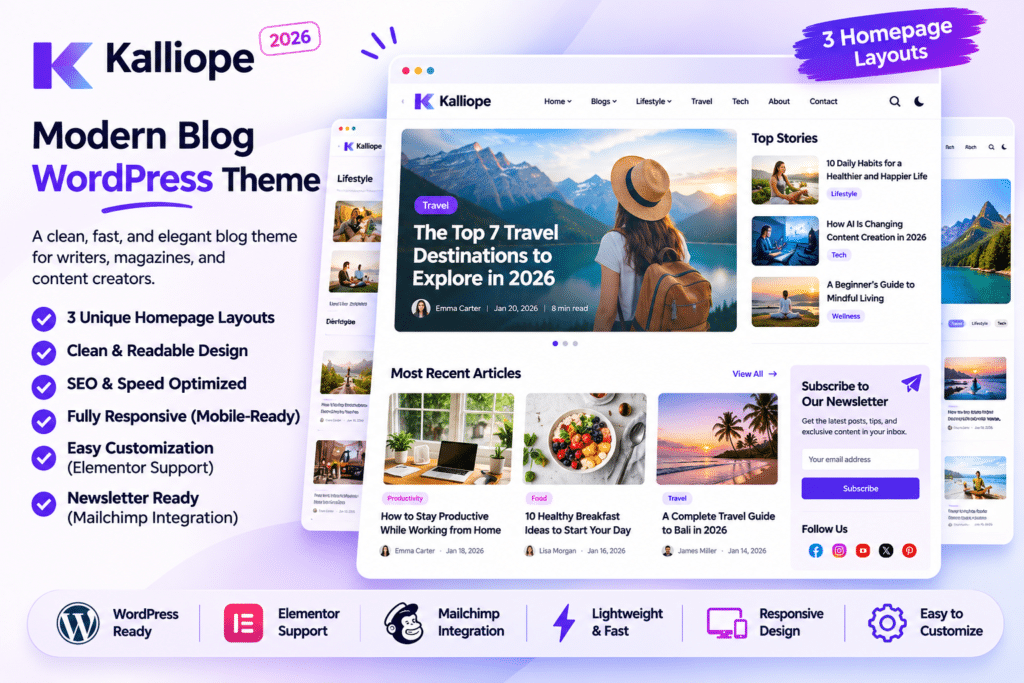
Kalliope is a modern and customizable WordPress theme designed for bloggers, publishers, content creators, and online magazine websites. Developed by Promising-Themes, it combines clean layouts, attractive typography, and flexible customization options to create an engaging reading experience.
Whether you are running a personal blog, lifestyle magazine, fashion website, technology publication, travel blog, or news portal, Kalliope provides a stylish foundation for presenting articles and editorial content.
The theme includes multiple homepage variations, Elementor integration, dark mode, sticky navigation, related posts, and a powerful theme options panel. Its responsive design and typography controls help you create a consistent publishing experience across desktop, tablet, and mobile devices.
What You’re Getting
Kalliope includes a complete blog and magazine website design with customizable homepage layouts, article templates, navigation options, sidebar areas, and content presentation features.
You can import the available demo content, customize the website’s appearance through the WordPress Customizer and theme options panel, and use Elementor to build additional page layouts.
The included child theme also provides a safer starting point for developers who want to make custom theme modifications.
Key Features
1. Clean and Modern Blog Design
Kalliope features a contemporary editorial design that puts your articles and images at the center of the website. Its clean layouts and readable typography make it suitable for content-focused websites and digital publications.
2. Multiple Homepage Variations
Choose from ready-made homepage designs to create a blog or magazine layout that matches your publishing style. The available variations provide different ways to organize featured articles, categories, and recent posts.
3. One-Click Demo Import
Import the available demo content to quickly establish your website’s initial structure. The demo importer helps you get started with sample pages, layouts, and theme settings before replacing the content with your own.
4. Elementor Page Builder Integration
Use Elementor to create and customize website pages through a visual drag-and-drop interface. Adjust page sections, images, headings, buttons, spacing, and other design elements without writing code for ordinary design changes.
5. Built-In Dark Mode
Give visitors a darker reading experience with the theme’s dark mode functionality. This option provides an alternative appearance for users who prefer darker website interfaces.
6. Smart Sticky Navigation
Improve website navigation with flexible sticky header settings. You can configure the menu to remain visible while scrolling, appear when visitors scroll upward, or disable sticky navigation entirely.
7. Custom Colors and Typography
Personalize your website’s visual identity through the theme options panel. Adjust colors, font families, typography settings, and other styling options to match your brand.
8. WordPress Customizer Live Preview
Preview design changes while customizing your website. The live preview functionality makes it easier to experiment with colors, typography, and layout settings before publishing changes.
9. Article Reading Time
Display estimated reading times on blog posts to help visitors understand how long an article may take to read. This is particularly useful for websites publishing long-form guides, tutorials, and editorial content.
10. Related Posts
Show related articles to encourage visitors to explore more content on your website. This feature provides another way to connect readers with relevant posts and improve content discovery.
11. Breadcrumb Navigation
Add breadcrumb navigation to supported website sections. Breadcrumbs help visitors understand their current location within the website and navigate between related pages and categories.
12. Responsive and Mobile-Friendly Layout
Kalliope is designed to adapt to different screen sizes, including desktops, tablets, and smartphones. Its responsive layouts help maintain readability and navigation usability across devices.
13. Multiple Icon Libraries
The theme includes support for popular icon libraries:
- Font Awesome
- IcoFont
- Remix Icons
These icon collections provide visual elements for navigation, buttons, and other website sections.
14. Google Fonts Integration
Choose from available Google Fonts to customize your website’s typography. Select suitable font combinations for headings, article text, navigation, and other content areas.
15. Widget-Ready Layouts
Use available widget areas and sidebar sections to display useful website elements such as recent posts, categories, search, and other supported WordPress widgets.
16. Child Theme Included
The package includes a customizable child theme. Use it to maintain your custom PHP, CSS, and template modifications separately from the parent theme, making future theme updates easier to manage.
17. WooCommerce Compatibility
Kalliope supports WooCommerce, allowing you to extend your blog or magazine website with basic online store functionality. You can add product pages and ecommerce sections alongside your editorial content.
18. Contact Form and Plugin Compatibility
The theme is compatible with several popular WordPress plugins, including:
- Contact Form 7
- Gravity Forms
- WPForms
- Jetpack
- Elementor
- WooCommerce
Individual plugin features require the corresponding plugin to be installed and configured.
19. Cross-Browser Compatibility
The theme is designed to work with popular web browsers, including Chrome, Firefox, Safari, Opera, and Microsoft Edge.
20. Documentation and Customization Options
Kalliope includes theme documentation and a comprehensive options panel. Customize layouts, sidebars, typography, colors, and navigation settings through the WordPress administration area.
Who Should Use Kalliope?
Kalliope is suitable for:
- Personal and professional bloggers
- Lifestyle and fashion magazines
- Technology and digital publications
- Travel and photography blogs
- Health and wellness websites
- Beauty and fitness blogs
- News and editorial websites
- Video blog publishers
- Creative content websites
- Online magazine businesses
Compatibility and Setup Notes
Kalliope is a WordPress blog and magazine theme, not a standalone page builder. Elementor is supported for visual page customization, while the theme options panel and WordPress Customizer provide additional design controls.
The ThemeForest listing identifies compatibility with Contact Form 7, Elementor, Gravity Forms, Jetpack, WooCommerce, and WPForms. Its published software compatibility metadata lists WordPress versions up to 6.9.x and WooCommerce versions up to 9.x. Since this compatibility information may not reflect the newest releases, test the theme with your current WordPress and plugin versions before installing it on a production website.
The theme listing also indicates that it is not Gutenberg-optimized. You can still use the WordPress editor for ordinary content where supported, but its primary design customization workflow is based on the theme options and Elementor.
Create a Stylish Blog or Online Magazine with Kalliope
Kalliope provides a flexible design foundation for bloggers and publishers who want to present their content in a clean, modern, and readable format. With Elementor integration, homepage variations, dark mode, sticky navigation, related posts, reading-time indicators, and customizable typography, it offers useful tools for building a professional editorial website. Customize the layouts with your own branding and content to create a blog or magazine that gives readers a comfortable browsing experience.