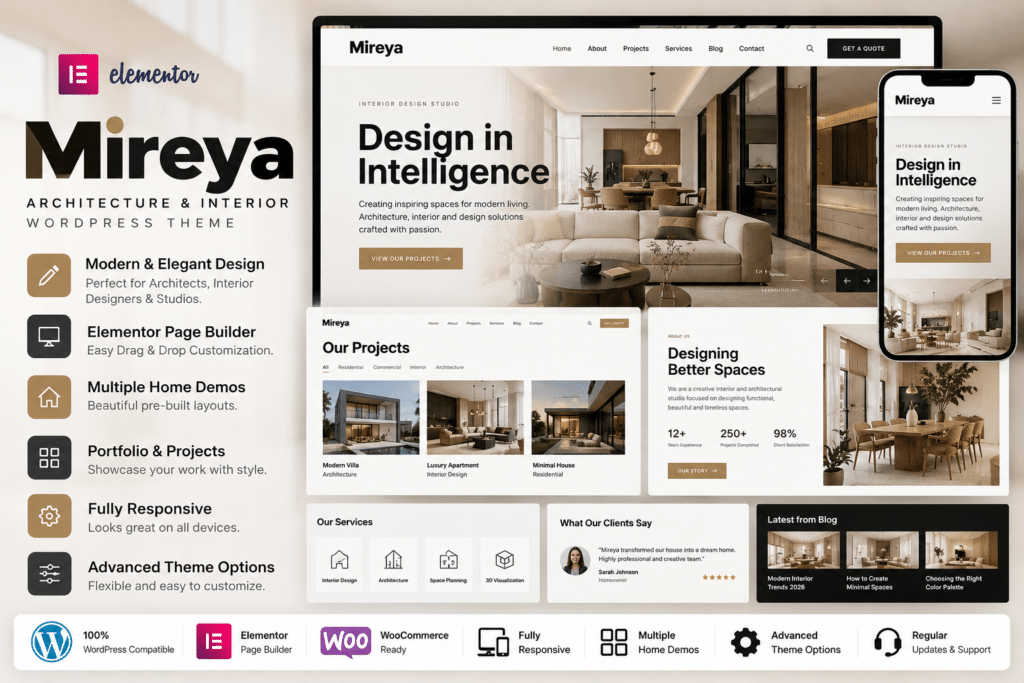
Mireya is a modern and visually focused WordPress theme created for interior designers, architects, design studios, creative agencies, photographers, artists, and professionals who need an elegant portfolio website.
Its minimal design puts projects and visual work at the center of the website, making it particularly suitable for showcasing interiors, architecture projects, concepts, photography, and other design-focused work.
Built with Elementor, Mireya provides visual page editing alongside custom Elementor widgets, portfolio functionality, project layouts, dark and light design styles, animated transitions, and advanced theme controls.
Key Features
- Elementor Page Builder – Create and customize supported pages visually without needing to code.
- 20+ Custom Elementor Widgets – Extend Elementor with dedicated Mireya elements for architecture and interior-design websites.
- 10+ Pre-Built Pages – Start with ready-made layouts instead of creating every page from scratch.
- Dark & Light Versions – Choose between contrasting visual styles to match your studio or personal brand.
- Advanced Portfolio System – Showcase interior, architecture, photography, and creative projects professionally.
- Portfolio Filters – Allow visitors to browse supported projects by category or other configured filters.
- Project Grid & Listing Layouts – Display portfolio content through multiple project presentation styles.
- Single Project Templates – Build detailed project pages visually with Elementor.
- Services Layouts – Present interior-design, architecture, consulting, or other professional services.
- Team Member Sections – Introduce architects, designers, artists, and other team members.
- Animated Sliders – Create visually engaging presentation sections for projects and featured work.
- Smooth Page Transitions – Add animated transitions between supported pages without traditional full-page refresh behavior.
- Lightbox Gallery – Present portfolio images and project photography in an expanded gallery view.
- One-Click Demo Import – Import supported demo layouts and content for a faster initial setup.
Perfect For
Mireya is suitable for interior designers, architects, architecture studios, interior-design agencies, photographers, furniture designers, creative agencies, artists, portfolio websites, construction designers, freelancers, and other visually driven professionals.
Showcase Interior Design Projects
Mireya is built around portfolio presentation.
You can create project grids and listings for work such as:
- Residential interiors
- Commercial interiors
- Architecture projects
- Office designs
- Furniture concepts
- Renovation projects
- Hospitality interiors
- Retail design
- Photography
- Creative installations
Individual project pages can be designed with Elementor, giving you control over images, descriptions, project information, galleries, and other content.
Build Pages with Elementor
Elementor is the primary visual builder used by Mireya.
The theme includes more than 20 custom Mireya widgets designed specifically for interior, architecture, and creative portfolio websites.
You can use Elementor to customize supported:
- Homepages
- Portfolio pages
- Project pages
- Service sections
- Team layouts
- Contact pages
- Blog content
- Other landing pages
This makes it easier to adapt the demo design to your own brand without manually rewriting theme templates.
Use Dark or Light Designs
Mireya provides both dark and light versions.
A darker design can work well for luxury architecture, premium interior studios, or photography portfolios, while the lighter version provides a cleaner presentation suitable for minimalist architecture and contemporary design brands.
The two approaches can help create a distinctive visual identity while keeping the underlying theme structure consistent.
Create Powerful Portfolio Layouts
Portfolio functionality is one of Mireya’s main strengths.
The theme includes project listings, grid styles, project carousels, portfolio filters, and dedicated single-project layouts.
This allows visitors to browse your work visually before opening individual projects for more information.
For architects and interior designers, this structure can be useful for turning a general website into a professional project showcase.
Present Services & Team Members
Mireya also includes dedicated Elementor layouts for services and team members.
Service sections can be adapted for offerings such as:
- Interior design
- Architecture
- Space planning
- Furniture design
- Project consulting
- Renovation
- Visualization
- Creative direction
Team layouts can introduce designers, architects, consultants, and other professionals involved in your studio.
Smooth Page Transitions & Animations
Mireya includes animated page transitions and parallax-style visual effects.
These effects can give portfolio websites a more immersive presentation when visitors navigate between projects and other pages.
The theme also provides animated sliders and interactive portfolio elements for presenting imagery more dynamically.
Animations should still be used carefully, especially on mobile devices, to preserve accessibility and performance.
Advanced Theme Options
Mireya includes theme options built around Advanced Custom Fields Pro.
Supported controls include options for:
- Colors
- Typography
- Headers
- Footers
- Blog layouts
- General page settings
- Portfolio settings
The theme also provides access to more than 1,000 Google Fonts according to its current marketplace description.
Multilingual Website Support
Mireya is translation ready and lists compatibility with:
- WPML
- Polylang
- TranslatePress
Translation template files are included, making the theme suitable for architecture or design studios serving clients in multiple languages.
Responsive & Retina Ready
Mireya is designed to adapt across desktop computers, laptops, tablets, and smartphones.
This is especially important for portfolio websites because potential clients often browse project photography and design examples on mobile devices.
The theme is also retina ready and lists compatibility with major modern browsers.
One-Click Demo Installation
Supported demo content can be imported through the theme’s one-click demo installation workflow.
This gives you a ready-made starting structure containing layouts similar to the official preview.
You can then replace demo images, text, project details, typography, and colors with your own content and branding.
Build a Modern Interior Design Portfolio
Showcase your creative work with Mireya – Interior Design WordPress Theme.
With Elementor, 20+ custom widgets, 10+ pre-built pages, dark and light versions, advanced project portfolios, services, team sections, animated transitions, one-click demo import, multilingual support, and responsive design, Mireya provides a stylish foundation for architecture and interior-design websites.