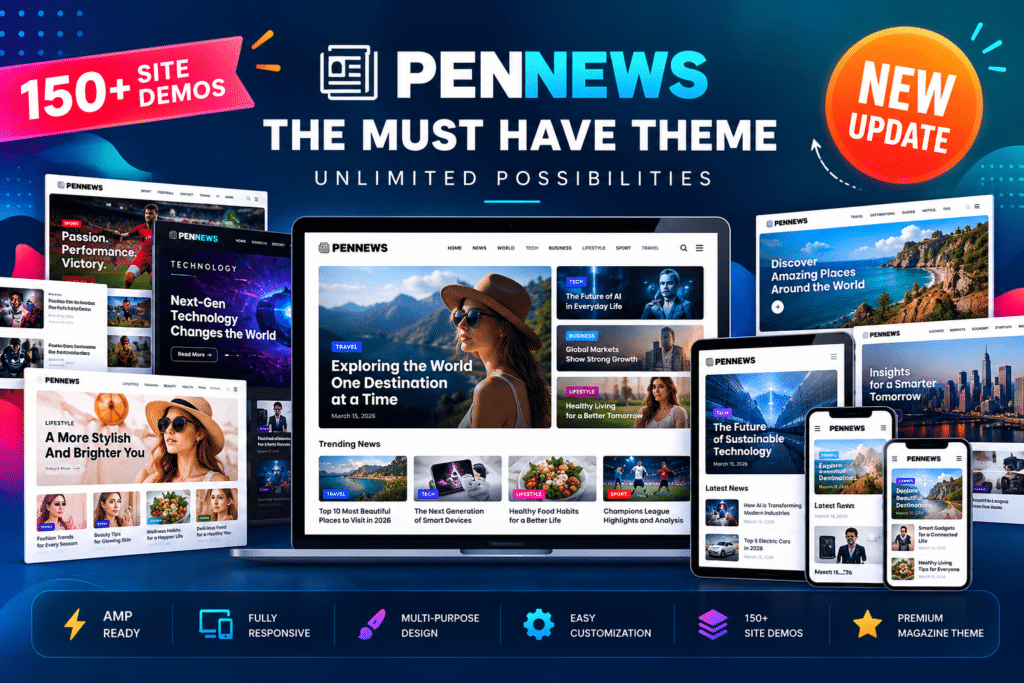
PenNews combines magazine-focused layouts with tools for customizing article pages, homepage sections, navigation, sidebars, advertisements, and featured content. You can import a supported demo, rearrange content blocks, and configure the site’s appearance without building every page from scratch.
The theme also includes a companion AMP plugin in its full download package, allowing you to configure AMP versions of supported pages. Additional bundled plugins provide optional functionality for sliders, page building, reviews, recipes, and other content features.
Key Features
- Multiple Website Demos – Choose from pre-designed demos for news portals, online magazines, blogs, business websites, and creative projects.
- One-Click Demo Import – Start with a supported demo layout and customize it for your own publication.
- WPBakery Page Builder – Build and arrange page layouts using a visual drag-and-drop editing interface.
- AMP Companion Plugin – Configure supported AMP page layouts using the included Penci PenNews AMP plugin.
- Multiple Post Styles – Present articles with different layouts suited to news, editorial stories, reviews, and featured content.
- 40+ Content Blocks – Build magazine-style pages using a variety of content sections and article-display elements.
- Featured Grids and Sliders – Highlight important stories, trending articles, and selected categories.
- Advanced Mega Menus – Organize navigation with supported multi-column and category-based mega menu layouts.
- Custom Widgets – Add elements such as author information, popular categories, social counters, video playlists, and promotional banners.
- Extensive Customizer Options – Adjust typography, colors, layouts, spacing, and other supported design settings.
- Advertising Placements – Configure banner and in-feed advertisement positions throughout supported layouts.
- Affiliate Content Support – Present affiliate-related content using suitable article layouts and available advertising areas.
- Multiple Sidebar Layouts – Choose left-sidebar, right-sidebar, dual-sidebar, or full-width content arrangements.
- Sticky Navigation – Keep navigation visible while scrolling where the selected header configuration supports it.
- Sticky Sidebar Options – Keep supported sidebar content accessible as visitors browse longer articles.
- AJAX Live Search – Help visitors find relevant content with supported live-search functionality.
- Video Playlist Elements – Organize video content using supported widgets and page-builder elements.
- Review and Rating Layouts – Present reviews with supported star, percentage, and point-based rating styles.
- Portfolio Layouts – Display creative projects using grid and masonry arrangements.
- WooCommerce Compatibility – Build compatible online store pages when WooCommerce is installed and configured.
- Multilingual Support – Work with compatible translation tools such as WPML and Polylang.
- RTL Language Support – Use right-to-left layouts for supported languages.
- Responsive Design – Present content in layouts designed to adapt to desktop, tablet, and mobile screens.
Perfect For
PenNews is suitable for news publishers, online magazines, independent journalists, bloggers, editorial teams, affiliate marketers, technology websites, travel publications, food blogs, and review websites.
A technology publisher can use it to organize product news and tutorials. A lifestyle magazine can highlight fashion, travel, and food categories, while an affiliate website can build article pages with product reviews and comparison content. Businesses can also adapt its layouts for company news and editorial marketing.
Build a Magazine-Style Homepage
A content-rich website needs more than a list of recent posts. Readers should be able to identify important stories, browse categories, and discover related articles easily.
PenNews provides content blocks, featured grids, sliders, and category-based layouts that help you organize a homepage around your publishing priorities. You can highlight breaking stories, promote selected articles, and create separate sections for different topics.
This flexibility makes the theme useful for publications with multiple categories and regularly updated content.
Customize Your Editorial Design
Every publication has its own visual identity. PenNews provides extensive theme settings for adjusting layouts, typography, colors, navigation, sidebars, and article presentation.
You can choose different post styles for different types of stories and use WPBakery Page Builder to arrange supported content elements. Start with a demo that fits your niche, then modify its design to match your publication’s branding and editorial structure.
Manage Advertising and Affiliate Content
Advertising can be an important part of a publisher’s revenue strategy. PenNews offers configurable advertisement placements, including supported banner and in-feed positions, helping you incorporate promotional content into your website layout.
Affiliate publishers can also use the theme’s article and review layouts to present product information alongside suitable promotional links. Actual advertising delivery, affiliate tracking, and monetization depend on the services and plugins you configure separately.
Create a Mobile-Friendly Reading Experience
Readers access news and magazine content from a variety of devices. PenNews uses responsive layouts designed to adapt to different screen sizes, helping articles, menus, images, and content blocks fit different viewing environments.
The theme also provides an AMP companion plugin for supported AMP page versions. AMP is an optional implementation, not a guarantee of faster performance or better search rankings. Validate your pages and test the mobile experience after configuration.
Important Compatibility Information
PenNews is a WordPress theme, not a standalone page builder. It integrates with WPBakery Page Builder and uses the Penci Framework plugin for theme-specific functionality.
The full ThemeForest download package includes several bundled premium plugins, but included plugin files do not necessarily provide separate premium licenses, independent update entitlements, or vendor support for every plugin. Confirm the included versions and licensing terms before installation.
The ThemeForest listing records version 6.7.5 and a last update of June 9, 2026. Because the theme has a long release history and uses several companion plugins, verify compatibility with your installed WordPress and PHP versions before deployment. Test AMP output, page-builder layouts, caching, and plugin combinations on a staging site first.
PenNews – Multi-Purpose AMP WordPress Theme for Publishers
Build a flexible content-focused website with PenNews. Its magazine layouts, customizable article blocks, advertising options, review styles, and optional AMP integration provide a practical starting point for publishers who want to organize stories and present content in a distinctive editorial design.