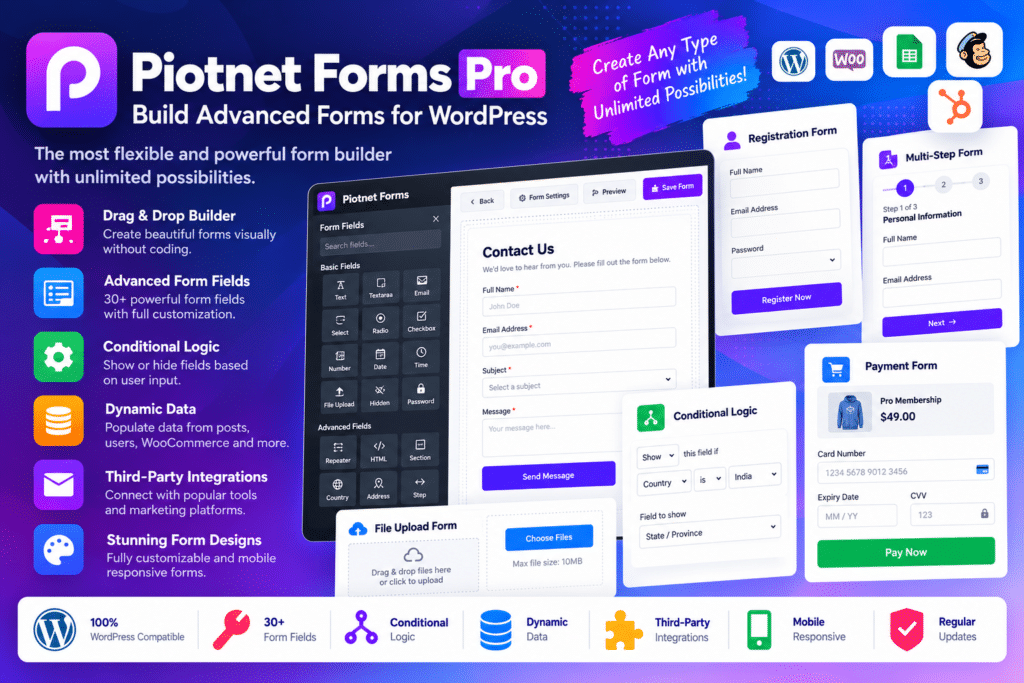
Piotnet Forms Pro combines a visual form builder with advanced field types, submission management, automation tools, and third-party integrations. You can arrange form fields, customize their appearance, define submission actions, and create workflows that respond to visitors’ selections.
Its advanced features include conditional logic, multi-level repeater fields, calculated fields, appointment booking, electronic signatures, PDF generation, and front-end post submissions. Supported integrations let you connect forms with payment providers, email marketing platforms, Google Sheets, calendar services, and custom-field tools.
The plugin is suitable for both straightforward forms and more complex workflows that need calculations, multiple user inputs, or connections to other business systems.
Key Features
- Drag-and-Drop Form Builder – Build customized forms by arranging fields and form elements visually.
- Multi-Step Forms – Divide long forms into smaller steps to create a more manageable submission process.
- Conditional Logic – Show or hide fields and sections based on user selections or configured conditions.
- Calculated Fields – Create dynamic calculations for estimates, pricing, quantities, and other form values.
- Multi-Level Repeater Fields – Let users add multiple entries or repeatable groups of information within a single form.
- Appointment Booking – Create booking forms for services and configure supported appointment workflows.
- User Registration Forms – Build front-end registration forms using supported account-creation features.
- Login and Profile Editing – Create supported login and profile-update workflows for registered users.
- Front-End Post Submission – Allow visitors to submit WordPress content through configured forms.
- Post Editing Forms – Provide supported workflows for editing existing posts from the front end.
- Custom Field Integration – Connect form submissions with supported custom-field tools such as ACF, Meta Box, Pods, Toolset, and JetEngine.
- Image Selection Fields – Let visitors choose options using image-based selections instead of conventional dropdowns.
- Range Slider Fields – Collect numeric selections through interactive sliders.
- Electronic Signature Fields – Collect signatures through supported form fields.
- File Upload Fields – Allow visitors to attach files when the relevant fields and upload settings are configured.
- Form Preview – Let users review entered information before submitting where supported.
- PDF Generation – Generate PDF documents from supported form submissions and configured templates.
- Form Database – Store and manage form submissions using the plugin’s supported database functionality.
- Form Abandonment Tools – Use supported abandonment-tracking features to help identify incomplete form submissions.
- Stripe and PayPal Integration – Connect supported payment workflows to accept payments through configured payment accounts.
- WooCommerce Integration – Create supported WooCommerce checkout and product-pricing workflows.
- Google Sheets Integration – Send supported submission data to Google Sheets after configuring the required connection.
- Google Calendar Integration – Connect supported booking or scheduling workflows with Google Calendar.
- Email Marketing Integrations – Connect supported services such as Mailchimp, ActiveCampaign, MailerLite, and other available platforms.
- Webhook and Remote Request Support – Send form data to compatible external endpoints and supported automation services.
- Address Autocomplete – Use supported address autocomplete fields for relevant form workflows.
- Input Masks – Guide visitors to enter information in a consistent format for fields such as telephone numbers.
- Coupon Code Fields – Add supported coupon-based pricing options to eligible forms.
- reCAPTCHA Integration – Configure supported Google reCAPTCHA protection to help reduce automated spam submissions.
- Responsive Form Styling – Customize field layouts, spacing, borders, colors, and button styles for different screen sizes.
- Page Builder Compatibility – Use Piotnet Forms with supported website builders, including Elementor, Divi, Bricks, Oxygen, and other compatible environments.
Perfect For
Piotnet Forms Pro is useful for small businesses, service providers, agencies, freelancers, online stores, membership websites, consultants, educators, and developers who need more than a basic contact form.
A service business can create quotation and booking forms, an agency can build multi-step lead-generation workflows, and an online store can use supported forms for product options or checkout enhancements. Membership websites can use registration and profile forms, while content-driven websites can collect front-end post submissions.
It is particularly useful for projects that combine conditional questions, calculations, repeatable entries, payments, and external integrations.
Build Smarter Forms With Conditional Logic
Not every visitor needs to answer the same questions. Piotnet Forms Pro lets you configure conditional logic so that fields and sections appear according to selected answers or other supported conditions.
For example, a quotation form can display different questions depending on the service selected. An application form can reveal additional fields when a particular option is chosen, while a booking form can collect different details for different appointment types.
This helps keep forms focused and makes complex workflows easier to organize.
Create Calculators and Dynamic Pricing Forms
For businesses that prepare estimates or offer customizable services, calculated fields can turn a form into a practical pricing tool. Configure formulas using supported field values to calculate quantities, totals, estimates, or other relevant results.
Repeater fields can collect information about multiple items, people, or services within the same submission. Combined with conditional logic, these features are useful for quotation requests, event registrations, service estimates, and product-order workflows.
Always test calculations carefully and verify totals before using them for customer-facing prices or payments.
Connect Forms to Your Business Tools
Form submissions are often just the first step in a business process. Piotnet Forms Pro supports integrations that can send data to payment services, email marketing platforms, Google Sheets, calendar tools, and compatible external endpoints.
You can use these connections to organize leads, collect payments, maintain spreadsheets, or support appointment workflows. Integration behavior depends on the connected service, account permissions, API credentials, and your form configuration.
Test each connection with sample submissions before using it for important customer or payment data.
Create More Flexible WordPress Workflows
Piotnet Forms Pro supports workflows beyond ordinary contact forms. You can configure user registration, profile updates, front-end post submissions, PDF generation, and other supported actions from the form-building interface.
For example, a community website can collect registration information, a content website can accept user-submitted articles, and a service provider can generate a PDF summary from a completed request.
These tools help you build more interactive WordPress experiences without depending on a separate plugin for every individual form requirement.
Important Compatibility Information
Piotnet Forms Pro is a standalone WordPress form builder, not an Elementor-only addon. According to Piotnet’s official documentation, it operates independently and is compatible with multiple page builders and properly developed WordPress themes.
Some integrations require separate accounts, API keys, subscriptions, or additional plugins. WooCommerce is needed for WooCommerce-specific checkout and pricing functionality, while payment processing depends on the selected gateway and its configuration.
Before installation, verify compatibility with your WordPress version, active theme, page builder, and other plugins. Test conditional logic, calculated fields, form notifications, user registration, file uploads, and payment workflows on a staging website before deploying them to production.
Piotnet Forms Pro – Build Advanced Forms for WordPress
Create more flexible forms and automated workflows with Piotnet Forms Pro. Its conditional logic, multi-step layouts, calculated fields, appointment booking, payment integrations, and submission-management tools provide a versatile foundation for collecting information and building interactive experiences on your WordPress website.