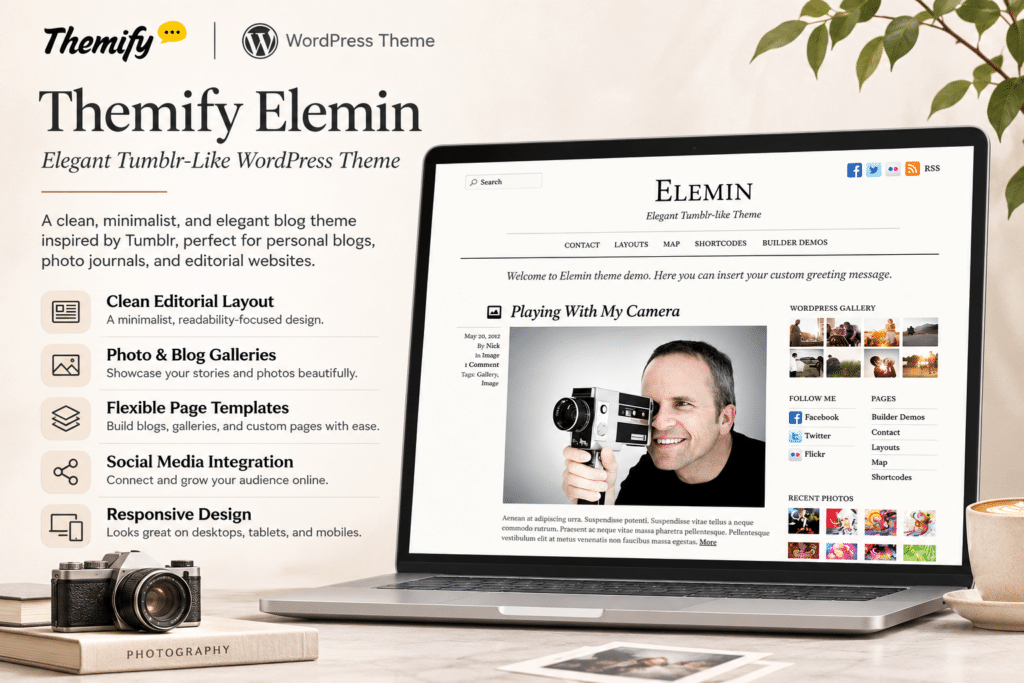
Elemin is a clean, minimal WordPress theme by Themify, designed for bloggers, writers, photographers, publishers, and creative professionals. It combines elegant typography, balanced white space, and simple graphics to create a distraction-free reading experience that keeps the focus on your content.
The theme offers flexible blog layouts, including traditional list views and multiple grid designs. Its Tumblr-style WordPress post format support allows you to publish different types of content, such as photos, galleries, videos, quotes, links, and standard articles.
Powered by the Themify framework, Elemin includes customization options, the Themify drag-and-drop Builder, responsive layouts, and WooCommerce compatibility. With multiple colour skins, built-in lightbox galleries, and customizable footer areas, it provides a flexible foundation for personal blogs, online magazines, and portfolio websites.
Key Features
Minimal and Elegant Design
Create a visually appealing website with clean typography, balanced spacing, and minimal graphics. The simple design keeps attention on articles, photographs, and other published content.
Responsive and Fluid Layout
Display your website across desktop computers, tablets, and smartphones. The fluid layout automatically adapts to different screen sizes for a consistent browsing experience.
List and Grid Blog Layouts
Choose between a traditional blog list and multiple grid-based layouts. Present articles and featured images in a format that suits your publishing style.
WordPress Post Format Support
Publish different content types using WordPress post formats, including standard posts, images, galleries, videos, quotes, links, and asides. Create a varied blog experience without relying on a single article layout.
Built-In Lightbox Gallery
Display photographs and image galleries in a lightbox slideshow. Allow visitors to view images in an enlarged presentation without installing a separate gallery plugin.
11 Theme Skins
Choose from 11 available theme skins to change the website’s visual appearance. Customize the overall look to complement your brand or personal publishing style.
Themify Drag-and-Drop Builder
Design custom page layouts using the Themify Builder included with the theme framework. Arrange rows, columns, and content modules with a visual editor and live preview.
Customizable Theme Options
Manage important website appearance settings through the Themify theme options panel. Customize layouts, colours, typography, logos, and other supported design elements without editing theme files.
Google Fonts Integration
Choose from an extensive collection of Google Fonts to customize headings, body text, and other website typography. Create a consistent visual identity with flexible font options.
Default Layout Controls
Configure different layout settings for the homepage, blog index, individual posts, and static pages. Adjust content presentation to suit different sections of your website.
Footer Customization
Add a footer logo, optional navigation menu, and custom footer text. Use up to four footer widget columns to display additional links, information, or other website content.
Right-to-Left Language Support
Use the included RTL stylesheet to support right-to-left website layouts. This makes Elemin suitable for websites publishing content in languages such as Arabic and Hebrew.
WooCommerce Compatibility
Integrate WooCommerce to add online shopping functionality to your website. Present products and build a basic online store alongside your blog or portfolio.
Demo Content Import
Use the Themify demo import functionality to recreate the theme’s sample website structure. Replace the demo content with your own text, photographs, and branding.
Custom CSS and Styling
Add custom CSS to adjust website elements beyond the standard theme settings. Fine-tune colours, spacing, typography, and other visual details.
SEO-Friendly Structure
Use the theme’s clean layout and organized content presentation as a foundation for search-friendly pages and blog posts. Search visibility also depends on content quality, technical configuration, and your SEO plugin.
Themify Framework Features
Benefit from the shared Themify framework, which includes customization tools, builder functionality, and supported performance features such as script minification and caching options.