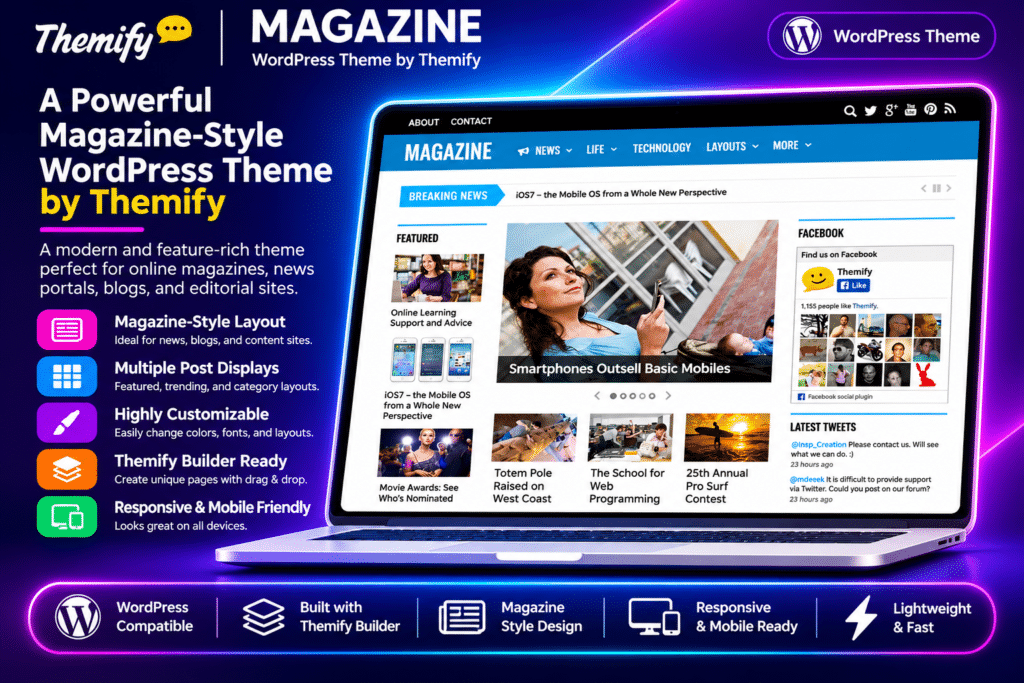
Themify Magazine is a feature-rich WordPress theme designed for online magazines, news portals, editorial websites, and content-driven blogs. Its flexible three-column design and drag-and-drop Themify Builder make it easy to create professional magazine layouts inspired by popular digital publications.
The theme includes 42 pre-built layout configurations, multiple post styles, mega menus, a breaking news ticker, and dedicated advertising areas. Whether you’re publishing daily news, industry updates, lifestyle articles, or editorial features, Themify Magazine provides a flexible foundation for organizing and presenting your content.
Key Features
Drag-and-Drop Magazine Builder
- Create custom magazine homepage layouts using the Themify Builder.
- Arrange content into multiple rows, columns, and sections.
- Build complex editorial grids without manually editing theme files.
- Use post and slider modules to display selected articles and categories.
42 Pre-Built Layout Configurations
- Choose from six sidebar configurations.
- Select from seven different single-post layouts.
- Combine layout options to create up to 42 configurations.
- Customize the appearance of archive pages, individual posts, and other content areas.
Breaking News Ticker
- Display important headlines in a dedicated ticker area.
- Select a category to determine which posts appear as breaking news.
- Give visitors quick access to important or recently published stories.
Mega Menu Navigation
- Create multi-column dropdown menus for large websites.
- Display recent posts from selected categories in menu dropdowns.
- Add static links and widgets to expanded navigation areas.
- Organize extensive news categories without overcrowding the main navigation.
Mobile Slide Navigation
- Use a sliding navigation menu designed for smaller screens.
- Organize multiple menu links in a compact mobile interface.
- Provide easier access to website sections on smartphones and tablets.
Advertising & Monetization Areas
- Display banner advertisements in prominent website locations.
- Add advertising code through widgetized areas.
- Support banner images, text links, Google AdSense, and other ad code.
- Use dedicated header, sidebar, and content-area placements to organize advertisements.
Related Posts & Social Sharing
- Display dynamically selected related articles below individual posts.
- Let readers share content through built-in social sharing buttons.
- Add social profile links using the theme’s social link options.
- Encourage visitors to discover more articles on your website.
Flexible Content & Media Display
- Display videos instead of standard featured images using post settings.
- Open images, videos, and iframe content in lightbox popups.
- Insert WordPress galleries into posts and pages.
- Use icon fonts to enhance navigation and other interface elements.
Six Color Skins & Styling Options
- Choose from six predefined theme skins.
- Customize fonts, colors, backgrounds, and other design elements.
- Use the live WordPress Customizer to preview visual changes.
- Add custom CSS for further design adjustments.
Responsive & Retina-Ready Design
- Adapt the magazine layout to desktop, tablet, and mobile screens.
- Display sharp visual elements on high-resolution screens.
- Provide a consistent reading experience across different devices.
WooCommerce & Themify Framework
- Integrate WooCommerce to add product-selling functionality.
- Use the standard Themify Builder and theme customization tools.
- Import demo content to establish a starting website layout.
- Add custom header and footer code, widgets, and dynamically inserted content.