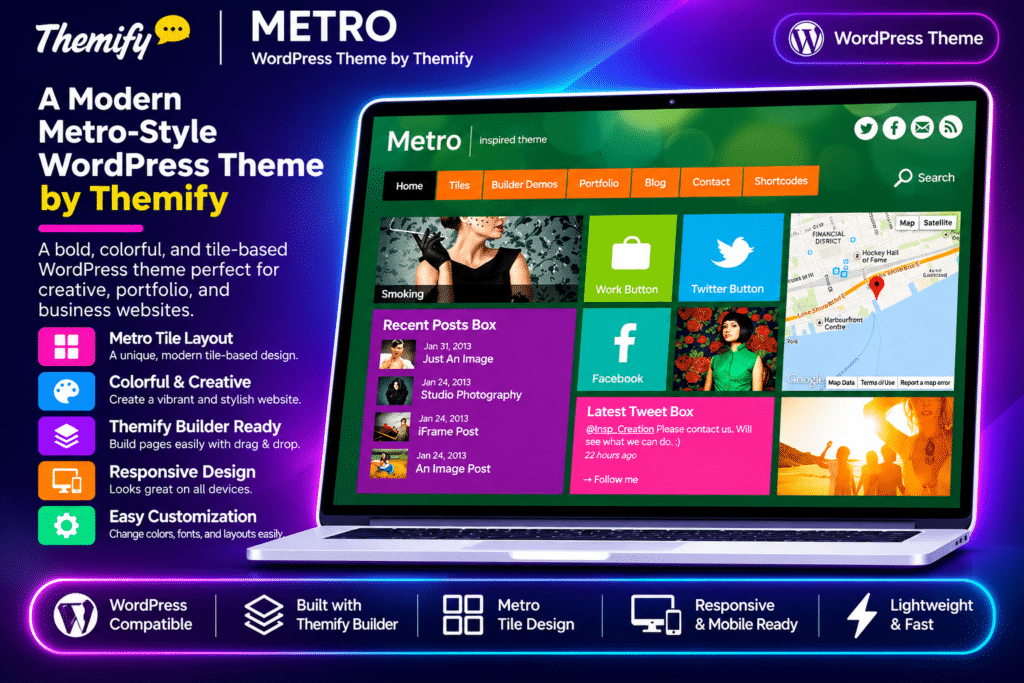
Themify Metro is a colourful, responsive WordPress theme inspired by the Windows 8 Metro interface. Designed for creative websites, blogs, portfolios, and visual showcases, it uses a distinctive tile-based layout to organize content into an engaging grid.
The theme includes a dedicated Tile custom post type that lets you create different content blocks, including images, text, buttons, gallery sliders, and maps. You can choose small, medium, or large tile sizes, combine different content types, and customize their colours to build a personalized homepage.
With portfolio layouts, WordPress post format support, infinite scrolling, and the Themify Builder, Metro provides a flexible foundation for creating visually distinctive websites.
Key Features
Metro Tile Layout System
- Create dynamic grid-based layouts using the dedicated Tile custom post type.
- Choose small, medium, or large tile sizes.
- Arrange different tile sizes to create a distinctive homepage design.
- Assign background colours to individual tiles.
- Organize tiles into categories for easier content management.
Multiple Tile Content Types
- Text Tiles: Display text, shortcodes, and other dynamic content.
- Button Tiles: Create image-based tiles that link to selected pages or external destinations.
- Gallery Tiles: Showcase multiple images using a gallery slider.
- Image Tiles: Display featured images with optional content that flips on hover.
- Map Tiles: Show Google Maps locations with optional content on the reverse side.
Portfolio Management
- Use the built-in Portfolio custom post type to showcase creative projects.
- Display projects with a single featured image or multiple gallery images.
- Organize portfolio items using custom categories.
- Choose different portfolio layouts, including grid and full-width displays.
- Use animated flip-over content and infinite scrolling to create a more interactive portfolio experience.
WordPress Post Format Support
- Publish content using image, video, gallery, quote, audio, link, and status formats.
- Access relevant custom fields based on the selected post format.
- Display different types of editorial and multimedia content.
- Add YouTube and Vimeo video content through supported video URLs.
Nine Metro Colour Options
- Choose from nine colour variations inspired by the Windows 8 Metro palette.
- Apply colours to blog posts, Tile posts, Portfolio posts, and theme styling.
- Customize the visual appearance of individual content blocks.
- Use predefined theme skins for a consistent design.
Infinite Scrolling & Pagination
- Automatically load additional posts as visitors scroll.
- Replace automatic loading with a manual Load More button.
- Use traditional numbered pagination when preferred.
- Choose a navigation style that suits your website’s content structure.
Flexible Blog & Portfolio Layouts
- Display blog content using grid or list-style layouts.
- Customize portfolio archive and individual project layouts.
- Adjust content presentation through the Themify settings panel.
- Use featured images, galleries, and different post formats to create varied content pages.
Gallery Slider & Lightbox
- Display image galleries within tiles and portfolio projects.
- Configure slider autoplay and transition effects.
- Open linked images, videos, and iframe content in lightbox popups.
- Present visual content without sending visitors away from the current page.
Themify Builder & Shortcodes
- Create custom page layouts using the drag-and-drop Themify Builder.
- Add dynamic content through supported Themify shortcodes.
- Display sliders, recent posts, maps, buttons, and social feeds in tile layouts.
- Build custom front pages using tiles and other content elements.
Responsive Design & Customization
- Adapt the website layout to mobile devices and different screen sizes.
- Customize colours, typography, backgrounds, and spacing through the WordPress Customizer.
- Configure navigation menus, social links, and widget areas.
- Add custom CSS and use child themes for further modifications.
WooCommerce Integration
- Add eCommerce functionality through WooCommerce.
- Combine product listings with blog and portfolio content.
- Build a website that brings creative showcases and online selling together.