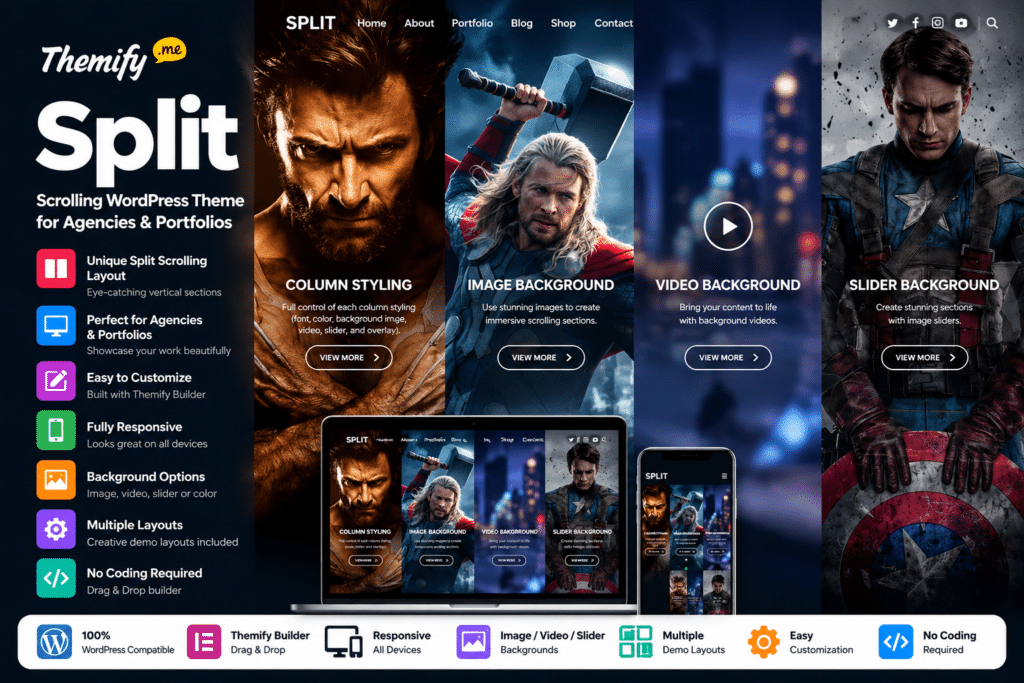
Its signature feature is Split Scrolling, which creates a split-screen transition as visitors move between full-height content sections.
Images, text, sliders, videos, and other supported content can be placed inside these sections, making Split particularly effective for visual portfolios, agency presentations, landing pages, and storytelling websites.
The theme also includes Themify Builder, allowing you to visually construct and customize layouts without building every page directly in code.
Key Features
- Split Scrolling Effect – Create full-height sections with an interactive split-screen transition while visitors scroll.
- Themify Drag & Drop Builder – Build supported page layouts visually from the frontend.
- 8 Sample Page Layouts – Start with ready-made concepts for Agency, Portfolio, Product, Restaurant, Shop, Personal, Wedding, and other websites.
- Advanced Column Styling – Customize individual columns with colors, images, sliders, videos, overlays, spacing, and typography.
- Portfolio Post Type – Create dedicated portfolio projects using the optional Themify Portfolio Posts functionality.
- Portfolio Filtering – Let visitors filter supported portfolio projects according to categories.
- WooCommerce Support – Add an online shop and display products within a design that matches the Split theme.
- Masonry Layouts – Present blog and portfolio content using responsive masonry grids.
- Infinite Scroll – Automatically load additional posts as visitors continue scrolling.
- Half-Page Post Layout – Display a fixed featured image alongside scrolling article or portfolio content.
- Header & Footer Controls – Show, hide, and customize supported header and footer elements on individual pages.
- 9 Color Skins – Quickly apply predefined theme color styles.
- Demo Import – Import supported demo content, menus, widgets, and theme settings for a faster starting point.
- Responsive & Retina Ready – Adapt layouts across desktop, tablet, mobile, and high-resolution screens.
Perfect For
Themify Split is suitable for creative agencies, graphic designers, photographers, freelancers, artists, architects, portfolio websites, product landing pages, restaurants, personal brands, small WooCommerce stores, and businesses that want a visually engaging one-page or presentation-style website.
Create Unique Split-Scrolling Pages
Split’s defining feature is its full-height split-scrolling system.
When enabled, Builder rows and columns fill the viewport and move through a split transition as the visitor scrolls.
You can use these sections for:
- Portfolio projects
- Agency services
- Product showcases
- Photography
- Full-screen videos
- Brand storytelling
- Landing pages
- Promotional campaigns
On tablet devices, Themify changes the experience to a full-section scrolling effect for better performance.
Build with Themify Builder
Split works closely with Themify Builder.
You can create layouts visually and add content such as text, images, maps, sliders, videos, and other supported Builder modules.
Rows and columns can be styled independently with controls for:
- Background colors
- Background images
- Parallax images
- Video backgrounds
- Sliders
- Fonts
- Padding
- Margins
- Borders
- Overlays
This makes it possible to create significantly different visual sections inside the same scrolling page.
8 Ready-Made Split Layout Ideas
Themify currently showcases eight Split Scrolling layout concepts:
- Restaurant
- Agency
- Product
- Portfolio
- Shop
- Personal
- Wedding
- Super Heroes
These layouts can be imported and then customized with your own text, images, branding, and content.
They provide a useful starting point for users who want the Split effect without designing every section from an empty page.
Build Portfolio Websites
Split includes an optional Portfolio post type through the Themify Portfolio Posts plugin.
Portfolio projects can contain featured images, custom content, and different display settings.
Supported portfolio controls include:
- Category selection
- Grid layouts
- Post ordering
- Items per page
- Featured images
- Excerpts or full content
- Post filters
- Custom project URLs
You can also design individual portfolio posts using Themify Builder.
Portfolio Category Filtering
The portfolio system includes category filtering.
Visitors can select a portfolio category and narrow the displayed projects without manually browsing separate archive pages.
This makes the theme particularly useful for designers, agencies, photographers, and freelancers who want to organize work into categories such as branding, photography, web design, products, or illustration.
Half-Page & Full-Width Post Layouts
Split includes distinctive layouts for blog and portfolio content.
The no-sidebar half-page layout places the featured image on one side of the screen while the article content scrolls on the other.
A sidebar-based layout can instead show the featured image full-width above the main content.
These layouts help maintain the theme’s visual identity even outside the primary Split Scrolling pages.
Masonry Layout & Infinite Scroll
Blogs and portfolios can also use responsive masonry layouts.
When Infinite Scroll is enabled, additional posts load as visitors continue down the page.
If you prefer more traditional navigation, automatic infinite scrolling can be disabled in favor of a Load More button or standard numbered pagination.
WooCommerce Support
Themify Split supports WooCommerce, allowing you to combine a creative portfolio or agency website with an online shop.
This can be useful for selling:
- Creative products
- Merchandise
- Artwork
- Photography
- Digital resources
- Design products
- Physical goods
Themify also provides a Shop sample layout demonstrating how WooCommerce products can fit into the Split design.
Custom Header & Footer Controls
Split provides page-level controls for supported header and footer elements.
You can:
- Hide the header
- Hide the footer
- Hide selected header elements
- Use solid backgrounds
- Use transparent headers
- Use image backgrounds
- Customize header text colors
This is particularly useful for landing pages and full-screen portfolio designs where traditional navigation could distract from the visual presentation.
9 Pre-Designed Color Skins
Split includes nine additional color skins:
- Yellow
- Orange
- Grey
- Pink
- Black
- Blue
- Purple
- White
- Red
These presets provide a fast way to change the overall visual direction of the website before making more detailed customizations.
Customize with WordPress Customizer
Split uses the Themify framework and WordPress Customizer for supported visual changes.
You can adjust elements such as:
- Colors
- Backgrounds
- Fonts
- Borders
- Spacing
- Layout settings
Changes can be previewed before they are published.
Themify currently also provides access to more than 1,500 Google Fonts through its standard theme framework.
Built-In Performance Tools
Current Themify framework features include built-in WebP image handling and caching options.
These tools can help optimize image delivery and reduce unnecessary page-loading work.
Actual performance still depends on hosting, image sizes, third-party scripts, Builder complexity, plugins, and overall site configuration, so no specific PageSpeed or Core Web Vitals score should be assumed.
Multilingual & Translation Ready
Themify themes support translation and multilingual workflows.
Split can be used with compatible multilingual plugins such as:
- WPML
- Polylang
- TranslatePress
This makes it suitable for agencies and portfolio businesses serving audiences in multiple languages.
Build a Visually Different WordPress Website
Create an interactive online presence with Themify Split – Scrolling WordPress Theme for Agencies & Portfolios.
With split-screen scrolling, Themify Builder, portfolio filtering, WooCommerce support, masonry grids, infinite scrolling, custom column styling, responsive layouts, demo imports, and multiple color skins, Split provides a distinctive foundation for creative and visually driven WordPress websites.