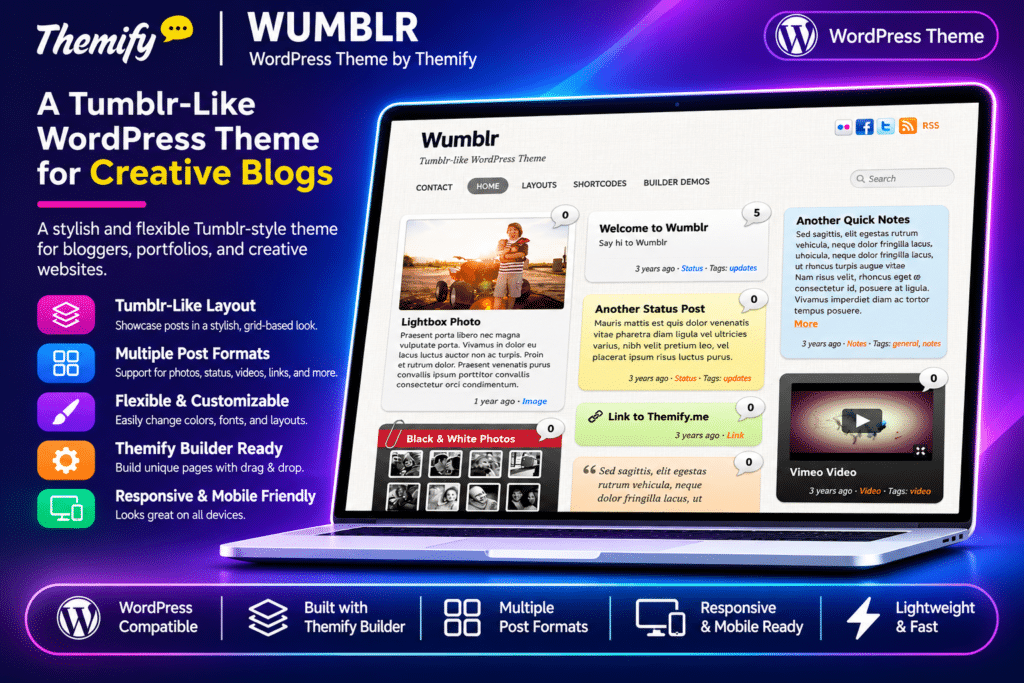
Wumblr is a Tumblr-inspired WordPress theme by Themify, designed for bloggers, photographers, artists, writers, and creative publishers who want to share different types of content in a visually engaging format. It brings a microblogging-style experience to WordPress with flexible post formats, colourful content blocks, and multiple column layouts.
The theme supports nine different post formats, allowing you to publish standard articles, notes, videos, images, galleries, quotes, audio, links, and status updates. Each post can have its own visual appearance using 15 colour presets, making it easy to distinguish different content types.
Wumblr also includes three page column layouts, seven theme skins, threaded comments, custom navigation menus, and footer widget areas. Powered by the Themify framework, it provides additional customization tools, a drag-and-drop Builder, WooCommerce compatibility, and demo import functionality.
Wumblr is an established Themify theme, so check compatibility with your current WordPress and PHP versions and test it on a staging website before using it on a production site.
Key Features
Tumblr-Style Microblogging Design
Give your WordPress website the appearance and feel of a Tumblr-style blog. Publish different content formats in a flexible layout designed for short updates, visual stories, and regular articles.
Nine WordPress Post Formats
Publish different types of content using dedicated post formats:
- Standard or General – Traditional blog articles
- Notes – Short text updates and announcements
- Video – Embedded video content
- Image – Individual photographs and images
- Gallery – Collections of images
- Quote – Featured quotations and attributed text
- Audio – Music and audio content
- Link – External links and shared resources
- Status – Short status updates
15 Individual Post Colour Presets
Choose from 15 colour presets to customize individual posts. Give different content types their own visual identity and create a colourful, varied blog presentation.
Three Page Column Layouts
Choose from three page layout options to organize your website content. Create a single-column layout with a sidebar or use two-column and three-column arrangements.
Seven Theme Skins
Select from seven pre-designed theme skins to change the overall appearance of your website. Customize the visual style to complement your blog or personal brand.
Video Embedding
Add video content using supported YouTube and Vimeo embed URLs. Display video posts through the dedicated video format without manually building complex embed layouts.
Audio Player Support
Publish audio content using the dedicated audio post format. The theme supports HTML5 audio playback with a fallback download link for browsers that do not support HTML5 audio.
Image and Gallery Support
Publish individual images and image galleries using the relevant post formats. Display visual content directly within your blog and create an engaging photography or media-focused website.
Lightbox Media
Use the Themify Custom Panel’s Lightbox Link option to open supported images, videos, and iframe content in a popup. Give visitors an enlarged viewing experience without leaving the current page.
Custom Page Layouts
Create pages that display posts from selected categories. Configure the number of posts, image dimensions, and available layout options to build customized blog and content pages.
Themify Drag-and-Drop Builder
Design custom website pages using the Themify Builder. Arrange text, images, videos, galleries, and other supported content modules through a visual editing interface.
Custom Navigation Menus
Create custom WordPress navigation menus with multiple-level dropdown support. Organize website sections and make important content easier to access.
Header Social Media Widget
Use the header widget area to display social media buttons, links, or other supported WordPress widgets. Make your social profiles more accessible to visitors.
Footer Widget Areas
Choose from up to four footer widget columns. Add useful information, social links, navigation, announcements, and other supported widgets.
Threaded Comments
Enable threaded comments to organize visitor discussions and replies. Encourage interaction around articles, updates, photographs, and other published content.
Custom Footer Text
Personalize the website footer with your own copyright information, branding, and additional text. Configure supported footer content through the Themify settings panel.
Themify Theme Customizer
Customize supported website elements through the WordPress Customizer. Adjust colours, backgrounds, typography, spacing, and other appearance settings with a live preview.
Demo Content Import
Import the available Wumblr demo setup, including sample posts, pages, comments, menus, widgets, and Themify settings. Use the demo structure as a starting point for your website.
WooCommerce Compatibility
Integrate WooCommerce to add online shopping functionality. Extend your blog with product listings and supported eCommerce features.
Google Fonts Integration
Choose from a large collection of Google Fonts to customize headings and body typography. Create a consistent visual style throughout your website.
Custom CSS and Hook Content
Extend the theme’s appearance and functionality using custom CSS and Themify Hook Content options. Add supported content dynamically without manually modifying every theme template.
Child Theme Support
Use a child theme to customize templates, styles, and other theme files while keeping your modifications separate from the parent theme.
Responsive Layout
Display website content across desktop computers, tablets, and smartphones. The responsive layout adapts to different screen sizes for a consistent browsing experience.