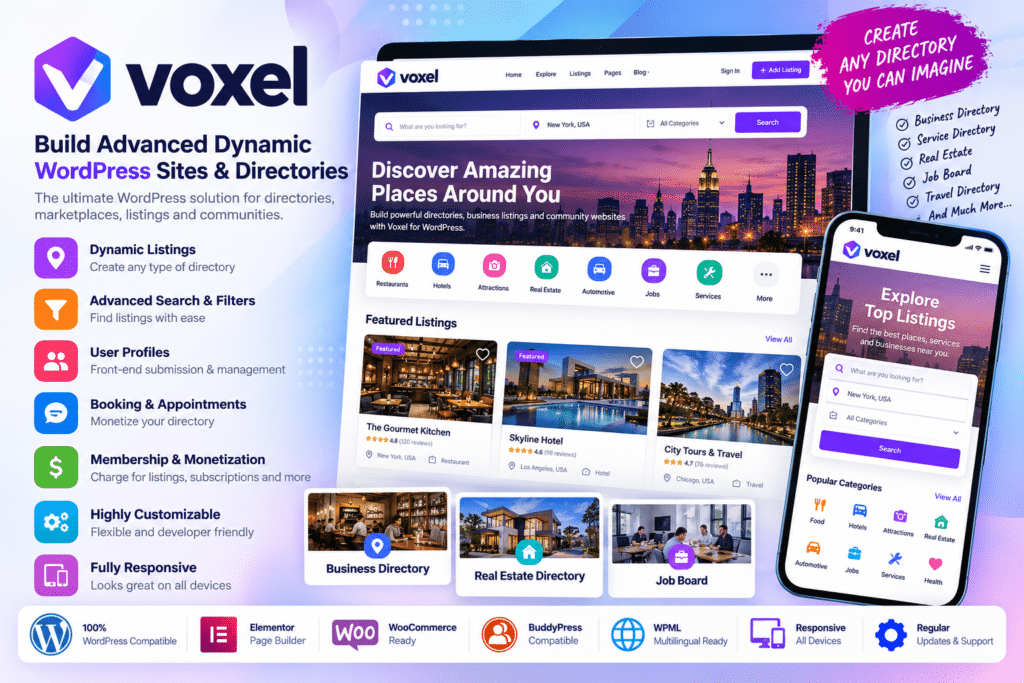
Voxel is an advanced WordPress theme and platform-building solution designed for creating highly dynamic websites such as business directories, listing marketplaces, booking platforms, rental websites, membership communities, social networks, eCommerce marketplaces, and other data-driven WordPress projects.
Instead of combining numerous separate plugins for custom post types, fields, search, frontend submissions, listings, memberships, social functionality, and monetization, Voxel brings many of these capabilities together within one tightly integrated system.
Voxel is deeply integrated with Elementor, allowing dynamic tags, visibility rules, loops, custom widgets, and Voxel data to be used directly inside the visual builder.
Key Features
- Custom Post Type Builder – Create custom WordPress post types for listings, properties, vehicles, businesses, events, services, or other structured content.
- Custom Fields & Taxonomies – Build detailed content structures using a drag-and-drop field editor with numerous field types and presets.
- Dynamic Data – Connect Elementor templates to database content through Voxel dynamic tags.
- Advanced Voxel Search – Create faceted search interfaces with configurable filters and high-performance indexed queries.
- Frontend Post Submission – Allow users to create and manage supported listings and content directly from the frontend.
- Paid Listings – Monetize directory submissions through one-time or subscription-based listing plans.
- Paid Memberships – Create membership plans that unlock selected content or site functionality.
- Promoted Listings – Sell promotional packages that increase supported listing visibility in search results.
- Claim Listings – Allow business owners to claim and manage existing directory listings.
- Booking Products – Build booking and reservation workflows for suitable services, rentals, stays, or appointments.
- Marketplace Functionality – Create multi-vendor commerce workflows using Stripe Connect and supported commissions.
- Direct Messaging – Enable private conversations between users or between users and listings.
- Timeline & Followers – Add community feeds, comments, reviews, followers, and social activity.
- Collections – Let users organize listings and posts they want to save.
- Full Site Editing – Design headers, footers, archives, single templates, preview cards, submission pages, and other site areas visually.
Perfect For
Voxel is suitable for business directories, property portals, classified websites, job boards, car marketplaces, restaurant directories, doctor directories, rental platforms, travel websites, booking marketplaces, service directories, membership platforms, online communities, social networks, multi-vendor marketplaces, and other advanced dynamic WordPress websites.
Create Custom Post Types & Fields
Voxel includes its own custom post type and field-building system.
You can create content structures for almost any type of website, including:
- Businesses
- Properties
- Cars
- Hotels
- Doctors
- Restaurants
- Events
- Jobs
- Services
- Rentals
- Courses
- Classified listings
The current field builder provides more than 20 field types, multiple presets, and layout fields, allowing you to capture structured information instead of relying only on standard WordPress titles and content.
Build Dynamic Elementor Templates
Voxel integrates directly with Elementor.
Dynamic tags can connect Elementor elements to information stored inside your posts, users, taxonomies, listings, and other supported data.
This means you can design a template once and have Voxel automatically populate it with different database content.
Current Voxel integration also adds visibility rules, loops, and more than 20 Voxel widgets directly into Elementor.
Build Advanced Search & Filtering
Voxel Search is designed specifically for websites containing large amounts of structured content.
Current official documentation lists more than 15 filter types along with:
- Faceted search
- Conditional filters
- Adaptive filters
- Custom search ordering
- Multi-clause ordering
- Dedicated indexing tables
Each custom post type can have its own search configuration.
Voxel stores searchable information in dedicated index tables containing only the data required by the configured filters, which is designed to improve query performance and scalability compared with relying entirely on normal WordPress queries.
Create Paid Directory Listings
Voxel can monetize frontend directory submissions through Paid Listings.
You can create listing plans that determine what a user receives when submitting or managing directory content.
Plans can be structured around one-time or subscription payments, making them suitable for business directories, job boards, property portals, service marketplaces, and other listing websites.
Visibility conditions can also be tied to listing plans, allowing different plans to unlock different fields, widgets, or content.
Create Membership Plans
Voxel includes a Paid Members addon for subscription-based memberships.
Membership plans can unlock different parts of the website using Voxel’s visibility rules.
Current membership pricing options support settings such as:
- Price
- Discount price
- Currency
- Subscription interval
- Free trials
- Multiple billing periods
A single plan can therefore offer monthly, yearly, or other supported billing options.
Build Booking & Rental Platforms
Voxel can also be used for booking-focused websites.
Official examples include accommodation bookings, doctor platforms, and car rental websites.
Combined with custom fields, search, frontend submission, product types, user accounts, and marketplace functionality, this makes Voxel suitable for sites where users need to find and reserve services or resources.
Build Multi-Vendor Marketplaces
Voxel includes marketplace functionality powered by Stripe Connect.
Vendors can sell supported products or services while the platform owner configures commissions.
Voxel’s product system can support:
- One-time products
- Subscription products
- Physical products
- Digital products
- Simple products
- Variable products
- Bookings
This allows directory and marketplace functionality to coexist within the same WordPress platform.
Monetize Promoted Listings
Directory owners can sell promoted-post packages that increase listing priority in supported search results for a limited period.
This gives businesses or vendors an additional way to gain visibility while creating another monetization stream for the directory operator.
Add Claim Listing Functionality
Voxel can be used to publish businesses or other listings before the actual owner has registered.
The Claim Listing functionality allows the real owner to request control of an eligible listing.
Directory owners can also charge for supported claiming workflows, creating another monetization option for business-directory websites.
Build Social & Community Features
Voxel includes several community-oriented tools that go beyond traditional directory functionality.
Its Timeline and Followers system supports social activity including reviews, comments, and other interactions.
Collections let users organize posts or listings they want to save, while Direct Messages provide private communication between users or between users and listings.
This makes Voxel useful for platforms that combine directory data with community functionality.
Create Conditional Experiences
Voxel includes advanced visibility rules and conditions.
You can show or hide supported content depending on user information, post information, membership plans, listing plans, custom fields, and other dynamic conditions.
For example, you could:
- Hide premium fields from free listings
- Display tools only to paid members
- Show content to listing owners
- Create role-specific sections
- Change layouts according to dynamic data
This makes it possible to build personalized website experiences without creating separate templates for every situation.
Design the Entire Website
Voxel’s Full Site Editing system lets you visually design far more than ordinary pages.
Supported templates include:
- Headers
- Footers
- Single post templates
- Archive pages
- Preview cards
- Create Post pages
- Taxonomy templates
- Membership pages
- eCommerce templates
Unlimited headers and footers can also be assigned conditionally to different sections of the website.
App Events & Notifications
Voxel includes an App Events system for triggering notifications when supported activity occurs.
These can include onsite notifications and email messages.
App Events can also connect Voxel activity with external automation workflows through compatible integrations, helping you automate onboarding, listing activity, transactions, membership events, and community interactions.
Build Almost Any Dynamic WordPress Platform
Create powerful data-driven websites with Voxel – Build Advanced Dynamic WordPress Sites & Directories.
With custom post types, custom fields, Elementor dynamic data, advanced search, frontend submissions, paid listings, memberships, bookings, marketplace functionality, Stripe Connect, social features, messaging, visibility conditions, and full-site template building, Voxel provides a comprehensive foundation for advanced WordPress directory and platform projects.