Deprecated: Return type of EDD_Multi_Currency\Container\Container::offsetExists($key) should either be compatible with ArrayAccess::offsetExists(mixed $offset): bool, or the #[\ReturnTypeWillChange] attribute should be used to temporarily suppress the notice in /home/u512595749/domains/gplnests.com/public_html/wp-content/plugins/edd-multi-currency/src/Container/Container.php on line 1200

Deprecated: Return type of EDD_Multi_Currency\Container\Container::offsetGet($key) should either be compatible with ArrayAccess::offsetGet(mixed $offset): mixed, or the #[\ReturnTypeWillChange] attribute should be used to temporarily suppress the notice in /home/u512595749/domains/gplnests.com/public_html/wp-content/plugins/edd-multi-currency/src/Container/Container.php on line 1211

Deprecated: Return type of EDD_Multi_Currency\Container\Container::offsetSet($key, $value) should either be compatible with ArrayAccess::offsetSet(mixed $offset, mixed $value): void, or the #[\ReturnTypeWillChange] attribute should be used to temporarily suppress the notice in /home/u512595749/domains/gplnests.com/public_html/wp-content/plugins/edd-multi-currency/src/Container/Container.php on line 1223

Deprecated: Return type of EDD_Multi_Currency\Container\Container::offsetUnset($key) should either be compatible with ArrayAccess::offsetUnset(mixed $offset): void, or the #[\ReturnTypeWillChange] attribute should be used to temporarily suppress the notice in /home/u512595749/domains/gplnests.com/public_html/wp-content/plugins/edd-multi-currency/src/Container/Container.php on line 1239
Woffice – Intranet & Project Management WordPress Theme

Woffice – Intranet, Extranet & Project Management WordPress Theme

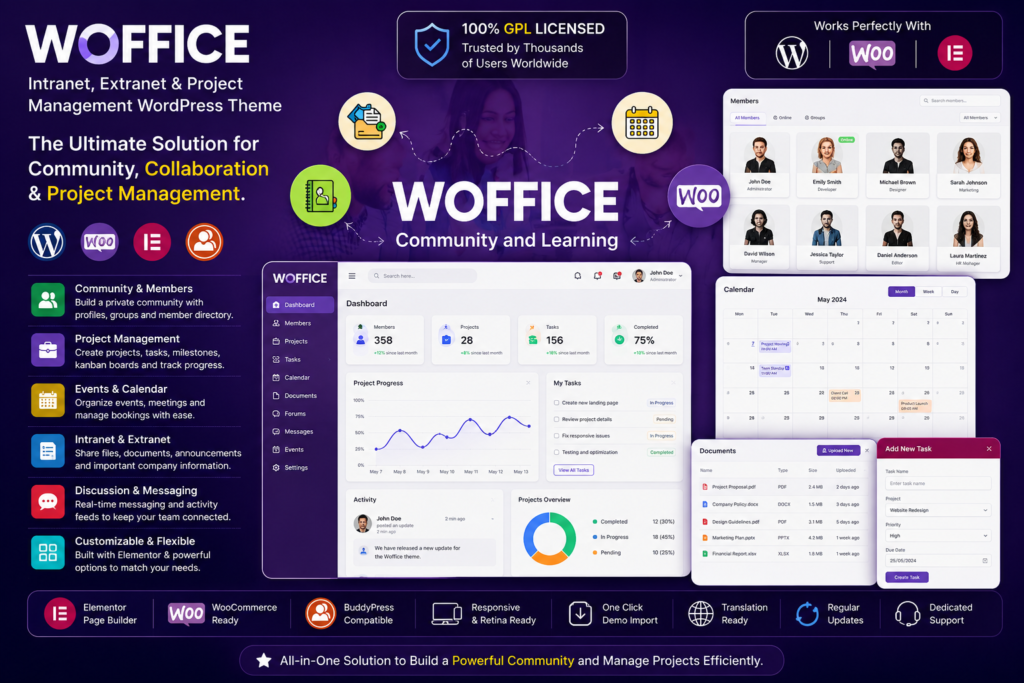
Woffice is a feature-rich WordPress theme designed for building intranet, extranet, community, and project management websites

Woffice – Intranet, Extranet & Project Management WordPress Theme

₹ 710.28 - one-time

  • 🛡 Virus-scanned & clean
  • 🏅 Licensed under GPL — yours to keep
  • 🎧 One Year of support included
  • 🔒 Secure checkout
  • 0 downloads

₹ 710.28

Overview

What you’re getting

Woffice is a feature-rich WordPress theme designed for building intranet, extranet, community, and project management websites. It provides businesses, organizations, agencies, and teams with a central online space where members can collaborate, manage projects, share information, and stay connected.

Instead of combining multiple tools to create a private company portal, Woffice brings a range of workplace and community-focused features into WordPress. You can use it to organize projects, create member directories, publish internal content, share files, manage events, and build a structured workspace for your team.

Its responsive design also helps members access important information from desktops, tablets, and mobile devices.

Key Features

  • Intranet & Extranet Websites – Create private or public workspaces for employees, clients, teams, and communities.
  • Project Management Tools – Organize projects, tasks, progress, and team collaboration from your WordPress website.
  • Member Directory – Build searchable profiles and directories to help users find and connect with other members.
  • User Profiles – Give registered members their own profiles and account areas.
  • Community Features – Create a more interactive environment where members can communicate and collaborate.
  • File & Document Sharing – Keep useful resources, documents, and project files accessible to your team.
  • Events & Calendar Features – Organize company events, meetings, deadlines, and other important dates.
  • Private Content Options – Restrict selected areas and information to logged-in or authorized users.
  • Dashboard-Style Layouts – Present projects, announcements, activities, and other important information in an organized workspace.
  • Responsive Design – Provide a consistent experience across desktop, tablet, and mobile devices.
  • Customizable Design – Adjust layouts, branding, menus, typography, and other visual elements to suit your organization.
  • WordPress Integration – Build your collaborative platform while continuing to use the familiar WordPress environment.

Perfect For

Woffice is a useful choice for:

  • Company intranets
  • Employee portals
  • Client extranets
  • Project management websites
  • Remote teams
  • Agencies and freelancers
  • Online communities
  • Educational organizations
  • Membership websites
  • Internal knowledge portals
  • Team collaboration platforms
  • Private business networks

Bring Your Team Into One Workspace

Woffice helps you create a centralized digital workspace where team members can find information, follow projects, access resources, and collaborate more efficiently.

Whether you need an employee intranet, private client area, project workspace, or community portal, the theme gives you a flexible WordPress foundation that can be adapted to different organizational needs.

Build a Better WordPress Workspace

Create a professional intranet, extranet, or collaborative platform with Woffice. Its combination of project management, community, member, and content-management features makes it a practical choice for organizations that want to bring their internal activities into one WordPress-powered environment.

From small teams to larger organizations, Woffice can help you create a more organized and connected online workspace.


Installation

Up and running in minutes

What you’ll need

  • After downloading, unzip the package first. It may contain extras such as documentation or bundled templates — make sure you install the correct plugin file.
  1. Unzip the Plugin File

    Find the downloaded .zip file on your computer. Right-click it and extract its contents to a new folder.

    Unzip the Plugin File
  2. Upload the Plugin Folder

    Navigate to the wp-content/plugins folder on your website, then drag and drop the unzipped plugin folder into it.

    Upload the Plugin Folder
  3. Activate the Plugin

    Log in to your WordPress dashboard and open the Plugins menu. Your new plugin will be listed — click Activate to finish.

    Activate the Plugin

FAQ

Questions, Answered

Is this the original product?

GPL NEST provides GPL-licensed WordPress products distributed under the applicable open-source license. We do not claim to be the original developer unless specifically stated.

Usage depends on the product’s GPL license and the terms shown on the product page. Please review the product information before installation.

When an updated version becomes available on GPL NEST, you can download it from your account according to your purchase or membership access.

Some premium features that depend on the original developer’s license key, cloud service, API, automatic updates, or external account may not be included.

Contact our support team if you have an issue with your download or installation. We’ll do our best to help.

GPL NEST MEMBERSHIP

Need More Than One Product?

Get access to thousands of WordPress themes and plugins with a GPL NEST membership.