
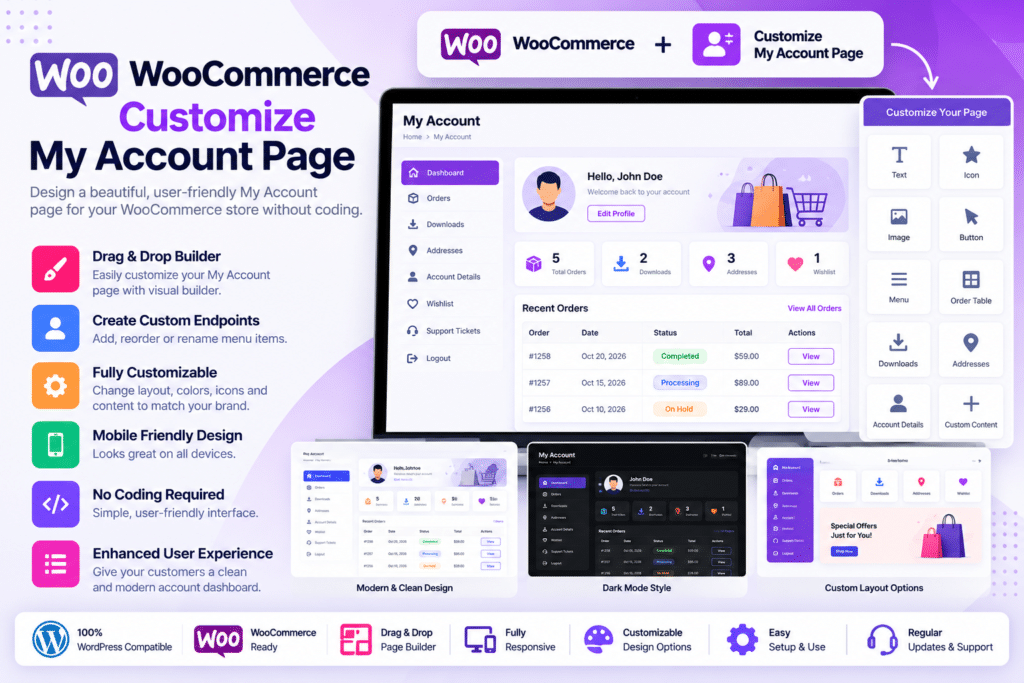
Customize My Account for WooCommerce is a customer-dashboard enhancement plugin designed to give store owners greater control over the standard WooCommerce My Account area.
Instead of relying only on the default WooCommerce tabs for orders, downloads, addresses, payment methods, and account details, you can add custom endpoints, links, groups, personalized content, profile pictures, and role-specific sections.
It is especially useful for stores that want to turn the customer account page into a more organized dashboard containing important links, membership information, support resources, downloads, promotions, subscriptions, bookings, and other customer-specific content.
Key Features
- Unlimited Custom Endpoints – Create additional tabs and account sections according to your store requirements.
- Edit Default WooCommerce Tabs – Rename, reorganize, or disable supported default account endpoints.
- Drag & Drop Ordering – Reorder default and custom account tabs without coding.
- Custom Links – Add menu items that link to internal pages or external websites.
- Grouped Endpoints – Organize related account sections together for cleaner navigation.
- User Role Conditions – Display selected endpoints only to specific WordPress user roles.
- Custom Dashboard Content – Add formatted text, media, HTML, and supported shortcodes to customer account sections.
- Smart Tags – Insert personalized user information such as names, email addresses, billing details, and other supported account data.
- Profile Pictures – Allow customers to upload their own profile image.
- Default Endpoint Control – Choose which account tab customers see first when they enter the My Account page.
- AJAX Navigation – Load supported account tabs without a full page refresh.
- Multiple Menu Layouts – Choose vertical left, vertical right, or horizontal navigation layouts.
- Live Style Customizer – Adjust colors, typography, spacing, profile images, and navigation appearance with preview controls.
- Custom CSS Support – Add additional styling for more advanced dashboard customization.
Perfect For
Customize My Account for WooCommerce is suitable for online stores, membership websites, subscription businesses, digital download stores, booking websites, customer portals, wholesale stores, educational businesses, service providers, and WooCommerce websites that need a more useful customer dashboard.
Customize Default WooCommerce Endpoints
WooCommerce normally includes standard account sections such as:
- Dashboard
- Orders
- Downloads
- Addresses
- Payment Methods
- Account Details
- Logout
Customize My Account for WooCommerce lets you modify the way these sections appear.
You can change supported labels, control visibility, reorganize their position, and combine them with additional custom account content.
This allows the customer dashboard to better match the structure of your business instead of relying on the same default layout used by every WooCommerce store.
Add Unlimited Custom Account Tabs
Custom endpoints can be used to add completely new sections to the My Account page.
For example, you could create tabs for:
- Customer support
- Member resources
- Tutorials
- Warranty information
- Account documents
- Downloads
- Loyalty information
- Affiliate details
- Special offers
- Product guides
- Custom services
Each custom endpoint can include its own label, slug, icon, and supported content.
Group Related Account Sections
Large customer dashboards can become difficult to navigate when too many tabs are shown at the same level.
The plugin supports grouped endpoints, allowing related sections to be organized together.
For example, a Support group could contain:
- Documentation
- Submit Ticket
- FAQs
- Contact Support
Similarly, a Membership group could contain resources, downloads, account information, and exclusive content.
Show Tabs by User Role
Not every customer needs to see the same account information.
Customize My Account for WooCommerce lets supported endpoints be restricted according to WordPress user roles.
This can be useful for:
- Wholesale customers
- Subscribers
- Members
- VIP customers
- Students
- Vendors
- Staff
- Other custom roles
A wholesale customer, for example, could see special account resources that remain hidden from standard retail customers.
Personalize Content with Smart Tags
The plugin includes smart tags that can insert customer-specific information into custom account content.
Current official information lists supported values including:
- User ID
- User Name
- User Email
- First Name
- Last Name
- Display Name
- User IP Address
- Site Name
- Site URL
- Current Page URL
- Current Date
- Current Time
- Billing Address
- Billing Company
- Shipping Address
- Shipping Company
This can help create more personalized dashboards without manually building unique content for every customer.
Add Custom Links
Not every My Account menu item needs to contain native dashboard content.
The plugin lets you create links to other areas of your store or to external websites.
You can configure whether supported links open in the same browser tab or a new tab.
This can be useful for customer documentation, external support systems, community portals, affiliate dashboards, or related services.
Let Customers Upload Profile Pictures
Customers can upload a custom profile image for their account page.
Current settings include profile picture file-size controls and square or circular display styles.
Adding profile pictures can make membership, community, training, or customer-portal websites feel more personalized.
Customize the My Account Layout
The plugin includes multiple menu-position options.
Current official documentation lists:
- Vertical Left
- Vertical Right
- Horizontal
Menu styles and predefined color palettes can also be applied and customized according to your store branding.
Live Design Customizer
The built-in customizer provides visual controls for changing the My Account design with a live preview.
You can customize supported:
- Navigation colors
- Button colors
- Backgrounds
- Borders
- Box shadows
- Typography
- Margins
- Padding
- Profile picture styling
- Other layout settings
Custom CSS can also be added when you need more precise visual control.
AJAX Account Navigation
AJAX navigation can load account sections without refreshing the complete browser page.
This can make moving between Orders, Downloads, Addresses, Membership information, and other supported endpoints feel smoother for customers.
Compatible with Popular WooCommerce Extensions
Current official compatibility includes:
- WooCommerce Bookings
- WooCommerce Subscription Downloads
- WooCommerce Subscriptions
- WooCommerce Memberships
This makes the plugin particularly useful for stores where the account dashboard needs to display information generated by additional WooCommerce extensions.
Multilingual Support
Customize My Account for WooCommerce is translation ready and officially lists compatibility with:
- WPML
- Polylang
This makes it suitable for stores serving customers in multiple languages.
Developer Controls
The plugin also includes developer-oriented controls for troubleshooting account-page conflicts.
Supported options include loading unminified assets and enabling or disabling selected CSS and JavaScript libraries used on the My Account page.
These controls can help developers isolate styling or JavaScript conflicts with certain themes or plugins.
Build a Better WooCommerce Customer Dashboard
Improve the customer experience with WooCommerce | Customize My Account Page – Customer Dashboard Plugin.
With unlimited endpoints, custom links, grouped navigation, profile pictures, role-specific content, smart tags, AJAX navigation, custom layouts, multilingual support, and WooCommerce extension compatibility, Customize My Account for WooCommerce provides a flexible way to transform the standard customer account area into a more useful and branded dashboard.