
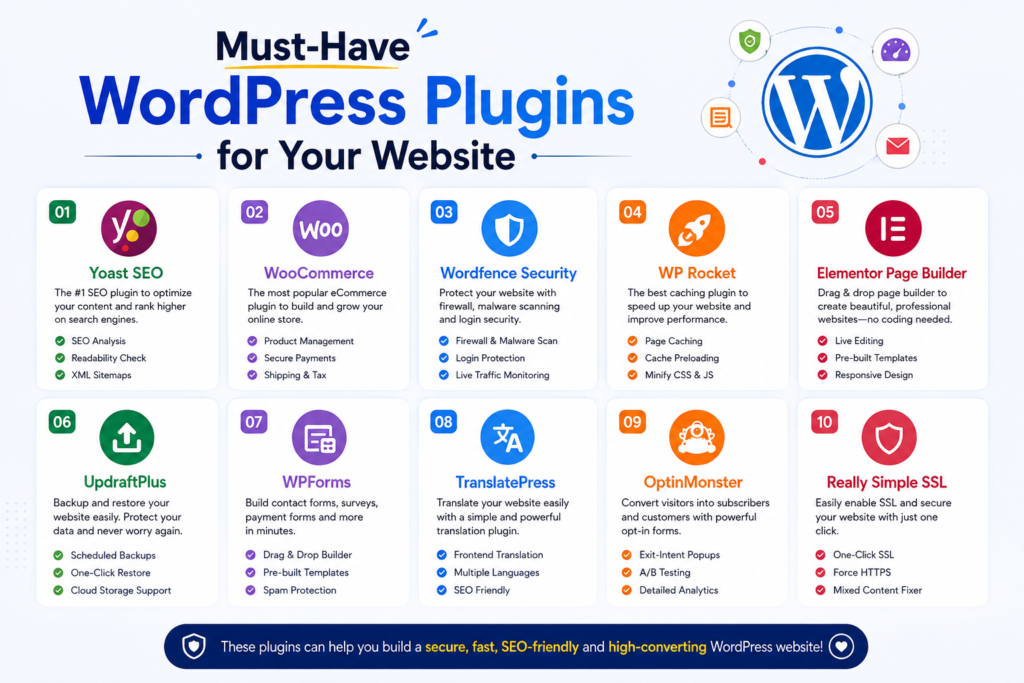
Must-Have WordPress Plugins for Your Website in 2026
WordPress is powerful on its own, but the right plugins can help you improve security, speed, SEO, backups, and overall website functionality.
The challenge is choosing plugins that genuinely add value without installing unnecessary tools.
In this guide, we’ll explore ten must-have WordPress plugins for 2026, covering the essential categories most websites need.
Quick Comparison
| Plugin | Main Purpose | Best For |
|---|---|---|
| Yoast SEO | Search engine optimization | Blogs and businesses |
| Wordfence | Website security | Security protection |
| WP Rocket | Caching and performance | Faster websites |
| UpdraftPlus | Backups and restoration | Data protection |
| WPForms | Contact forms | Lead generation |
| WP Mail SMTP | Email deliverability | Reliable WordPress emails |
| Akismet | Spam protection | Comments and forms |
| Elementor | Visual page building | Custom website design |
| WooCommerce | eCommerce | Online stores |
| Redirection | URL redirect management | SEO maintenance |
1. Yoast SEO
Best for: Search engine optimization.
Yoast SEO helps website owners optimize their content and manage important SEO settings.
It provides tools for editing SEO titles, meta descriptions, XML sitemaps, and other search-related elements.
Key Features
- SEO title and meta description editing
- XML sitemaps
- Content analysis
- Readability suggestions
- Schema-related functionality
- Search appearance controls
Yoast is particularly useful for bloggers and business owners who want a straightforward SEO workflow.
Alternative: Rank Math.
2. Wordfence Security
Best for: Protecting WordPress websites.
Wordfence is a popular security plugin that provides firewall protection, malware scanning, and login security features.
Security should be a priority for every website, especially those handling customer accounts or payments.
Key Features
- Web application firewall
- Malware scanning
- Login security
- Two-factor authentication
- Security alerts
- Brute-force protection
Wordfence is a strong choice for website owners who want dedicated WordPress security tools.
Alternative: Sucuri Security.
3. WP Rocket
Best for: Website caching and performance.
WP Rocket is a premium performance plugin designed to make WordPress optimization easier.
It includes caching and several frontend optimization features that can reduce loading times when configured correctly.
Key Features
- Page caching
- Cache preloading
- CSS and JavaScript optimization
- Lazy loading
- Database cleanup
- CDN compatibility
WP Rocket is particularly attractive for users who want a streamlined premium caching solution.
Alternative: LiteSpeed Cache, especially on compatible LiteSpeed hosting.
4. UpdraftPlus
Best for: Website backups.
A reliable backup system is essential because websites can experience hosting failures, accidental deletions, plugin conflicts, or security incidents.
UpdraftPlus allows you to create backups and restore your WordPress website when needed.
Key Features
- Scheduled backups
- Manual backups
- Database backups
- File backups
- Remote storage options
- Restoration tools
Always keep backups in a separate location from your hosting server whenever possible.
Alternative: Duplicator.
5. WPForms
Best for: Contact forms and lead generation.
WPForms helps you create forms without writing code.
It is useful for contact pages, quote requests, surveys, and other website interactions.
Key Features
- Drag-and-drop form builder
- Contact forms
- Form templates
- Spam protection
- Email notifications
- Conditional logic in supported plans
For most business websites, a reliable contact form is one of the most important conversion tools.
Alternative: Fluent Forms or Contact Form 7.
6. WP Mail SMTP
Best for: Improving WordPress email deliverability.
WordPress websites send important emails, including password resets, contact form notifications, and order confirmations.
WP Mail SMTP helps configure WordPress to send emails through an appropriate email service instead of relying solely on the default PHP mail function.
Key Features
- SMTP configuration
- Email service integrations
- Email testing
- Mailer setup
- Email logging in supported plans
This plugin is especially important for WooCommerce stores and membership websites.
Alternative: FluentSMTP.
7. Akismet Anti-spam
Best for: Reducing spam.
Spam comments and form submissions can waste time and create security or moderation problems.
Akismet helps identify and filter spam automatically.
Key Features
- Automated spam detection
- Comment spam filtering
- Spam status information
- Integration with supported forms
It is particularly useful for blogs with active comment sections.
Alternative: Antispam Bee.
8. Elementor
Best for: Visual website design.
Elementor is a page builder that allows users to create custom WordPress layouts through a visual interface.
It is useful for landing pages, business websites, portfolios, and marketing pages.
Key Features
- Drag-and-drop editor
- Responsive design controls
- Layout templates
- Design widgets
- Theme-building functionality in Pro
- WooCommerce design tools in Pro
Elementor is a strong option for users who want extensive visual control without developing every layout manually.
Alternative: WordPress block editor or Beaver Builder.
9. WooCommerce
Best for: Creating an online store.
WooCommerce transforms WordPress into an eCommerce platform.
It supports physical products, digital products, product variations, payments, shipping, and order management.
Key Features
- Product management
- Shopping cart and checkout
- Payment gateway integrations
- Shipping options
- Order management
- Extensive extension ecosystem
WooCommerce is essential if you want to build a traditional online store using WordPress.
Alternative: Easy Digital Downloads for websites focused primarily on digital products.
10. Redirection
Best for: Managing URL redirects.
When you change or delete a page URL, visitors may encounter a 404 error.
Redirection helps manage redirects and track broken URLs.
Key Features
- 301 redirects
- 404 error monitoring
- Redirect management
- Import and export tools
- Conditional redirect options
It is particularly useful when redesigning a website or changing your permalink structure.
Alternative: Redirect functionality included in some premium SEO plugins.
Which Plugins Does Every Website Actually Need?
Not every website needs all ten plugins.
A typical business website should prioritize SEO, security, backups, performance, contact forms, and reliable email delivery.
An online store will additionally need eCommerce functionality and careful checkout optimization.
A blog may benefit more from spam protection and content-focused SEO tools.
The goal is to install the smallest set of plugins that covers your website’s actual requirements.
Tips for Choosing WordPress Plugins
Before installing a plugin, check its compatibility with your WordPress version, recent update history, support quality, and reputation.
Avoid installing multiple plugins that perform the same task. For example, two full caching plugins or several overlapping security suites can create conflicts.
Always back up your website before major plugin changes and test important functionality after updates.
Final Verdict
The best WordPress plugin stack is balanced, reliable, and tailored to your website.
For most websites, Yoast SEO, Wordfence, UpdraftPlus, and a suitable caching plugin provide a strong foundation. WPForms and WP Mail SMTP support communication, while Elementor and WooCommerce should be added when your website actually needs their functionality.
Choose plugins based on your goals rather than installing every popular tool.
Frequently Asked Questions
How many plugins should a WordPress website have?
There is no ideal number. Plugin quality, compatibility, and functionality matter more than the total count.
Are free WordPress plugins enough?
Yes, many websites can operate successfully using free plugins. Premium versions are useful when you need advanced features, support, or additional integrations.
Which plugin is best for WordPress speed?
WP Rocket is a strong premium option, while LiteSpeed Cache is particularly useful on compatible LiteSpeed hosting.
Do I need both Elementor and WooCommerce?
Only if you want to use Elementor to design your WooCommerce website. WooCommerce can work without Elementor.
Should I install multiple SEO plugins?
Generally, no. Use one primary SEO plugin to avoid overlapping settings and functionality.



