
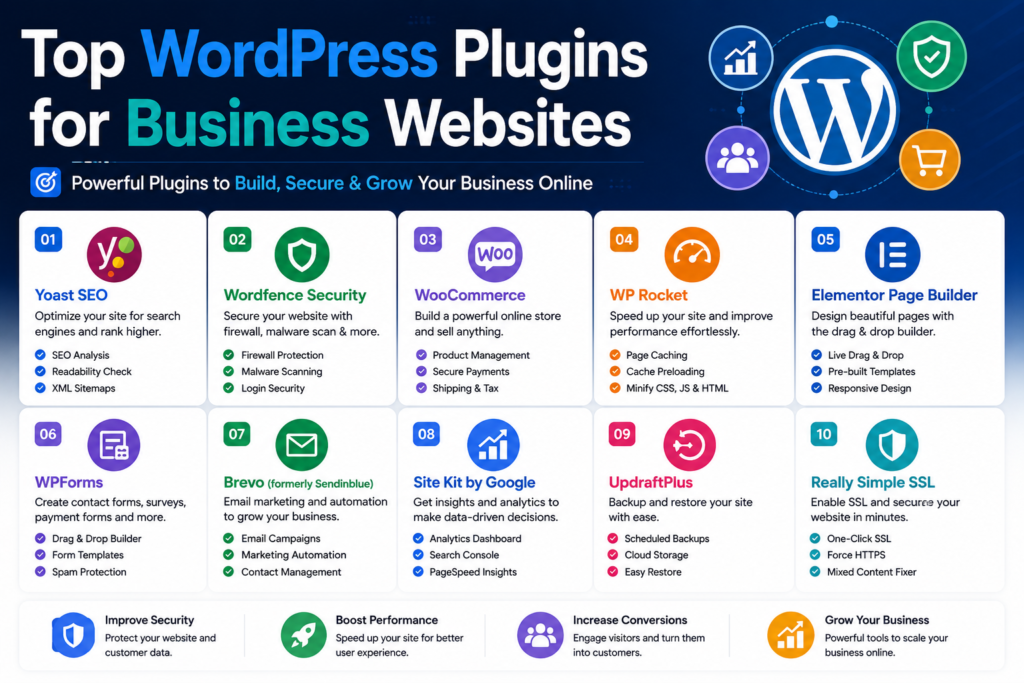
Top WordPress Plugins for Business Websites in 2026
Running a successful business website requires more than an attractive WordPress theme. Your website needs to be fast, secure, easy to find on Google, capable of generating leads, and simple for your team to manage.
That’s where WordPress plugins come in.
The right plugins can add contact forms, SEO tools, backups, security features, eCommerce functionality, analytics, caching, and dozens of other capabilities without requiring you to build everything from scratch.
However, installing too many plugins can create performance and compatibility problems. The goal isn’t to install as many plugins as possible—it’s to choose the right tools for your business.
In this guide, we’ll look at some of the top WordPress plugins for business websites in 2026 and explain what each one can bring to your website.
Why Business Websites Need WordPress Plugins
WordPress provides an excellent foundation for building a website, but most businesses need functionality beyond the standard WordPress installation.
Depending on your business, you may need:
- Search engine optimization
- Contact and lead-generation forms
- Website security
- Automated backups
- Faster page loading
- Analytics and visitor tracking
- Online payments
- eCommerce functionality
- Email marketing
- Page building and design tools
- Spam protection
- Social sharing
Instead of developing these features manually, WordPress plugins allow you to add them quickly.
Let’s explore some of the best options.
1. Yoast SEO – Best for Search Engine Optimization
If organic search traffic is important to your business, SEO should be part of your WordPress strategy.
Yoast SEO is one of the most established SEO plugins available for WordPress.
It helps website owners optimize pages and blog posts for search engines while providing guidance directly inside the WordPress editor.
Key Features
- SEO analysis
- Readability analysis
- XML sitemaps
- Schema functionality
- Canonical URL management
- Search appearance controls
- Internal linking tools in Premium
- Redirect management in Premium
- Social media previews
Yoast is particularly useful for businesses that regularly publish blog posts, landing pages, service pages, and other search-focused content.
Who Should Use Yoast SEO?
Yoast SEO is suitable for:
- Small businesses
- Agencies
- Bloggers
- Local businesses
- Service websites
- eCommerce stores
If Google is an important customer-acquisition channel for your business, having a dedicated SEO plugin is highly recommended.
2. Elementor Pro – Best for Website Design
Not every business owner wants to hire a developer whenever a landing page needs changing.
That’s where Elementor Pro can help.
Elementor provides a visual drag-and-drop environment for designing WordPress websites.
You can build pages while seeing how they will appear to visitors.
Key Features
- Drag-and-drop visual editor
- Responsive design controls
- Theme Builder
- Form Builder
- Popup Builder
- WooCommerce Builder
- Dynamic content
- Templates
- Global design controls
- Marketing widgets
One major advantage for businesses is flexibility.
Your marketing team can create landing pages, update calls to action, design promotional sections, and modify layouts without editing PHP templates.
Who Should Use Elementor Pro?
Elementor Pro can be useful for businesses that frequently create:
- Landing pages
- Service pages
- Campaign pages
- Product pages
- Lead-generation forms
- Promotional popups
For businesses that want substantial control over their WordPress design without writing code, Elementor remains a powerful option.
3. WPForms – Best Contact Form Plugin
Almost every business website needs a reliable way for visitors to get in touch.
WPForms provides a beginner-friendly drag-and-drop form builder for WordPress.
You can create anything from a basic contact form to more advanced lead-generation and payment forms.
Key Features
- Drag-and-drop form builder
- Contact forms
- Lead-generation forms
- Conditional logic
- File uploads
- Multi-page forms
- Payment integrations
- Email notifications
- Form templates
- Spam protection
A good contact form should make contacting your business as easy as possible.
Avoid asking visitors for unnecessary information. In many situations, a name, email address, phone number, and short message are enough.
4. WooCommerce – Best for Selling Online
If your business sells products or services online, WooCommerce is one of the most important WordPress plugins to consider.
WooCommerce transforms a WordPress website into an eCommerce store.
You can use it to sell physical products, digital products, subscriptions with suitable extensions, and various other types of products.
Key Features
- Product management
- Shopping cart
- Checkout
- Order management
- Coupons
- Tax configuration
- Shipping options
- Customer accounts
- Payment gateway integrations
- Extensive extension ecosystem
WooCommerce’s biggest advantage is flexibility.
Rather than moving your business to a completely separate website platform, you can combine your content, blog, marketing pages, and store within WordPress.
Who Should Use WooCommerce?
WooCommerce can work well for:
- Online retailers
- Digital product stores
- Subscription businesses
- Service providers
- Membership websites
- Small businesses
- Large eCommerce websites
Your exact setup will depend on what you’re selling and how customers need to pay.
5. Wordfence Security – Best for WordPress Security
Security should never be an afterthought on a business website.
A compromised website can result in downtime, lost customer trust, damaged search rankings, and significant recovery costs.
Wordfence Security provides WordPress-focused security functionality.
Key Features
- WordPress firewall
- Malware scanning
- Login security
- Brute-force protection
- Two-factor authentication
- Security alerts
- File integrity monitoring
- IP blocking options
Wordfence can help provide an additional security layer, but no security plugin should be considered a complete security strategy.
You should also keep WordPress, themes, and plugins updated and use strong passwords, secure hosting, and regular backups.
6. UpdraftPlus – Best for Website Backups
Imagine losing your business website tomorrow.
Would you have a recent backup available?
If the answer isn’t an immediate yes, backups should become a priority.
UpdraftPlus is a popular WordPress backup plugin that can automate website backups.
Key Features
- Scheduled backups
- Database backups
- File backups
- Website restoration
- Remote storage options
- Manual backups
- Backup migration options
Automated backups are particularly important because people often forget to create manual backups.
A good backup strategy should also keep copies away from the same server hosting your website.
If the server itself fails or becomes compromised, an off-site backup can be invaluable.
7. WP Rocket – Best for Website Performance
Website speed affects both user experience and conversions.
Visitors don’t want to wait several seconds for every page to appear.
WP Rocket is a premium WordPress performance and caching plugin designed to make optimization easier.
Key Features
- Page caching
- Browser caching
- Cache preloading
- CSS optimization
- JavaScript optimization
- Lazy loading
- Database optimization
- CDN compatibility
One advantage of WP Rocket is that many useful optimizations can be implemented without manually configuring complicated server settings.
However, performance results vary depending on your hosting environment, theme, plugins, and website structure.
Why Speed Matters for Businesses
A faster website can contribute to:
- Better visitor experience
- Lower bounce rates
- Improved conversions
- Better mobile usability
- Stronger Core Web Vitals
Before installing several different optimization plugins, check whether your hosting provider already includes caching and performance features.
8. MonsterInsights – Best for Google Analytics
You can’t improve your website effectively if you don’t understand how visitors are using it.
MonsterInsights makes it easier to connect WordPress with Google Analytics and view important reports from your WordPress dashboard.
Key Features
- Google Analytics integration
- Traffic reports
- eCommerce tracking
- Link tracking
- Conversion tracking
- Publisher reports
- User journey information
- Dashboard reports
Analytics can answer important business questions.
Which pages generate the most visitors?
Where does your traffic come from?
Which marketing campaigns generate conversions?
What content attracts potential customers?
Instead of making decisions entirely on assumptions, analytics gives your business actual data to work with.
9. Rank Math – Excellent Yoast SEO Alternative
Yoast isn’t the only strong SEO plugin for WordPress.
Rank Math has become another popular option, particularly among users who want extensive SEO controls in one plugin.
Key Features
- SEO analysis
- Keyword optimization
- XML sitemaps
- Schema markup
- Redirect management
- 404 monitoring
- Local SEO features
- WooCommerce SEO options
- Internal linking features
You generally don’t need Rank Math and Yoast running together.
Choose one primary SEO plugin and configure it properly.
Running multiple plugins that attempt to control the same SEO settings can create unnecessary complications.
10. FluentCRM – Best for WordPress CRM and Email Marketing
Customer relationships don’t end when someone submits a form.
Businesses often need to follow up with leads, segment contacts, and run email campaigns.
FluentCRM provides CRM and email-marketing functionality inside WordPress.
Key Features
- Contact management
- Email campaigns
- Email sequences
- Contact segmentation
- Marketing automation
- Tags
- Lists
- Reporting
- WordPress integrations
For businesses that want more control over customer information and marketing workflows from inside WordPress, a CRM plugin can be extremely useful.
Remember that reliable bulk email delivery generally requires an appropriate transactional or email-delivery service rather than relying entirely on basic WordPress mail functionality.
11. WP Mail SMTP – Best for Email Deliverability
A customer submits your contact form.
WordPress says the message was sent.
But the email never reaches your inbox.
This is a surprisingly common problem.
WP Mail SMTP helps WordPress send email through a properly configured email provider rather than relying solely on the default PHP mail method.
Key Features
- SMTP configuration
- Multiple mailer integrations
- Email logging on supported plans
- Email reports
- Backup connections on supported plans
- Email failure alerts
- Testing tools
For business websites, reliable email delivery is critical.
Contact form notifications, password-reset emails, order confirmations, account messages, and administrative notifications all depend on WordPress being able to send email successfully.
12. Akismet – Best for Spam Protection
Spam can quickly become frustrating on websites with comments or contact forms.
Akismet helps detect and filter spam automatically.
Instead of manually reviewing hundreds of suspicious submissions, automated spam filtering can significantly reduce administrative work.
Key Features
- Automated spam detection
- Comment filtering
- Spam status information
- URL checking
- Integration with WordPress
Business websites receiving significant amounts of spam should consider implementing a dedicated anti-spam solution.
13. MemberPress – Best for Membership Websites
Some businesses make money by selling access rather than individual products.
Examples include:
- Online courses
- Premium communities
- Coaching programs
- Subscription content
- Training libraries
- Professional resources
MemberPress is designed to help create membership-based WordPress websites.
Key Features
- Membership levels
- Content restriction
- Subscription management
- Payment integrations
- Coupons
- Access rules
- Course functionality
- Member management
If recurring membership revenue is central to your business model, a specialized membership plugin can save considerable development time.
14. Advanced Custom Fields (ACF) – Best for Custom Business Websites
Not every WordPress website fits neatly into standard posts and pages.
Businesses often need structured information such as:
- Team members
- Locations
- Projects
- Case studies
- Property information
- Product specifications
- Testimonials
Advanced Custom Fields (ACF) allows developers to create additional structured fields inside WordPress.
For example, a real-estate website could create separate fields for:
Price: $450,000
Bedrooms: 4
Bathrooms: 3
Property Type: House
Instead of manually formatting this information every time, WordPress stores each value separately.
ACF is particularly valuable for custom WordPress development.
15. Redirection – Best for Managing Redirects
URLs sometimes change.
You might rename a service, delete an old page, restructure your website, or migrate content.
When an old URL disappears, visitors and search engines can encounter a 404 error.
Redirection helps WordPress administrators manage URL redirects.
Key Features
- 301 redirects
- 404 monitoring
- Redirect management
- Conditional redirects
- Import/export tools
Proper redirects are particularly important during website redesigns and migrations.
For example:
Old URL: /web-design-services/
New URL: /services/web-design/
A 301 redirect can automatically send visitors from the old page to the new one.
Essential Plugin Stack for a Business Website
You don’t need every plugin mentioned above.
A typical small business website could start with something like:
SEO: Yoast SEO or Rank Math
Forms: WPForms
Security: Wordfence
Backups: UpdraftPlus
Performance: WP Rocket
Email Delivery: WP Mail SMTP
Analytics: MonsterInsights
Then add specialized plugins only when your business actually needs them.
For example, an online store could add WooCommerce, while a membership business could consider MemberPress.
Free vs Premium WordPress Plugins
Many WordPress plugins offer both free and paid versions.
The free version may be perfectly adequate when you’re starting.
Premium plugins typically provide additional features, integrations, templates, automation, support, or advanced controls.
Before upgrading, ask:
Does the premium feature solve an actual business problem?
If the answer is yes, paying for the plugin can make sense.
If you’re upgrading simply because a premium version exists, you may be spending money unnecessarily.
How Many WordPress Plugins Should a Business Website Have?
There’s no perfect number.
A website with 30 well-coded plugins can potentially perform better than one with 10 poorly optimized plugins.
Quality matters more than the raw number.
However, every additional plugin introduces another component that needs to be:
- Updated
- Secured
- Tested
- Maintained
- Checked for compatibility
Install plugins because your website needs them—not because they look interesting.
How to Choose the Right WordPress Plugins
Before installing a plugin on a business website, evaluate several factors.
Active Development
Check whether the plugin is still actively maintained.
An abandoned plugin can eventually become incompatible or create security concerns.
WordPress Compatibility
Make sure the plugin supports your current WordPress and PHP environment.
User Reviews
Reviews can reveal recurring problems involving bugs, support, performance, or usability.
Don’t judge solely by the star rating. Read recent reviews and understand what users actually experienced.
Support
Reliable support becomes more important when your business depends on the plugin.
Performance
Avoid plugins that load excessive scripts and styles across every page when they’re unnecessary.
Security
Download plugins from trusted sources and keep them updated.
Features
Don’t choose a plugin simply because it has the longest feature list.
Choose the one that solves your specific problem effectively.
Mistakes to Avoid When Installing WordPress Plugins
One of the most common mistakes business owners make is installing multiple plugins that perform the same job.
For example, you usually don’t need:
- Two SEO plugins
- Three caching plugins
- Multiple security plugins performing identical tasks
- Several redirect managers
Overlapping plugins can create conflicts and make troubleshooting much harder.
Another mistake is installing plugins and forgetting about them.
If you no longer use a plugin, consider removing it rather than leaving unnecessary software installed indefinitely.
Keep Your Plugins Updated
Plugin maintenance is essential for business websites.
Updates frequently contain:
- Security patches
- Bug fixes
- Compatibility improvements
- Performance improvements
- New features
Before applying major updates to an important production website, create a backup and ideally test significant changes in a staging environment.
This becomes particularly important for WooCommerce stores, membership websites, and websites with extensive custom functionality.
Frequently Asked Questions
What are the best WordPress plugins for business websites?
The best plugins depend on your business. Common choices include Yoast SEO or Rank Math for SEO, WPForms for forms, Wordfence for security, UpdraftPlus for backups, WP Rocket for performance, and WP Mail SMTP for email delivery.
What WordPress plugins does every business website need?
Most business websites should consider solutions for SEO, backups, security, forms, performance, analytics, and reliable email delivery. However, your hosting provider may already handle some of these functions.
Are premium WordPress plugins worth it?
Premium plugins can be worth paying for when their features save your business time, increase conversions, improve security, or replace custom development. You don’t need to upgrade every plugin simply because a premium version exists.
Do too many plugins slow down WordPress?
They can, but the number of plugins alone isn’t the deciding factor. Poorly optimized plugins, database queries, external requests, large scripts, and conflicting functionality can have a bigger impact than the raw plugin count.
Can I use Yoast SEO and Rank Math together?
It’s generally better to use one primary SEO plugin. Running multiple SEO plugins simultaneously can create overlapping functionality and configuration problems.
What is the best WordPress plugin for an online business?
WooCommerce is an excellent choice for businesses selling products through WordPress. Other plugins may be necessary depending on whether you sell physical products, digital downloads, subscriptions, memberships, or services.
Final Thoughts
The best WordPress plugins aren’t necessarily the ones with the most features.
They’re the plugins that solve genuine problems for your business.
For most business websites, start by covering the fundamentals: SEO, security, backups, performance, forms, analytics, and reliable email delivery.
Then expand your plugin stack based on what your business actually needs.
An eCommerce business may need WooCommerce. A membership website may need MemberPress. A custom corporate website may benefit from Advanced Custom Fields. A marketing-focused website may require more sophisticated forms and CRM automation.
Whatever you choose, prioritize reputable plugins, regular updates, good performance, and compatibility.
A carefully selected WordPress plugin stack can transform a basic website into a powerful platform for generating leads, serving customers, selling products, and growing your business.



