
Breakdance Builder is a visual website builder for WordPress that helps you design professional websites using a drag-and-drop editing experience. Developed by Soflyy, it combines page design, theme building, dynamic content, forms, popups, and WooCommerce customization in one integrated toolkit.
Instead of relying entirely on a pre-designed theme, you can customize page layouts, headers, footers, blog templates, archive pages, and other website elements from a visual interface. Its responsive design controls, global styling options, animations, and reusable components make it easier to maintain a consistent appearance across your website.
Breakdance also includes tools for creating lead-generation forms, interactive popups, and dynamic content layouts. For online stores, its WooCommerce integration supports customized product pages, shop layouts, carts, and checkout experiences, with advanced capabilities available in eligible plans.
Whether you’re building a business website, portfolio, blog, landing page, or online store, Breakdance provides a flexible environment for designing and managing a WordPress website.
- A visual drag-and-drop website builder for WordPress.
- Tools for designing pages, headers, footers, and templates.
- Responsive layout and styling controls.
- Global colors, typography, buttons, and design settings.
- Dynamic content and custom-field integrations.
- Built-in form and popup builders.
- WooCommerce design and customization tools.
- Reusable design elements and template resources.
- Animation, interaction, and conditional display options.
- Developer tools for custom HTML, CSS, JavaScript, and PHP.
Key Features
- Visual Drag-and-Drop Editor – Build page layouts by adding, arranging, and customizing elements directly within the visual editor.
- 130+ Built-In Elements – Access a broad collection of design elements for headings, images, buttons, layouts, content sections, and other website components. The available element count varies by plan and version.
- Full Website Theme Builder – Design headers, footers, single-post templates, archive pages, search results, and 404 pages using supported template tools.
- Responsive Design Controls – Adjust layouts, spacing, typography, visibility, and other properties for different screen sizes and custom breakpoints.
- Global Styling Options – Manage brand colors, gradients, typography, buttons, forms, and container settings from centralized controls.
- Dynamic Content Integration – Display WordPress content, custom fields, post information, and supported data sources dynamically.
- Advanced Custom Fields Support – Connect supported ACF fields to design elements and dynamic templates.
- Meta Box Integration – Build layouts that use compatible Meta Box custom fields and repeater data.
- Post Loop Builder – Create custom layouts for blog posts, custom post types, and other supported content collections.
- WooCommerce Builder – Customize product displays, shop archives, product pages, cart layouts, checkout, and account-related pages according to your plan.
- Built-In Form Builder – Create contact forms, lead-generation forms, registration forms, and other supported forms with customizable fields and submission actions.
- Multi-Step Forms – Divide longer forms into multiple steps to make data collection more organized.
- Form Integrations – Connect form submissions to email services, webhooks, and supported third-party platforms.
- Popup Builder – Create promotional popups, lead-capture forms, and other popup layouts with configurable triggers and display conditions.
- Animations and Interactions – Add entrance effects, scrolling animations, hover states, transitions, and interactive elements.
- Conditional Display Rules – Show or hide supported elements and templates based on selected conditions, including user data, content, time, and WooCommerce information.
- Design Library – Reuse saved elements and import available design sets or templates to speed up website creation.
- Performance-Oriented Features – Use tools such as static CSS caching, responsive image output, and control over image sizes to support efficient page delivery.
- Developer Customization – Extend designs with custom HTML, CSS, JavaScript, PHP, selectors, and developer APIs where supported.
- AI-Assisted Workflows – Connect supported AI coding agents and use compatible workflows to help build or modify editable website designs.
Build Professional Websites Visually
Breakdance makes it possible to design website layouts without manually coding every section. You can arrange content, adjust spacing, customize typography, and add visual effects from the editor.
Its template-building tools also help you create consistent layouts for different parts of a website. For example, you can design a reusable header, establish a common blog post layout, or create a custom archive template for a particular content category.
Global styling controls reduce repetitive design work by allowing you to manage important visual settings centrally. This is particularly useful when updating a website’s branding or maintaining a consistent design across multiple pages.
Create Custom Headers, Footers, and Dynamic Templates
A website often needs more than individually designed pages. Breakdance includes tools for building reusable templates that control how different types of content appear across the site.
You can create custom headers and footers, design single-post layouts, customize archive pages, and build templates using dynamic WordPress data. Supported integrations with Advanced Custom Fields and Meta Box make it possible to create structured layouts for directories, portfolios, property listings, team pages, and other custom content.
Template conditions help determine where particular designs should appear, giving you more control over the structure of a growing website.
Design WooCommerce Stores with More Flexibility
For online businesses, Breakdance provides WooCommerce design tools that allow you to customize the appearance of product pages and other shopping-related layouts.
Depending on your plan, you can work with product information, images, prices, ratings, related products, shop archives, cart elements, checkout layouts, and customer account pages. This helps you create a storefront that matches your brand rather than relying entirely on default store styling.
WooCommerce remains responsible for core store functionality, including product management, orders, shipping, taxes, and payment processing. The available design and customization options depend on the Breakdance version, plan, and installed extensions.
Build Forms and Capture Leads
Breakdance includes a form builder for collecting information from website visitors. You can configure fields, required inputs, validation settings, and post-submission actions to suit different business needs.
Multi-step forms can organize longer questionnaires, while supported integrations let you send submitted information to email marketing services, webhooks, or other connected tools.
The builder also provides submission storage options, allowing administrators to review form entries from the WordPress dashboard when configured. Always test the form, email delivery, integrations, and spam protection before publishing a live lead-generation campaign.
Improve the Website Experience with Popups and Interactions
Breakdance offers tools for creating popups and interactive page elements without needing a separate plugin for every design requirement.
You can build promotional notices, newsletter signup popups, and lead-capture layouts with supported triggers and display conditions. Animations, hover effects, and scroll-based interactions can also help highlight important content when used appropriately.
For the best visitor experience, keep popups relevant and avoid excessive animations. Clear navigation, accessible controls, and readable content should remain priorities across desktop and mobile devices.
Who Should Use Breakdance Builder?
Breakdance Builder can be useful for:
- Business owners creating professional WordPress websites.
- Freelancers and agencies designing websites for clients.
- Bloggers and publishers customizing article and archive layouts.
- WooCommerce store owners who want greater control over storefront design.
- Designers building responsive landing pages and marketing websites.
- Developers working with dynamic content, custom fields, and reusable templates.
- Lead-generation businesses building forms and promotional popups.
- Website maintainers who want centralized styling and reusable design components.
Requirements and Compatibility
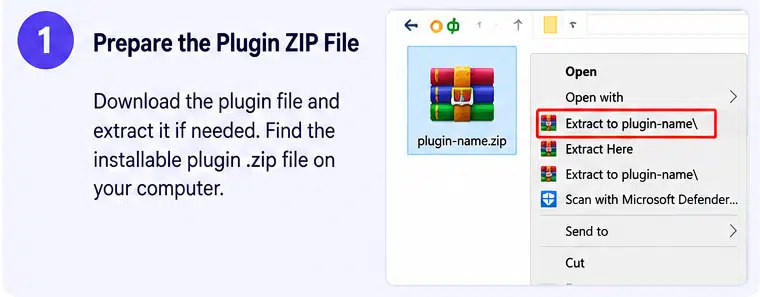
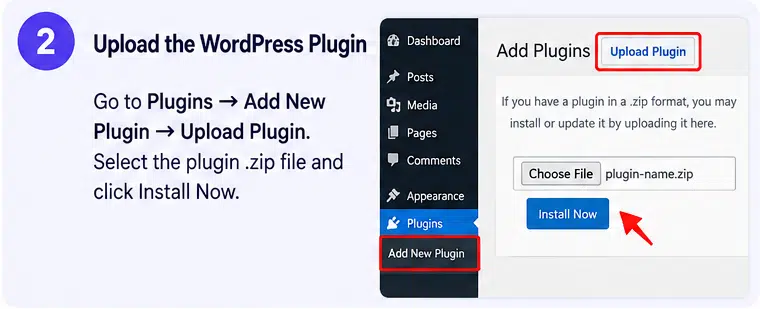
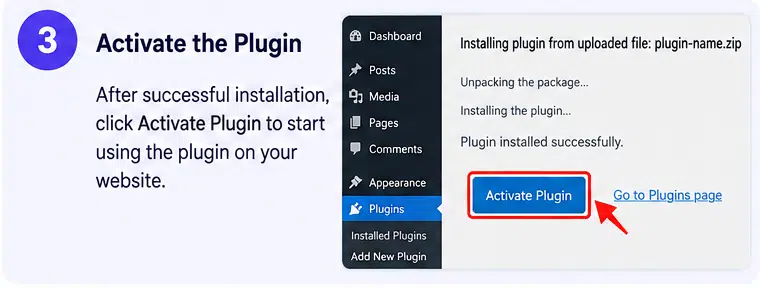
Breakdance Builder installs as a WordPress plugin. Depending on your preferred workflow, you can use it with a compatible WordPress theme or choose its supported themeless setup for greater control over the overall site design.
The plugin offers both free and paid Pro plans. The free version includes core design capabilities, while advanced functionality—such as the full WooCommerce builder, expanded dynamic data tools, and additional design resources—depends on the eligible Pro plan.
Before installation, check the current WordPress, PHP, and plugin requirements. If your website already uses another page builder or a theme with extensive custom layouts, test compatibility before migrating existing pages.
For live websites, create a backup and test important templates, forms, navigation, mobile layouts, and checkout workflows before making major changes. Also confirm that your selected license covers your intended usage and that you understand the update and support terms.
Create More with Breakdance Builder
Breakdance Builder brings visual page design, website templating, dynamic content, forms, popups, and WooCommerce customization into one WordPress building environment. Its responsive controls and reusable design tools can help streamline the process of creating and maintaining a consistent website.
If you want greater control over your WordPress design without manually coding every page, Breakdance offers a flexible toolkit for building business websites, content-driven projects, and online stores.