
Variation Swatches for WooCommerce Pro by GetWooPlugins helps online store owners present product variations in a more visual and user-friendly way. Instead of relying only on WooCommerce’s standard dropdown menus, you can display product options as color swatches, images, labels, buttons, and other supported swatch styles.
The plugin makes it easier for customers to explore available colors, sizes, materials, and product styles before adding an item to their cart. Its advanced features also let you display variation swatches on shop and category pages, customize swatches for individual products, and change product gallery images when customers select supported attributes.
Whether you run a fashion store, electronics shop, beauty business, furniture website, or general WooCommerce store, Variation Swatches for WooCommerce Pro can help create a more intuitive product selection experience.
- Advanced visual product variation swatches for WooCommerce.
- Color, image, label, and other supported swatch types.
- Swatches on product pages and shop or archive pages.
- Individual swatch customization for selected products.
- Variation image previews and tooltip options.
- Product gallery updates based on selected attributes.
- Controls for displaying out-of-stock variations.
- Shareable URLs for selected product variations.
- Additional catalog display and swatch styling options.
Key Features
- Color Swatches – Display product colors as visual swatches instead of requiring customers to interpret text-only dropdown options.
- Image Swatches – Use images to represent product variations such as fabric patterns, finishes, materials, or different product styles.
- Label and Button Swatches – Present options such as sizes, capacities, and other attributes as clickable labels or buttons.
- Shop Page Swatches – Display supported variation options on product archive and category pages, allowing customers to explore choices before opening a product.
- Single Attribute Display – Choose a particular attribute to show in the catalog when you want a cleaner product grid.
- Variation Image Preview – Update the product gallery when customers select a configured attribute, including supported single-attribute preview workflows.
- Individual Product Settings – Customize swatch behavior and appearance for specific products instead of applying identical settings throughout the store.
- Custom Swatch Shapes – Choose supported round or square designs to match your storefront’s visual style.
- Swatch Size and Styling Controls – Adjust supported dimensions, spacing, borders, and other appearance settings.
- Image Tooltips – Show image previews or additional information when customers interact with supported swatches.
- Selected Attribute Labels – Display the selected variation name alongside its attribute label to help customers confirm their choice.
- Out-of-Stock Variation Display – Cross out, blur, or hide unavailable options according to your configured settings.
- Shareable Variation URLs – Generate links for selected product variations so customers can share or revisit a specific product option.
- Catalog Swatch Limits – Control how many variation options appear in product listings and use a supported “More” link to keep product grids organized.
- Automatic Dropdown Conversion – Convert supported WooCommerce variation dropdowns into visual swatches with the configured attribute types.
- Global and Product-Level Controls – Set general display rules for the store while making individual adjustments where supported.
- WooCommerce Theme Compatibility – Integrate with compatible WooCommerce themes and page-building tools, with styling adjustments potentially needed for customized layouts.
Make Product Variations Easier to Understand
Customers often want to see a product’s available colors, sizes, or styles before making a purchase. Standard dropdown menus can make this process less visual, particularly for products where appearance is an important buying factor.
Variation Swatches for WooCommerce Pro lets you represent those options using colors, images, and clickable labels. For example, a clothing store can display color choices as swatches and size options as buttons, helping customers select the combination they want more confidently.
Clear variation labels and visual previews also reduce confusion when products have many similar options.
Improve Product Discovery on Shop Pages
Product variations do not always need to remain hidden until customers open individual product pages. With the Pro version, you can display supported swatches on shop, category, and archive pages.
This allows shoppers to preview available choices while browsing a product catalog. You can also choose which attribute appears in the catalog, helping keep product cards visually consistent when items have many variations.
These controls are particularly useful for fashion, footwear, accessories, home decor, and other stores where product options are a major part of the buying decision.
Create a More Interactive Product Page
The plugin offers additional tools for customizing how variations behave on individual product pages. Depending on your configuration, selecting an attribute can update the displayed product image or gallery preview.
Image tooltips, selected variation labels, and custom swatch styling can provide extra context without overcrowding the product page. Shareable variation URLs can also help customers return to or share a particular product option.
The final experience depends on the product’s configured attributes, variation data, images, and the compatibility of your theme and other WooCommerce extensions.
Who Should Use Variation Swatches for WooCommerce Pro?
This plugin can be useful for:
- Fashion and apparel stores displaying colors, sizes, and patterns.
- Footwear retailers presenting different shoe colors and sizes.
- Beauty stores showcasing shades and product variants.
- Furniture and home decor shops displaying materials, finishes, and fabrics.
- Electronics stores offering different colors, storage capacities, or configurations.
- WooCommerce developers creating customized product pages for clients.
- Online retailers with large catalogs of variable products.
Requirements and Setup Notes
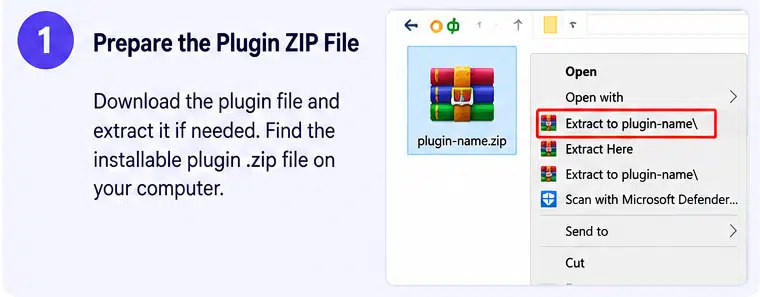
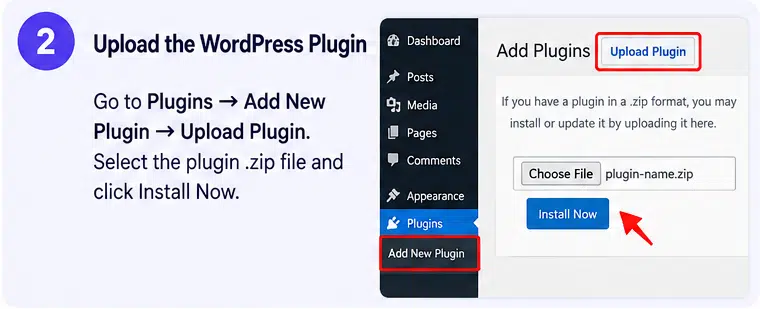
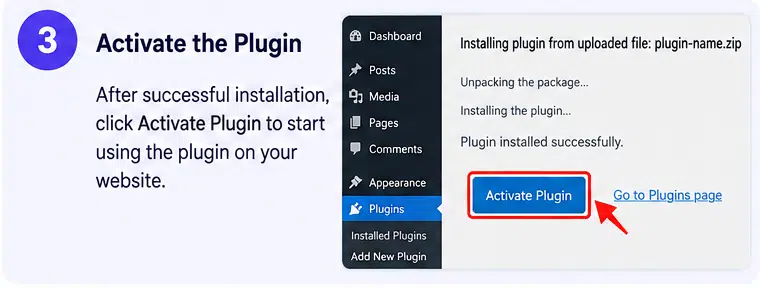
Variation Swatches for WooCommerce Pro is an extension for WooCommerce, not a standalone store platform. The developer’s documented installation workflow requires the free Variation Swatches for WooCommerce plugin alongside its Pro extension.
After installing both components, configure the attribute types under WooCommerce product attributes and assign the relevant colors, images, labels, or other supported values. You can then adjust global swatch settings and apply individual product-level options where needed.
For reliable results, make sure your variable products have properly configured attributes, variation combinations, prices, stock information, and images. Test swatches on product pages, shop archives, mobile devices, and any custom product templates.
The Pro extension also has its own licensing and update arrangements. Verify the license terms and current WordPress, PHP, WooCommerce, and theme compatibility requirements before installation.
Improve Your WooCommerce Product Pages with Variation Swatches Pro
Variation Swatches for WooCommerce Pro by GetWooPlugins gives store owners more control over how customers explore product variations. Its visual swatches, catalog display options, image previews, and flexible styling controls help make product selection more informative and convenient.
If your WooCommerce store sells products in multiple colors, sizes, materials, or styles, this plugin can help create a more polished product browsing experience while keeping variation selection integrated with WooCommerce.