- A collection of additional Divi Builder modules.
- Interactive design elements and visual effects.
- Blog, portfolio, gallery, and testimonial modules.
- WooCommerce-focused display modules.
- Marketing and conversion-oriented components.
- Extensions and tools for improving website functionality.
- Access to supported pre-built websites, starter templates, and section layouts.
Key Features
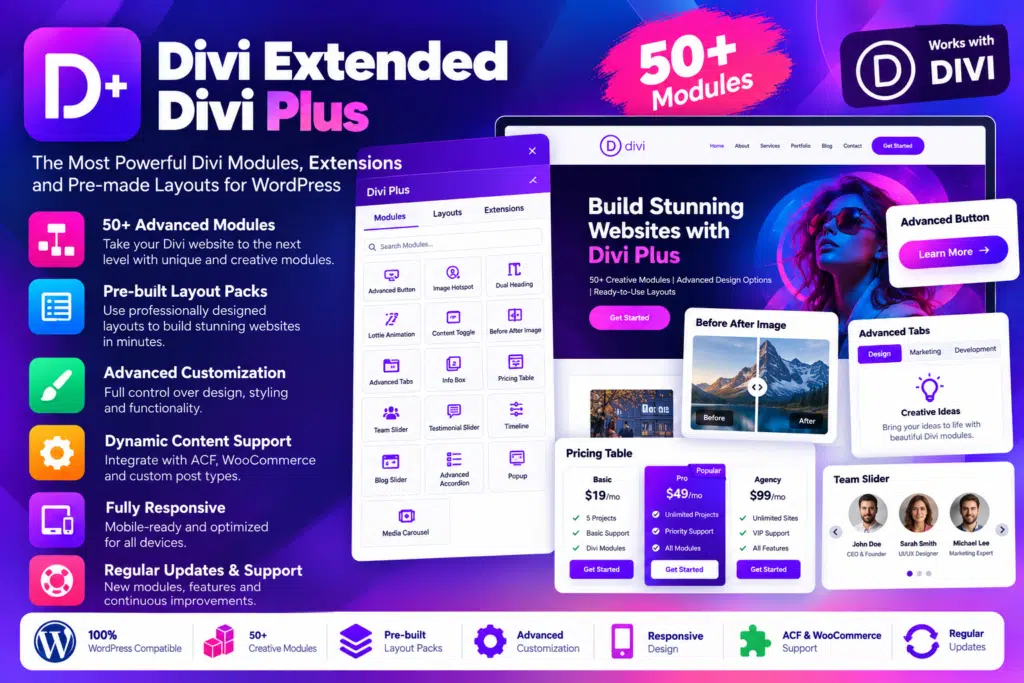
- Advanced Content Modules – Create attractive headings, fancy text, breadcrumbs, content toggles, lists, and other structured page elements.
- Interactive Image Effects – Enhance visual content with image masks, hotspots, tilt effects, image stacks, magnifiers, and before-and-after sliders.
- Advanced Gallery Designs – Build masonry galleries, filterable image collections, image carousels, and other creative visual displays.
- Blog and Post Modules – Present articles using customizable blog layouts, post sliders, timelines, scrolling posts, and ticker-style elements.
- Testimonial and Team Displays – Showcase customer feedback and team members with dedicated grids and slider layouts.
- Marketing Elements – Add promotional bars, coupon displays, alert boxes, comparison lists, advanced buttons, and pricing components.
- Popup and Content Visibility Tools – Create supported modal popups and control the visibility of selected Divi elements using available extensions.
- Animated Typography – Add rotating text, scrolling text, text highlighting, marquee effects, and other supported text animations.
- Data Visualization – Display information through bar charts, pie charts, progress bars, counters, and advanced tables.
- WooCommerce Modules – Customize product grids, product carousels, product galleries, and category displays when WooCommerce is installed.
- Social Media Elements – Add supported Instagram, Facebook, and X/Twitter content or sharing elements to suitable pages.
- Form Styling – Improve the appearance of supported forms, including integrations for compatible form plugins.
- Pre-Built Website Layouts – Start projects with available child themes, starter templates, and reusable section blocks.
- Website Utility Extensions – Use supported tools such as back-to-top buttons, maintenance mode, WhatsApp chat, page preloaders, and cache-related utilities.
Build More Creative Divi Websites
Divi Plus gives designers more options when creating landing pages, service pages, portfolios, and business websites. Instead of relying only on standard builder modules, you can use specialized elements to create interactive sections and distinctive page layouts.
Its styling controls make it easier to maintain a consistent appearance across headings, buttons, images, cards, and other page components. You can combine different modules to create a design that fits your project’s requirements.
Create Engaging Content and Visual Experiences
Images, animations, testimonials, and interactive layouts can help visitors explore website content more easily when used thoughtfully. Divi Plus offers a variety of elements for presenting information in a more visual format.
For example, you can display projects in a filterable portfolio, highlight services with interactive image cards, present customer feedback in a slider, or organize important information in tabs and comparison lists.
Choose effects that support the content rather than adding unnecessary animation to every section. Keeping layouts clear and responsive helps maintain a better experience across devices.
Customize Your WooCommerce Store
For websites using WooCommerce, Divi Plus includes modules designed to present products and categories in more flexible layouts. Depending on the module, you can adjust product presentation, images, spacing, buttons, and other visual details.
These options can help your shop pages match the overall design of your website. WooCommerce must be installed and configured for the relevant store modules to work, and standard WooCommerce settings continue to control core shopping functionality such as products, prices, carts, and checkout.
Who Should Use Divi Plus?
Divi Plus can be useful for:
- Web designers who want more creative modules for Divi projects.
- Freelancers and agencies building websites for clients.
- Business owners creating service pages and lead-generation landing pages.
- Bloggers and publishers looking for flexible article layouts.
- Portfolio websites showcasing projects, galleries, and testimonials.
- WooCommerce store owners who want more design options for product displays.
- Divi developers who regularly build and customize WordPress websites.
Compatibility and Setup Notes
Divi Plus is an extension plugin for the Divi design ecosystem, not a standalone WordPress theme or independent page builder. You need a compatible Divi Builder setup to use its modules, while importing included child themes generally requires the Divi parent theme.
Some features depend on additional plugins or services. For example, WooCommerce modules require WooCommerce, and form-styling modules may need their supported form plugin. Social feeds and external integrations can also depend on API access or third-party service changes.
Before installing the plugin on a live website, check the current compatibility documentation for your Divi version, particularly if you use Divi 5 or other builder extensions. Test important pages after activation and before updating a production site.
Expand Your Divi Design Toolkit with Divi Plus
Divi Plus by Divi Extended brings together a broad selection of creative modules, interactive effects, layout resources, and website utilities for Divi-based WordPress websites. It can help simplify page-building workflows and give designers more flexibility when creating business websites, portfolios, blogs, and online stores.
If you already build websites with Divi and want more design options without assembling a separate plugin for every visual feature, Divi Plus is worth considering.