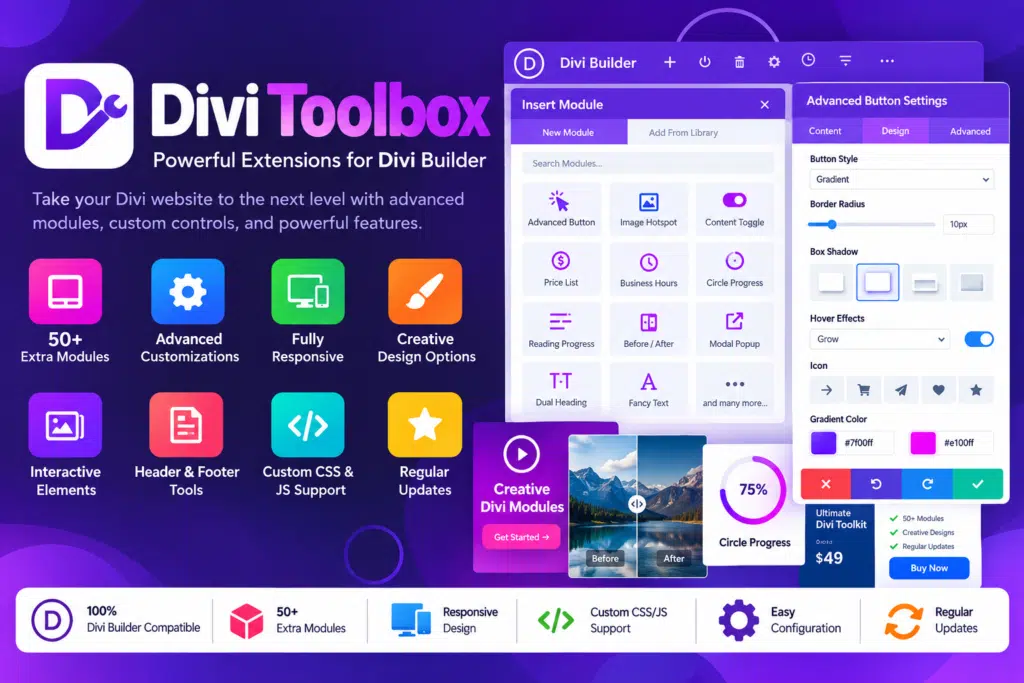
Divi Toolbox extends the Divi Theme with additional controls organized into categories such as global settings, headers, footers, mobile navigation, blog layouts, and module effects.
You can enable the features you need and customize supported settings through the WordPress dashboard and Divi Theme Customizer. The plugin includes tools for modifying navigation, styling widgets, creating popups, adjusting blog layouts, and adding visual effects to selected elements.
This modular approach lets you focus on the enhancements that suit your website instead of enabling every available feature.
Key Features
- Global Design Customization – Adjust supported website-wide design elements, including typography, colors, and visual styling.
- Custom Login Page – Personalize the WordPress login screen with your own logo, background, colors, and other available settings.
- Divi Library Layout Shortcodes – Display compatible Divi Library layouts in supported areas using shortcodes.
- Custom Popup Builder – Create up to five popups using Divi Builder layouts and customize their appearance.
- Advanced Header Options – Enhance your navigation with additional header layouts, styling controls, and fixed-header effects.
- Custom Fixed Headers – Configure supported sections to act as fixed headers while visitors scroll.
- Call-to-Action Menu Buttons – Highlight selected navigation links with custom button styling.
- Dropdown Menu Styling – Customize dropdown colors, appearance, and supported animations.
- Enhanced Social Icons – Add more social profile links and customize icon colors, spacing, borders, and animations.
- Custom Mobile Navigation – Build a more distinctive mobile menu with additional layout and styling controls.
- Mobile Menu Animations – Choose from supported menu-opening and closing animations.
- Fixed Mobile Menu Bar – Keep selected mobile navigation controls accessible while visitors browse.
- Mobile Menu Content Areas – Add supported content such as logos, search fields, social icons, and other compatible elements to the mobile menu.
- Custom Footer Effects – Enable sticky-footer and footer-reveal effects for supported layouts.
- Footer Styling Controls – Customize footer menus, widget appearances, and back-to-top buttons.
- Advanced Blog Layouts – Choose from multiple blog and archive layouts to present posts in different styles.
- Related Posts Display – Add related articles to encourage visitors to explore more content.
- Author Box and Post Navigation – Display author information and supported previous/next post links.
- Custom Sidebar Styling – Adjust sidebar backgrounds, widget headings, spacing, borders, and other supported visual details.
- Animated Text Effects – Add a typing effect to compatible Divi Text modules.
- 3D Tilt Hover Effects – Apply a directional 3D-style hover effect to supported elements.
- Moving Particles Backgrounds – Add animated particle effects to compatible sections or elements.
- Sticky Elements – Keep selected elements positioned at the top of the page during scrolling.
- Custom Parallax Effects – Add supported scrolling effects to enhance visual presentation.
- SVG and Font Upload Options – Enable supported SVG, TTF, and OTF uploads for additional design flexibility.
- Module Enhancements – Apply selected effects and adjustments to compatible Divi modules, including supported gallery, portfolio, testimonial, and pricing elements.
Perfect For
Divi Toolbox is useful for WordPress designers, freelancers, web development agencies, business owners, bloggers, and anyone who builds websites using the Divi Theme.
Agencies can use it to streamline common design customizations across client projects. Business websites can benefit from more prominent navigation and call-to-action buttons, while bloggers can improve archive layouts and related-post displays. Designers can also use its visual effects to give portfolios, landing pages, and creative websites a more distinctive appearance.
Customize Your Divi Website Without Repetitive Coding
Many website enhancements that seem small individually can require additional CSS, JavaScript, or separate plugins. Divi Toolbox brings a broad selection of these adjustments into one interface.
You can refine navigation styles, customize widget appearances, change blog layouts, and add supported visual effects through configurable settings. This makes it easier to experiment with different designs while keeping your customization workflow organized.
Advanced custom development may still be necessary for requirements that fall outside the plugin’s built-in options.
Create a Better Mobile Navigation Experience
Mobile navigation plays an important role in how visitors explore a website. Divi Toolbox adds options for customizing menu appearance, adjusting the mobile breakpoint, styling hamburger icons, and using supported animations.
You can also configure fixed mobile navigation and add compatible content to mobile menu areas. These controls are particularly useful for business websites, service providers, and content-rich websites where visitors need convenient access to important pages.
Add Interactive Effects and Custom Popups
Divi Toolbox includes several options for making pages more engaging. You can create popups using Divi layouts, add typing effects to supported text modules, and apply visual effects such as 3D tilt and moving particle backgrounds.
Use these features selectively to highlight announcements, calls to action, important information, or portfolio elements. A balanced approach helps maintain readability and usability instead of overwhelming visitors with too many animations.
Improve Blog Layouts and Content Discovery
For blogs and editorial websites, Divi Toolbox offers additional layout and presentation controls for archives, categories, and blog modules. You can adjust how posts appear, customize sidebars, add author information, and display related content.
These options help you create a more consistent reading experience and make it easier for visitors to discover other articles on your website.
Important Compatibility Information
Divi Toolbox is a Divi Theme extension, not a standalone page builder. According to the developer, version 1.8 supports both Divi 4 and Divi 5.
The developer explicitly states that Divi Toolbox does not work with the Extra Theme or the standalone Divi Builder plugin. Some advanced visual effects may also have limited visibility inside the Visual Builder while still functioning on the front end.
The plugin’s settings are modular, but enabling animations and other effects can add browser workload. Test your selected features with your current theme, caching setup, and other plugins before deploying changes on a live website.
Divi Toolbox – Unlock More Design Possibilities
Give your Divi website more flexibility with Divi Toolbox. From advanced mobile navigation and custom popups to enhanced blog layouts, sticky elements, and visual effects, it provides a practical collection of tools for creating a more personalized WordPress website with less repetitive custom coding.