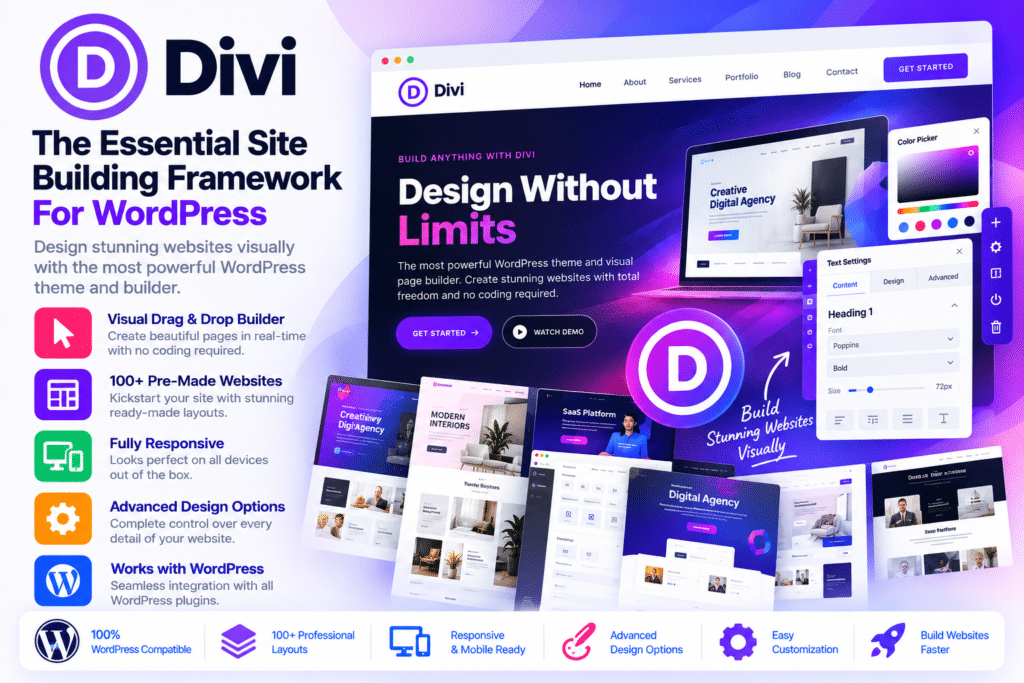
Divi is a premium WordPress theme and visual website-building framework developed by Elegant Themes. It combines a customizable theme with a powerful drag-and-drop builder, allowing users to design complete websites without editing theme files or writing code for every layout change.
From business websites and creative portfolios to blogs, landing pages, and WooCommerce stores, Divi provides a flexible design environment for building different types of WordPress websites. Its visual editor lets you work directly on the page, customize individual elements, adjust responsive layouts, and see design changes as you make them.
Divi includes a large collection of content modules, pre-designed layouts, global design settings, dynamic content options, and full-site customization tools. The Divi Theme Builder also allows you to create custom headers, footers, post templates, archive layouts, and other website-wide designs.
- Divi WordPress theme and visual page builder
- Divi 5 and Divi 4 version files as specified in the package
- Frontend visual drag-and-drop editing
- 100+ website design elements and modules
- Pre-designed website and page layouts
- Theme Builder for custom headers and footers
- Responsive design and customizable breakpoints
- Global colors, variables, and design presets
- CSS Grid and Flexbox layout controls
- Dynamic content and Loop Builder
- Custom typography, backgrounds, and spacing
- Animation, hover, and scroll effects
- WooCommerce design modules
- Custom CSS and code integration options
- Divi Library for reusable layouts and design elements
- Third-party extensions and child-theme ecosystem
Key Features
1. Visual Drag-and-Drop Website Builder
Design pages directly on the frontend using Divi’s visual editor. Add elements, move sections, adjust spacing, and customize content while viewing the actual page layout.
The visual workflow makes it easier to build custom website designs without switching repeatedly between the WordPress editor and frontend preview.
2. 100+ Content Modules and Elements
Divi provides a collection of modules for building different website sections. Add content elements to a page and customize their appearance using the available design settings.
Common modules include:
- Text and headings
- Images and galleries
- Buttons and calls to action
- Blurbs and icon lists
- Contact forms
- Email opt-in forms
- Sliders and video elements
- Testimonials
- Pricing tables
- Tabs and accordions
- Counters and progress bars
- Blog and portfolio layouts
- Maps and social elements
- WooCommerce product modules
These elements can be combined to create landing pages, business sections, product displays, and other custom layouts.
3. Divi Theme Builder
Customize more than individual pages with the Divi Theme Builder. Create reusable templates for different parts of your WordPress website.
You can design:
- Global website headers
- Custom footers
- Blog post templates
- Category and archive layouts
- Search results pages
- Custom post type templates
- WooCommerce product layouts
- Other dynamic website sections
Display conditions help assign templates to specific content types, pages, or sections of your website.
4. Premade Website Layouts
Get started with professionally designed layouts instead of building every page from scratch. Divi’s premade layout library includes designs for business websites, agencies, restaurants, online stores, portfolios, blogs, and many other industries.
Import a suitable layout, replace the sample content, customize the colors and typography, and adapt the design to your brand.
The official Divi website advertises access to more than 2,600 premade layouts.
5. Responsive Design Controls
Create layouts that adapt to desktop, tablet, and mobile screens. Divi provides device-specific design settings so you can adjust element sizes, spacing, alignment, typography, and visibility for different screen widths.
Divi 5 also offers customizable breakpoints, giving designers more control over how layouts respond to different devices.
6. Global Design Settings
Maintain a consistent appearance across your website with global design settings. Configure reusable colors, fonts, sizes, and other design values rather than manually adjusting every module.
When a shared design value changes, you can update the appearance of multiple elements through the same design system.
7. Design Presets and Reusable Components
Create reusable design presets for commonly used elements and styling options. Apply consistent button styles, typography, borders, shadows, and spacing across different pages.
Divi 5 also introduces a more advanced component-based workflow, making it easier to reuse and manage shared design elements.
8. CSS Grid and Flexbox Layouts
Build structured page layouts using modern CSS layout techniques. Divi 5 supports CSS Grid and Flexbox controls, providing greater flexibility when arranging columns, content groups, and responsive sections.
These tools are useful for creating complex layouts without manually writing all the underlying CSS.
9. Dynamic Content Integration
Connect design elements to WordPress content and supported custom fields. Dynamic content can display information from posts, pages, taxonomies, and compatible custom-field integrations.
This is useful for websites that rely on reusable templates, directories, portfolios, blogs, and custom post types.
10. Loop Builder
Create repeating layouts for posts, products, terms, and other supported content. Use the Loop Builder to design custom content listings instead of relying entirely on default WordPress archive layouts.
This provides more control over how blog posts, product collections, and dynamic content appear on your website.
11. Custom Animations and Visual Effects
Add movement and interactive styling to website elements. Divi includes animation and motion controls that can help create more engaging page designs.
Available effects include:
- Scroll-based animations
- Hover transitions
- Element entrance animations
- Transform effects
- Opacity and scaling controls
- Rotation and movement effects
- Mouse-based interactions
Use these effects selectively to improve the visual experience without making pages unnecessarily distracting.
12. WooCommerce Integration
Build and customize online stores using Divi’s WooCommerce modules. Design product sections, shop layouts, and individual product presentations with visual editing controls.
WooCommerce-related design elements can be used for:
- Product images and descriptions
- Product prices
- Add-to-cart buttons
- Product ratings
- Product galleries
- Related products
- Product listings
- Shopping cart and store layouts
WooCommerce must be installed separately to use the eCommerce functionality.
13. Custom Headers and Footers
Create website headers and footers that match your brand instead of relying only on the theme’s default layout. Add logos, navigation menus, buttons, social icons, and other design elements.
You can also create different header and footer designs for selected pages or content types using Theme Builder display conditions.
14. Divi Library and Layout Reuse
Save custom sections, rows, modules, and layouts in the Divi Library. Reuse saved designs on other pages and projects to reduce repetitive work.
This is particularly helpful for agencies and developers who build multiple websites using similar design structures.
15. Custom CSS and Code Integration
Extend your website designs with custom CSS and supported code options. Add custom styling to individual modules or apply broader styles through the relevant theme settings.
Developers can use these controls to implement design details that are not available through standard visual settings.
16. Advanced Design Controls
Customize the appearance of individual elements with detailed controls for typography, borders, shadows, backgrounds, spacing, positioning, and sizing.
Divi 5 also supports advanced CSS units, variables, and mathematical functions in supported fields, giving developers more precise control over page layouts.
17. Conditional Display Rules
Control when selected elements and layouts appear on your website using display conditions. Depending on the available conditions, you can target user roles, device types, dates, times, cart status, and other supported criteria.
This can be useful for personalized content, promotional sections, and conditional website elements.
18. Divi 5 Modernized Builder Framework
Divi 5 rebuilds important parts of the builder with a modernized architecture and design workflow. Its improvements include a more flexible visual editing environment, responsive layout systems, reusable components, design presets, and enhanced dynamic content controls.
The Divi 5.18 release also includes improvements to variable-based content editing, nested variables, and dynamic content handling.
19. Divi 4 Compatibility for Existing Websites
Divi 4 provides the established builder environment used by many existing WordPress websites. It can be useful when maintaining older Divi layouts, child themes, or third-party extensions that have not yet been fully updated for Divi 5.
Divi 5 includes backward compatibility for many existing Divi 4 layouts and legacy modules, although older extensions may continue using the legacy framework.
20. Extend Divi Through Its Marketplace
Expand the builder with third-party modules, extensions, child themes, and layout packs from the Divi ecosystem.
Additional tools can provide features such as advanced menus, custom animations, sliders, dynamic content elements, and specialized design modules. Third-party products may require separate purchases or licenses.
Divi 5 vs Divi 4
Both versions provide visual website-building capabilities, but they use different builder frameworks.
| Feature | Divi 5 | Divi 4 |
|---|---|---|
| Visual page builder | Modernized builder | Established visual builder |
| Responsive design | Advanced customizable breakpoints | Device-specific design controls |
| Layout systems | CSS Grid and Flexbox | Traditional Divi layout system |
| Design presets | Advanced preset system | Existing preset options |
| Dynamic content | Enhanced variable workflows | Established dynamic content |
| Components | Advanced reusable components | Divi Library layouts and elements |
| Legacy modules | Backward compatibility mode | Native legacy framework |
| Best suited for | New builds and tested migrations | Existing Divi 4 projects |
Who Should Use Divi Theme?
Divi can be a suitable choice for:
- WordPress website designers and developers
- Freelancers and web design agencies
- Business and corporate websites
- Creative portfolios and personal websites
- Bloggers and online publishers
- WooCommerce store owners
- Landing page and marketing website creators
- Website owners who prefer visual editing
- Developers managing multiple WordPress projects
Compatibility and Setup Notes
- Platform: WordPress
- Theme: Divi
- Developer: Elegant Themes
- Builder: Integrated Divi Visual Builder
- Versions referenced: Divi 5.18.1 and Divi 4.27.6
- eCommerce: WooCommerce integration
- Design system: Global variables, presets, and reusable components
- Extensions: Divi Marketplace modules, child themes, and third-party add-ons
Important version note: Divi 5 and Divi 4 are separate versions and should not be activated as two themes simultaneously. The official Elegant Themes documentation identifies Divi 4.27.6 or later as the starting point for enabling the Divi 5 update. Always create a complete backup and test migration on a staging website before updating an existing project.
Check third-party Divi modules, child themes, and custom code for Divi 5 compatibility. Legacy extensions may continue working through backward compatibility mode, but they can still rely on the older Divi framework and may not receive all Divi 5 improvements.
Divi AI, Divi Cloud, and other extended services are separate ecosystem offerings whose availability depends on the applicable Elegant Themes membership. Do not assume that a theme ZIP file includes an active subscription, AI credits, cloud storage, or official update and support access.
Build Flexible WordPress Websites with Divi
Divi combines a visual page builder, customizable WordPress theme, reusable design system, and full-site editing tools in one framework. Its extensive modules and premade layouts help users create websites for different industries, while advanced styling and dynamic content controls provide room for more customized projects.
Whether you are starting a new website or maintaining an existing Divi project, Divi offers a flexible environment for designing pages, managing layouts, and building WooCommerce experiences without depending entirely on custom code.