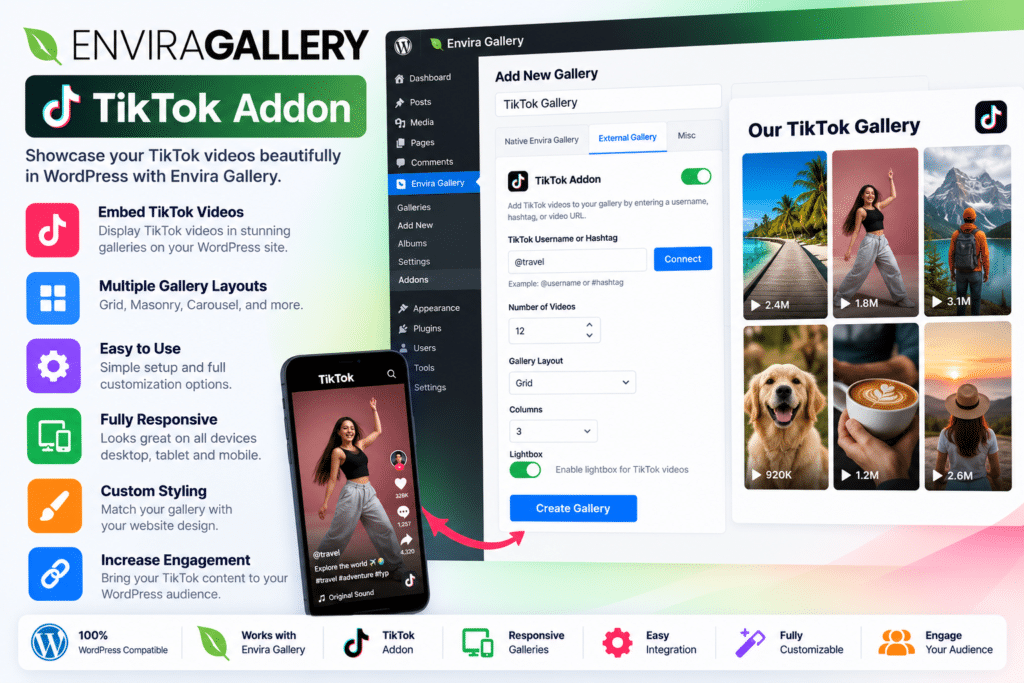
Bring your TikTok content directly to your WordPress website with the Envira Gallery TikTok Addon. This extension lets you create engaging video galleries using content from your connected TikTok account, making it easier to showcase short-form videos without manually uploading every new post to your website.
Whether you’re a content creator, business owner, photographer, influencer, or digital marketer, this addon helps connect your social media presence with your website. Display recent videos in a dedicated gallery, customize how visitors interact with them, and keep your content fresh with automatic syncing.
The TikTok Addon works with Envira Gallery and its Videos Addon, giving you a practical way to integrate TikTok videos into your existing WordPress gallery workflow.
What You’re Getting
The Envira Gallery TikTok Addon extends Envira Gallery with a dedicated TikTok gallery source. After connecting your TikTok account, you can select the videos to display, control link behavior, customize captions, and configure how frequently the gallery checks for new content.
It is designed for website owners who want to reuse their social content on their own website while maintaining a consistent visual presentation.
Key Features
- TikTok Account Integration – Connect your TikTok account to display your video content on your WordPress website.
- Automatic Video Synchronization – Configure a sync interval so your gallery can fetch new videos without manually rebuilding it.
- Multiple Account Support – Connect and manage up to three TikTok accounts, according to Envira’s documentation.
- Custom Video Count – Choose how many TikTok videos appear in a gallery.
- Flexible Link Options – Let visitors open videos in the gallery lightbox, visit the original TikTok video, or view the full video on your website where supported.
- Caption Display – Use the original TikTok captions to provide context for your videos.
- Caption Length Controls – Limit caption length to keep the gallery tidy and easy to browse.
- New-Tab Links – Choose whether external TikTok links open in a new browser tab.
- External Gallery Source – Select TikTok as the source when creating an Envira external gallery.
- Gallery Customization – Use compatible Envira Gallery settings to adjust the presentation of your content.
- Responsive Gallery Experience – Build on Envira’s gallery tools to present video content across different screen sizes.
- Less Manual Work – Reduce the need to download, upload, and manually replace videos whenever you publish new TikTok content.
- Social Content Promotion – Give website visitors another way to discover your TikTok profile and explore your videos.
- WordPress Workflow Integration – Manage TikTok galleries from your WordPress dashboard alongside your other Envira galleries.
Perfect For
The Envira Gallery TikTok Addon is useful for content creators, influencers, online businesses, marketing agencies, photographers, event organizers, lifestyle brands, and portfolio websites.
It can help creators showcase recent videos, businesses highlight products or behind-the-scenes content, and agencies present social media work on client websites. It is also a practical option for brands that want their website to reflect their latest social content.
Showcase Your TikTok Videos on Your Website
Your TikTok profile can be an important part of your online presence, but visitors browsing your website may never discover it. By displaying TikTok videos in an Envira Gallery, you can introduce your social content to website visitors without requiring them to leave your site immediately.
This creates another opportunity to share your work, demonstrate products, highlight events, and encourage visitors to explore your social channels.
Keep Your Video Gallery Fresh
Updating a website gallery manually every time you publish a new video can become repetitive. With the TikTok Addon’s configurable synchronization settings, your gallery can check for new videos automatically.
You can also control the number of videos displayed and adjust caption settings to maintain a clean presentation as your social content grows.
Customize How Visitors Watch Your Videos
Different websites have different needs. You may want visitors to watch a video in a gallery lightbox, open the original TikTok post, or view the video on your website where supported.
The addon provides link and caption controls to help you choose an experience that fits your site’s layout and audience.
Important Compatibility Information
The TikTok Addon is an extension, not a standalone WordPress gallery plugin. You need Envira Gallery installed, and Envira’s official setup guide also requires the Videos Addon to be installed and activated.
TikTok account authorization is required to connect your content. The addon is listed by Envira for Pro plans and above, so check your license and included features before installation. Third-party platform changes may also affect integration behavior.
Envira Gallery TikTok Addon – Connect Your Website and Social Content
Make your WordPress website more engaging by bringing your TikTok videos into your gallery workflow. With account integration, configurable video displays, caption controls, and automatic synchronization, the Envira Gallery TikTok Addon helps you showcase your short-form content in a convenient place on your website.