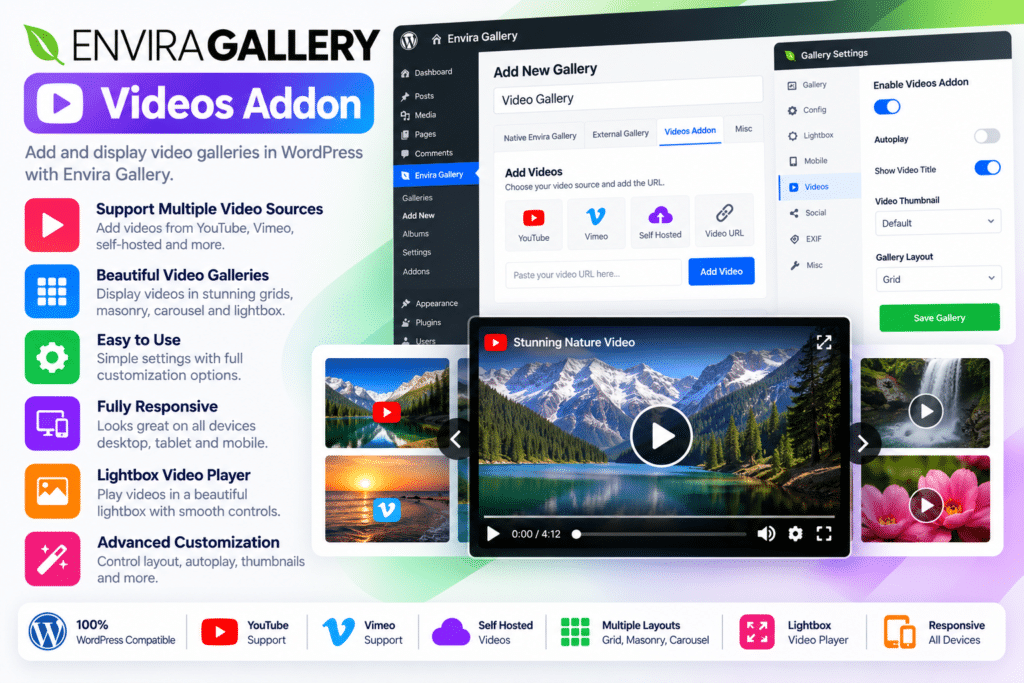
The Envira Gallery Videos Addon extends the standard Envira Gallery plugin with video-specific functionality. You can create galleries using supported video URLs, configure thumbnails, choose whether videos play inside the gallery or open in a lightbox, and adjust available playback settings.
For creators who publish regularly on YouTube, the addon also supports playlist-based galleries, which require a YouTube API key. Self-hosted videos can be configured with video dimensions and other supported settings.
Key Features
- YouTube Video Support – Add YouTube videos to your WordPress galleries using supported video links.
- Vimeo Integration – Showcase Vimeo videos alongside your other gallery content.
- Wistia Video Support – Create galleries featuring supported Wistia video links.
- Self-Hosted MP4 Videos – Include compatible MP4 files hosted on your own server.
- YouTube Playlist Galleries – Display videos from supported YouTube playlists after configuring a YouTube API key.
- Additional Video Platforms – Support for services such as Twitch, VideoPress, and Dailymotion, subject to the addon’s supported URL formats.
- Video Lightbox Playback – Let visitors open and watch videos in a larger lightbox view.
- In-Gallery Video Playback – Configure supported videos to play directly within the gallery instead of opening in a lightbox.
- Automatic Poster Images – Generate poster thumbnails for supported video sources when adding videos.
- Custom Video Thumbnails – Replace an automatically generated thumbnail with an image from your WordPress Media Library.
- Video Start-Time Support – Configure supported YouTube links to start at a selected point in the video.
- Aspect Ratio Controls – Use the available 16:9 video option to improve the presentation of widescreen content.
- Self-Hosted Video Dimensions – Set width and height for supported self-hosted videos.
- Fullscreen Viewing – Use compatible fullscreen options to provide a larger viewing experience.
- Playback Settings – Configure available autoplay and video display options, keeping in mind that individual video providers may restrict autoplay behavior.
- Responsive Gallery Layouts – Use compatible Envira Gallery layouts to present video content across different screen sizes.
- Amazon S3 Video Support – Use videos hosted on Amazon S3 when the required file permissions and display settings are configured correctly.
Perfect For
The Envira Gallery Videos Addon is useful for content creators, YouTubers, photographers, educators, travel bloggers, marketing agencies, online stores, and businesses that publish video content.
Photographers can showcase films alongside their image portfolios. Educators can organize lesson videos into a dedicated gallery. Businesses can present product demonstrations, while travel websites can group destination videos into visual collections.
It is also useful for creative agencies and portfolio websites that need a dedicated place to display video projects without scattering individual embeds across multiple pages.
Create a Dedicated Video Gallery
When videos are spread across different pages, visitors may find it difficult to explore your full collection. A dedicated video gallery brings related content together in a more organized format.
You can create separate galleries for tutorials, product videos, travel experiences, interviews, or portfolio projects. Visitors can browse the available videos and select the ones they want to watch.
This approach is especially helpful for websites with multiple video categories or a growing content library.
Give Visitors More Control Over Playback
Different websites benefit from different viewing experiences. Some work best with videos opening in a lightbox, while others prefer playback directly inside the gallery.
The Videos Addon lets you configure supported videos for these different display behaviors. You can also customize poster images and adjust available playback options to make your gallery more consistent with the rest of your website.
Keep in mind that autoplay and certain playback features depend on the video provider, browser policies, and the way each video is hosted.
Organize YouTube Content More Efficiently
If you publish videos regularly on YouTube, playlist support can make gallery management more convenient. Rather than adding each video individually, you can configure a gallery around a supported YouTube playlist.
This feature requires a YouTube API key, which you configure in Envira Gallery’s video settings. API access, playlist permissions, and YouTube’s current policies can affect how the integration works.
Important Compatibility Information
The Envira Gallery Videos Addon is an extension, not a standalone video gallery plugin. You need Envira Gallery installed and activated, along with an eligible Envira license that includes the Videos Addon. Envira’s documentation identifies Pro or higher as the required license level.
For YouTube playlist functionality, you must configure a YouTube API key. Self-hosted video playback depends on compatible file formats, hosting capacity, and server configuration. Third-party platforms may also change their supported URLs or playback behavior.
Compatibility note: Envira’s documentation states that the Videos Addon and Dynamic Addon are not compatible with each other at present. Check your installed versions and required addon combinations before using them on a live website.
Envira Gallery Videos Addon – Showcase Videos Beautifully on WordPress
Make your video content easier to browse with the Envira Gallery Videos Addon. With support for multiple video sources, customizable thumbnails, lightbox playback, and flexible display settings, it helps you create an organized video gallery that complements your WordPress website and gives visitors a better way to explore your content.