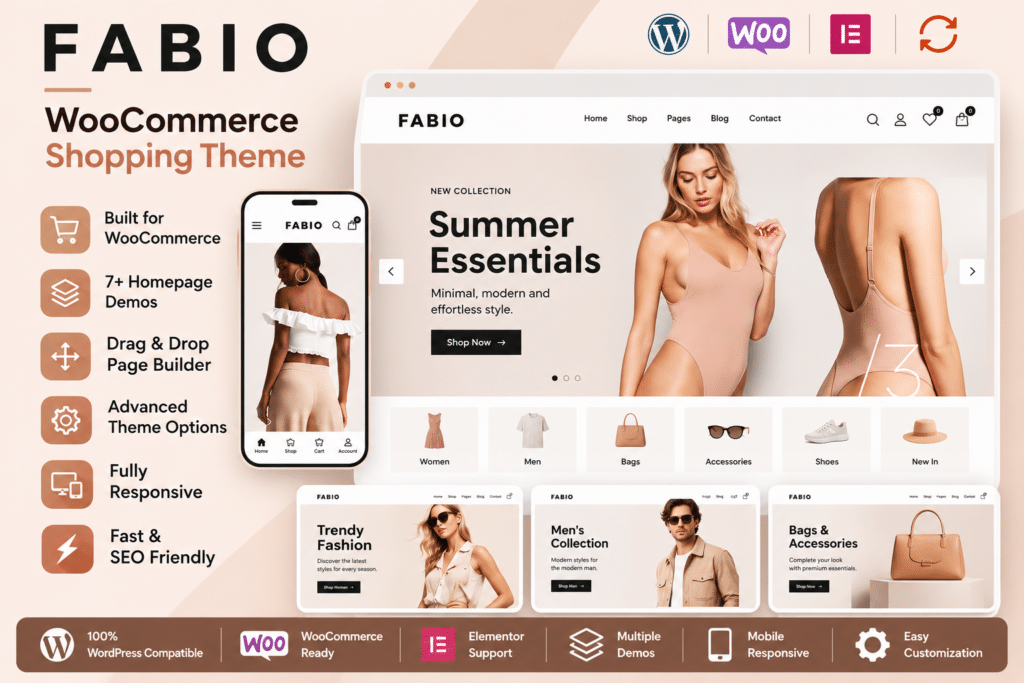
Fabio is a minimalist WooCommerce shopping theme developed by disgogo, designed for businesses that want to create a clean and product-focused online store. Its black and light-grey design, responsive layouts, and customizable shop elements make it suitable for fashion boutiques, electronics retailers, accessories stores, and other eCommerce businesses.
Built with the Bootstrap framework, Fabio integrates with WooCommerce and includes Visual Composer elements and the Unyson page-building framework for creating customized website layouts. You can choose from multiple homepage designs, configure shop and product pages, display featured products, and organize your catalog using dedicated eCommerce widgets.
The theme also includes shopping-focused features such as a header mini cart, product image zoom, wishlist integration, catalog mode, product filters, and multiple product display options. Its minimalist approach keeps attention on product photography and essential shopping information.
Whether you are launching a small online boutique or building a larger product catalog, Fabio provides a collection of storefront layouts and WooCommerce customization options to establish your online shop.
- Fabio WooCommerce WordPress theme
- 6 homepage layout styles
- 6 homepage slider designs
- Visual Composer integration
- Unyson page-building framework
- Bootstrap-based responsive layout
- Full-width and sidebar shop layouts
- Customizable single-product pages
- Product image zoom functionality
- Header mini cart dropdown
- Catalog mode
- Wishlist integration through YITH WooCommerce Wishlist
- Product filtering and display elements
- 15 dedicated WooCommerce widgets
- Three blog layout styles
- Sticky navigation menu
- Custom typography and color settings
- Multi-level dropdown navigation
- Newsletter widget integration
- WPML and Polylang compatibility
- One-click demo content import
- Child theme support
- Theme settings import and export
Key Features
1. 6 Homepage Layout Styles
Choose from six homepage design variations to create a storefront that matches your business. Each layout provides a different starting point for displaying promotional banners, product collections, categories, and featured merchandise.
You can customize the selected homepage with your own images, text, products, and branding.
2. Minimalist Shopping Design
Fabio uses a clean black and light-grey visual style to keep attention on the products. Its uncluttered layout is particularly suitable for fashion, accessories, lifestyle products, and electronics stores.
The theme also includes customization options for colors, fonts, and backgrounds, allowing you to adapt the original appearance to your brand.
3. WooCommerce Integration
Build your online store using WooCommerce, the WordPress eCommerce platform. Fabio integrates with WooCommerce to display product catalogs, product details, shopping carts, and other store components.
WooCommerce handles important store operations such as:
- Product management
- Product variations
- Shopping cart and checkout
- Customer accounts
- Order management
- Inventory management
- Coupons and discounts
- Shipping and tax configuration
- Supported payment gateways
WooCommerce must be installed separately.
4. Flexible Shop and Product Page Layouts
Choose between full-width and sidebar layouts for shop archives and individual product pages.
You can also control the visibility of different product information elements, including:
- Product titles
- Product prices
- Add-to-cart buttons
- Product categories
- Descriptions
- Product metadata
- Product tabs
- Upsells
- Cross-sells
- Related products
These settings help create a product presentation that suits your catalog.
5. Product Image Zoom
Allow customers to inspect product images more closely using the built-in zoom magnifier functionality.
This can be useful for fashion, footwear, accessories, electronics, and other products where customers want to examine visual details before purchasing.
6. Header Mini Cart
Display a dropdown mini cart in the website header so customers can review their selected products without navigating directly to the cart page.
The theme includes mini-cart styling and improvements to its dropdown shopping experience.
7. Wishlist Integration
Add wishlist functionality through the YITH WooCommerce Wishlist plugin. Customers can save products they are interested in and return to them later.
This integration requires the compatible wishlist plugin to be installed and configured separately.
8. WooCommerce Catalog Mode
Use Fabio’s catalog mode to turn off purchasing functionality and display products as a browsable catalog.
This can be useful for manufacturers, wholesalers, suppliers, and businesses that want visitors to explore products before requesting a quotation or contacting the sales team.
9. Product Filtering Elements
Help customers browse products using the available Visual Composer product-filter elements.
You can create product sections with category filtering and supported masonry or carousel layouts, making it easier to organize products into different collections.
10. Featured and Recent Products
Highlight selected products and recently added merchandise through dedicated content elements.
Use these sections to showcase new arrivals, popular products, promotional collections, and important items on your homepage or other website pages.
11. Multiple Product Display Options
Fabio includes product display elements for different WooCommerce collections, including:
- Featured products
- Recent products
- Sale products
- Best-selling products
- Top-rated products
- Products selected by SKU or ID
- Product categories
These elements help create customized shopping sections without manually building every product listing.
12. 15 WooCommerce Widgets
Use the available widgets to organize product information and improve store navigation.
The theme includes widgets for:
- Best Sellers
- Cart
- Featured Products
- Layered Navigation
- Login
- On-Sale Products
- Price Filter
- Product Categories
- Product Search
- Product Tags
- Random Products
- Recently Viewed Products
- Recent Products
- Recent Reviews
- Top-Rated Products
You can position supported widgets in the available sidebar and widget areas.
13. Sticky Navigation Menu
Keep the main navigation accessible while visitors scroll through your website. The sticky menu helps customers move between important shop sections without having to return to the top of every page.
Fabio also supports multi-level dropdown navigation for organizing product categories and other website links.
14. Six Homepage Slider Designs
Create promotional homepage sections using the available Revolution Slider-powered slider designs.
Use these sections to highlight seasonal collections, new arrivals, product launches, and special offers.
Revolution Slider is a separate plugin dependency. Confirm the included plugin files and independent license and update entitlements before relying on premium functionality.
15. Three Blog Layout Styles
Publish product updates, buying guides, company news, and other content using three blog display styles:
- FitRows
- Masonry
- List
The theme also supports classic pagination and a Load More button, providing different ways to browse blog content.
16. Custom Colors and Typography
Adjust the visual appearance of your store using the available theme options.
Customize fonts, colors, and backgrounds to match your branding. Fabio supports system fonts and Google Fonts for supported typography settings.
17. Newsletter Integration
Add newsletter subscription functionality using the Mailchimp for WordPress plugin.
This allows visitors to subscribe to your mailing list and receive product announcements, store updates, and promotional communications through your configured Mailchimp account.
The Mailchimp integration requires the companion plugin and a connected Mailchimp account.
18. Multilingual Website Compatibility
Create multilingual WooCommerce websites using the theme’s compatibility with WPML and Polylang.
This can help businesses serve customers in different language markets. The appropriate multilingual plugin and translation configuration are required.
19. Responsive Bootstrap Framework
Fabio is built with Bootstrap and designed to adapt to desktop computers, tablets, and mobile devices.
Its responsive layouts help maintain usable product grids, navigation menus, and shopping sections across different screen sizes.
20. One-Click Demo Import
Import the available demo content to establish the initial website structure. This can help you get started with homepage layouts, sample pages, and theme configurations before replacing the content with your own products and branding.
21. Theme Settings Import and Export
Back up and transfer theme configuration settings using the available import and export functionality.
This can be useful when moving a website between environments or recreating a similar configuration on another WordPress installation.
22. Child Theme Support
Use a child theme for custom PHP, CSS, and template modifications. Keeping customizations separate from the parent theme can make future maintenance easier when the parent theme is updated.
Who Should Use Fabio?
Fabio can be useful for:
- Fashion and clothing stores
- Electronics and gadget retailers
- Footwear and accessories shops
- Lifestyle and gift stores
- Small online boutiques
- Product catalog websites
- Wholesale and supplier businesses
- Businesses using WooCommerce catalog mode
- Freelancers and agencies maintaining older WooCommerce projects
Compatibility and Setup Notes
- Platform: WordPress
- Theme: Fabio – Shopping WordPress Theme
- Developer: disgogo
- eCommerce: WooCommerce
- Framework: Bootstrap
- Page building: Visual Composer and Unyson framework
- Wishlist: YITH WooCommerce Wishlist integration
- Slider: Revolution Slider-powered layouts
- Multilingual: WPML and Polylang
- Newsletter: Mailchimp for WordPress
- Customization: Theme options, custom widgets, and child themes
Important compatibility warning: Fabio is an older theme built around the Unyson framework and legacy Visual Composer-based workflows. The official ThemeForest listing identifies compatibility with WooCommerce 5.x and 6.x and WordPress versions up to 6.0.x in its software compatibility information. It also marks the theme as not Gutenberg-optimized.
The listing has inconsistent version information: its header displays version 1.7, while its changelog includes version 1.8 dated December 23, 2018. Its item metadata reports a last update of August 9, 2024, but that date does not establish compatibility with current WordPress and WooCommerce releases.
Before installing Fabio on a live store, verify the exact package version, PHP compatibility, and functionality with your current WooCommerce setup. Test the shop, checkout, product variations, mini cart, and companion plugins on a staging website first.
Do not assume that bundled premium plugin files include independent license keys, direct developer support, or automatic updates from their original authors.
Create a Clean Online Store with Fabio
Fabio combines a minimalist storefront design with WooCommerce shopping tools, customizable product layouts, homepage sliders, and dedicated product widgets. Its catalog mode, image zoom, mini cart, and product display options provide a useful foundation for presenting merchandise online.
For businesses maintaining an older WooCommerce project or looking for a simple, product-focused storefront, Fabio offers a range of customization options. However, its legacy framework and dated compatibility information should be carefully evaluated before choosing it for a new production website.