Gravity Forms Geolocation is a WordPress add-on designed to bring location-based functionality to forms created with Gravity Forms.
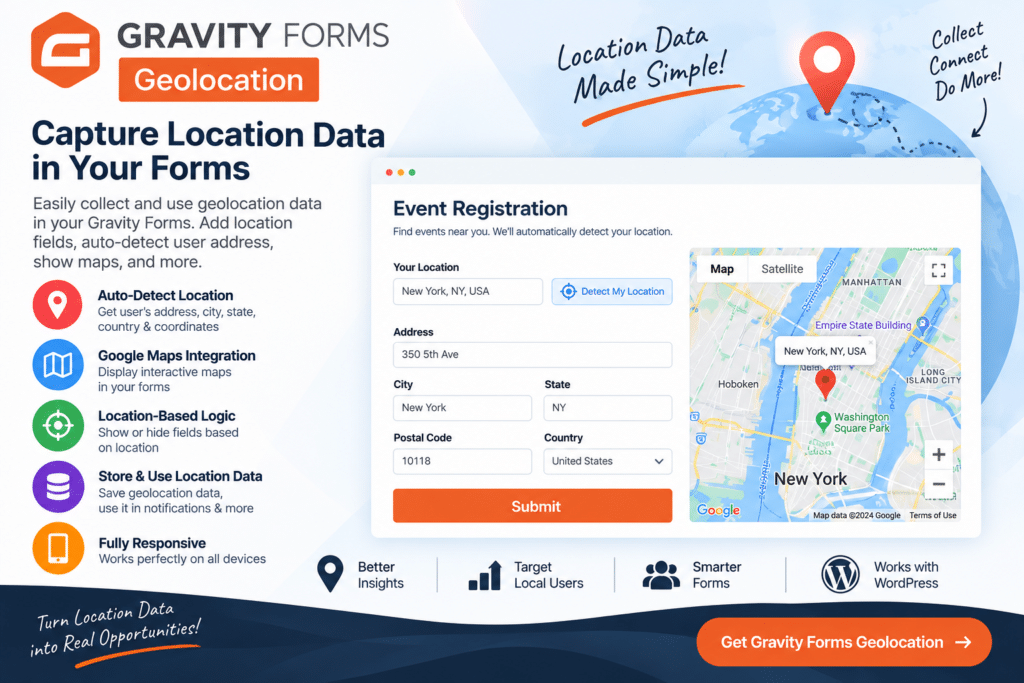
It can help you build forms that collect addresses, geographic coordinates, and other supported location information while giving users a more convenient way to enter location data. Depending on your configuration, location fields can work with maps, address autocomplete, geocoding, and other geolocation features.
This makes the add-on useful for business directories, store locators, property listings, delivery forms, event submissions, service requests, and other WordPress websites where accurate location information matters.
Key Features
- Gravity Forms Integration – Add geolocation functionality to forms built with Gravity Forms.
- Address Autocomplete – Help users complete supported address fields faster with location suggestions.
- Geolocation Fields – Collect geographic information directly through your WordPress forms.
- Latitude & Longitude – Capture supported coordinate data for submitted locations.
- Interactive Maps – Display or select locations using supported map functionality.
- Geocoding Support – Convert supported addresses into geographic coordinates where configured.
- Reverse Geocoding – Convert supported coordinate information into readable location details when available.
- Current Location Detection – Allow users to use their current location in supported form configurations and with appropriate permission.
- Location-Based Forms – Create forms for directories, listings, events, properties, stores, and local services.
- Custom Location Fields – Collect the location information required for your particular workflow.
- User-Friendly Address Entry – Reduce the amount of manual typing required when entering supported addresses.
- Responsive Forms – Create location-enabled forms suitable for desktop, tablet, and mobile visitors.
- Dynamic Location Data – Use submitted geographic information within supported WordPress workflows.
- Flexible Form Applications – Build everything from simple address forms to more advanced location-based submission systems.
Perfect For
Gravity Forms Geolocation is useful for business directories, real estate websites, store locators, delivery services, local marketplaces, event websites, travel platforms, job boards, service businesses, restaurant directories, user-submitted listings, and other WordPress projects that need location-aware forms.
Make Location Forms Easier to Use
Manually entering complete addresses can be slow and can lead to inconsistent location data.
With geolocation features, supported Gravity Forms fields can provide address suggestions, maps, coordinates, and other location information. This can make the submission process more convenient for visitors while providing website owners with more structured geographic data.
For websites built around local listings, deliveries, properties, events, or service areas, these capabilities can be especially useful.
Add Location Intelligence to Gravity Forms
Enhance your forms with Gravity Forms | Geolocation – WordPress Location & Maps Add-On.
With address autocomplete, geolocation fields, coordinates, maps, geocoding, and location-based form functionality, this add-on provides a flexible solution for collecting and working with geographic information through Gravity Forms.