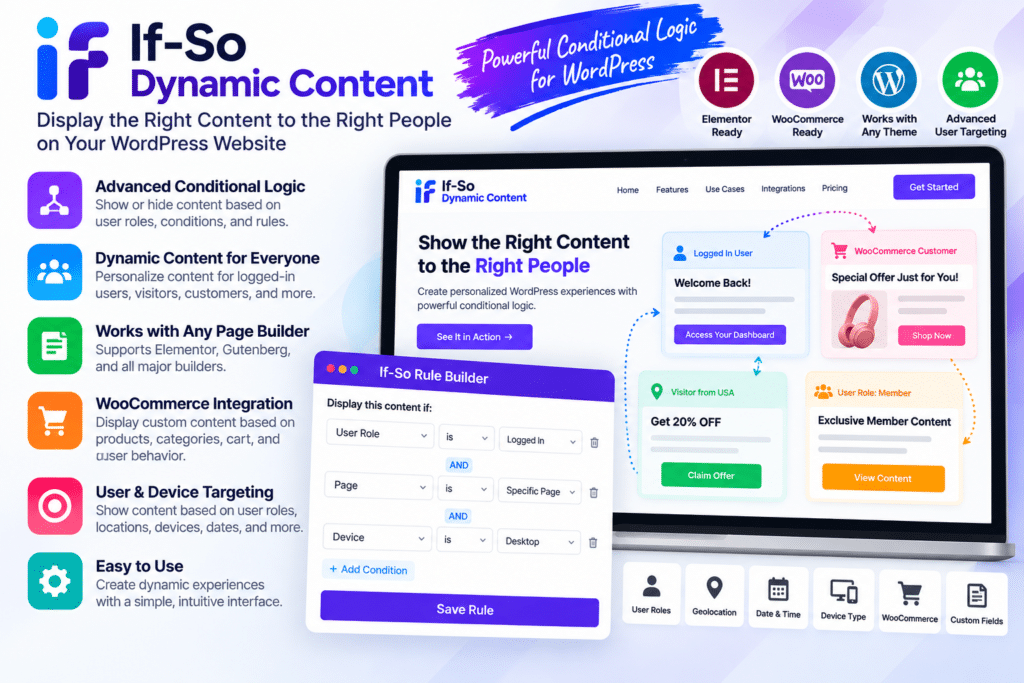
If-So Dynamic Content is a WordPress plugin designed to help website owners display different content to different visitors based on predefined conditions.
Instead of showing every visitor exactly the same page, you can personalize supported content according to factors such as location, device, user status, referral source, dates, visitor behavior, and other available conditions.
This makes If-So useful for marketers, WooCommerce stores, membership websites, local businesses, agencies, and service providers that want to create more relevant website experiences without building separate pages for every audience.
Key Features
- Conditional Content Display – Show or hide supported content according to configured visitor conditions.
- Personalized Website Content – Create different messages, offers, or sections for different audience groups.
- Geolocation Conditions – Display supported content according to a visitor’s country, city, or geographic information.
- Logged-In User Conditions – Show specific content to logged-in or logged-out visitors.
- User Role Targeting – Personalize supported content according to WordPress user roles.
- Device-Based Content – Display different content for desktop, tablet, or mobile visitors where supported.
- Referral Source Targeting – Change content based on how visitors reached your website.
- URL Parameter Conditions – Personalize supported content using query-string or URL-based information.
- Date & Time Scheduling – Display offers or announcements according to configured dates and schedules.
- Returning Visitor Targeting – Create different experiences for supported new and returning visitor scenarios.
- WooCommerce Personalization – Use supported conditions to customize content around eCommerce visitors and workflows.
- Shortcode Support – Place dynamic content within supported WordPress pages and content areas.
- Page Builder Compatibility – Use conditional content with compatible WordPress page-building environments.
- Dynamic Trigger Management – Create multiple variations and control when each one should appear.
Perfect For
If-So Dynamic Content is suitable for WooCommerce stores, membership websites, digital agencies, marketers, local businesses, SaaS websites, landing pages, online courses, blogs, service providers, and websites that want to personalize visitor experiences.
Show More Relevant Content to Visitors
Different visitors often have different needs.
A returning customer may need a different message from a first-time visitor, while users in different locations may need different prices, contact information, promotions, or service details.
If-So Dynamic Content lets you define conditions for these situations and automatically display the most appropriate supported content.
This can help you build more targeted landing pages and website experiences without maintaining numerous duplicate pages.
Create Personalized WordPress Experiences
Make your website more dynamic with If-So Dynamic Content – WordPress Conditional Content Plugin.
With conditional display rules, geolocation targeting, user-role conditions, device targeting, scheduling, referral-based content, and WooCommerce compatibility, If-So provides a flexible solution for personalizing WordPress content.