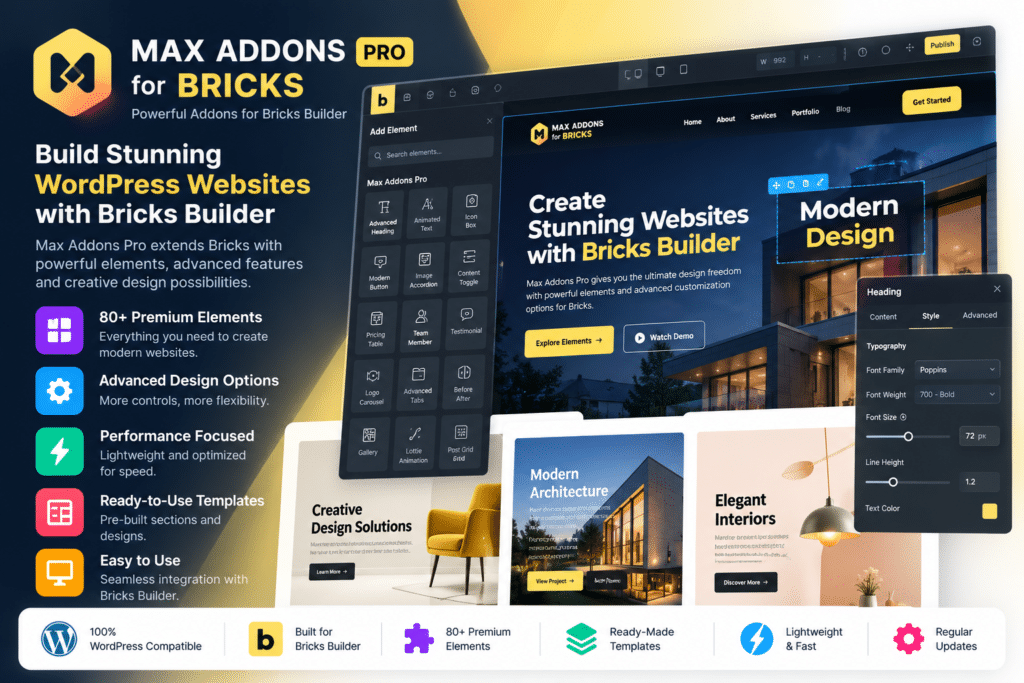
Max Addons Pro for Bricks is a premium addon collection designed to extend the functionality of Bricks Builder with additional elements, dynamic features, WooCommerce tools, form enhancements, galleries, tables, animations, navigation components, and advanced content controls.
Developed by BloomPixel, Max Addons integrates directly with the Bricks visual builder, allowing you to add its elements to pages and templates using the familiar Bricks workflow.
It is suitable for agencies, developers, freelancers, WooCommerce stores, and website creators who want additional design and dynamic-content functionality without building every custom element from scratch.
Key Features
- 60+ Bricks Elements – Expand Bricks Builder with a large collection of creative, dynamic, media, navigation, form, and WooCommerce elements.
- Advanced Display Conditions – Show or hide supported content according to custom WordPress and WooCommerce conditions.
- Max Query Loop – Extend Bricks Query Loop capabilities with additional supported query types.
- Advanced Form Fields – Add enhanced fields and functionality to Bricks forms.
- Form Conditions – Build supported conditional behavior into Bricks form workflows.
- Dynamic Tags – Access additional supported dynamic values when building data-driven layouts.
- Image & Video Elements – Create galleries, albums, image comparisons, hotspots, video galleries, sliders, and other visual sections.
- Tables & Dynamic Charts – Build styled tables and data-driven chart presentations.
- Form Styler Elements – Visually style supported Gravity Forms, Contact Form 7, Fluent Forms, and Formidable Forms.
- WooCommerce Elements – Customize stores with product, cart, checkout, reviews, swatches, wishlist, and related commerce elements.
- Checkout Page Builder – Build customized supported WooCommerce checkout templates with Bricks.
- Thank You Page Builder – Design branded post-purchase pages containing customer and order information.
- Maintenance Mode – Design custom maintenance and coming-soon pages using Bricks.
- Performance Controls – Enable only the elements you need and load supported assets where those elements are actually used.
Perfect For
Max Addons Pro for Bricks is suitable for WordPress agencies, freelancers, Bricks developers, web designers, WooCommerce stores, marketing websites, membership projects, business sites, dynamic-content websites, and users who want to expand Bricks Builder without relying on multiple separate addon plugins.
Expand Bricks with More Design Elements
Max Addons adds a broad collection of elements covering content, images, navigation, animations, forms, tables, video, and dynamic layouts.
Current official documentation includes elements such as Post Tiles, Reviews, Timeline, Toggle, Animated Heading, Lottie, Dynamic Charts, Image Gallery, Image Comparison, Hotspots, Instagram Feed, Album, Off Canvas, Slide Menu, Video Gallery, Table of Contents, and more.
These elements appear directly inside the Bricks interface, allowing them to be combined with native Bricks containers, templates, styles, dynamic data, and responsive controls.
Build More Dynamic Websites
Max Addons includes several tools focused on dynamic WordPress websites.
Its Max Query Loop extends the standard Bricks query workflow with additional query options. Current releases include supported use cases such as related content, adjacent posts, most-viewed posts, favorite posts, gallery data, WooCommerce queries, and FluentCart-related product queries.
Display Conditions can also control whether elements appear based on custom rules or supported WooCommerce conditions.
This can be useful for membership websites, online stores, directories, blogs, personalized content, and other projects that need more than static page layouts.
Create Advanced Bricks Forms
Max Addons Pro extends Bricks forms with additional field functionality.
The latest 1.18.0 update added support for:
- Multi-step forms with Step Break fields
- Progress indicators
- Calculator fields
- Star Rating fields
- Toggle Switch fields
- Color Picker fields
- Input masking
- Enhanced Range fields
- Signature field controls
- International Phone fields
These additions can help create quote forms, surveys, application forms, calculators, registrations, lead-generation forms, and other advanced form experiences directly within Bricks.
Customize WooCommerce with Bricks
Max Addons Pro includes a dedicated collection of WooCommerce elements.
Current official documentation lists tools including:
- Checkout Builder
- Thank You Page Builder
- Add to Cart
- Buy Now Button
- Product Gallery
- Product Image
- Product Badges
- Product Reviews
- Empty Cart Button
- Free Shipping Bar
- Product Swatches
- Wishlist
- Stock Progress Bar
These tools let you create more customized product and checkout experiences using the Bricks visual builder.
Build Custom WooCommerce Thank You Pages
The Thank You Page Builder lets you replace the standard WooCommerce post-purchase layout with a customized Bricks template.
Supported elements include Billing Address, Shipping Address, Order Overview, and Order Details.
You can combine these with regular Bricks elements to add custom messages, images, videos, offers, tutorials, or other post-purchase content.
Style Popular WordPress Forms
Max Addons includes dedicated styling elements for popular WordPress form plugins.
Current official materials list support for:
- Gravity Forms
- Contact Form 7
- Fluent Forms
- Formidable Forms
These elements let you visually customize supported form fields, typography, spacing, labels, buttons, and other presentation settings inside Bricks instead of relying entirely on custom CSS.
Build Galleries, Tables & Interactive Content
The plugin also includes creative elements for richer page experiences.
You can create filtered image galleries, albums, video galleries, image hotspots, before-and-after comparisons, dynamic tables, charts, timelines, accordions, toggles, modal popups, animations, and other interactive content.
This makes Max Addons useful for portfolio websites, agencies, product showcases, data presentations, marketing pages, and visually focused business sites.
Built with Performance Controls
Max Addons is designed to avoid unnecessarily loading every addon asset across every page.
The developer states that element CSS and JavaScript are loaded only where the relevant elements are being used, while granular controls allow unused elements to be disabled.
Actual site performance will still depend on your page design, hosting, scripts, images, third-party plugins, and overall WordPress configuration.
Extend Bricks Builder with Max Addons Pro
Build more advanced websites with Max Addons Pro for Bricks – Advanced Bricks Builder Addons.
With 60+ elements, advanced Query Loops, display conditions, form enhancements, WooCommerce builders, galleries, dynamic tables, animations, form stylers, and performance controls, Max Addons Pro provides a flexible toolkit for extending Bricks-based WordPress websites.