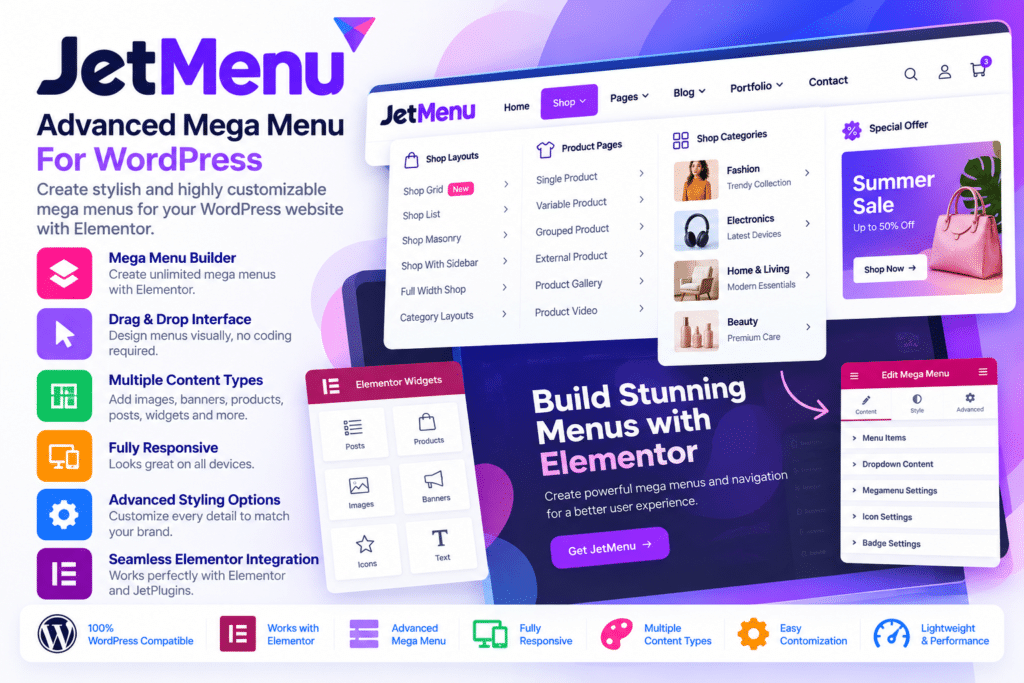
JetMenu is a powerful WordPress mega menu plugin developed by Crocoblock. It helps website owners and designers create advanced navigation systems with dropdown menus, multi-column layouts, multimedia content, custom templates, and responsive mobile navigation.
Unlike a basic WordPress navigation menu, JetMenu allows you to turn menu sections into content-rich layouts. You can add images, banners, product grids, videos, dynamic content, and other interactive elements to help visitors explore your website more easily.
The plugin works with Elementor and the WordPress Gutenberg block editor. It includes dedicated Mega Menu and Hamburger Menu widgets or blocks, along with a Vertical Mega Menu widget for Elementor. You can customize menu layouts, configure desktop and mobile navigation separately, and control how submenus behave across different screen sizes.
Whether you are building a business website, online store, portfolio, directory, or content-heavy website, JetMenu provides flexible tools for creating organized and visually appealing navigation.
- Advanced WordPress mega menu builder
- Elementor Mega Menu widget
- Gutenberg Mega Menu block
- Hamburger Menu widget and block
- Vertical Mega Menu widget for Elementor
- Horizontal, vertical, and dropdown layouts
- Multi-column submenu layouts
- Custom menu templates
- Images, videos, banners, and multimedia content
- Dynamic content inside menu layouts
- WooCommerce product and cart integration
- Separate desktop and mobile menu configurations
- Slide-out, dropdown, and push mobile menu layouts
- Custom icons, badges, and menu descriptions
- AJAX-powered mega menu content loading
- Menu animations and hover effects
- Responsive breakpoints and menu roll-up
- Style presets with import and export options
- WPML translation compatibility
Key Features
1. Create Advanced Mega Menus
Transform standard WordPress navigation into detailed mega menus with multiple columns and custom content. Instead of displaying only text links, you can organize navigation into structured sections containing images, product information, promotional banners, and other website elements.
This is especially useful for websites with many categories, services, products, or content sections.
2. Elementor Mega Menu Widget
Build custom mega menu layouts using the Elementor visual editor. Add the Mega Menu widget to your header or website layout, select an existing WordPress menu, and customize its appearance.
You can create multi-column dropdowns, insert Elementor templates, and arrange different content elements inside menu sections.
3. Gutenberg Mega Menu Block
JetMenu also supports the WordPress block editor. Use its Mega Menu block to display and customize previously configured WordPress menus directly within Gutenberg-based layouts.
This provides an alternative to Elementor for websites that use the native WordPress editing experience.
4. Horizontal Menu Layout
Create traditional horizontal navigation menus with top-level items arranged from left to right. Customize menu spacing, alignment, typography, icons, and submenu behaviour to match your website design.
Horizontal navigation is suitable for business websites, online stores, portfolios, and corporate websites.
5. Vertical Mega Menu
Create sidebar-style navigation with menu items arranged vertically. The Vertical Mega Menu widget allows you to customize the width, position, content, and appearance of the menu.
Vertical navigation works particularly well for product catalogs, online shops, dashboards, directories, and content-heavy websites.
6. Hamburger Menu and Popup Navigation
Create compact navigation panels that open when visitors click a hamburger icon or another configured toggle.
JetMenu supports different mobile menu layouts, including:
- Slide-out navigation
- Dropdown navigation
- Push-style navigation
- Toggle-based menu panels
- Custom menu header and footer content
You can customize toggle icons, close buttons, back buttons, and the position from which the navigation panel opens.
7. Multi-Column Submenus
Organize large navigation structures into multiple columns. Add headings, categories, links, and other content to make complex menus easier to browse.
This is particularly useful for online stores with extensive product categories or websites with multiple service sections.
8. Add Images and Multimedia Content
Make your navigation more engaging by adding visual elements to mega menu layouts.
Depending on the selected layout and editor, you can include:
- Product images
- Promotional banners
- Video content
- Portfolio images
- Image grids
- Masonry layouts
- Custom content sections
- Audio and other supported media
These elements help create more informative menus while giving visitors a visual introduction to important website sections.
9. Custom Menu Templates
Build reusable menu templates using your preferred supported page editor. Arrange columns, sections, images, buttons, and other elements, then use the saved templates inside your mega menu layouts.
This makes it easier to maintain a consistent navigation design across different website sections.
10. Separate Desktop and Mobile Menus
Create a different navigation experience for mobile devices instead of simply shrinking your desktop menu.
You can select a separate WordPress menu for mobile and customize its layout, toggle position, submenu behaviour, icons, and content.
This is useful when desktop navigation contains many categories that need a simpler structure on smartphones.
11. Responsive Breakpoint Controls
Choose when your desktop navigation should switch to its tablet or mobile layout. Configure the breakpoint according to your website design and screen-size requirements.
This helps maintain a usable navigation experience across different devices.
12. AJAX-Powered Menu Content Loading
Use AJAX loading to display mega menu content when visitors interact with the menu. This can help avoid loading all complex menu content immediately, particularly when working with large menus containing dynamic elements.
Actual performance depends on the amount of content, hosting environment, caching, and other website configurations.
13. WooCommerce Product Integration
Display product-related content directly inside your mega menus. JetMenu supports WooCommerce product displays, allowing online stores to create more useful shopping navigation.
You can build menu sections featuring product grids, promotional products, and category-related content.
14. Display WooCommerce Cart Information
Add WooCommerce cart content to supported mega menu layouts. This allows customers to access shopping-related information without navigating away from the current page.
WooCommerce must be installed and configured separately for store-specific functionality.
15. Dynamic Content in Menus
Create content-rich navigation using supported dynamic content and templates. Depending on your setup and connected Crocoblock tools, you can display listings, posts, products, and other dynamic information inside menu layouts.
This can be useful for directories, online stores, real estate websites, and other projects that rely on structured content.
16. Custom Icons and Menu Badges
Improve navigation clarity with icons and badges. Add visual indicators to selected menu items to highlight important categories, new content, promotional offers, or special links.
You can customize icon appearance, badge colours, typography, spacing, and hover states.
17. Menu Descriptions and Breadcrumbs
Add short descriptions below menu item labels to provide additional context. The mobile menu also supports breadcrumb navigation, helping visitors understand their current position within a nested menu structure.
These options are useful when a website has several levels of navigation.
18. Submenu Trigger and Animation Controls
Customize how visitors open and interact with submenus. Choose between hover-based and click-based triggers where supported, and configure submenu animations and positioning.
Additional controls include mouse-leave delays, submenu close behaviour, and dropdown icon styling.
19. Menu Roll-Up Feature
Prevent horizontal navigation from overflowing when a menu contains too many items. The roll-up feature groups excess menu items under a compact text or icon option.
This helps keep navigation organized when working with limited header space.
20. Style Presets and Import/Export
Save menu styling configurations as presets and reuse them across different menu designs. JetMenu also provides import and export options for transferring configuration settings.
This can save time when maintaining multiple websites or applying a consistent navigation style throughout a project.
21. Dynamic Visibility Conditions
Control when menus or menu elements are displayed using supported dynamic visibility conditions.
This can help create different navigation experiences according to configured conditions, user context, or website content.
Some advanced visibility workflows may require additional Crocoblock plugins or integrations.
22. WPML Translation Compatibility
Use JetMenu with WPML-based multilingual websites. This helps maintain translated navigation structures and menu content for websites serving visitors in different languages.
Multilingual functionality requires the appropriate WPML setup and translated WordPress menus.
Available JetMenu Widgets and Blocks
JetMenu provides different menu-building elements for supported editors.
Elementor:
- Mega Menu widget
- Hamburger Menu widget
- Vertical Mega Menu widget
Gutenberg:
- Mega Menu block
- Hamburger Menu block
The available settings and layout options can differ between widgets and blocks. The Vertical Mega Menu is an Elementor widget rather than a Gutenberg block.
Who Should Use JetMenu?
JetMenu can be useful for:
- WooCommerce store owners
- Business and corporate websites
- Digital agencies and web designers
- Large product catalog websites
- Real estate and directory websites
- Portfolio and creative websites
- Travel and booking websites
- Educational and membership platforms
- Websites with complex navigation structures
- Developers building custom Elementor or Gutenberg headers
Compatibility and Setup Notes
- Platform: WordPress
- Plugin: JetMenu
- Developer: Crocoblock
- Page builder: Elementor
- Block editor: Gutenberg
- eCommerce integration: WooCommerce
- Dynamic content: Supported WordPress content and compatible Crocoblock integrations
- Multilingual support: WPML
- Menu source: Existing WordPress navigation menus
Important: JetMenu is a navigation plugin, not a standalone WordPress theme or complete website builder. You need a compatible WordPress theme or header-building solution to place the menu within your website’s header or layout.
Elementor is required for its Elementor widgets, while Gutenberg support is available through the dedicated blocks. WooCommerce is needed for product and cart content. Some advanced dynamic menu layouts may require additional Crocoblock plugins, depending on the functionality you want to build.
Before installation, check compatibility with your active theme, Elementor version, WordPress version, and other Crocoblock plugins. Test desktop and mobile navigation after setup to ensure that dropdowns, menu triggers, and responsive layouts work as expected.
Build Better Website Navigation with JetMenu
JetMenu gives WordPress designers greater control over how visitors navigate a website. Its multi-column layouts, multimedia content, Elementor widgets, Gutenberg blocks, WooCommerce integration, and separate mobile menu controls make it suitable for projects that need more than a basic navigation bar.
Whether you want to create a product-focused mega menu, a compact mobile navigation panel, or a detailed multi-level website menu, JetMenu provides flexible tools to design and manage the experience.