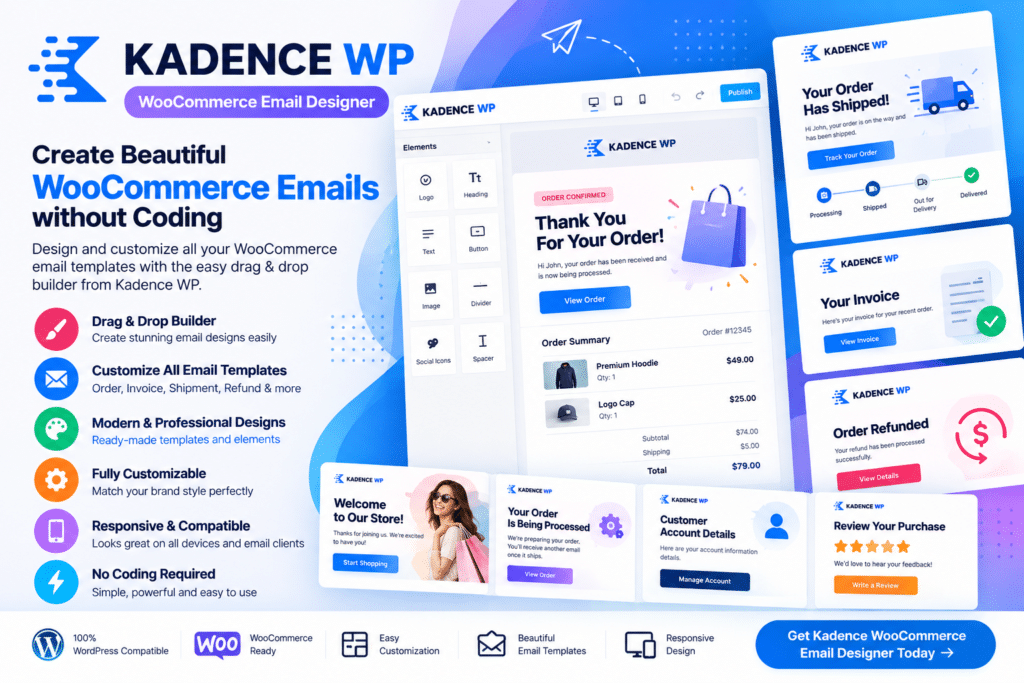
Kadence WP WooCommerce Email Designer is a WordPress plugin designed to help store owners customize the appearance of WooCommerce transactional emails without editing template files manually.
It gives you more control over how order confirmations, processing emails, completed order messages, customer notes, and other supported WooCommerce emails look when they reach your customers.
Instead of sending plain or generic email templates, you can create a more branded experience by adjusting supported colors, typography, logos, spacing, and layout elements to better match your online store.
Key Features
- WooCommerce Email Customization – Modify the appearance of supported WooCommerce transactional emails.
- Visual Email Editing – Customize email styles from a user-friendly interface without manually editing template files.
- Brand Logo Support – Add your store or company logo to supported email templates.
- Color Customization – Adjust supported background, text, button, and accent colors.
- Typography Controls – Change supported fonts, text sizes, headings, and other typography settings.
- Header Customization – Personalize the top section of WooCommerce emails to match your branding.
- Footer Styling – Customize supported footer content and visual elements.
- Button Styling – Adjust the look of supported call-to-action buttons in transactional emails.
- Email Preview – Review supported design changes before using them for customer emails.
- Order Email Styling – Improve the presentation of order details, customer information, and purchase summaries.
- Multiple WooCommerce Email Types – Apply a consistent style across supported order and customer notifications.
- No Template Coding Required – Make common design changes without directly modifying WooCommerce email PHP templates.
- Responsive Email Design – Create emails intended to remain readable across common desktop and mobile email clients.
- WooCommerce Integration – Work directly with the WooCommerce transactional email system.
Perfect For
Kadence WP WooCommerce Email Designer is suitable for online stores, fashion shops, digital product businesses, subscription stores, beauty brands, electronics stores, agencies, WooCommerce developers, and any store owner who wants transactional emails to better reflect their brand.
Create a More Consistent Customer Experience
Customer communication does not end when someone finishes checkout.
Order confirmations, shipping updates, completed order emails, and account notifications are all part of the buying experience. If these emails look disconnected from the rest of your website, your branding can feel inconsistent.
Kadence WP WooCommerce Email Designer helps you apply a more polished visual style to supported WooCommerce emails so customers receive communication that feels more closely connected to your store.
Improve Your WooCommerce Emails
Customize transactional emails with Kadence WP | WooCommerce Email Designer.
With visual styling controls, logo support, typography settings, color customization, email previews, responsive layouts, and WooCommerce integration, the plugin provides a practical way to create more professional and brand-consistent customer emails.