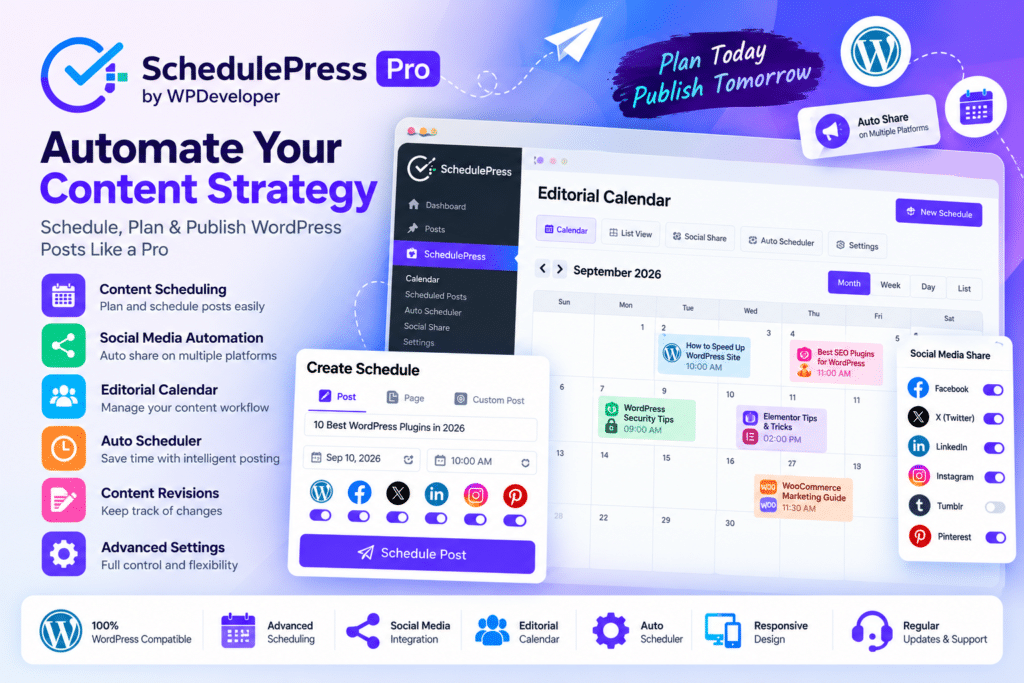
SchedulePress Pro by WPDeveloper is an advanced WordPress content scheduling and social automation plugin designed to help bloggers, publishers, agencies, marketers, and multi-author websites plan and publish content more efficiently.
It expands WordPress scheduling with a visual editorial calendar, automated publishing queues, manual time slots, missed-schedule recovery, future content updates, republishing and unpublishing controls, and automated social media sharing.
Instead of managing publishing dates and social promotion separately, SchedulePress brings these workflows together inside WordPress.
Key Features
- Visual Schedule Calendar – Organize upcoming WordPress content through a drag-and-drop editorial calendar.
- Auto Scheduler – Automatically place content into your predefined publishing time slots.
- Manual Scheduler – Select specific configured days and times when scheduling individual posts.
- Advanced Schedule – Schedule future updates to already published content without taking the current version offline first.
- Missed Schedule Handler – Detect supported missed WordPress schedules and publish affected content automatically.
- Republish Content – Schedule existing posts to go live again at a future date.
- Automatic Unpublishing – Set supported posts to return to draft at a specified date and time.
- Publishing Cycle Controls – Manage when content is published, unpublished, and republished.
- Schedule and Share Board – Manage publishing and social-sharing options from a centralized workflow.
- Pages & Custom Post Types – Schedule pages, products, and other supported custom post types in addition to regular posts.
- Automatic Social Sharing – Share published or scheduled content across multiple supported social networks.
- Custom Social Templates – Customize social captions, hashtags, images, and supported post templates.
- AI Social Captions – Generate social copy designed around your selected content and brand tone.
- Elementor Scheduling – Schedule supported Elementor sections to appear or disappear at specified times.
Perfect For
SchedulePress Pro is suitable for bloggers, online magazines, news websites, content marketing teams, agencies, multi-author blogs, WooCommerce websites, editorial teams, affiliate websites, businesses, and publishers managing a consistent content calendar.
Plan Content with a Visual Calendar
SchedulePress includes an interactive Schedule Calendar that provides an overview of your planned WordPress content.
You can drag and drop supported posts between dates, create drafts directly from the calendar, edit content, and reorganize your publishing schedule without opening every post individually.
Pages and configured custom post types can also be managed through the scheduling workflow.
Automate Your Publishing Schedule
SchedulePress Pro provides both Auto Scheduler and Manual Scheduler options.
With Auto Scheduler, you define preferred publishing days and time ranges. Content can then be placed automatically into the next available configured slot.
With Manual Scheduler, you define specific publishing slots and choose the appropriate one while editing content.
These tools are especially useful for websites publishing several pieces of content each week or coordinating work between multiple authors.
Schedule Updates to Published Posts
Advanced Schedule lets you prepare changes to an existing live post and specify when those changes should become visible.
The current live version remains available until the scheduled update occurs.
This can be useful for:
- Updating promotional pages
- Changing pricing information
- Refreshing time-sensitive articles
- Launching seasonal content
- Updating product information
- Scheduling campaign changes
This feature is available in SchedulePress Pro.
Automatically Unpublish & Republish Content
SchedulePress can manage more than the initial publication date.
Its publishing-cycle controls let you define an Unpublish On date that returns supported content to draft, followed by an optional Republish On date that makes it live again.
This is useful for limited-time offers, seasonal campaigns, announcements, event pages, temporary promotions, and other time-sensitive content.
Prevent Missed WordPress Schedules
WordPress scheduled posts can occasionally fail to publish when scheduled tasks do not execute as expected.
SchedulePress Pro includes a Missed Schedule Handler designed to check for missed publishing events and publish affected content.
WPDeveloper documents the handler as checking periodically for content WordPress failed to publish, providing an additional safeguard for scheduled workflows.
Automatically Share Posts on Social Media
SchedulePress Pro combines publishing with social-media distribution.
Current official product information lists automatic sharing support for:
- X (Twitter)
- Medium
- Threads
- Google Business Profile
Content can be shared automatically when published, scheduled for social sharing, or shared instantly through supported workflows.
Customize Social Sharing Templates
SchedulePress lets you control how supported WordPress posts appear when shared socially.
Depending on the connected platform, templates can include post information, hashtags, category-based tags, featured images, custom banners, and customized captions.
This gives marketing teams greater control over social presentation instead of posting the same basic WordPress title and link everywhere.
Create Social Captions with AI
SchedulePress currently includes AI-powered social-caption functionality.
It can help generate platform-ready captions based on your WordPress content and selected brand tone, reducing the amount of manual writing needed when promoting newly published posts across several social networks.
AI-generated copy should still be reviewed before publication for accuracy, brand consistency, and platform suitability.
Schedule Elementor Sections
SchedulePress Pro can also control the visibility of supported Elementor sections.
You can configure a section to appear at a future date or disappear after a particular time without manually editing the page when the campaign begins or ends.
This can be useful for promotional banners, event notices, seasonal offers, limited-time calls to action, and launch sections.
Manage Posts, Pages & Custom Content
SchedulePress is not limited to standard blog posts.
Current documentation confirms scheduling support for configured pages, products, and other WordPress custom post types.
This makes it useful for WooCommerce products, announcements, landing pages, custom content types, and websites that use WordPress as more than a traditional blog.
Improve Your WordPress Publishing Workflow
Take control of your content calendar with SchedulePress Pro – WordPress Content Scheduling & Social Sharing Plugin.
With automated scheduling, manual time slots, visual calendars, future updates, publishing cycles, missed-schedule handling, Elementor scheduling, AI captions, and automatic social sharing, SchedulePress Pro provides a comprehensive workflow for planning and distributing WordPress content.