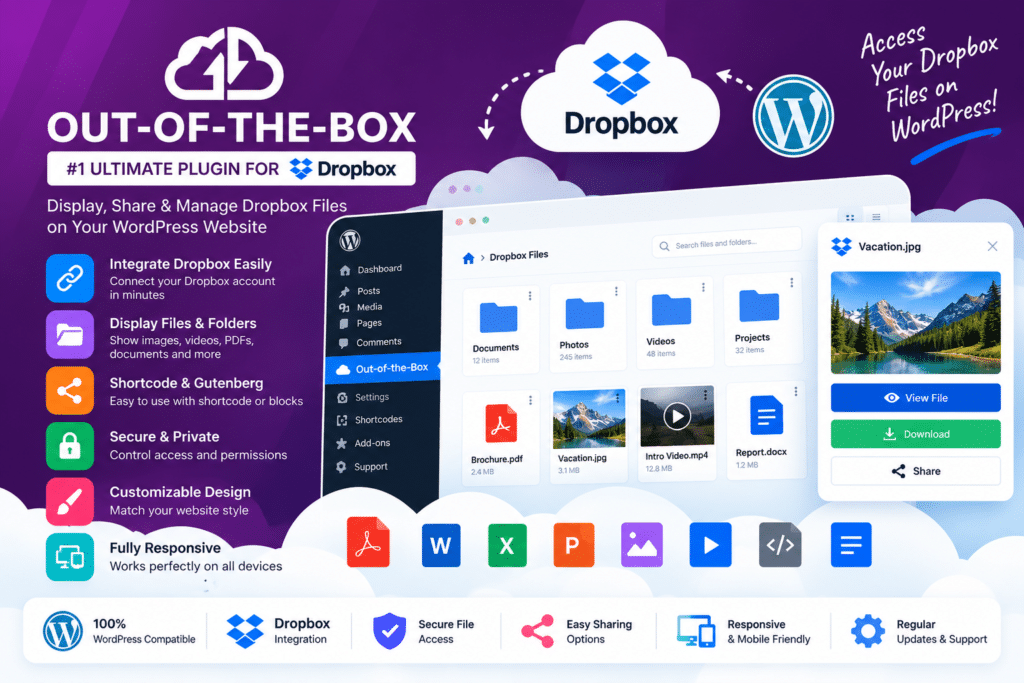
Instead of uploading duplicate copies of files into the WordPress Media Library, your content remains stored in Dropbox while WordPress provides the interface visitors use to access it.
This makes Out-of-the-Box useful for document libraries, customer portals, private member areas, download centers, photography galleries, media libraries, digital-product stores, file-submission workflows, and business websites already using Dropbox.
Key Features
- Dropbox File Browser – Let visitors navigate Dropbox folders and files directly from WordPress.
- Grid & List Views – Present cloud files using visual grid or structured list layouts.
- Inline File Previews – Preview supported PDFs, images, video, audio, code, and other files without forcing an immediate download.
- Direct Dropbox Uploads – Let visitors upload files into selected Dropbox folders from your website.
- Advanced Search – Help users find files and folders inside supported Dropbox locations.
- Image Galleries – Automatically display images stored inside Dropbox folders as responsive galleries.
- Audio Player – Stream supported audio files and create cloud-powered playlists.
- Video Player – Stream supported video directly from Dropbox using temporary cloud URLs.
- Personal Folders – Give individual WordPress users access to separate private Dropbox folders.
- Multiple Dropbox Accounts – Connect multiple Dropbox accounts or supported team folders to one WordPress website.
- Download Lists & Buttons – Create compact lists or individual download buttons for selected cloud files.
- Role-Based Permissions – Control who can preview, download, upload, rename, delete, share, or create folders.
- WooCommerce Integration – Sell digital files stored in Dropbox or collect customer uploads with orders.
- Easy Digital Downloads Support – Deliver purchased digital files directly from Dropbox through supported EDD workflows.
Perfect For
Out-of-the-Box is suitable for agencies, client portals, educational websites, membership platforms, photographers, digital-product stores, WooCommerce websites, design businesses, employee portals, document libraries, consultants, creative teams, and organizations already using Dropbox for file management.
Display Dropbox Files Without Copying Them to WordPress
One of the main advantages of Out-of-the-Box is that your files remain in Dropbox.
WordPress displays the selected cloud content while Dropbox continues to act as the storage location.
If your team adds, updates, or removes a file in the connected Dropbox folder, the website can reflect those changes without requiring the same file to be uploaded separately into WordPress.
This can reduce duplicate storage and simplify file management for teams that already work from Dropbox.
Create File Browsers & Document Libraries
The File Browser module lets visitors navigate selected Dropbox folders from your WordPress website.
Supported actions can include:
- Viewing folders
- Searching files
- Previewing content
- Downloading individual files
- Downloading ZIP archives
- Uploading files
- Creating folders
- Renaming files and folders
- Deleting content
- Sharing supported links
Each action can be restricted according to WordPress roles and module permissions.
Accept Uploads Directly to Dropbox
Out-of-the-Box includes an Upload Box module for collecting visitor files.
You can configure supported:
- File types
- Minimum and maximum file sizes
- Number of files per upload
- Upload destinations
- User-specific folders
- Notifications
Uploads are stored in Dropbox instead of creating duplicate files in the WordPress Media Library.
The upload system also supports multiple files and entire folder uploads where compatible.
Create Private Client & Member Folders
Personal Folders can give every logged-in WordPress user their own private area within Dropbox.
For example, an agency could create individual client folders where each customer sees only their own documents and uploads.
This is useful for:
- Client documents
- Employee files
- Student assignments
- Customer deliverables
- Membership resources
- Project files
- Private downloads
Dynamic Folders can also automate supported per-user folder creation and routing.
Build Dropbox Image Galleries
Images stored inside selected Dropbox folders can automatically appear as responsive WordPress galleries.
When images are added or removed from the source Dropbox folder, the gallery can update without manually rebuilding the WordPress page.
The Gallery module supports justified layouts and a full-screen lightbox experience for supported media.
Stream Audio & Video from Dropbox
Out-of-the-Box can turn Dropbox folders into audio and video libraries.
Audio tracks can be presented individually or in playlists, while videos can stream through temporary Dropbox download URLs.
This can be useful for podcasts, training material, video portfolios, music previews, customer media libraries, and other cloud-hosted media workflows.
Sell Dropbox Files with WooCommerce
Out-of-the-Box integrates with WooCommerce for digital product delivery.
You can select Dropbox files inside supported WooCommerce downloadable products. After a successful purchase, customers receive secure temporary download links while the original file remains stored in Dropbox.
You can also place upload boxes on supported:
- Product pages
- Cart pages
- Checkout pages
- Order detail pages
This is useful for printing services, personalized products, design submissions, documents, photography, and other orders requiring customer file uploads.
Easy Digital Downloads Integration
Easy Digital Downloads can also deliver files stored in Dropbox.
Supported EDD products can use cloud files instead of copying those downloads into WordPress hosting.
After purchase, customers receive temporary download links while the source files remain stored in Dropbox.
Integrate Dropbox with WordPress Forms
Out-of-the-Box can add cloud-upload functionality to compatible WordPress forms.
Current official integration information includes popular tools such as:
- Gravity Forms
- Contact Form 7
- WPForms
- Elementor Forms
- Fluent Forms
- Formidable Forms
This allows users to submit form information and upload associated documents directly into your cloud-storage workflow.
Works with Popular Page Builders
Out-of-the-Box modules can be placed inside popular WordPress editing environments.
Current official integrations include:
- Gutenberg
- Elementor
- Divi 5
- WPBakery
- Classic Editor
Modules can also be inserted through shortcodes where supported.
Control File Access & Permissions
The plugin provides detailed access settings for Dropbox content.
Depending on your module configuration, you can control who is allowed to:
- Access the module
- Preview files
- Download files
- Upload new files
- Rename items
- Delete files
- Create folders
- Share supported links
Access can be limited according to WordPress roles, and non-logged-in users can be shown supported login or password controls.
Build a Dropbox-Powered WordPress Website
Connect your cloud files with Out-of-the-Box – Dropbox Plugin for WordPress.
With Dropbox file browsing, direct uploads, document previews, responsive galleries, audio and video streaming, personal folders, role-based permissions, WooCommerce, Easy Digital Downloads, form integrations, and page-builder support, Out-of-the-Box provides a comprehensive way to bring Dropbox directly into WordPress.