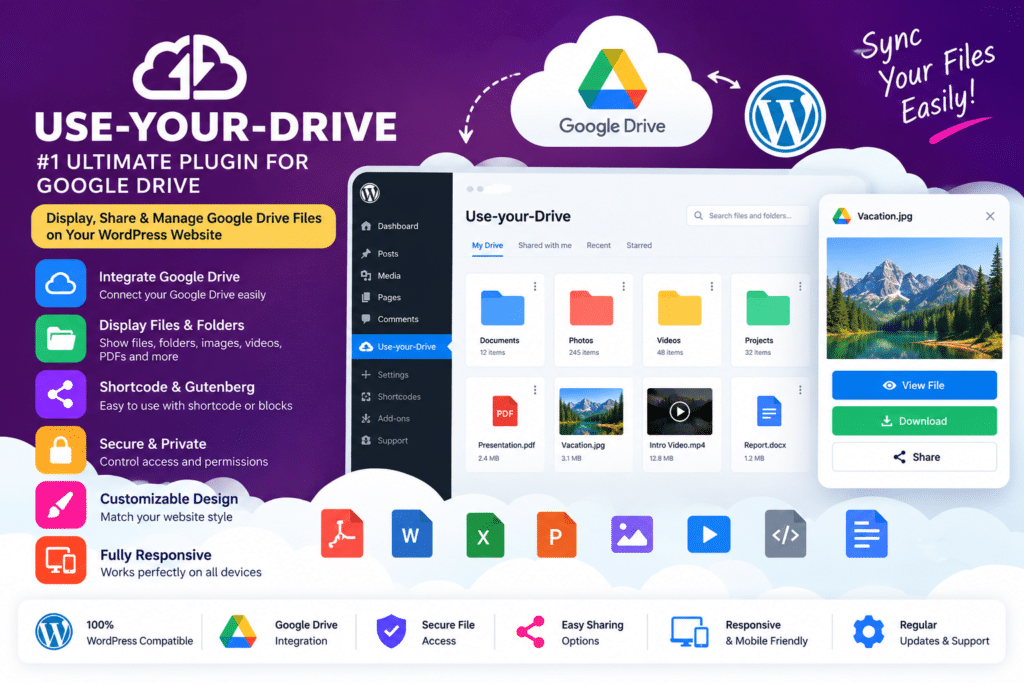
Use-your-Drive is a powerful Google Drive integration plugin for WordPress that lets you display, manage, upload, download, preview, and stream files stored in Google Drive directly from your website.
Instead of copying the same files into the WordPress Media Library, the plugin connects WordPress directly to Google Drive. Your files remain stored in Drive while visitors interact with them through your WordPress pages.
It can be used to create document libraries, client portals, member file areas, image galleries, download centers, upload forms, audio playlists, video libraries, WooCommerce downloads, and other cloud-powered file systems.
Key Features
- Google Drive File Browser – Display folders and files in an interactive browser directly inside WordPress.
- Inline File Previews – Let visitors preview supported PDFs, Google Docs, Sheets, Slides, Microsoft Office files, and other documents.
- Advanced File Search – Search filenames and supported document content stored in Google Drive.
- Direct Cloud Uploads – Allow visitors to upload files directly to Google Drive without storing duplicate copies on the WordPress server.
- Image Galleries – Create responsive galleries automatically from images stored in Drive folders.
- Audio Player – Stream supported audio files and create playlists from Google Drive content.
- Video Player – Play supported videos stored in Google Drive directly through your WordPress website.
- Carousel Module – Turn cloud images into interactive carousel presentations.
- Download Lists & Buttons – Create compact file lists or individual download buttons for selected Drive files.
- Document Embedding – Embed supported Docs, Sheets, Slides, PDFs, and other files directly into pages.
- Shared Drive Support – Display and manage supported content stored in Google Workspace Shared Drives.
- Personal User Folders – Give individual WordPress users or customers access to their own private Drive folders.
- Role-Based Permissions – Control browsing, uploading, downloading, and management actions based on WordPress user roles.
- Activity Logging & Notifications – Track supported uploads, downloads, previews, and other file activity.
Perfect For
Use-your-Drive is suitable for membership websites, educational platforms, agencies, client portals, online stores, digital-download websites, photographers, businesses, document libraries, project-management portals, communities, intranets, and websites that already rely heavily on Google Drive.
Display Google Drive Files Without Duplicating Them
One of the main advantages of Use-your-Drive is that files do not need to be copied into your WordPress hosting account.
Your documents remain in Google Drive, and WordPress acts as the presentation and access layer.
When you update a file in Google Drive, website visitors can access the latest version without requiring you to manually upload a replacement copy to WordPress.
This can reduce duplicate storage and make file management easier for teams that already work inside Google Workspace.
Choose from Multiple Display Modules
Use-your-Drive provides several ways to display cloud content.
You can create:
- File browsers
- Image galleries
- Upload boxes
- Audio players
- Video players
- Carousels
- File lists
- Download buttons
- Document embeds
The module configurator lets you select a Google Drive folder, configure permissions, adjust presentation settings, and then place the resulting module on your WordPress website.
Create Private Client & Member Portals
The Personal Folders feature can connect individual WordPress users with specific Google Drive folders.
For example, each client can log in and access their own documents without seeing files belonging to other customers.
This can be useful for:
- Client deliverables
- Employee documents
- Student resources
- Membership downloads
- Project files
- Customer submissions
- Private document portals
WordPress roles and module-level permissions can further control browsing, downloading, uploading, and other supported actions.
Accept Uploads Directly to Google Drive
The Upload Box module lets visitors drag and drop files directly into a selected Google Drive folder.
Uploads go to the cloud rather than being stored as duplicate files in WordPress.
You can configure supported file types, maximum file sizes, upload destinations, and notifications according to your workflow.
This is especially useful for client submissions, assignments, documents, artwork, print files, job applications, and other file-heavy workflows.
Integrate Google Drive with WordPress Forms
Use-your-Drive works with several popular WordPress form systems.
Current official integrations include:
- Gravity Forms
- WPForms
- Contact Form 7
- Formidable Forms
- Ninja Forms
- Elementor Forms
- Fluent Forms
Cloud upload fields can be added directly to supported forms, allowing visitors to complete form information and upload files in the same workflow.
Dynamic folder destinations, automatic file renaming, file-type restrictions, multiple upload fields, and email notifications are also supported in compatible integrations.
Sell Google Drive Files with WooCommerce
Use-your-Drive integrates with WooCommerce for selling digital files stored in Google Drive.
Cloud files can be selected inside WooCommerce downloadable products. After a successful purchase, customers receive secure temporary download links while the original file remains in Google Drive.
You can update the source file in Drive and future eligible downloads can use the updated file without uploading another copy into WordPress.
Collect Customer Files with WooCommerce
The plugin can also be used for WooCommerce businesses that need customers to submit files.
Upload boxes can be added to supported:
- Product pages
- Shopping carts
- Checkout pages
- Order detail pages
Individual order folders can be created in cloud storage to help keep customer files organized.
This is particularly useful for printing services, personalized products, document processing, artwork orders, photography services, and other file-based eCommerce workflows.
Easy Digital Downloads Integration
Use-your-Drive also integrates with Easy Digital Downloads.
Digital files can remain stored in Google Drive while customers receive secure temporary links after completing an eligible purchase.
Multiple cloud files can be connected to supported EDD products without moving the source files into WordPress hosting.
Support Google Workspace Shared Drives
Businesses using Google Workspace can work with Shared Drives in addition to personal Google Drive storage.
Shared Drive support is especially useful for organizations because files can remain owned by the organization rather than an individual staff account.
This can simplify document ownership when employees, contractors, or team members change over time.
Control File Access & Permissions
Use-your-Drive provides several layers of supported access control.
You can use WordPress user roles to control browsing, uploading, downloading, and management permissions.
Modules can also be limited to specific root folders so visitors cannot simply navigate outside the area you have intentionally exposed.
The plugin stores supported OAuth credentials encrypted in the WordPress database and allows configurable read-only or read/write connection scopes.
Work with Popular Page Builders
WP Cloud Plugins provides integrations for popular WordPress editing environments.
Current official integrations include:
- Gutenberg
- Elementor
- Divi 5
- WPBakery
- Classic Editor
Native blocks or widgets are available for several supported builders, while shortcodes can be used in other editors that support them.
Build a Google Drive-Powered WordPress Website
Connect your cloud storage with Use-your-Drive – Google Drive Plugin for WordPress.
With live file browsing, uploads, document previews, search, galleries, audio and video streaming, personal folders, user permissions, WooCommerce, Easy Digital Downloads, form integrations, and Google Workspace support, Use-your-Drive provides a comprehensive way to bring Google Drive content directly into WordPress.