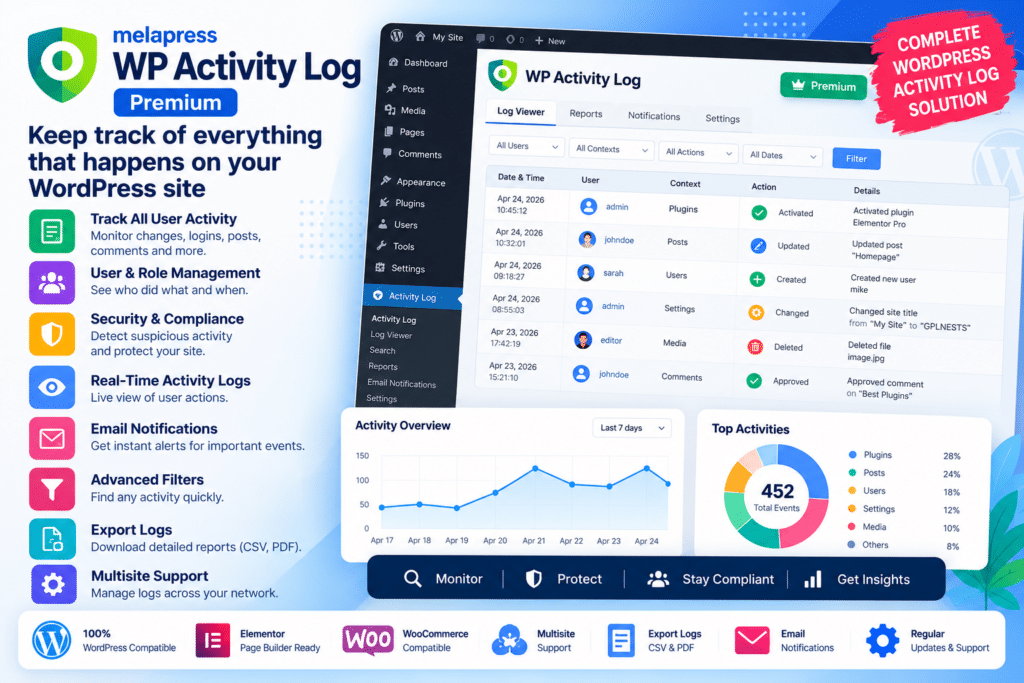
WP Activity Log Premium by Melapress is an advanced WordPress audit logging and user activity monitoring plugin designed to help website administrators keep a detailed record of changes happening across their WordPress website.
It can track user logins, content edits, plugin and theme changes, account modifications, WordPress settings, WooCommerce activity, LMS events, membership changes, and many other important actions.
The Premium edition expands the core activity log with advanced search, configurable notifications, scheduled reports, real-time session monitoring, user-session management, CSV exports, and additional administration controls.
Key Features
- Detailed Activity Logging – Record important user and system changes across WordPress.
- User Login Tracking – Monitor successful logins, logouts, failed login attempts, blocked logins, and supported session events.
- Content Change Tracking – Record changes to posts, pages, custom post types, URLs, authors, categories, and other content information.
- Plugin & Theme Monitoring – Track installations, activations, deactivations, updates, and other supported plugin or theme changes.
- User Account Monitoring – Track changes to roles, passwords, email addresses, account details, and supported user metadata.
- Advanced Search & Filters – Find specific events using usernames, dates, event types, objects, IDs, and other available criteria.
- Instant Notifications – Configure supported email, SMS, and Slack notifications for important activity.
- Scheduled Reports – Automatically generate and send activity reports on daily, weekly, or monthly schedules.
- Real-Time User Sessions – See currently logged-in users and their active WordPress sessions.
- Session Management – Terminate selected user sessions directly from the administration interface.
- CSV Export – Export filtered activity-log information for auditing, reporting, or external analysis.
- Configurable Data Retention – Choose how long activity-log records should remain available.
- Multisite Support – Track supported changes across WordPress Multisite networks.
- Activity Log Notes – Add administrator notes to individual activity events for additional context.
Perfect For
WP Activity Log Premium is suitable for WordPress agencies, WooCommerce stores, membership sites, LMS platforms, corporate websites, client portals, multisite networks, security-conscious businesses, website administrators, developers, and organizations that need a reliable audit trail of WordPress activity.
Know Who Changed What & When
A WordPress website can have administrators, editors, customers, instructors, shop managers, members, and other users making changes every day.
WP Activity Log creates a detailed audit trail that can include information such as:
- Username
- First and last name where configured
- Date and time
- Event type
- Affected WordPress object
- Details about the change
- Previous and new values where supported
For example, if a post URL changes, the activity log can record both the previous and updated URL.
This makes troubleshooting and auditing significantly easier than trying to identify changes after something has already gone wrong.
Monitor WordPress Content Changes
WP Activity Log tracks supported changes to posts, pages, and custom post types.
Depending on the event, it can record changes involving:
- Titles
- Content
- Authors
- URLs
- Categories
- Statuses
- Metadata
- Other supported properties
This can be valuable for editorial websites and multi-author teams where several users regularly modify website content.
Track Plugins, Themes & WordPress Settings
The plugin can record important technical changes to the website.
These include supported activities such as:
- Plugin installation
- Plugin activation or deactivation
- Plugin updates
- Theme installation
- Theme activation
- WordPress core updates
- Permalink changes
- Website URL changes
- System setting modifications
Having these events in an activity log can make it easier to understand when a technical change occurred and which user performed it.
Advanced Search & Filtering
Large activity logs can contain thousands of events.
WP Activity Log Premium includes advanced filtering tools that allow administrators to narrow results according to information such as:
- Username
- Date and time
- Post ID
- Event type
- Event object
- Other supported event information
Search filters can also be saved for reuse.
Filtered results can be exported to CSV when the information needs to be reviewed outside WordPress.
Get Instant Activity Alerts
WP Activity Log Premium can notify administrators when selected events occur.
Supported notification channels currently include:
- SMS
- Slack
The plugin includes predefined alerts as well as a trigger builder for creating more specific notification rules.
For example, an alert could be configured when a particular user logs in, when a plugin is installed, or when an activity matches specific conditions.
This is useful when certain changes require attention faster than a routine activity-log review.
Create Scheduled Activity Reports
Premium reporting tools let administrators create activity reports and schedule them for automatic delivery.
Reports can be configured for supported daily, weekly, or monthly schedules.
Available reports can cover information such as:
- Login activity
- Password changes
- Plugin changes
- System changes
- Content updates
- Other selected activity
Reports can be exported in HTML or CSV format and customized according to the information the administrator wants included.
Monitor Active User Sessions
WP Activity Log Premium includes real-time user-session monitoring.
Administrators can see active logged-in users, search sessions, and terminate supported sessions directly from WordPress.
This can be useful when:
- An account appears compromised
- A former employee remains logged in
- Suspicious sessions are detected
- Shared accounts need investigation
- Administrators need to force a logout
Premium session tools can also help administrators monitor how user accounts are being used.
Track WooCommerce Activity
WP Activity Log includes extensive WooCommerce monitoring.
Supported activity can include changes involving:
- Products
- Orders
- Coupons
- Customers
- Store settings
- Billing information
- Shipping information
This can make the plugin useful for investigating unexpected store changes, monitoring staff activity, and maintaining a clearer audit history for WooCommerce operations.
Monitor LearnDash & Membership Websites
WP Activity Log includes integrations for educational and membership platforms.
Current official integration information lists support for tools including:
- LearnDash
- MemberPress
- Paid Memberships Pro
- bbPress
LearnDash activity can include course-content changes and supported learner events such as enrollments, completions, and certificates.
Membership integrations can track supported changes to memberships, subscriptions, transactions, user assignments, and related configuration.
Works with Popular WordPress Plugins
Current WP Activity Log integrations also include popular plugins such as:
- WooCommerce
- Yoast SEO
- Rank Math
- Advanced Custom Fields
- Gravity Forms
- WPForms
- Redirection
- TablePress
- WP 2FA
- MainWP
- ModularDS
Even when a dedicated integration is unavailable, WP Activity Log may still record generic WordPress events that the third-party plugin triggers.
Configure Activity Log Retention
Administrators can control how long audit data is retained.
The plugin can automatically remove events older than the configured retention period or keep activity data indefinitely when required.
This helps websites balance auditing requirements, database storage, organizational policies, and privacy considerations.
Add Notes to Activity Events
Premium users can add administrator notes directly to activity-log entries.
This is useful for documenting why a change occurred, adding investigation notes, recording follow-up actions, or sharing context with other administrators.
For example, a security administrator could add a note explaining that a suspicious login was investigated and confirmed to be legitimate.
Control Who Can Access the Log
WP Activity Log provides permissions for controlling who can view the activity log and manage plugin settings.
Administrators can also restrict configuration access more tightly or hide the plugin from other WordPress users where appropriate.
This can be useful on client sites or environments containing several administrator-level accounts.
Build a Detailed WordPress Audit Trail
Monitor important website activity with Melapress | WP Activity Log Premium – WordPress Activity Log Plugin.
With detailed audit logging, advanced search, real-time user sessions, instant alerts, scheduled reports, CSV exports, configurable retention, multisite support, WooCommerce monitoring, LMS integrations, and activity notes, WP Activity Log Premium provides a comprehensive way to understand what is happening across a WordPress website.