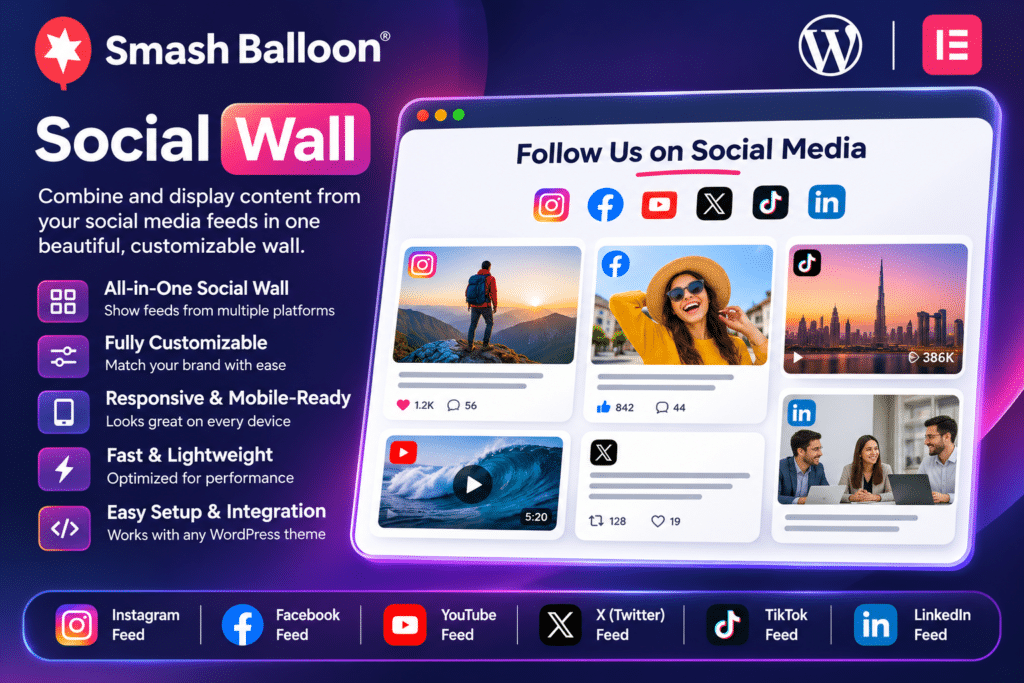
Smash Balloon Social Wall provides a central dashboard for combining existing social media feeds into one customizable display. You can select feeds created with supported Smash Balloon Pro plugins, arrange them into a unified wall, customize the appearance, and embed the result on your website.
The plugin includes multiple layout options, content filtering, responsive display settings, feed customization, and image optimization features.
Key Features
1. Combine Multiple Social Media Platforms
Bring content from different social networks together in one feed. Social Wall supports integrations with:
- X (formerly Twitter)
- YouTube
- TikTok
This makes it easier to showcase different types of social content in one place rather than maintaining separate feed sections.
2. Unified Social Media Wall
Combine selected feeds into a single display window. Each post retains its social network identity, helping visitors recognize whether content comes from Instagram, Facebook, YouTube, X, or TikTok.
3. Multiple Feed Layouts
Choose from different display styles to match your website design:
- Masonry: Arrange posts in a flexible grid with varying content heights.
- List: Display posts in a vertical feed format.
- Carousel: Present social posts in a horizontally scrollable layout.
These options make it easier to create a social media section that fits different website layouts.
4. Customizable Feed Appearance
Adjust the appearance of your social wall to complement your WordPress theme. Customize colors, layouts, spacing, columns, and other display settings without manually building the feed from scratch.
5. Multiple Social Walls
Create different social walls for different website sections. For example, you can combine Instagram and TikTok content in one feed while displaying Facebook and YouTube content in another.
This is useful for businesses that want separate displays for campaigns, product launches, community activity, or brand content.
6. Content Filtering and Curation
Control which posts appear in your social wall using keyword and hashtag filtering. You can automatically exclude posts containing specific words or display only content containing selected terms.
This helps keep the displayed content relevant to your website and audience.
7. Responsive Design
Social Wall is designed to adapt to different screen sizes. Customize the number of columns for desktop, tablet, and mobile layouts to create a consistent viewing experience across devices.
8. Image Optimization
The plugin can resize social media images, save them locally to your website, and select suitable image sizes for display. This helps avoid unnecessarily large images being loaded into your social feed.
9. Smart Feed Caching
Social Wall uses caching to reduce repeated requests to social media platforms. Its caching and backup mechanisms help maintain feed availability when a connected platform experiences temporary issues.
Actual feed updates still depend on the connected platform, its API, and the source plugin configuration.
10. Live Feed Preview
Preview your social wall while customizing it in the WordPress dashboard. This makes it easier to adjust layouts, colors, and column settings before publishing the feed.
11. Feed Templates
Use predefined feed templates to get started with a suitable layout more quickly. Templates provide a starting configuration that you can modify to match your website’s design.
12. Social Media Content from Different Feed Types
Combine different types of content depending on the connected source plugins. Supported feed types can include:
- Instagram profile and hashtag feeds
- Facebook page and group content
- X timelines, mentions, and hashtag feeds
- YouTube channels, playlists, and search results
- TikTok video feeds
Available feed types depend on the individual Smash Balloon plugin, account permissions, and platform API capabilities.
13. Shortcode Embedding
Once your social wall is configured, generate its shortcode and place it on any suitable WordPress page, post, or widget area.
This gives you flexibility to display social content on your homepage, landing pages, about page, or dedicated community section.
14. SEO-Friendly Social Content
Social Wall embeds social media content directly into your website rather than relying exclusively on external iframe displays. This allows supported post text to become part of the page content.
It can add fresh, relevant material to pages, although displaying social feeds does not guarantee improved search rankings.
15. International Language Support
Customize or translate the text displayed within your social wall. This makes the plugin useful for multilingual websites and businesses serving international audiences.
16. Developer-Friendly Custom Templates
Developers can customize the social wall’s HTML output using template files placed in the active theme. The plugin also provides hooks for modifying feed settings and functionality.
Custom template changes may require maintenance after plugin updates and can affect the level of support available from the developer.
Who Should Use Smash Balloon Social Wall?
This plugin is suitable for:
- Businesses with multiple social media accounts
- Digital marketing agencies
- Bloggers and content creators
- Ecommerce brands
- Influencers and online personalities
- News and media websites
- Community and membership websites
- Event organizers
- Portfolio and photography websites
- WordPress website developers
Required Plugins and Integrations
Important: Smash Balloon Social Wall is not a standalone social media feed plugin.
It requires at least two supported Smash Balloon Pro social media plugins to be installed and activated before you can create a combined social wall.
Depending on the platforms you want to display, you may need:
- Instagram Feed Pro
- Custom Facebook Feed Pro
- Custom Twitter Feeds Pro
- Feeds for YouTube Pro
- TikTok Feeds Pro
You must first create and configure feeds inside the relevant individual plugins. Social Wall then lets you select those feeds and combine them into one display.
The individual Pro feed plugins are separate products unless they are included in an eligible bundle.
Installation and Setup
- Install WordPress on your hosting account.
- Install and activate at least two supported Smash Balloon Pro social feed plugins.
- Connect the required social media accounts and configure the individual feeds.
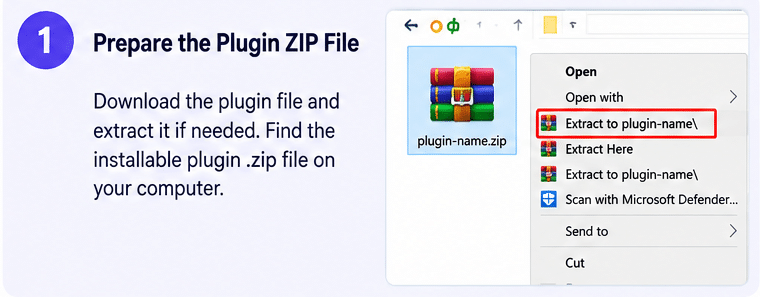
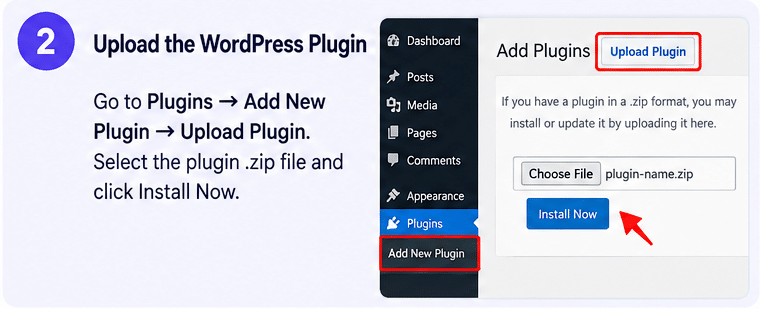
- Upload the Smash Balloon Social Wall plugin ZIP through Plugins → Add New → Upload Plugin.
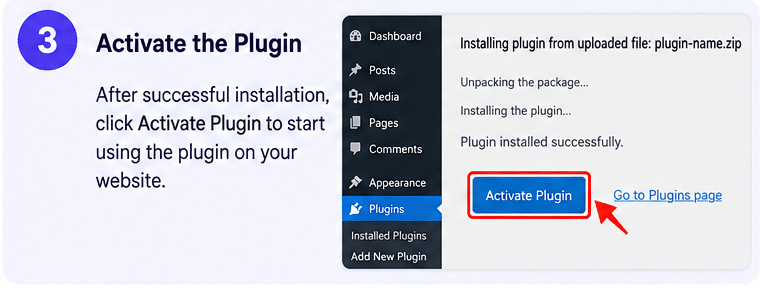
- Activate the plugin and open the Social Wall dashboard.
- Select All Feeds → Add New to create a social wall.
- Choose the existing feeds you want to combine.
- Customize the layout, colors, columns, and content filters.
- Preview the result and generate the shortcode.
- Add the shortcode to your preferred WordPress page, post, or widget area.
Compatibility and Important Notes
Smash Balloon Social Wall is designed for WordPress and works alongside the supported Smash Balloon Pro feed plugins. It does not independently connect to every social network; the relevant source plugins must be installed and configured first.
Social media platforms regularly change their APIs, permissions, and content access policies. Feed availability, update frequency, and supported content types may therefore depend on platform restrictions and connected account permissions.
For websites using privacy or consent-management tools, configure the relevant GDPR features and consent settings according to your site’s requirements. The plugin alone does not guarantee legal privacy compliance.
Bring All Your Social Media Content Together
Smash Balloon Social Wall makes it easier to showcase your brand’s social activity in one organized section of your WordPress website. With support for multiple social networks, customizable layouts, content filtering, responsive displays, caching, and image optimization, it provides a flexible way to connect your website with your social media presence. Combine your existing Smash Balloon feeds and create a unified social wall that keeps visitors connected with your latest content.