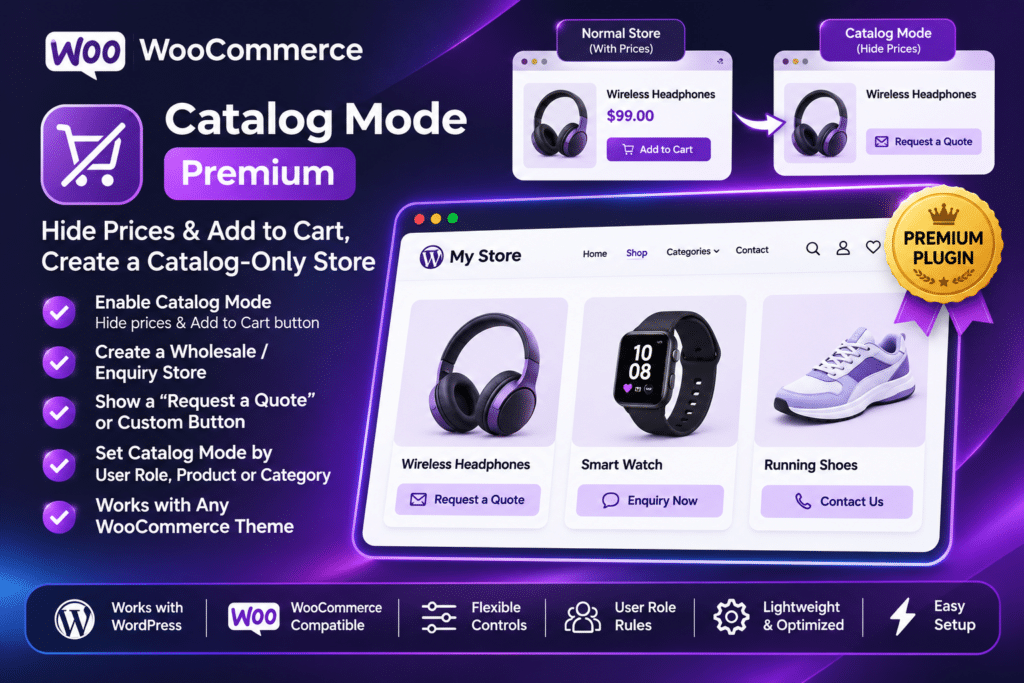
YITH WooCommerce Catalog Mode Premium adds advanced catalog management features to WooCommerce. You can apply catalog rules across your entire store or configure them for selected products, categories, and tags.
The plugin also provides custom call-to-action buttons, replacement labels, scheduled catalog mode, country-based restrictions, and product enquiry forms. This makes it possible to maintain a product-focused website while controlling which purchasing options visitors can access.
Key Features
1. Convert Your WooCommerce Store into a Product Catalog
Switch your online shop into catalog mode without removing your existing product listings. Customers can continue browsing product pages and categories while purchasing options are hidden or restricted.
You can return to normal ecommerce functionality when you are ready to accept orders again.
2. Hide Product Prices
Control whether product prices are displayed to visitors. You can hide prices across the store or apply visibility rules to selected products.
This is useful for wholesale businesses, custom-priced products, and stores that prefer to provide quotations after understanding customer requirements.
3. Remove Add to Cart Buttons
Disable Add to Cart buttons on individual product pages and WooCommerce shop, category, and tag listings. This prevents customers from purchasing products directly when catalog-only browsing is preferred.
4. Disable Cart and Checkout
Remove access to the WooCommerce cart and checkout pages when you do not want visitors placing online orders.
This is particularly useful during maintenance periods, product launches, inventory updates, or when a business handles orders through direct communication.
5. Apply Catalog Rules to Selected Products
You do not have to enable catalog mode for every product. Create rules for selected products, categories, or tags while keeping other items available for normal purchases.
The exclusion-list functionality also helps you keep specific products outside a general catalog rule.
6. Control Visibility for Guests and Registered Customers
Configure catalog rules for different visitor groups. For example, you can hide prices or purchasing options from guest visitors while allowing eligible registered customers to access the information they need.
This is useful for wholesale stores, distributor portals, and membership-based product catalogs.
7. Country-Based Catalog Restrictions
Use geolocation-based rules to control catalog visibility for visitors from selected countries. You can hide prices, restrict Add to Cart options, or disable purchasing for specific geographical markets.
This is helpful for businesses with regional pricing policies or different sales arrangements across countries.
8. Schedule Catalog Mode
Set catalog restrictions for specific dates, days, or time ranges. You can temporarily stop online purchases while keeping products visible to visitors.
Examples include:
- Closing the shop during holidays
- Suspending orders on selected weekdays
- Scheduling temporary store closures
- Managing inventory and maintenance periods
- Preparing a catalog before a product launch
9. Custom Call-to-Action Buttons
Replace the standard Add to Cart button with a custom button that encourages visitors to take another action.
You can create messages such as:
- Request a Quote
- Contact Us
- Ask for Price
- Enquire Now
- Call for Details
- Login to View Price
The advanced button and label builder gives you more control over the appearance and wording of these elements.
10. Replace Prices with Custom Labels
Instead of showing a product price, display a custom message that explains how customers can obtain pricing information.
For example, you can use labels such as “Price on Request”, “Contact for Pricing”, or “Login to View Price”.
This is useful when prices depend on quantity, customization, location, or individual business agreements.
11. Product Enquiry Forms
Add enquiry forms directly to product pages so visitors can ask questions about specific products. The plugin includes a customizable default form and supports integrations with popular form builders.
You can use forms from:
- Contact Form 7
- Gravity Forms
- Formidable Forms
- Ninja Forms
- WPForms
12. Flexible Enquiry Form Placement
Choose where the enquiry form appears on the product page. Depending on your configuration, you can position it after the price, short description, or Add to Cart area.
You can also display the form inside a WooCommerce product tab or a collapsible section.
13. Include Product Information in Enquiry Emails
Make it easier to understand customer requests by including the relevant product link in enquiry emails. This helps store administrators identify which item the customer is asking about, including requests concerning product variations.
14. Hide Product Reviews for Guest Visitors
The plugin includes an option to hide the Reviews tab from product pages for guest users. This gives store owners additional control over which product information is visible to different visitor groups.
15. YITH Multi Vendor Integration
If you use YITH WooCommerce Multi Vendor, the integration allows individual vendors to manage catalog mode settings for their own products.
Vendors can control price visibility, Add to Cart buttons, custom buttons, and product enquiry options according to their configuration.
16. Integration with Other YITH Plugins
YITH WooCommerce Catalog Mode works with several other YITH extensions, including:
- YITH Booking and Appointment for WooCommerce
- YITH WooCommerce Multi Vendor
- YITH WooCommerce Product Add-ons & Extra Options
- YITH WooCommerce Product Bundles
- YITH Request a Quote for WooCommerce
- YITH WooCommerce Quick View
These integrations help extend catalog controls to additional product types and shopping experiences.
Note: The compatible YITH extensions are separate products and are not automatically included with Catalog Mode Premium.
17. Multilingual Website Compatibility
The plugin supports multilingual setups with WPML, Weglot, Loco Translate, and Polylang. With WPML, you can configure different enquiry forms for different languages.
This is useful for international stores that serve customers in multiple markets.
18. Manage Catalog Rules from WordPress
Configure catalog visibility, prices, buttons, labels, and enquiry forms through the WordPress administration area. The plugin provides a graphical settings interface, so ordinary catalog configuration does not require custom PHP code.
Who Should Use YITH WooCommerce Catalog Mode Premium?
This plugin is suitable for:
- Wholesale and B2B ecommerce stores
- Manufacturers and product distributors
- Retailers with custom pricing
- Businesses that accept orders through enquiries
- Stores displaying products before launch
- Custom-made and handmade product sellers
- Suppliers and industrial product catalogs
- Membership-based online stores
- Businesses temporarily suspending online sales
- Multilingual WooCommerce websites
Requirements and Compatibility
YITH WooCommerce Catalog Mode Premium requires:
- WordPress: The website must run on WordPress.
- WooCommerce: Required for product catalogs and ecommerce functionality.
- PHP: The current vendor listing specifies PHP 8.0 or later.
- Multilingual plugins: WPML, Weglot, Loco Translate, and Polylang are supported.
The vendor’s current listing identifies version 2.59.0, released September 30, 2026, with compatibility listed up to WordPress 7.1.x and WooCommerce 11.2. Check the actual plugin package and your installed WordPress, WooCommerce, and PHP versions before deploying it on a live store.
Installation and Setup
- Install and activate WordPress on your hosting account.
- Install and activate WooCommerce.
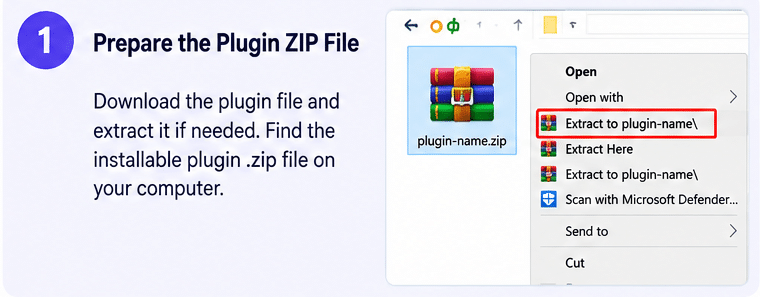
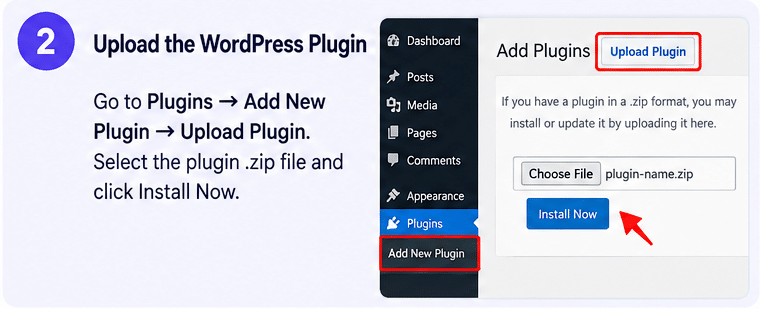
- Upload the YITH WooCommerce Catalog Mode Premium plugin ZIP through Plugins → Add New → Upload Plugin.
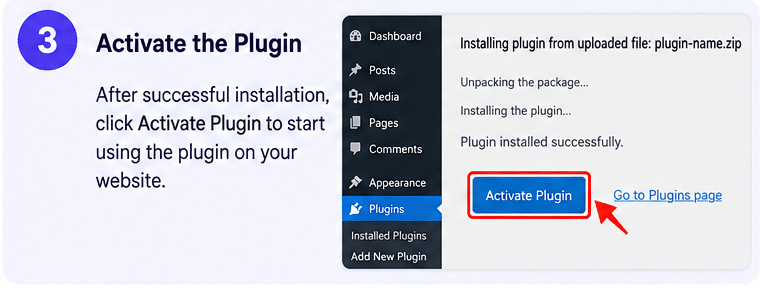
- Activate the plugin from your WordPress dashboard.
- Open the YITH Catalog Mode settings.
- Enable catalog mode globally or create rules for selected products and categories.
- Configure price visibility, Add to Cart restrictions, and cart or checkout settings.
- Create custom buttons, labels, and enquiry forms.
- Configure guest, country, and scheduling rules if required.
- Test product pages, shop archives, enquiry emails, and checkout restrictions before publishing.
Important Notes
YITH WooCommerce Catalog Mode is a WooCommerce extension, not a standalone ecommerce platform. WooCommerce must remain installed and configured for the product catalog to work.
The plugin can collect product enquiries, but a complete quotation-management workflow may require a separate solution such as YITH Request a Quote for WooCommerce. Likewise, integrations with other YITH premium extensions require those products to be installed and activated separately.
An official YITH license includes one year of updates and technical support. Availability of license activation, automatic updates, and official developer support depends on the license and distribution source through which the plugin is obtained.
Turn Your WooCommerce Store into a Flexible Product Catalog
YITH WooCommerce Catalog Mode Premium gives store owners more control over how products, prices, and purchasing options appear on their websites. With selective catalog rules, custom buttons, scheduled restrictions, country-based controls, and product enquiry forms, it provides a practical solution for businesses that want customers to explore products before contacting the sales team. Use it to build a professional wholesale catalog, showcase custom-priced products, or temporarily suspend online purchases without removing your WooCommerce product listings.