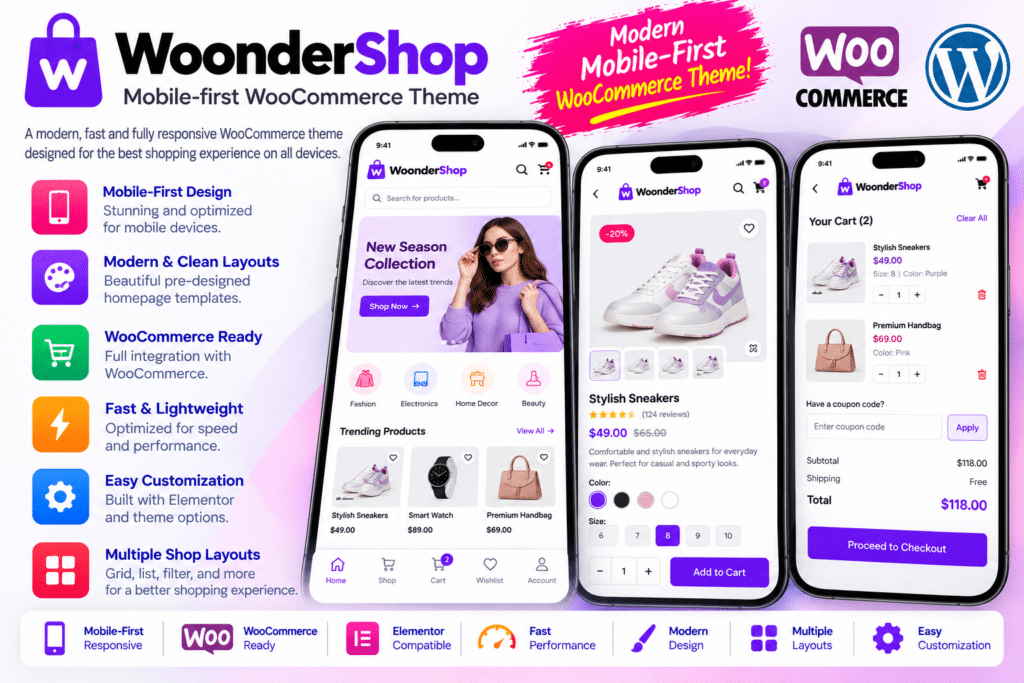
WoonderShop by ProteusThemes is a mobile-first WordPress theme designed for WooCommerce stores that want a clean shopping experience, flexible storefront layouts, and customer-friendly product pages. Its responsive design helps present products clearly across smartphones, tablets, and desktop screens, making it a practical choice for businesses with customers shopping on different devices.
The theme focuses on helping shoppers discover products and move through the buying process with less friction. Features such as AJAX product filtering, autocomplete search, quick add-to-cart functionality, cross-selling elements, and a simplified checkout experience help create a more convenient online shopping journey.
WoonderShop also integrates with SiteOrigin Page Builder, giving store owners visual tools to customize page layouts. With its theme customization options and one-click demo import, you can establish a storefront design and adapt it to your brand without building every section from scratch.
Whether you sell fashion, accessories, electronics, beauty products, home essentials, or other physical goods, WoonderShop provides a WooCommerce-focused foundation for building a professional online store.
- A mobile-first WordPress theme built for WooCommerce.
- Responsive storefront layouts for different screen sizes.
- SiteOrigin Page Builder integration.
- One-click demo import and starter content.
- Multiple design skins and customization options.
- AJAX-powered product filtering and add-to-cart functionality.
- Autocomplete product search and search suggestions.
- Conversion-oriented product and checkout layouts.
- Cross-selling elements for related products.
- Customization controls for key website design elements.
Key Features
- Mobile-First Responsive Design – Present products, navigation, and shopping elements in layouts designed to work across smartphones, tablets, and desktop devices.
- WooCommerce Integration – Build an online store with product catalogs, category pages, product details, cart functionality, and checkout powered by WooCommerce.
- SiteOrigin Page Builder Support – Customize supported page layouts using a visual drag-and-drop editing interface.
- One-Click Demo Import – Start with available demo content and adapt the layouts, pages, and styling to your business.
- Multiple Design Skins – Choose from the theme’s available design styles to establish a storefront that suits your products and brand identity.
- AJAX Product Filters – Let customers narrow product listings using supported filters without requiring a full page reload for each filtering action.
- Autocomplete Product Search – Help shoppers find products more quickly with search suggestions as they enter a query.
- AJAX Add to Cart – Support convenient product additions with the theme’s AJAX shopping functionality and dropdown cart experience.
- Cross-Selling Widgets – Highlight related products or items that customers may want to purchase together.
- Conversion-Focused Checkout – Use a streamlined checkout design intended to reduce unnecessary distractions during the purchase process.
- Product Presentation Layouts – Organize product images, descriptions, prices, and purchasing controls in a clear storefront layout.
- Trust Elements – Display supported trust badges and reassurance messages to help communicate important shopping information.
- Theme Customizer Controls – Adjust available design settings, including colors, typography, and other supported styling options.
- Responsive Navigation – Present store navigation in a format suited to smaller screens as well as desktop browsing.
- Blog and Content Pages – Publish articles, product guides, company information, and other supporting content alongside your shop.
- Third-Party Widget Integration – Extend supported page layouts with compatible SiteOrigin widgets and other suitable WordPress tools.
- Translation Support – Build multilingual websites using compatible translation workflows.
- Developer-Friendly Customization – Use supported theme customization methods and a child theme where appropriate to maintain your changes.
Create a Better Mobile Shopping Experience
Many customers browse products and make purchases directly from their phones. WoonderShop is designed with mobile shoppers in mind, giving product listings, navigation, and shopping controls a responsive layout.
A well-organized mobile storefront makes it easier for customers to explore categories, review product details, and add items to their carts. The theme’s mobile-focused approach provides a useful starting point for stores that want a consistent experience across different screen sizes.
For the best results, use appropriately sized product images, concise descriptions, readable typography, and clearly visible purchase buttons.
Help Customers Find Products Faster
Finding the right product should not require unnecessary navigation. WoonderShop includes shopping-oriented features such as AJAX filters and autocomplete search to help customers narrow their choices and discover relevant products.
These tools can be especially useful for stores with larger catalogs. Customers can refine their browsing experience, search for specific items, and move between products more conveniently.
You can also use cross-selling elements to highlight complementary or related items. For example, an accessories store could display matching products, while an electronics store could recommend compatible accessories.
Simplify the Shopping and Checkout Journey
A complicated checkout can make purchasing less convenient. WoonderShop offers a checkout design intended to keep the buying process focused, along with AJAX add-to-cart functionality and a dropdown cart experience.
These features can help customers review their selections and continue shopping without unnecessary interruptions. You can further improve the checkout experience by keeping shipping information clear, offering appropriate payment methods, and removing unnecessary form fields where possible.
Actual checkout behavior, payment options, and cart functionality depend on your WooCommerce settings and any additional extensions you install.
Customize Your Store Without Starting from Scratch
WoonderShop integrates with SiteOrigin Page Builder, allowing you to create and adjust supported page layouts through a visual interface. Its demo import tools provide starter content that you can replace with your own products, images, branding, and business information.
Theme customization options help you establish a consistent visual identity across your storefront. You can adapt supported styling controls to suit your niche, whether you are building a fashion boutique, electronics shop, or general retail store.
For custom functionality or extensive design changes, test your modifications carefully and use a child theme where appropriate to help preserve them during theme updates.
Who Should Use WoonderShop?
WoonderShop can be useful for:
- Fashion and apparel stores showcasing clothing, footwear, and accessories.
- Electronics retailers organizing products and compatible accessories.
- Beauty and lifestyle brands building a clean, mobile-friendly storefront.
- Home and lifestyle shops presenting product collections and related items.
- Small businesses launching a WooCommerce store with starter layouts.
- Established retailers looking for a customer-friendly product discovery experience.
- Freelancers and agencies building eCommerce websites for clients.
Compatibility and Setup Notes
WoonderShop is a WordPress theme, not a standalone eCommerce platform. You need WordPress and WooCommerce for the core online store functionality. SiteOrigin Page Builder supports the theme’s visual page-building workflow, and some layouts or widgets may depend on compatible companion plugins.
Before installing the theme, review its current WordPress, PHP, and WooCommerce compatibility requirements. Some published feature information may describe earlier theme versions, so confirm that the features you need are available in the version you plan to use.
After activation, configure your shop pages, navigation, product catalog, payment methods, shipping settings, and tax options. Test product variations, filters, cart behavior, and the complete checkout process on mobile and desktop before launching your store.
A mobile-first theme does not automatically guarantee high PageSpeed scores or increased sales. Hosting quality, image sizes, additional plugins, and your store configuration all influence performance and the overall shopping experience.
Build a Mobile-Friendly Store with WoonderShop
WoonderShop – Mobile-first WooCommerce WordPress Theme combines responsive design, visual customization, product discovery tools, and shopping-focused features in one WooCommerce theme. Its AJAX filtering, autocomplete search, cross-selling options, and streamlined shopping experience make it a useful option for retailers who want to build an organized online storefront.
If you’re looking for a WooCommerce theme that puts mobile usability and product discovery at the center of the shopping experience, WoonderShop is worth considering for your next online store.