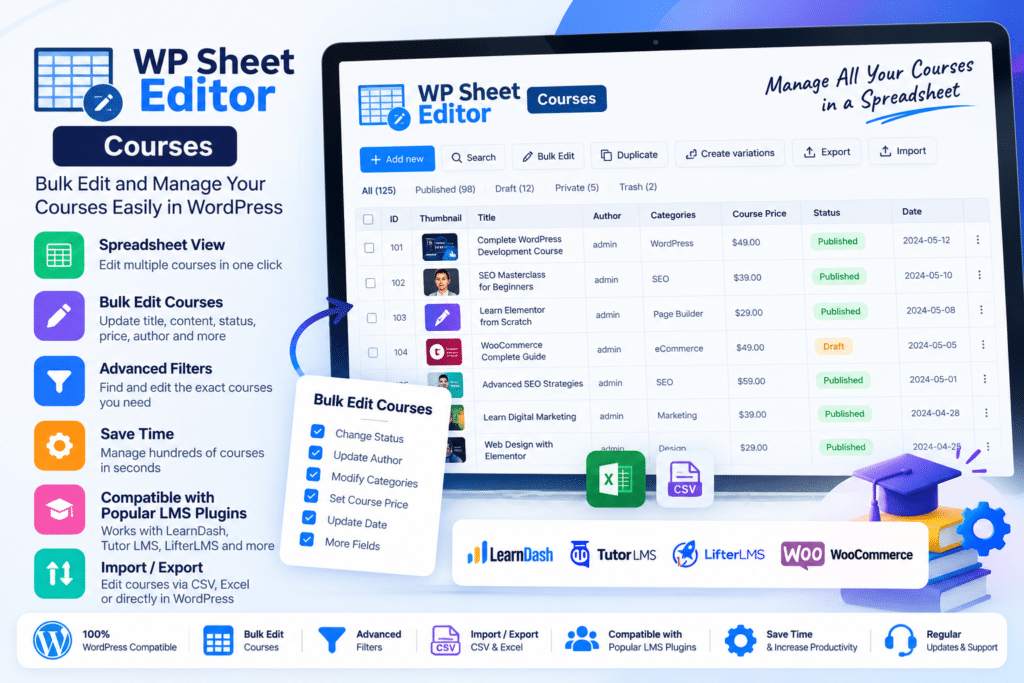
WP Sheet Editor | Courses is a WordPress LMS management plugin designed to help administrators manage large amounts of course content through a familiar spreadsheet-style interface.
Instead of opening every course, lesson, quiz, or question individually, you can view LMS content as rows and editable fields as columns directly inside the WordPress dashboard.
It supports popular learning management systems including LearnDash LMS, Tutor LMS, and LearnPress, making it especially useful for online academies, training websites, course marketplaces, and educational platforms with large amounts of content.
Key Features
- Spreadsheet LMS Management – Edit course information using an Excel or Google Sheets-style WordPress interface.
- Bulk Edit Courses – Update titles, descriptions, prices, duration, access settings, categories, and other supported fields across multiple courses.
- Bulk Edit Lessons – Manage lesson content, assignments, ordering, duration, video information, and other LMS-specific settings.
- Quiz Management – Edit quiz settings, passing grades, duration, retries, points, and other supported options.
- Question Management – Update question text, question types, points, answers, explanations, hints, and relationships.
- Advanced Search – Filter LMS content using categories, authors, statuses, prices, durations, courses, and other supported fields.
- CSV Import – Create or update large numbers of courses, lessons, quizzes, and other LMS records from CSV files.
- CSV Export – Export LMS data for editing, reporting, migration, or backup purposes.
- Duplicate LMS Content – Duplicate existing courses, lessons, quizzes, topics, and other supported items.
- Advanced Formulas – Apply spreadsheet-style formulas to supported numeric and text fields in bulk.
- Custom Field Support – Edit custom fields created by compatible third-party WordPress plugins.
- Featured Image Management – Bulk assign or update course featured images.
- Multilingual Compatibility – Work with multilingual setups using compatible solutions such as WPML and Polylang.
- Batch Processing – Process large bulk updates in configurable batches to reduce server load.
Perfect For
WP Sheet Editor | Courses is suitable for online academies, LearnDash websites, Tutor LMS platforms, LearnPress websites, universities, training businesses, course marketplaces, educational organizations, instructional designers, agencies, and administrators managing large WordPress LMS catalogs.
Manage LearnDash in a Spreadsheet
For LearnDash websites, WP Sheet Editor can generate separate spreadsheet interfaces for supported LMS content including:
- Courses
- Lessons
- Topics
- Quizzes
- Questions
- Exams
- Assignments
This allows administrators to manage course structures and settings without repeatedly navigating through individual LearnDash editing screens.
For example, LearnDash course fields such as titles, content, access settings, prices, categories, tags, certificates, and related settings can be reviewed and updated from the spreadsheet.
Manage Tutor LMS Content in Bulk
WP Sheet Editor also supports Tutor LMS.
Depending on the content type, you can work with spreadsheets for:
- Courses
- Topics
- Lessons
- Quizzes
- Questions
This can be especially useful for large academies where instructors or administrators need to update course descriptions, difficulty levels, instructor assignments, student limits, lesson content, or quiz information across many courses.
Bulk Edit LearnPress Courses
LearnPress users can also manage supported:
- Courses
- Lessons
- Quizzes
- Questions
You can filter records, update information in spreadsheet cells, run bulk edits, and import or export LMS data instead of editing every LearnPress item individually.
Search LMS Content Using Any Field
Large course libraries can become difficult to manage through the standard WordPress interface.
WP Sheet Editor provides advanced search tools that can use supported fields as filters.
For example, you can search courses according to:
- Category
- Author
- Status
- Price
- Duration
- Access mode
- Course relationships
- Custom fields
Once matching content is displayed, the selected records can be edited together.
Update Hundreds of Courses at Once
The Bulk Edit tool is designed for repetitive changes across many LMS items.
Instead of opening 100 courses separately, you can filter the courses you want and then apply one change across the complete selection.
Depending on your LMS, this can include operations such as changing:
- Course prices
- Access modes
- Durations
- Authors
- Categories
- Statuses
- Descriptions
- Prerequisites
- Certificates
- Featured images
For LearnDash, for example, the plugin supports bulk editing access modes such as Open, Free, Buy Now, Recurring, and Closed.
Bulk Manage Quizzes & Questions
Managing assessments can require hundreds of repetitive edits.
WP Sheet Editor lets you display supported quizzes and questions as spreadsheet rows and edit associated settings more efficiently.
You can bulk update information such as:
- Passing percentages
- Quiz durations
- Retake settings
- Question points
- Question types
- Explanations
- Hints
- Quiz relationships
This makes it useful when reorganizing an existing course library or migrating large sets of assessment content.
Import & Export LMS Data
WP Sheet Editor includes CSV import and export tools.
You can export your LMS data, edit it using Excel or another spreadsheet application, and import the revised information back into WordPress.
Imports can also be used to create new course content or update existing records.
This is useful for:
- LMS migrations
- Large course launches
- Bulk content updates
- External content preparation
- Data backups
- Course audits
The vendor also documents workflows for transferring data from one LMS configuration to another using import/export tools.
Create Courses Faster with Duplication
If many courses use a similar structure, you can create a master course and duplicate it.
The same approach can be used for supported lessons, quizzes, topics, exams, and other LMS records.
After duplicating the content, you can modify individual spreadsheet cells or use bulk-edit tools to create different versions much faster than rebuilding each item from scratch.
Work with Custom Fields
WP Sheet Editor supports custom fields created by compatible third-party plugins.
This means additional course metadata can often be included as spreadsheet columns and then searched, edited, imported, or exported alongside standard LMS information.
Use WPML & Polylang
The developer confirms compatibility with multilingual plugins including WPML and Polylang.
This can be useful for educational websites that maintain different translations of courses and need a more efficient way to manage multilingual LMS data.
Control Server Resource Usage
Large bulk operations can be demanding on WordPress hosting.
WP Sheet Editor handles bulk changes in batches and allows supported batch-size and processing-delay settings to be adjusted.
Sites running on limited hosting can use smaller batches, while more powerful servers can process larger groups of changes.
Optional Google Sheets Workflows
WP Sheet Editor also offers a separate Google Sheets Sync service.
When used together, supported LearnDash, Tutor LMS, or LearnPress data can be exported to or imported from Google Sheets for collaboration, auditing, migrations, and bulk management.
The vendor’s October 7, 2026 LearnDash documentation confirms Google Sheets workflows for courses, lessons, topics, quizzes, questions, and exams.
Google Sheets Sync is a separate service and should not be assumed to be included automatically with WP Sheet Editor | Courses.
Manage WordPress Courses More Efficiently
Simplify LMS administration with WP Sheet Editor | Courses – WordPress LMS Bulk Editor.
With spreadsheet editing, advanced search, bulk updates, duplication, formulas, CSV import/export, custom-field support, multilingual compatibility, and dedicated support for LearnDash, Tutor LMS, and LearnPress content, WP Sheet Editor | Courses provides a practical way to manage large WordPress learning platforms.